Search the Community
Showing results for tags 'powered up'.
-
 Hello! After a while, I decided to rework my fireplace: (original post can be found here - ). The main goal was to rebuild the back of the model to make it look more realistic. Given that now it utilizes a Powered Up hub and it can be programmed, the flames have and effect of blinking/flickering. The build uses one Powered Up L motor and one pair of LEDs. Also the inner mechanism was changed too and it allowed to make the model less thick. Also #2: a simple option to remove the front border was added to allow it to be a standalone model or a part of the modular build. Here are some other photos and an animation: Also #3: here is a smaller and non-motorized version of this fireplace: Also #4: not a final version, but still may be interesting - an addition with dancing minifigures (the male one rotates and the female - rotates and jumps): Thank you for attention! :)
 -
 BrickController2 is an Android and iOS application that allows you to control your Lego models using a compatible gamepad. It supports the following devices: - SBrick - BuWizz 1-2 - BuWizz 3 (basic support) - Lego Powered-Up devices: Boost, PUP HUB and Technic HUB (or Control+) - PF infrared (on Android devices having infrared emitter). Features: - Multiple profiles for a single creation - Multiple motor (or output) assignment to a single controller event - Different types of devices can be used at the same time - The same motor (or output) can be assigned to multiple controller events - Different joystick characteristic settings - Different button modes: normal button, simple toggle, ping-pong toggle, carousel toggle, ... - Train mode on joysticks - Normal and servo mode for the new Control+ motors - Sequences (like for flashing light) BrickController 2 on the Google Play Store: BrickController2 android BrickController 2 is also available on the Apple App Store. BrickController2 iOS Video tutorial created by @kbalage (many thanks for this): And another great video by @kbalage: Older versions: BrickController Android application. It lets you to control Lego creations via Lego infra-red, SBrick and BuWizz V1 and V2 using any Android compatible game controller: Current version: BrickController 0.6 User guide: BrickController User Guide Minimum system requirement: Android 4.4 and bluetooth low energy support on the phone (or tablet) Video on the older SBrickController application:
 -
 Control Lego Control+, Lego Powered Up, BuWizz 2.0, BuWizz 3.0 devices. You can create a profile for your MOC model on your smartphone or set up gamepad controls. Supported: - Lego Technic Hub, - Lego Boost Hub, - Lego Smart Hub, - BuWizz 2.0 (BuWizz extension pack), - BuWizz 3.0 Pro (BuWizz extension pack) Motors: - Powered Up, - Control+, - Mindstorm Robot Inventor, - Spike Prime, - Power Functions Get app: [AppStore] [Google Play]
 -
 After a trial run earlier this year we made it to Legoworld in Utrecht for seven days of fun with heavy machinery. This scale allows for vehicles that are both attractive and functional, and we're pleased to report we had very little technical trouble along the way. Replacing one burned out L motor, some fiddling with the parts and back to mining we went. We had lots of positive attention from the audience, and we hope you'll like the video as well.
 -
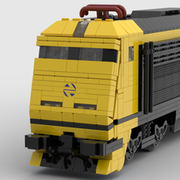
Hi everyone, I present to you my second version of the Renfe S-130 like Ferro-Friki did some time ago. I wanted to remake this train that I made first in 2018 with not the best result so I now made this version in 7 studs. LEGO Renfe S-130 DEF [MOC] by Imanol, en Flickr The set is heavily detailed even in the rear of the power cars and end cars LEGO Renfe S-130 Testeros Interiores [MOC] by Imanol, en Flickr I have made a reduced train set of only 7 cars instead of the 11 that has in real life but it has one of each of the different cars that form the real train with detailed interiors. First the "Preferente" end and "Preferente" LEGO Renfe S-130 Lateral Extremo Preferente [MOC] by Imanol, en Flickr LEGO Renfe S-130 Lateral Preferente [MOC] by Imanol, en Flickr The interiors of "Preferente" cars LEGO Renfe S-130 Interior Preferente [MOC] by Imanol, en Flickr The "Preferente" adapted car and it´s interior LEGO Renfe S-130 Lateral Preferente PMR [MOC] by Imanol, en Flickr LEGO Renfe S-130 Interior Preferente PMR [MOC] by Imanol, en Flickr The cafe car and it´s interior LEGO Renfe S-130 Lateral Cafeteria [MOC] by Imanol, en Flickr LEGO Renfe S-130 Interior cafeteria [MOC] by Imanol, en Flickr And the Turista cars which are the same as preferente but with 2+2 seating arrangement LEGO Renfe S-130 Lateral Remolques Turista [MOC] by Imanol, en Flickr LEGO Renfe S-130 Lateral Remolques Turista [MOC] by Imanol, en Flickr And now that I presented it I want to ask for help to build it as it will be my first lego train in real life. The car coupling mechanism that I have installed is only for aesthetical purposes and will not work in real life. Another problem is that i have seen many models in which all of the rear of the locomotive or power car pivots and I don´t know if it could be necesary to do in this case. Lastly I want to know how to motorize it, being so long I would suppose I would need the two power cars to provide power but I don´t know. Anyway, I hope you enjoy this project as much as I enjoyed designing it
-
I have recently acquired Cargo Train 60198, which is a great set. I figured out it could do with a shunter, so I started designing one. The main things I am after are: Something small With accurate and releastic speeds (slow!) and acceleration (slow!) Playable and not too difficult to build So the following is largely inspired by other topics, including: There it goes: Unfortunately, the Powered Up motor takes up too much space for the driver to sit inside the cab, but at least they can hang out from the door! Designed largely around placement of motor + battery box like this, giving it the same overall length and wheelbase I think of Shunter 7760.
-
One of the biggest issues I find with building in 6 wide is hiding PF/PUP elements, especially when I want to have walkways down the side of the locomotive. A few years back, I started on a locomotive design to put the battery pack partially below the base, between the two sets of wheels. I never finished this design, so when I wanted to create a switcher a few days back, I thought of this old design (as I didn't want the loco to end up being huge to conceal the battery box and end up looking bloated). This is what I came up with. The engine is essentially symmetrical front to back, so it is meant for going in and out of sidings all day in a yard. The cab comes off in one assembly below the 1x1 cheese slopes. Inside, there is a seat that is directly on top of the PUP box, so easy access for power/linking. Unlike some of my other models, I did not make space for a PF receiver so it can only be powered by PUP or 9V. I felt this was ok though, as I really wanted the electrical components to not dictate the shape of the engine too much. I have never tried putting the battery box in this location and since it is not above the powered wheels, traction may be a problem? There should be enough open space to put a ballast brick in above the wheels, should there be any issues. Overall, I'm pretty happy with this MOC. I feel the cab looks off in the side view, but other than that, I think it turned out nicely. As usual, there is a download for the Studio file. From now on though, I will just be putting all of my files into one folder so any links on my posts will grant you access to all my models. Thanks for reading! File Download: https://bricksafe.com/pages/Legownz/legownzs-train-mocs
-
 Hi. If this is the wrong question in the wrong place then feel free to direct me to the right place. I have the top gear rally car model which uses a bluetooth powered up controller app on a phone and that works. What I want to do is to find a generic controller library / software that I could run on a laptop or PC (windows or linux either is acceptable) to use to control the powered up devices without specifically knowing which model it is. What I want to do is to use it as an environment to teach about programming. Yes there may be better educational environments but being lego it will appeal and this is what I have so nice as it would be I am not about to rush out and spend more money on mindstorms or similar. I did find some very basic "generic controller" apps on the apple store but while they were able to drive different models, albeit with the same basic motors none of them seemed to be able to drive the main motor. Steer yes, but not the motor itself, even though the model specific app does work. Essentially what I would hope for would be a library of routines which really knows nothing more than channel and setting for each of the available channels on any powered up controller brick. Is there such a thing out there already? Thanks in advance
 -
 Thought I'd create a thread to just post WIPs of my MOCs, or neat mechanisms. Finished: Generic Muscle Car
 -
 Inspired by the Volvo EC750 Excavator with the new Powered Up motors All motors in the rotating platform Tracks with subtractor mechanism and two differentials Tensioner regulated tracks
 -
I think we can all agree that Lego's own 42109 Top Gear Rally thing wasn't really all that. In order to improve it a bit I set out to build a rather popular car with it. Turns out someone beat me to the punch Some trickery was used to create the GIF- the Porsche itself is stationary, while the light moves. Functionally, the model is identical to the 42109, with some added lights. Luckily, performance has been improved by using Imurvai's Brickcontroller app. In a pinch, Lego's own app will work as well if you don't mind about the lights staying off. The dimensions are the based on the 42093 Corvette, so it should work with the 42098 car transporter. Underside with differential. (What, like it's hard?) Also note the extremely tidy cable management Given my typical production speed I should have a video out somewhere around christmas.
-
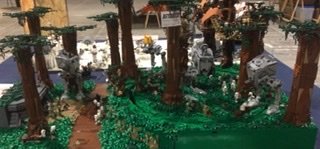
Hi! One year ago create this MOC. You can see working in https://www.flickr.com/photos/blackfalcon81/ Thanks!?
-
 The idea with this is project is to get speed from buggy motors, and torque from PU XLs, which have a very convenient shape. Powering the hungry buggy motors from 2 buwizz units and the PU XLs from the big technic hub, which will be in the rear and controlling it with the buwizz app. Servo for steering, PU L for fake v8. Perfect car. I would enter it in the mad max contest but 2 things stop me. 1, I doubt I will finish in time and 2, I don’t have any real buggy motors and will be using fake ones.
 -
 Technic App-Controlled Top Gear Rally Car Thanks to Lego and EB for this review set - I'd seen the rumors and leaked images, so I was thrilled to get to try it out. Name: App-Controlled Top Gear Rally Car Set Number: 42109 Pieces: 463 Price: $129.99 Minifigs: 0 Theme: Technic The Box Front There is a LOT going on here. Logos everywhere, and not just on the car. But overall, that's a pretty nice looking set. I'm worried that it's over-reliant on the stickers though. I get the Top Gear branding - it makes sense for a car. Except they've never had a rally car on the show driven by the Stig. There were SO many opportunities for a more fitting car - any of the "reasonably priced cars" that they had stars race in (but that would've required more licensing deals), or the Reliant Robin, or the ridiculous P45, or the Hammerhead Eagle i-Thrust, or best of all, the indestructible Toyota Hilux. This feels more like Lego designed a rally car set and then got TG to do a licensing deal and just slapped stickers on it. The Box Back Yep, it's the Stig. With so much Top Gear branding, I feel like this set is Euro-targeted. Yes, people here in the USA have sometimes seen Top Gear on the internet, and there was a few episodes of "Top Gear America," but it's still not a popular thing here. I think the average person seeing this on a shelf won't know the reference. And sadly, no sign of a B-model.... even worse, no Stig is included. This would have been a GREAT opportunity to bring back the Technic figures and have an all-white one. The Box Side Here's the electronics included. You get a Powered Up hub, a large motor, and an XL motor. Yes, this is the bigger hub that has FOUR ports. It's previously only available in the Off-Roader set and the massive Leibherr Excavator. That alone will probably sell some of these sets. The Contents Nothing shocking - a manual, sticker sheet, non-numbered bags of parts, and an inner box that has the electronic stuff. The Stickers Yep, there's a lot of them. And they're full of puns and TG references. But being Lego, not the inappropriate TG jokes (sorry, no Penistone or anything like that) The New Parts Yes, there is a new differential in the set. It's actually pretty nice - it's easier to use than the old one, since you don't have any of the inner gears falling out while you're trying to put it in place. And it's the same size, but with a double-bevel gear so you've got more flexibility in driving it. As for other new parts, the only thing I noticed was the mudguard panel in white, which you get FIVE of. The Build, 1 The build starts with the simple drive system. It's upside down in the photo - you've got the rear axle with the differential. It'll take advantage of the new diff gear by using a simple drive. The motor will get a gear attached and directly drive the diff. I also appreciate the new cable management clips, which come in a couple colors in this set. The Build, 2 Here is the chassis basically done. It has a fair bit of decorative bits - brake discs on the rear axle, engine components up front (around the L motor which handles the steering), and dual exhausts. The Build, 2B The steering is directly done, like the drive setup. The L motor has a small gear that meshes with a gear rack to steer. The Build, Done All that was left is adding the body panels. And stickers. So many stickers. There's big ones, little ones, all over. The car looks really naked without them. The Underside From the bottom, the car looks pretty boring. There's no drive train, suspension, etc. Having the two motors so directly driving their functions makes it mechanically a pretty simplistic set. The batteries are easily accessible, and you can see two of the new larger 7x11 frames in white. Those give the car a lot of strength without needing many parts to reinforce it. The Side View There's a few cosmetic misses, IMHO. There is a gap in front of the black panels at the rear, behind the "door" - it's necessary due to how the beams behind it are placed, but that panel with "The Stig" on it would look better a stud or two forward. I don't like the different tire sizes either. It's partially to give the car an aggressive posture, and it's partially for easier clearance on the steering mechanism. The larger tires do fit the front wheel wells, but they just barely rub when the steering is turned to the max. I just think the littler tires look too small. The App Yes, you MUST have an Apple or Android device to use this set. Well, perhaps the Powered Up remote could control it, but I didn't test that. They completely expect you to use the app. So before you buy the set, make sure you can get the Technic Control+ app on your device (I don't know how old of devices it'll work on). This is the primary interface. You use your left thumb to steer, on the corner steering wheel. Your right thumb controls the throttle on the right. There is a handbrake, but it doesn't do much (the car stops pretty fast on its own). And you can switch to "manual transmission" where you select one of 3 gears, which do affect the car's speed. There are also some "races" you can do, driving the car following onscreen prompts and trying to beat a set time. The Video So how does it drive? Well... it's a mixed bag. Personally, I think it's too slow. It's a race car, Lego. Not a piece of construction equipment. It does maneuver well and the app works well to drive it. One perk is that the new motors have position sensors built in, so the steering automatically returns to center. It's not perfect though - it would typically be still curving slightly any time I tried to go straight. The Results Overall, how is the set? I think it's a nice set. The cost seems high, but that's driven by the new Control+ system. Lego doesn't currently sell any of the included parts alone, but for comparison, the smaller PUP Hub retails for $50. The Medium motor retails for $17. So I'm sure Lego would value the hub and motors from this set at $90+. Given that, the value of the set is good. However, on Bricklink, the current selling price is $25-30 for this hub and $15-20 each for the motors. There's a lot of people parting out the Liebherr set! One huge benefit to Technic builders is that there's now a car in the app. You could easily design your own car, and as long as you have an L motor for steering and an XL for driving, the app would work. There are definitely things that I think could be better on the car, it needs a B-model, it's expensive, and I seriously wish it came with a Stig to drive it. Overall though, I'd give it a solid B. Whether it's a good buy for you depends on your wants - do you want a Technic app-controlled car? If yes, go buy it! Then mod it to go faster
 -
We’ve been working on redesigning and improving our web interface to control multiple trains using one tablet / phone. Besides the trains, you can of course also control all the other devices in your layout: switches, lights, boom barriers, etc. We added the following features: Support for SBrick We have added support for SBrick controllers, so now you can control LEGO PU hubs, SBrick and our 4DBrix WiFi controllers with our system. Just like for PU hubs, controller SBrick requires a BLE112 dongle and an software license. Touch Controls You can now control the speed of the train by sweeping the power control, see video below. It’s a very intuitive and effective way to control the trains, especially to position them. Skins We have redesigned the multi-train interface. It now uses skins so you can customize the look of the app in function of the train you’re controlling. We’ve tried to give it a LEGO feel. At the moment you can use a number of pre-defined skins. The goal is to support custom skins in the future. Emergency button We also added an emergency button so you can immediately stop all trains in case that’s needed. You can see it at the bottom of the screen capture of the control app. Let us know what you think and don’t hesitate to get in touch with us if you’re interested in controlling your LEGO train layout this way. ---- P.S. the initial post had an incorrect link to the YouTube video, this has been fixed now.
-
Hi All, I'm new to this forum, and new to the Lego RC train world. I have just started collecting this range with my son (who's 5) so this is mostly about me.... :) In all seriousness, he is over the moon with these trains and the sets in general and we have 3 already (60051, 60197 and 60198). I'm looking for some expert guidance as to the best and most cost effective way to be able to remotely control/motorise the switch tracks (points). Having done some research online, I see there are many ways, although i haven't found a definitive step by step guide yet. It would be good to get some valuable feedback and guidance from someone who has been through this process if possible (i.e method and functionality vs cost and practicality). Appreciate the time spent reading my post and any feedback received. James.
-
 Hi This weekend I could finsish the 8x4 dump truck project which I started somewhen in February. It is a simple 8x4 dump truck inspired by Scania G450XT. The functions are driving, steering, dumping and automatic tail gate locking. Everthing is controlled via Powered Up. I control the model with the brickcontroller2 app. For propulsion I used 2 x PU L motors and for steering and dumping one PU L Motor. I'm really happy with the PU system. For this moc it works great and the model is powerful. At the front axle I developed a new supension system. it is inspired by leave spring systems. However, there are no leave springs since I haven't found a proper solution for LEGO. Anyhow, the suspension works great. The model is built in scale 1:16.5 and fits to my telehandler and other mocs and Technic sets (42043)
 -
 I would like to introduce my own control Solution: >>My Radio BLEuS << ( Bluetooth Low Energy useful System) Powered by Arduino Nano 33 BLE Sense, 4 x Power funtions port - 9V/1.5 A, each (optional updatable by that: Adafruit DRV8871 DC Motor Driver Breakout Board - 3.6A Max) --> Keep in mind the technical requirements to provide ~ 130W by using max, current simulanoiusly , at all ports ! Not realy needed for an ordinary Brickset Car. In A MOC i would recomend; Battery, ESC, and BL Motors taken from "real" RC Motor Sports section. power supply by PF Bat. box or internal 9V/ 1000 mAh Accu Internal Akku has USB charge connector. Control options: Infrared, by using PF IR Transmitter RC Transmitter(up to 4 channel) supporting, "AFHSD2A" LEGO Powered Up App LEGO Control+ Profiles Because of S-Brick published their protocol , it can be used with their mobile app , too. Because of, Brickcontroller 2 app works with any PU Hub, that is emulated by using profiles here, you can use Brickcontroller 2 app, also. Additions: SD Kart Slot for storing profiles , used by PU or Control+,...... Programming via USB Port, or JTAG connetor. Supported Frameworks: Arduino, MBED,Nordic SDK Note about Arduino Frameworks: Works with ArduinoBLE, as well as Adafruit BLUfruit Libraries by using Adafruit Bootloader. It is my new development base for next projects to come ;-) Greetings Marc
 -
This post to share some MODdings that can be done to the Powered Up Android APP interface (Create mode with controller). I searched the forum but didn't find a similar post. With the actual version, it's possible to change the size and positions of the widgets, and mix on the same interface the widgets of the 2 controllers It's even possible to add the widgets of the Play mode controllers (Te trains and Batman), and access more code blocks. So theorically, it should be possible to control several trains/cars with one interface. After creating a new project with controller, go to "/android/data/com.lego.common.poweredup/files/Activities/<xxxxxxxx>/" to find the associated files (if you open the metadata.json file you can verify in the "name" if it's the right project) In the "playCanvas.json" file there's all the actual widgets, identified by their "widgetId", with their positioning informations. It's then possible to add/modify them, and restart each time the App to see the results. To find out the widgetId, you can create a new project with the other controller and open it's "playCanvas.json" file (the positioning should hint on the concerned widgets). To exploit the added widgets, we need their associated code blocks. For that, in the powered-up-metadata.json file, replace the "Controller" value by "00000000-0000-0000-0000-000000000000". Thus, the palette.json file will be used to display the needed code blocks by replacing "/widgets/widget-(.+)-block-(5[5-9])" or "/widgets/widget-(.+)-block-(3[7-8])" by "/widgets/.*" The App has to be restarted after the modifications. To go further and use the Play mode widgets, you can search the widgetId in their playCanvas.json files at "/android/data/com.lego.common.poweredup/files/PredefinedActivities/<xxxxxxxx>/" and change the playCanvas.son as above, and do those modifications in the "palette.json" file : - add the following at the end of "TabDefinitions" : {"Name": "Dev", "HexColor": "CompositeBlock3"} This will add new category "Dev" in the code blocks - in "contents", disable all the blocks with "null", and add the following at its end : {"Field": "TypeName", "Value": ".*", "Tab": "Dev"} After App restart, a new tab (red) will appear with new code blocks. The ones to use has the same icons as the global variables but are orange with a red "P" written on them. The parameter to use is the widgetId. Don't consider this as a tutorial as it needs some clarifications and I surely miss other informations. Also, this may not work with the comming versions of the App
-
I like to power my Technic models to make them move. However, I am very confused about current powered up compatibility: 1. I've read that Lego powered up family include spike prime system (such as Lego 45678 and 51515), and Boost creative toolbox (Lego 17101) 2. If above is true, there are total 4 categories of hubs in powered up family: large "move hub" (88006), common hub (88009), "tech hub" (88012) and "spike prime hub" (45601). They all have Bluetooth function 3. There is one Remote controller (88010) which can control common hub (88009) by Bluetooth. This remote controller is standard component in Powered up Train series (60197/60198). I'am very curious if we can control other powered up family hub such as Tech hub (72099/72109) or spike prime hub ? 4. There are also many motor in powered up family: Boost Medium Linear Motor (88008), Simple Medium Linear Motor (45303), Technic Large Motor (88013), Technic XL motor (88014), Spike prime Technic Large Angular Motor (45602), Spike prime Technic Medium Angular Motor (45603). There is one train motor in powered-up family, too: 88011 5.I wonder if all these motors could be used in all hubs? For example, can I use Technic Large motor (88013) with Spike prime hub (45601)? Can I use Spike prime Technic Large Angular Motor (45602) in Move hub (88006) or Tech Hub (88012?) 6.If I want to control with these motor/hub combination by app, control + app seems to be the most restrictive because it only provide 3 original Lego set panels without user define interface. Powered-up app seems to be more flexible choice?
-
Piano is not my forte. The end. Oh, you're still here. Okay. Let me try again. The statement above is a joke but it is also true. No pun intended. This review is about the Grand Piano set, a LEGO scale model with ornate details inside and out. If you were around back in April, my last review was about the immaculate 1-piece LEGO white baseplate. Today, I am about to review a set with over 3600 pieces. Not much of a difference, really. Now, let's begin with my 32nd RA review, set# 21323 Grand Piano. Overview Name: 21323 - Grand Piano Theme: IDEAS Year: 2020 (2H) Pieces: 3662 Minifigures: 0 Price: USD 349.99 / EUR / GBP 319.99 Introduction I have very fond memories in my childhood wanting to play an upright piano whenever my mom and I visit my aunt's house. In fact, I have a picture of me pretending to play that piano -- it is one of my favourite childhood photo. Sadly, the untapped potential got wasted because I never had any proper training to play a piano, or any musical instrument for that matter. I don't think I could ever read sheet music as that take years of practice too. I only understand music alphabets - those 7 letters A, B, C, D, E, F and G. Regardless, I enjoy music and I am one of those person who could listen from rock music to gospel song, then to jazz, switch to EDM, then back to classical symphonies. I love music and that's why I appreciate this set that celebrates the art of music. With this LEGO set, I could fool you into thinking that I am also an expert musician. I am not kidding. I will be expertly playing Fur Elise like Beethoven himself, towards the end of this review, so keep on reading. Before proceeding, let me thank TLG and Eurobricks for giving me the opportunity to review this remarkable set. All opinion about this set is my own. Front Box Panel The new branding of 18+ looks very premium especially with the gold font used in the grand piano branding. It just exudes class. Side note -- for some reason, the gold and black colour scheme reminds me of a Belgian chocolate brand. Back Box Panel The classiness continues at the back. The back panel shows the dimension of the grand piano, as well as the Powered Up components featured for its auto-play feature. There are minimal text in the packaging so it is not explained how this feature works. More about that later. If you have not bought the set yet, I encourage you to know how the play function works first before making any purchase because it could lead to disappointment if you don't do any homework or research. Now, let's carry on. Carry on, it doesn't even matter... (for the mostly parts) The box is a lift-up type similar to that of the recent Technic sets such as 42115 Lamborghini Sian. While looking premium, the box is so huge that 4 tapes are needed to seal the box. I wonder how long the seals are going to last. What’s inside the box? There is a box within a box. I am not tracking how many such LEGO sets have this kind of packaging -- but when I do see one, it means serious business. Really serious. Below, you can see the contents of the smaller black box laid down. The other half remained inside the bigger box for the time being. There are are so many pieces that I cannot take picture of them all in one go. Instruction Booklet For a set this expensive, I already expected there is no sticker sheet. Indeed, there is no sticker sheet in this set, and I prefer it that way. The instruction book looks very good but I am not keen on using this for building reference. I thought that it would ruin the bindings because the instruction book is too thick and I don’t want to ruin it by flipping it over and over. As you can see from the picture above -- it is 2 bricks tall. I decided that I will be using the LEGO Instructions app for this round. So, looking at my phone, I now have more LEGO games and apps that I could ask for. That’s because in the last 24 hours upon receiving this set, I downloaded 3 more LEGO apps on my phone. I even have The LEGO NINJAGO Movie game on PS4 which my kids and I recently got platinum trophy. These LEGO apps and games just keep on coming. LEGO is everywhere. In the playroom, in the living room, and even in my pocket. Build Starting with the build overview, the screenshot from the instruction app is a very good starting point. From bag 1 until bag 10, the focus is mainly on the frame and body of the piano. From bags 11 to 15, the focus is shifted onto keyboard, while bags 16 and 17 are meant for the fall board, music shelf and desk. Then, bags 18 to 20, are all about the lid only. Finally, bag 21 is meant solely for the chair. Ready for the long read? Adagio. Bag 1 out of 21 The interior of the grand piano is mostly tan. I like this colour and it’s the obvious choice for the frame as the cabinet cavity is mostly made of wood. Dark tan makes sense here as well. Bag #1 progress - cabinet underside and spine The first in-progress picture and it looks odd because I oriented this the wrong way. The tan side should be flat on the ground because it is the bottom of our grand piano. The black flat wall of the piano cabinet is called the spine. While building this, I am curious as to how the ball joints will be used later. More on that soon...ish. Bag 2 out of 21 I was not too familiar with the newer battery unit / smarthub so when I learned I needed 6 AAA batteries, the AA batteries that I prepared were useless. So, I needed to get spares quickly. Bag #2 Progress - Powered Up smarthub, motor and motion sensor I felt that having these electrical components at bag #2 is too early in the build. So much bricks will be added on different directions and it is very likely that these component might be locked inside this build permanently, or until dismantled. Take a good look at the arrangement of these Technic beams. All the colours point in the same direction. Bag 3 out of 21 Bag #3 Progress - Damper wires The dark bluish grey pins are meant to be the damper wire. These damper wires hold the dampers which stop the note once you release the piano keys. Just remember this for now because it is a long way before we even get to the dampers. Bag 4 out of 21 So far, this bag is full of 1x6 tan tiles, and I really like the smoothness of the build so far. Bag #4 Progress - Soundboard At this angle we can confidently say that the studless to studfull ratio is off the charts already. Bag 5 out of 21 At this point, I got confused that I could not see bag #5 from the smaller box that I have unboxed. Then, I realised that it was outside the smaller box, and inside the bigger box. Due to my confusion I almost forgot to take the in-between progress after building bag 5. Bag #5 Progress - tail Bag #5 is essentially the buttocks of the piano. Remember the ball joints earlier? With technic pins connecting the upper parts (soundboard), the job of the ball joints below is to connect the piano tail on its belly. I know it doesn’t sound right but I did not make up the names of the piano anatomy... Just remember that in case you want to take the motor out of the piano’s belly, or perhaps even its motion sensor -- you need to remove the tail cover at the back first and detach the ball joints so you can pull the tail off to have access to the cabinet cavity. Finally, the chubby tail of the piano is completed. Bag 6 out of 21 I am very pleased that there are many tan and dark tan parts in this set up to this point. However, we are mostly done with the interior of the piano, so we will see more black parts from here onwards. Bag #6 Progress - Keybed Part 1 I hope that you are learning the parts of the piano as we go along this building process because surely, I am. This section of the build is part of the keybed. This is literally where the action happens in the piano and where the piano action mechanism is located. Bag 7 out of 21 Bag #7 Progress - Keybed Part 2 Bag 8 out of 21 Bag #8 is essentially the pinblock of the piano where you can find the pins, which are represented by the pearl gold tile 1x1 with open O clip. The pins hold the string securely with the right tension to produce the right frequency for the note. What's not included in the picture are the pearl gold hoses that serves as bass and treble strings. Those are attached to the pins, on top the pinblock, in the subsequent pictures. Bag 9 out of 21 Bag #8 & #9 Progress - pinblock, pins, strings, cheeks and bent side cover At first glance you can see the gap at the bent side part of the piano. At first I was very distracted by it, but as I finished the whole build, I grew used to it.. In case you don't know what are piano cheeks, those are the ends of piano keyboard. It is built with part # 6005 brick, arch 1 x 3 x 2 curved top. At this point, you are instructed to reset the gear by pressing the encircled icon in the Powered Up app. Missing this important step might cause frustration later. The reason is simple - if you don’t reset the gear, the technic beams will be in random position so they would obstruct the keyboard rear end. The gear reset will set the beams in neutral position so you can fully slide the keyboard in. Take my word for it, I learned it the hard way. Bag 10 out of 21 Bag #10 Progress - Legs These legs are chunky, but they look proportional to the chunky grand piano as well. You have to remember, the entire weight of the piano rests on these 3 legs so they need to be strong. Bag 11 out of 21 From bags 11 to 15, it is all about the keyboard. That includes the keyframe, as well as the individual keys, and the action mechanism. Bag #11 Progress - F4 to B4 Provided the middle C in this pretend piano is C4, as it is the widely accepted middle C, then the lowest register in this grand piano build would be C3. That would be the leftmost white key in this build. But let me step back a little bit. I thought initially that the build will start from left to right but it’s not the case. The build starts somewhere in the middle left. If that makes sense. These keys correspond to F4 - B4 range. Just play along for now. The keyframe itself would be the array of plates underneath which hold the keys. Interestingly, the only connection that holds the keyframe and the keys are those conical shaped parts, which is conveniently named “ice cream cone” in Bricklink. Technically, they are not even connected. The key is simply positioned on top of the keyframe, guided by inverted ice cream cone. The gap beneath allows someone to push down the key, and this tilts the key from the top of the dark medium flesh slope like a lever. Bag 12 out of 21 Bag #12 Progress - C4 to E4 + F4 to B4 We have just added 7 more keys. That is 4 white keys and 3 black keys. These 7 keys are added on the left side of bag #11 build. Bag 13 out of 21 Bag #13 Progress - C4 to E4 + F4 to B4 + (middle C) C3 to E3 Bag 14 out of 21 Bag #14 Progress - C4 to E4 + F4 to B4 + (middle C) C3 to E3 + F3 to B3 This is the most repetitive part in the build and it does not help that you need to do different variants of the keys. It is interesting nonetheless because the end result is beautiful. Bag 15 out of 21 The last key (C2) is found in bag #15, which also happens to include the keyslip. This is the part that runs across the front of the piano which protects the keyboard assembly from sliding out. Last look inside the empty keybed. Bag #14 Progress - Complete keyboard, range C4 to C2 For reference, you may compare the keyboard layout to the finished keyboard assembly below. With 15 white keys, this keyboard features 2 octaves and an extra C note at the highest register (rightmost). Attached to the keyframe, the assembly looks like the picture above, just before sliding inside the keybed. Provided you did not skip the crucial step found in Bag #9, sliding the assembly should be easy as pie. With the keyframe fitted in, we now have the keyboard ready for action. Note that the keyslip and the keyboard, are not connected by any studs. They just slide in together. To secure the keyboard, the keyblock is secured using a technic pin that locks the left and right side, underneath the piano cheeks. Since the keyslip is connected to the keyblock, this prevents the keyframe from sliding out, and keeps the keyboard safely intact. Bag 16 out of 21 Bag #16 is the fall board or key cover. The most interesting part for me here is the single inverted tile 2 x 2 with old LEGO logo circa 1934. Bag #16 Progress - Fall board The instruction wants you to slide in the fall board or the key cover while the keys and keyframe assembly are already fitted inside the keybed. However, I find it much easier to remove the keyblock, keyslip and the entire keyboard assembly and just attach the fall board on top just as how it is pictured below. Once the cover is fitted, just slide them back inside, then put back the pin locks underneath again. Now, enjoy the key covers. The cover has a slight friction preventing it from slamming onto your fingers. With the right push, it will stay in position as pictured above. As noted by the fan designer, the fall board is supposed to have a soft close feature. Meaning, it won’t slam on your fingers because closes down gently. Bag 17 out of 21 This bag contain parts for the music shelf and music desk - the one that supports the sheet music as well as your phone if you choose to use it for the auto-play feature. Apart from this, this bag also contains the parts for the dampers. Those are the black convex shaped things that are found on top of the strings. Bags 18, 19 and 20 out of 21 Frankly I am not sure why these parts are broken down into 3 separate bags when these bags are meant for the piano lid only. That includes the main lid, front lid, as well as the hinge which connects at the spine of the piano. The parts are all black. Here they for your viewing pleasure: Bags #18, #19 and #20 Progress - Lid This is the top of the lid. I don’t think you can find a build as straight forward and smooth as this in any LEGO catalogue. The underside is just as interesting, with technic bricks running across the lid that makes the structure rigid. Once attached, the cover does a really good job in holding itself even when fully opened. However, I suggest you don’t do this on purpose because the technic bricks with pins, which connects the hinges on the piano spine, will be stressed so much with the lid’s sheer weight. Now, the moment I am waiting for -- with the lid closed down and the key cover shut, join me in admiring the beauty of the piano case and its sexy body shape. Viewed from the tail, I can appreciate the chubby proportion of the build because it is a toy. If this is a real piano, the rim height is just too high for its body. For what it is, the proportion is very toy-like. Also, can someone please let me know if there is any other set smoother than this? I checked many times. Save the 3 legs which have 4 exposed studs each, I cannot count any exposed stud in this closed-lid grand piano body. There are 2 anti-studs at the spine edge of the lid but they do not count as studs, do they? Bag 21 out of 21 Finally, we came a long way to finally build the last part of the Grand Piano set. The ultra-luxurious looking chair with a lift mechanism. This chair looks more comfortable than the IKEA chair I am sitting on right now. While the piano itself only has 12 exposed studs on its exterior, this time, I could see 2 studs on the chair - one on each side, left and right. I have never been more excited to find exposed studs in a set because it is such a rarity in this build. Viewed from side to side, and top, this set is 14 exposed studs on top only. That is over 99% SNOT perfection. Maybe I am wrong. Let me know, please. Once again, viewed from a different angle, the studs not on top design in this build is topnotch. Overall, those who supported the project in IDEAS will be very pleased. Even though the interior is changed, I don’t mind swapping the strings with rigid hoses -- but I am not sure if there are grand piano with gold strings. Maybe the bass strings could use copper colour instead because those strings are commonly using heavy copper wound strings to generate lower bass notes. As for the treble strings, I think that pearl grey or silver would be more accurate. Not really a big deal as long as the build is sturdy. So, about its sturdiness -- it is strong and well put together even if the case has a hinge at the bent side. I don't fear that it will crumble into pieces at all. Surprisingly, it is very swooshable. It can race with LEGO Speed Champions. Just make sure you race on a smooth surface because a slight bump or level change could nudge or cripple one of its legs. To further support my point on how strong it is, I had no trouble putting the piano on its side or turning it upside down. Enjoy the underside of the piano Let’s talk about play features To begin with, turning the smarthub on feels awkward at first because it opens at the unexpected direction. In my opinion, it would be more natural if opening is on the other side because the green "on" button is further in. So turn the device on, connect the app via bluetooth, select a song (very limited list) and you have yourself an auto-playing piano. I like the novelty idea very much but I don't see myself playing the piano with the Powered Up phone app because I cannot put the app in background to keep it from playing. It is such a big flaw in the app design. That means in order to play the piano songs, you need the app to be running in foreground all the time. You can't do anything else! smh... Playing the keyboard is a good experience. It feels responsive but I can tell that it does not feel like a real piano key at all. For starters, it is very light because it is made of ABS plastic. You don’t need to be a piano expert to know that a real piano key feels substantially heavier. It gets A+ for trying. The GIF above is me, randomly pressing any key to generate the melody of Fur Elise. Just note that the whole key press action is only being processed by a single motion sensor that tracks the red technic beams as illustrated in the instruction below. When you press a key, the full-length of the black technic axle will move, along with the red technic beams, which is then translated as a key press in the app. Therefore, if you press a single key for the entire song, the Powered Up app won’t even know which key you pressed because the information is reduced to an up and down motion only. You may not know it earlier while building but the step shown below is responsible for all the notes you hear on the piano. As I said at the beginning of this review, I will be expertly playing Fur Elise. So, to demo this, I mustered all the courage to record this silly "press any" performance. First part is the app demo, and the the second part is about the performance itself. Enjoy the playlist. I don't think that the oversimplified "play your own" music is an insult to pianists or aspiring musicians. It is a limitation of the tech components included in the set. To be fair, the fan designer himself is a music teacher and piano tuner, while the wife of the LEGO designer who worked on this product is a pianist and piano teacher, too. Insulting or discrediting musicians would be the last thing they will do. Just keep that in mind. Parts While the new parts are not a stand-out in this set, there are exclusive prints and new colour of existing LEGO elements. Take a look at the list below. New part/recolour list: 6322630 (11203pb055) - Tile, Modified 2 x 2 Inverted with Gold 'LEGO' Pattern, exclusive to this set 6322624 (10202pb016) - Playday sheet music 6 x 6 tile, exclusive to this set 6322135 (part 65734 in black) - first appearance in this colour. 6310833 (part 32064a in dark tan) - first appearance in this colour. 6311104 (part 32124 in tan) - first appearance in this colour 6322138 (75c32 in pearl gold) - Hose, Rigid 3mm D. 32L / 25.6cm (first appearance in pearl gold?) 6322139 (75c26 in pearl gold) - Hose, Rigid 3mm D. 26L / 20.8cm (first appearance in pearl gold?) 6173281 (75c16 in pearl gold) - Hose, Rigid 3mm D. 16L / 12.8cm (appeared 3x) 6267914 (75c12 in pearl gold) - Hose, Rigid 3mm D. 12L / 9.6cm (appeared 2x) 11212 in dark tan - appeared in only in set 75317 so far 11211 in dark tan - appeared in only in set 75317 so far 6312473 (part 15068) in medium dark flesh - only appeared in 2 other Mario sets 6294492 (part 9563 in metallic gold) Money / Gold Bar - appeared in 2 other sets only. They look like golden spaghetti strands Conclusion When Donny Chen submitted the original design to LEGO IDEAS, he outlined his main goal in the project. He wanted to capture the mechanical details of a genuine piano, featuring: Removable keyboard with 25 independent working keys, each key connects to its own hammer. Working damper and pedal function. 25 strings. Realistic piano lid which can be open either half stick of full stick. Realistic fall board with a soft close. Removable music stand. Height adjustable piano bench. Self-playing function enabled by adding PowerFunction, which allows keys to play at different tempos and rhythms. Realistic piano wheels. Overall, the final commercial product by the LEGO designer Woon Tze Chee is very close to Donny’s goals, and to some degree exceeded them even if there were some changes made in the interior and exterior design, for better or worse. To highlight a few, these are: The omission of LEGO strings for the treble strings. Likely, looping around strings does not meet LEGO standards so they were replaced by pearl gold hoses instead. The bent side is definitely better in the commercial product despite having a gap, which is necessary to open the door easily. The height adjustable piano bench is actually adjustable. The original design was not. Grand Piano legs design is slightly better because it uses plates and tiles for added detail. No chromed parts. Sadly. On the flipside, there is no paint coat that is going to crack or peel off ever. If you are a music enthusiast or a musician, there are many things to like about the set. The highlights for me are: Great representation of the parts of piano, both exterior and interior. 25 keys, which captures the essence of the piano action mechanism, such as hammer, damper and sustain pedal. Majestic looking set, which is possibly the smoothest set LEGO ever created thanks to the extravagant use of SNOT techniques. Some of the nitpicks I could think of are: The play feature is there, but it is not mandatory to enjoy the set -- majority will display this set only and may not even use the play feature anyway. The strings are not angled inside the piano cabinet, like how a modern grand piano might look like. However, thinking more about the last point, I don't think this LEGO set is trying to be one. I know that the modern grand piano design has 2 bridges, one for the treble and another one for the bass strings. These 2 would cross each other, one on top of the other at an angle, using a wiring method called overstringing or cross-stringing. This has become very common in the modern era as it allows longer strings in a shorter cabinet design. However, grand pianos before the 1800s use a single bridge scale design, without criss-crossing of strings. A simple Google search of Erard grand piano will show that this antique instrument uses an old string wiring method, similar to this LEGO model. As this set alludes to being an antique grand piano design, this is probably the reason why the LEGO designers used the oldest LEGO logo. Finally this leads me to list down some caution before buying (or not buying) the set (soon). The key press does not correspond to the right note or any particular note for that matter. Using the LEGO Powered Up mobile app, pressing any key will play back the correct note in the phone app regardless if you are pressing the correct piano key or not. Some people may find this misleading because one might think it is capable of doing that due to its hefty price. I understand the argument that a cheap electronic toy piano can play correct notes using the right key, so why can't it do the same? Not my own words, but I am just saying that some people might think this way. You cannot play your own song in the app, even if it is all pretend play. The app is also quite restrictive. As one could be building this model to display only, without the intention of ever playing it, the set could have been cheaper if the electronic parts were not included and made as an optional add-on. However, these components were included so you might as well use them for another project. Don't trap them inside the piano if you won't use them for that purpose. There are some reports that this is hard to get because it is in limited availability status at the moment. I am not sure if the stock will normalise after few weeks but keep this in mind. Do check with your local retailer for availability first. The inspiration Review summary Design / Building Experience: 10/10 - I really appreciate the countless SNOT techniques and effort to make the mechanical parts functional depicting that of a real piano. Highly detailed and educational build. My design "complaints" are very minor and easily outweighed by extremely positive results. Playability: 7/10 - In my opinion, this should have been a display model first and foremost, with optional Powered Up add-ons only. The auto-play does not really add much because the app is restricted to very few songs only. You can’t even add your own song even if it is just a pretend play. Some might think that the pretend play is misleading, especially when someone is not familiar with the limitations of the components inside. Minifigures: N/A - Not applicable / not scored Price / Value for money: 8/10 - The price per piece ratio is highly reasonable but the set could have been cheaper if the electronic components were not included. Overall: 8.33/10 - A premium set that is best displayed even if it has very functional parts. It suffers on playability and value but it is a perfect artistic model for music lovers and LEGO fans alike. Full Flickr album could be found here.
-
Hi, a few weeks ago I started a tutorial series on youtube. It's about how to program the lego powered up hardware with the Powered Up App (Lego Boost, lego Control+ and the wedo 2.0 sensors are part of the powered up hardware). The complete tutorial is 100% free. So far most of the stuff is pretty basic but it will get much, much, much more complicated later. I promise that ;) (People that saw the german version of the tutorial might know that already) There will be a new part each wednesday.
-
Hi All, title is already self explanatory. I know that it is possible to connect powered up motors to a buwizz using dedicated adapters. What about controlling a powered up servo with buwizz? Is that possible? I did I quick search but did not find anything so specific. Thanks.
-
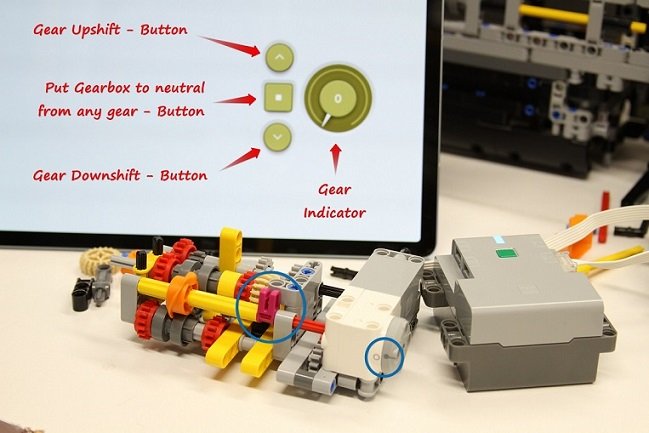
I am building a RC version of the Lego Land Rover Defender (42119) and it will include a 3 speed sequential Transmission. It will be operated from the Powered-Up Lego app. using 3 buttons and it includes a dial that shows the selected gear. I am using a Technic Hub (88012) and a Technic Medium Angular Motor (45603). The Remote Control has 3 buttons; up-shift, down-shift and neutral. When the application is started it calibrates the shifting axle to be at the "neutral" gear and sets the angle to 0. Pressing the up-shift button will engage the 1st gear, then if pressed again the 2nd until it reaches the 3rd gear. If you press the up-shift button more times it will not move the shifting mechanism but will make a "clanking" noise. Pressing the down-shift button will sequentially shift to the next lower gear until it gets to neutral where again will make a "clanking" noise trying to go lower. To the right of the 3 buttons there is a dial that indicates the gear is selected. [Media]
-
 My apologies if there's a tutorial on the recent updates to the Powered Up app somewhere - I haven't been able to find one. Having spent a couple of days playing with recent updates to the app, here's some stuff I figured out so far. I'm sure somebody can contribute with more: how to create custom control profiles with drive & steering motors (also works for the C+ Servo motor) how to set up joysticks, end-to-end buttons, sliders and how to enable controlling motors by tilting your device how to set up display of a motor's speed or position