Search the Community
Showing results for tags 'bluetooth'.
Found 13 results
-
 Hello! We are ethusiastic adult LEGO fans and we have developed this new remote technology (kck.st/1sf6zOU). We know that lego is not just a toy, but an expression of the passion of creation. We are very interested in your opinion! Once upon a time there was a group of LEGO fans that had a dream, namely the dream of not simply taking readily existing building blocks to create a new model, but rather to create something that would take the LEGO experience to an entirely new level. They started their journey half a year ago but in order to fully realize their dream they now need your support. Take a look at what they’ve achieved so far and play your part to help turn what was simply a dream six months ago into a reality today . What they have produced is the SBrick, a universal remote control unit that slots simply into your existing LEGO models and allows you to control up to 64 Power Functions® units using your smartphone or tablet. This is just one of the very many things it does (there is a full list of the features listed below). If you browse any of the LEGO forums worldwide, it soon becomes clear that this is something that this is something fans have wanted for a very long time and the good news is that this very product is here now.
 -
Hi! I bought a Boost last week and struggle with paring the Boost with my Samsung S9. Have tried to pair with a Sony XZ tablet as well. When I open the bluetooth menu on my phone or tablet I can see the Boost appear there, but not when I try to pair using the app. Any suggestions?
-
I would like to share my vechile on Raspberry with Bluetooth and Video transmission. Now it can: transmit video via bluetooth has lights measure distance to objects behind uptime 4+ hours all code for raspberry were implemented using Java Details about implementation: http://privateblog.info/lego-vezdexod-s-video-i-bluetooth/ http://privateblog.info/dorabotka-lego-vezdexoda/
-
 Hi guys, I've had a chance to test a prototype of a BuWizz - an interesting device that combines remote control unit which allows controlling stuff with your phone AND a power supply which is surprisingly powerful. My video test is below, keep in mind that this is a prototype and you can make the finished product happen by supporting it at Kickstarter: https://www.kickstar...for-lego-models Project website: http://buwizz.com/
 -
Here's a silly little video I made last year and never shared. Both trains are controlled from my phone via my open source Bluetooth receiver. Stay tuned for the bloopers at the end. Hope you enjoy!
-
 Inspired by the Volvo EC750 Excavator with the new Powered Up motors All motors in the rotating platform Tracks with subtractor mechanism and two differentials Tensioner regulated tracks
 -
HI, I wonder if anyone has some experience with using buwizz with Lego trains? I am attracted by the small form factor and the opportunity to design profiles, but over 120 Euros is a lot to risk without asking advice here ...
-
Hi. If this is the wrong question in the wrong place then feel free to direct me to the right place. I have the top gear rally car model which uses a bluetooth powered up controller app on a phone and that works. What I want to do is to find a generic controller library / software that I could run on a laptop or PC (windows or linux either is acceptable) to use to control the powered up devices without specifically knowing which model it is. What I want to do is to use it as an environment to teach about programming. Yes there may be better educational environments but being lego it will appeal and this is what I have so nice as it would be I am not about to rush out and spend more money on mindstorms or similar. I did find some very basic "generic controller" apps on the apple store but while they were able to drive different models, albeit with the same basic motors none of them seemed to be able to drive the main motor. Steer yes, but not the motor itself, even though the model specific app does work. Essentially what I would hope for would be a library of routines which really knows nothing more than channel and setting for each of the available channels on any powered up controller brick. Is there such a thing out there already? Thanks in advance
-
 Hi all, I've been working on a Lego 51515 robot that uses computer vision to detect an object and then pick it up. Here is a video: The robot works as follows: 1) Objects are detected by a free TensorFlow Android App, available on Google Play (ArdObjectTracker) 2) The detection data is sent from the mobile via Bluetooth Classic and picked up on the Arduino board by an HC-05 module 3) The object detection data is then processed and converted to robot movement instructions which are then sent to the Lego hub via the BluetoothLE module (HM-10) 4) Finally, the Lego hub (running a Python program) receives the instructions via a BluetoothLE notification and then moves to pick up the object I have shared the code and more details on this Github page: https://github.com/osullivp/Lego51515BLEArduinoTensorFlow Hope you all find this helpful! Regards, Paul.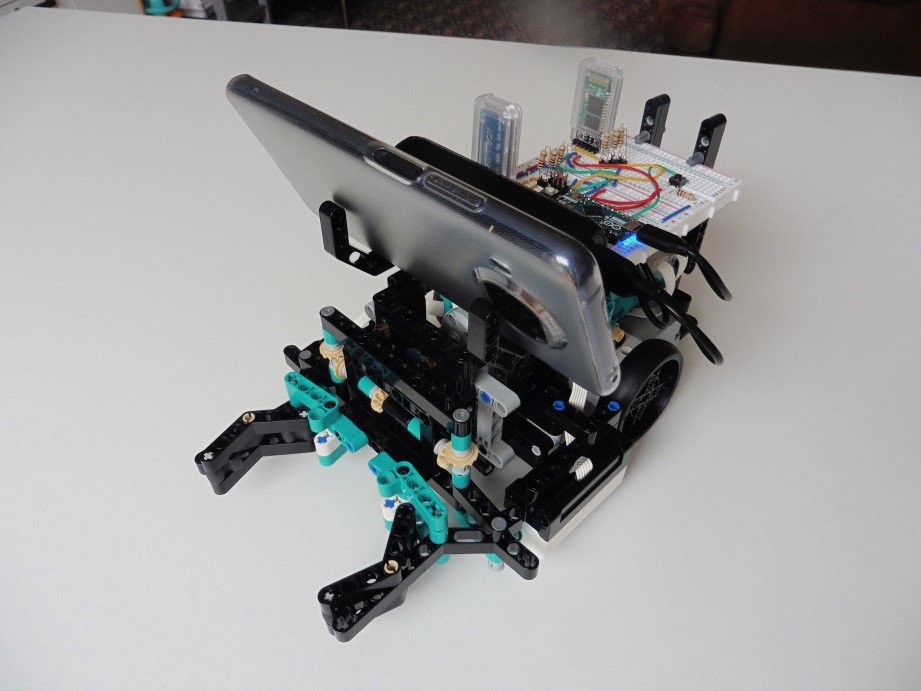
-
I am trying to make my Mindstorms NXT communicate with an Arduino board. The final project will be a warehouse robot that checks the colour of the contents on a pallet and stores it on a shelf. You can then order a number of pallets in different colours and the robot will get the order on a first-in-first-out basis. The inventory will be kept on the Arduino board along with the ordering interface and the Mindstorms will do the colour checking. New pallet operation: (NXT) Senses the pallet (NXT) Checks colour (NXT -> Arduino) Notifies the Arduino of a new arrival and its colour (Arduino) Finds a suitable location (Arduino -> NXT) Notifies the NXT of column and row (NXT) Puts the pallet in place (NXT -> Arduino) Sends an ok message (Arduino) Updates inventory Order operation: (Arduino) User creates order (Arduino) Checks which pallets to use (Arduino -> NXT) Requests NXT to get pallet (NXT) Delivers pallet (NXT -> Arduino) Sends ok message Step 3-5 is repeated for every pallet in the order (Arduino) Updates inventory What I can do at the moment: Connect the two manually Send single characters from the NXT to the Arduino What I would need input on: Sending information from the Arduino to the NXT At the moment the two units seems out of sync in some ways. The information sent from the NXT to the Arduino is sometimes picked up and sometimes not. I an guessing this has something to do with the Wait block and the delay() function. I am using the blocks for sending and receiving messages on the NXT and I am using Serial.write() and Serial.read() on the Arduino. The bluetooth module is an HC-06 ( http://www.kjell.com/sortiment/el/elektronik/mikrokontroller/arduino/bluetooth-transceiver-p87942 ) and I am using an Arduino Uno. I have found some information when searching, but many are specific to an alternative NXT language.
-
recently the bluetooth compatibility on my mindstorms NXT 2.0 has stopped working, the mindstorms porgram now does not recognise it as a bluetooth device, it says "unavailable". I run mindstorms v2.0f5 on a 2009 macbook (wich I recieved in 2011) the computer runs on 10.8.3 mountain lion and the NXT runs on firmware 1.31. I have established that the bluetooth connection on both machines (laptop and NXT) as I can in fact pair the two devices. the problem is the NXT Retail program itself, it just does not connect making it useless, so there must be some patch to the program. I have attached a picture of the window in question, when I hit "scan" essentially nothing happens, it appears to be searching but within a millisecond the screen returns to its previous state (the state the picture shows). I watched it in activity monitor when I hit scan and the program did nothing, nothing new came up. Please respond with any ideas, questions or even possible fixes, I really need help here!
-
 I have moved your question to the Mindstorms Programming topic. Original Question
 -
Problem: Powered Up hub Bluetooth disconnects shortly after running a custom program in the Powered Up app Details: I have the Crocodile locomotive that runs perfectly when I'm using the Lego Crocodile program. It will run without the Bluetooth disconnecting. Recently I made a small custom program in the Powered Up app and noticed that the Bluetooth was disconnecting frequently. I've tried a lot of different combinations to see if I could isolate the fault of the problem. 1. (Android device) Ran the Crocodile locomotive using the Lego Crocodile program and timed how long it would run before Bluetooth disconnected - Ran until I stopped it. 2. (Android device) Ran Croc using custom program and timed how long it took for Bluetooth to disconnect - Disconnects in about 30 seconds. 3. (iOS) Ran the custom program with my iPad and Bluetooth stayed connected longer, but still disconnected after about 2 minutes. 4. Got a reply from Lego Tech Support - Mostly checking settings, etc. (I checked settings and didn't find anything I needed to change). 5. Did some more testing - Verified with Android and iOS that the Lego crocodile program will run without Bluetooth disconnecting. Works perfectly (Ran the train for >5 minutes) 6. I tried putting iOS and Android device in different locations to see if that would make a difference; it didn't. I am <5 meters away from the hub. 7. My Android is up to date and so is the Powered Up app. I've probably tried some other things that I forgot to list. I've searched for others with the similar problem but I haven't found anything that matched. Any guidance on why the Bluetooth works fine when using the Lego crocodile program, but when using a simple custom one, it loses connection within minutes? I am planning to run a multi train set up with programmed stops, etc. Thank you in advance for any replies!