


imurvai
-
Posts
422 -
Joined
-
Last visited
Content Type
Profiles
Forums
Gallery
Everything posted by imurvai
-

[APP] BrickController2
imurvai replied to imurvai's topic in LEGO Technic, Mindstorms, Model Team and Scale Modeling
Yes, I've heard this limitation or weird behavior of the PS4 controller. Unfortunately I don't have any so I can't really test it. -
[APP] BrickController2
imurvai replied to imurvai's topic in LEGO Technic, Mindstorms, Model Team and Scale Modeling
Oh, I forgot this. Unfortunately the Android system doesn't forward the controller events to the application when it is put to background or the screen is turned off so it won't work :( iOS is even more rigorous in this regard. -
[APP] BrickController2
imurvai replied to imurvai's topic in LEGO Technic, Mindstorms, Model Team and Scale Modeling
Hi, Thanks for the suggestios. Let me go through them one-by-one: - If I understand correctly you would like to have an option for the toggle button to switch between -1 to 1 instead of 0 and 1. That would not be a big deal. - Dead zone is also a good idea. Someone also suggested to be able to set the characteristic of the joysticks or at least to have some presets like linear, exponential, logarithmic, ... I'll think about how I could add it without making the UI too much complex :) - Yes, the BuWizz output level option during playing is also on my TODO list :) - Unfortunately I don't have the EV3 set, but I bought the Boost for my daughter and I'm planning to investigate whether I can support it (along with the new PU receivers) - Playstore upload is also on my TODO list. And one more thing, I'm currently redesigning the whole app to support iOS too. So far it's very promising but I can't give any deadline at the moment. BR and happy playing :) I -
[APP] BrickController2
imurvai replied to imurvai's topic in LEGO Technic, Mindstorms, Model Team and Scale Modeling
Hi, there is no need to find the controller on the devices screen, you need to pair the controller as other bluetooth devices in the Android settings. Once it's done you can test it on the app's controller tester screen. I hope it helps. Happy playing :) -
[APP] BrickController2
imurvai replied to imurvai's topic in LEGO Technic, Mindstorms, Model Team and Scale Modeling
Hi, the app is not on the PlayStore (at least yet) but you can download the apk file from here: BrickController_0_32 Happy Playing! :) -
42083 - Bugatti Chiron
imurvai replied to Jurss's topic in LEGO Technic, Mindstorms, Model Team and Scale Modeling
Too bad it has been leaked - IMO. I hoped Lego could keep it in secret until the release date :( -
[APP] BrickController2
imurvai replied to imurvai's topic in LEGO Technic, Mindstorms, Model Team and Scale Modeling
Got it, thanks :) -
[APP] BrickController2
imurvai replied to imurvai's topic in LEGO Technic, Mindstorms, Model Team and Scale Modeling
Hi, Could you proceed with the email sending so that I can get the crash report from the app then I'll look into it... Thanks, I -
Hi, I managed to reproduce the issue and started working on the fix...
-
[APP] BrickController2
imurvai replied to imurvai's topic in LEGO Technic, Mindstorms, Model Team and Scale Modeling
Hi, Actually I have a couple of features to add and one of them is the live BuWizz level setting on the phone's screen during playing. Please be patient I don't have too much time to deal with the app nowadays... -
[APP] BrickController2
imurvai replied to imurvai's topic in LEGO Technic, Mindstorms, Model Team and Scale Modeling
Hi, theoretically all Android compatible game controllers should be OK, however a guy has reported issues using the official PS4 controller. I'm using a cheap one from a chinese webshop and that is completely fine. To set up the app for your model please follow the instructions of the manual: BrickController manual Happy playing! :) -
[APP] BrickController2
imurvai replied to imurvai's topic in LEGO Technic, Mindstorms, Model Team and Scale Modeling
Does the controller work in other apps, like some gamepad tester from the play store? If not then the issue is in the new firmware. -
[APP] BrickController2
imurvai replied to imurvai's topic in LEGO Technic, Mindstorms, Model Team and Scale Modeling
Hi, Hmm, that sounds strange. I'm just guessing but my controller has 4 modes and only one of the is working as a normal controller. Maybe the default setting on your controller has changed (if it has multiple modes at all). Doesn't it work in my app's controller tester either? -
[APP] BrickController2
imurvai replied to imurvai's topic in LEGO Technic, Mindstorms, Model Team and Scale Modeling
Hi, please try removing the controller in the bluetooth settings by forgetting the device and re-pair it again. Let me know if it helps. -
[APP] BrickController2
imurvai replied to imurvai's topic in LEGO Technic, Mindstorms, Model Team and Scale Modeling
Hi, it doesn't seem like you did anything wrong. Basically both my apps discover the bluetooth devices the same way so it's weird why BrickController doesn't see your SBrick. Could you check the firmware version of your SBrick in the official app? Mine is version 20 and it says it's the latest. And BTW is it a "pure" SBrick or an SBrick Plus? For the SBrickController issue: could you check if the outputs can be driven full speed in the device settings using the sliders? If so then I assume the issue has something to do with the controller, but I'm not 100% percent sure. -
SBrick Watchdog
imurvai replied to Lok24's topic in LEGO Technic, Mindstorms, Model Team and Scale Modeling
I meant what software were you using to send the drive command? -
SBrick Watchdog
imurvai replied to Lok24's topic in LEGO Technic, Mindstorms, Model Team and Scale Modeling
Hi, Isn't it possible that the "program" disconnects after stopping? What program is it anyway? -
[APP] BrickController2
imurvai replied to imurvai's topic in LEGO Technic, Mindstorms, Model Team and Scale Modeling
Good to hear it's working :) I don't have any PS3 controller but here's an instruction on how to connect it to Android devices: Connect PS3 controller to Android -
I also have cracked U-joints and I reinforced them using a simple thread:
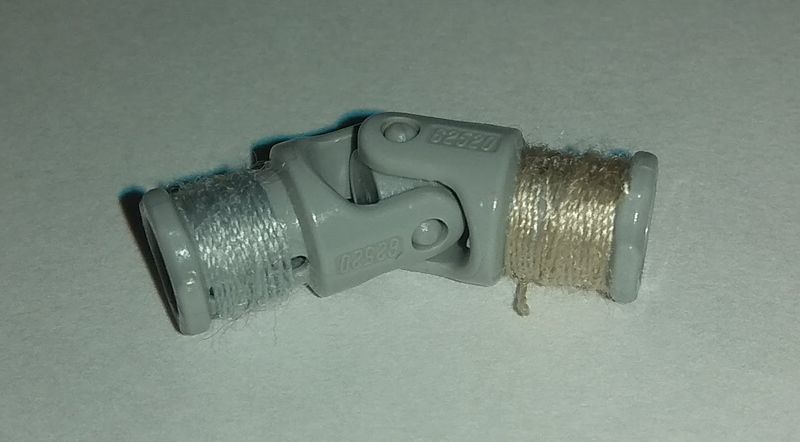
-
Done. Thx @Milan
-
24: 10 10: 6 3: 4 22: 3 8: 2 11: 1
-
[APP] BrickController2
imurvai replied to imurvai's topic in LEGO Technic, Mindstorms, Model Team and Scale Modeling
Hi, Sometime it happens that it's very hard to connect to the BuWizz even with the official app. I don't know why. Could you try the nRF Connect app ( https://play.google.com/store/apps/details?id=no.nordicsemi.android.mcp ) if it sees and connects to your BuWizz? Is it my app or the official app that crash by the way? Can you try my app on the tablet as well? (If it's an Android tablet ) Also I just found this in the other topic: -
[APP] BrickController2
imurvai replied to imurvai's topic in LEGO Technic, Mindstorms, Model Team and Scale Modeling
Sounds like it's the root cause of the issue. I've read in other forums that it's a common issue with the dualshock 4 controller that one of the triggers value gets stuck at -1. This is the motion code 13. What does the controller test shows when you press the triggers? And does the motion code 13 shows up when you are moving the sticks? One more thing to this: someone experienced this issue only when the controller was connected through USB OTG, but it worked ok using bluetooth. How are you connecting your controller to the android device? -
Hi! Try to connect to the BuWizz with nRF Connect app ( https://play.google.com/store/apps/details?id=no.nordicsemi.android.mcp&hl=en ). If it manages to connect than the issue is in the BuWizz app not on the device.
-
[APP] BrickController2
imurvai replied to imurvai's topic in LEGO Technic, Mindstorms, Model Team and Scale Modeling
Ok, so what is exactly the issue with the dualshock controller? Does it suddenly start any of the motors without even touching it? And can you reproduce it on the gamepad tester screen? I mean what if you just leave untouched the controller while you are on the tester screen? Also I just started adding the IR over audio jack feature to the app. Hopefully I can publish it soon...