


Superkalle
-
Posts
6,069 -
Joined
-
Last visited
Content Type
Profiles
Forums
Gallery
Everything posted by Superkalle
-
I'm starting a new topic for LDD 4 Bugs and errors. The old LDD 3 topic can be found here
-
First sneek peak at LDD 4.0
Superkalle replied to Superkalle's topic in Digital LEGO: Tools, Techniques, and Projects
Interersting subject. Specially the history of it and Maxwells' demon. Good luck. -
I know the answer to that one. We just got the relase date today actually: 29th october. See more in the LDD forum.
-
First sneek peak at LDD 4.0
Superkalle replied to Superkalle's topic in Digital LEGO: Tools, Techniques, and Projects
Thanks Claus! Lookin' forward to it. -
[Software] LDD Manager
Superkalle replied to Superkalle's topic in Digital LEGO: Tools, Techniques, and Projects
Thanks for noticing. And if you have any other ideas or questions about LDD Manager, let me know -
need help rotating road
Superkalle replied to alienwar9's topic in Digital LEGO: Tools, Techniques, and Projects
You may be absolutely right about this one In my defense I can only say that it was back in April when I was young and immature The LDD brick model does seem to be off. Thanks for spotting! But before we close this case, has anyone seen this technique used in a set? It'd be kind of interesting to see in what case it can be used. -
Thanks for the report
-
Good spottin' headlessroland! Also I notice that the two wing parts cannot be stacked ontop of each other (i.e. the tiny round peg won't go into the small hole of the other). However I don't know if they are supposed to with real bricks. And yes, all bugs are certainly wanted by TLG, including the ones for Universe Mode. At least that's what I've been told
-
So you figured it out too
-
More free Lego from The Mirror newspaper!
Superkalle replied to Big Pete's topic in Buy, Sell, Trade and Finds
Great spotting! Nice to see the lovely parrot. Now the redicolous price on BrickLink is no more! -
It never cease to surprise me the way official sets breaks the rules. Seems we have a whole bunch of examples now, even from very recent sets Anyway, I like the way you use the term "in system", which is as far as I know the term TLG use. Another intresting example of elements being not being in system (and then becoming in system) is these two (see pic). The red one (4623) is the old one, that will be phased out. It is not in system, since the hook is placed a bit too far out. The green one (88072) is the new one. This one is in system since the hook is inline. BrickLink does not make a distinction between the two which may cause problems for brick buyers/builders. Side note: As can be seen LDD incorrectly accepts the connection between the 1x1 plate with clip and the 4623. Thanks to Jamie for this example.
-
Thanks! I asked since I was thinking about adding these to the Calender.
-
Good first start Zeya! The thing I notice is that several colors are incorrect. If you compare to AndyC's model, you can see where you have used the wrong colors (Download Andys model and paste it next to yours and start comparing). In general, to find which the colors are supposed to be in an official set a good idea is to use BrickLink. In this case you would have this part list. So how do you know which color is which in LDD? This has been explained before here at forum, for example this post by Aanchir. To further check colors, use LDD Manager To see which LEGO Color equals a BrickLink color, use either the Color Lookup list in LDD Manager, or this chart Good luck!
-
Praise the Lord Seriosly though, welcome to the LDD Forum. Hope to see you around. And don't hesitate to ask any questions.
-
OK. Thanks for letting us know. And keep up the good work Index Master
-
LDD Statistics at Eurobricks
Superkalle replied to Superkalle's topic in Digital LEGO: Tools, Techniques, and Projects
Update October 22nd 276.000 views 3474 posts 558 Official sets in LDD We're alive and kickin' friends For reference: August 18th data 181.000 views 2484 posts 450 Official sets in LDD -
The one I was thinking about was the case with a certain LXF-file, that if you went in to Generate Building Guide mode, LDD would crash. Can't remember when it was reported, probably 6 months ago.
-
I did use the search function EDIT: see now that it wasn't indexed.
-
I'd like to wish for the Vestas promotional wind-mill
-
[Software] LDD Manager
Superkalle replied to Superkalle's topic in Digital LEGO: Tools, Techniques, and Projects
Good idea. I'll look into it. Yeah, but it should be managable -
[Software] LDD Manager
Superkalle replied to Superkalle's topic in Digital LEGO: Tools, Techniques, and Projects
Yes it can. Well not import (yet), but you can cut and paste. This is how you do it. 1) Find the model in BrickLink (example) and copy & paste the inventory list into excel 2) take the column with ITEMId's and "clean it" (for example, there is often a pre-fix space before the ITEMId's). 3) Select a total of four columns in Excel, so that the BrickLinkID is the third column and the other three are empty (look at picture below) 3) Paste into LXF-generator, like below. If the part in BrickLink does not exist in LDD, it will warn you about it. The only problem is color, but I can look into that (bascially a lookup-function). Also the number of parts is not included, but I don't know if that is wanted? Can be an awful lot of parts. As you can see I've added a bit nicer grouping function in next version of LDD Manager.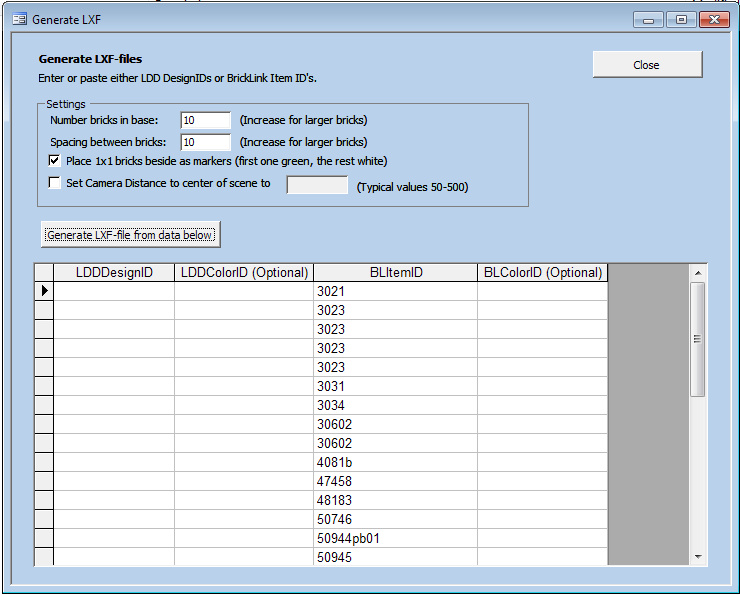
-
Great WIP. Do upload it when you're done
-
You are aware that it has been done, right? Even if you are, I love duplicate building because then I can test the new "Compare LDD files" function in LDD Manager
-
[Software] LDD Manager
Superkalle replied to Superkalle's topic in Digital LEGO: Tools, Techniques, and Projects
You're welcome! And please don't hesitate to come back with requests for the next version. -
New part in the latest Power Miners set?
Superkalle replied to Superkalle's topic in General LEGO Discussion
Well, I'm not doing to well am I? No new part, and no new set The 8709 popped up on Brickset in the new-additions-to-the-databaseas list, so I jumped the gun. Should have checked the my references first