Superkalle
-
Posts
6,069 -
Joined
-
Last visited
Content Type
Profiles
Forums
Gallery
Everything posted by Superkalle
-
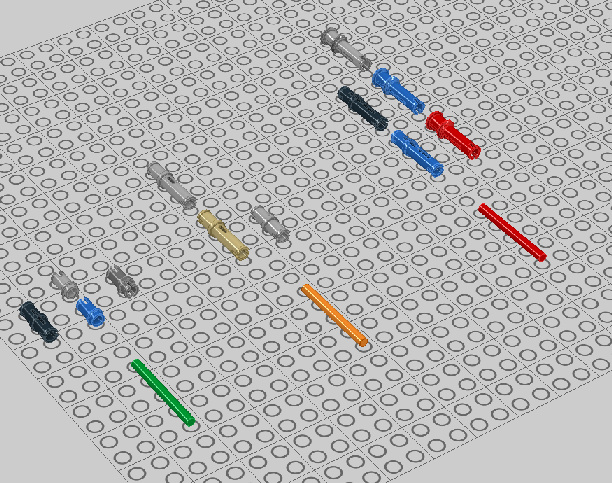
32138 and 41532 should most likely allow 3.2 bar in one module, but as you've pointed out this is not supported in LDD4. Does anyone know if this a technique that has been used in any official set for these two parts? Regarding bushes and 3.2 mm bar in general, here's what's LEGO legal (and it now also work like this in LDD): Allows the bar completely through 2780, 4274, 32002 Allow bar one module in 32556, 3673 Does not allow bar in at all (physcial stop at end) 6558, 32054 See attached LXF. I've used a red bar to signal that it can't go through, orange for one module, and green for all the way through. Neat, huh TechnicPinsand32mmbar.zip
-
Yes, I know the dish that is in the BoE has a hole, but does the 6942 that was in the old SCALA sets also have a hole? OK, I see it too. I guess the work-around is to hide the Windows status-bar
-
LDD 4 is released!
Superkalle replied to Daedalus304's topic in Digital LEGO: Tools, Techniques, and Projects
See here -
Can someone confirm that the 6942 Lamp Shade has a hole also in the old SCALA sets from the late 90's. Otherwise we might be looking at two DesignID's - one with, and one without the hole.
-
Only 4 flexible pieces!?
Superkalle replied to elmerohueso's topic in Digital LEGO: Tools, Techniques, and Projects
Only the pieces that are in DesignByMe mode are flexible at the moment. Rest asure the rest will become flexible in time. -
LDD 4 is released!
Superkalle replied to Daedalus304's topic in Digital LEGO: Tools, Techniques, and Projects
Well, I'm not sure what you mean. There are lot of new features we've been wanting - angles input in hinge tool, part ID in statusbar, search functions, more bricks, tons of fixed bugs that we fans have reported etc. Also LDD is free which is also kind of a nice feature. -
LDD 4 is released!
Superkalle replied to Daedalus304's topic in Digital LEGO: Tools, Techniques, and Projects
Pictures, pictures, pictures -
Two bugs in one smash (as we say in Sweden. I think you english speaking say two birds with one stone, right?) Well spotted, but that actually an old bug that hasn't been fixed yet.
-
OK, so we got LDD 4 now. What do you all say, should we check all our models? Most of the brick issues seemed fixed, and there's more bricks now also. I guess the best way would be to just update the original post, rather then re-posting. Maybe we can edit in a large "Upgraded to 4.0" or something so that you know a model is "4.0 compatiable"?
-
I'm not sure I follow. Can you post a screenshot please. EDIT: What screen resolution do you have?
-
IMPORTANT - Removed bricks in 4.0
Superkalle replied to Superkalle's topic in Digital LEGO: Tools, Techniques, and Projects
I agree. The bricks that have been removed are often "duplicates" such as the Motorcycle Fairing which in LDD 3 existed in two seemingly identical version, but with different DesignID's. One of those are still in LDD4, the other one is gone. Russian Rolette which you used in LDD3 -
Aha you mean 32069 and 32068 (gotta love that new status bar info) Can you give an example set (instruction) where this connection technique is used.
-
Good idea! Can you start a new topic about "fixed bugs in LDD 4" Which parts are those?
-
LDD 4 is released!
Superkalle replied to Daedalus304's topic in Digital LEGO: Tools, Techniques, and Projects
Well, two bricks I found are kind of special in that you can multi-color them The first one is 30367, which you can "color" as an R2-D2. I guess you like that However, the other one (1x1 tile) is most likely a bug. This one is also kind of dangerous, because if you re-color the brick, you will only see the "top" color being changed, but the rest of the brick will still be the orginal color (and that is the color that the brick "is").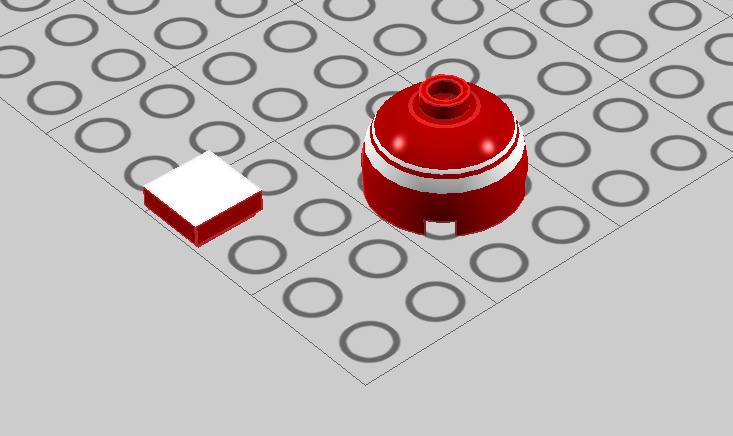
-
Aha, you mean 58120. Yepp that was a particularly nasty one. Ouch.
-
IMPORTANT - Removed bricks in 4.0
Superkalle replied to Superkalle's topic in Digital LEGO: Tools, Techniques, and Projects
No, if you get the message "placed incorrectly", it may be because the bricks actually are. I was told the precision of the bricks have been increased in 4.0, so some conection tolerances that were OK before, may not be anymore. Also, it may be that some connectivity has been shaped up. And yes, there should be two different pop-ups for "not placed correctly" and "brick not available". -
Rainworm exploring lego world
Superkalle replied to Zerobricks's topic in Digital LEGO: Tools, Techniques, and Projects
Lovely -
IMPORTANT - Removed bricks in 4.0
Superkalle replied to Superkalle's topic in Digital LEGO: Tools, Techniques, and Projects
Well, in all honesty, the problem will hopefully not happen in too often, as only the models containing the removed bricks will give you a warning. So the best way to identify a model with deleted bricks is just to open it, and see if the error occurs. If not, you're set to go. -
LDD 4 is released!
Superkalle replied to Daedalus304's topic in Digital LEGO: Tools, Techniques, and Projects
Great find. Aren't these new too?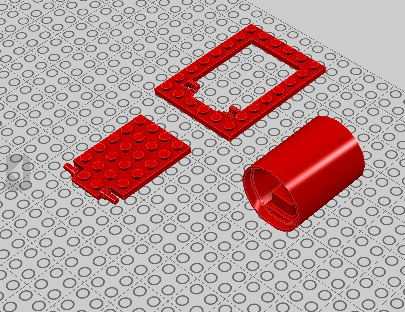
-
LDD 4 is released!
Superkalle replied to Daedalus304's topic in Digital LEGO: Tools, Techniques, and Projects
More brick analysis Here is a list of all new parts in LDD 4, as Excel-file and LXF. (Yepp, the LXF is generated in LDD Manager, I didn't manually put them square like that ) NewBricksInLDD4_287.xls NewBricksInLDD4.zip -
Give us some details. Like a part number (which is now so easy to search&find in LDD ) BUG: Color 297 (Warm gold), which is the gold color in for example Atlantis sets, is missing in the color palette. All other colors (except Maersk Blue) seems to be there.
-
I've done some analysis on the brick content of brickset 114.5 (used in LDD3) and the new 287 in LDD 4, and have found that the following bricks have been removed in the new LDD. This means that if you open a LDD3 model with those parts in it, you will get the dreaded "X bricks could not be loaded and will be been removed" error and the bricks will simply be deleted from your model. The good news, is that there are new substitute parts available. I'm thinking about adding a feature in LDD Manager that parses a LDD3 file and if it finds an outdated part number, replaces and outputs it as a LDD4 file. In the meantime, if you want to do it manually, you can open the LXF-file and do a simple Search & Replace. Below is the list of bricks that have been removed, with new and corresponding Part-numbers in LDD4. You can also download this list, as well as an extended list, as excel file. UPDATE Nov 18: Updated mapping information from TLG BricksRemovedInLDD4_UPDATE.xls
-
LDD 4 is released!
Superkalle replied to Daedalus304's topic in Digital LEGO: Tools, Techniques, and Projects
Thanks. Same as mine. -
LDD 4 is released!
Superkalle replied to Daedalus304's topic in Digital LEGO: Tools, Techniques, and Projects
What Brick version do you guys have (In the Help > About dialog)? EDIT: And what LDD version 4.0.?? -
[Software] LDD Manager
Superkalle replied to Superkalle's topic in Digital LEGO: Tools, Techniques, and Projects
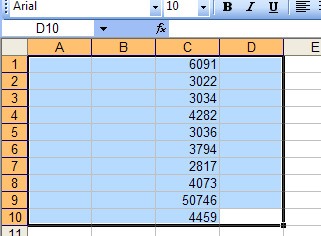
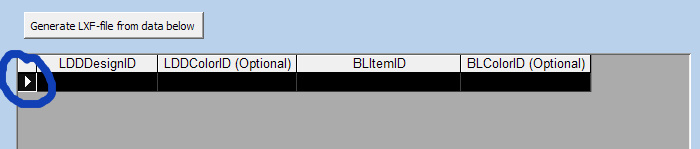
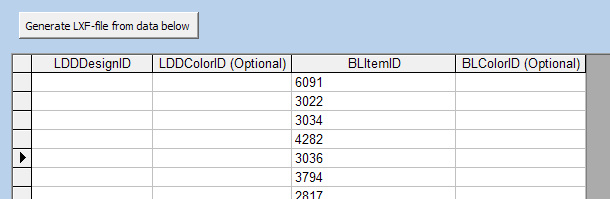
Yes. If you have four columns in excel, with the third containing the BL data, you then select all four columns and paste into LDD Manager (select The BL data will then be the third column and will paste correctly. Here's some pics. Pic 1 - select the columns in Excel Pic 2 - click on the arrow button in LDD Manager to the the row becomes black - then Ctrl-V Pic 3 - The final result PS: Now that LDD 4 is out, there will soon be a new version of LDD Manager.