


NikosSprocket
-
Posts
24 -
Joined
-
Last visited
Content Type
Profiles
Forums
Gallery
Everything posted by NikosSprocket
-
Nicely done!
-
Awesome! Thank you lol
-
Very nice! I will tried it on my next build.
-
Awesome! Attach an filament extruder and you have a 3D printer! Excellent! Btw what language did you program it with?
-
That looks awesome! What libraries are you using with Andruino to control the PF servos and how do you connect them to the ESP8266? Nikos
-
Awesome design. Looking Fujiwara to a video. Nikos
-
Excelent!
-
Awesome!
-
Ingenious! Bravo! Nikos
-
One of the most realisticly operating MOC I have seen! Using gears or the crankshaft to manipulate the air valve is just brilliant! Cheers, Nikos
-
Hi! For PF motors I use the BuWizz which has 3 power settings and basic remote control. I stop using the Lego battery boxes for PF MOCs. For PU hubs I use Eneloop Pro batteries as I like to use the Lego PU app. for custom coding. Cheers! Nikos
-
[MOC] Classic Police Car
NikosSprocket replied to paave's topic in LEGO Technic, Mindstorms, Model Team and Scale Modeling
Well done! Great photos with real backgrounds btw. -
Take a number! I am also disappointed with the release of PU (Powered Up) code without any documentation. I was greatly helped by https://racingbrick.com/powered-up-code-block-guide/. Using the older system PF (Power Functions) the best motor for steering is the Servo Motor (88004). No need for any programming.
-
Hi Peter, I am in a similar path with my Defender conversion to full RC. I need also to work on my steering as it is not as "responsive" as I would like it but I found a way to make the App. (3.6.0) to calibrate the Angular (SPIKE) position motor so it always start at the center. I created a quick built animation of this configuration below: I hope this helps. Nikos
-
That's an amazing built. Well done! Nikos
-
Adam don't be sorry! Actually thank you for pointing out my ... misinformation so I don't get a call from Land Rover (Tata...) about their new top secret car Discovery lol. Thanks again! Nikos PS. I am updating the name on all the sites
-
Wow! That's one awesome truck! I like the way you packaged everything and little details, like using cylinders over the half shaft a else to look more realistic. I need to get me the air valves with the axle through. The regular valves are painful to operate with any motor....
-
You are welcome! As my RC Discovery project progresses I will put more updates. The plan is to use 4 motors; steering, power motor, gear motor and a center diff motor. I think, I can fit all them and the hub! We will see.... Nikos
-
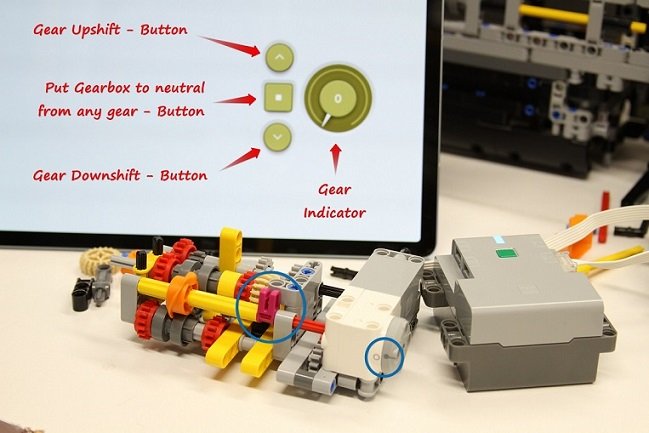
Thank you! I use a variable "a" for the gear number. Zero is for neutral, when you press the "up" button then the variable "a" becomes "a+1" and the button function rotates the gear selector 90 degrees. When you press "down" button then the variable "a" becomes "a-1" and the button function rotates the gear selector -90 degrees. Then I use a PU dial to display variable "a". I hope this helps. Nikos
-
I am building a RC version of the Lego Land Rover Defender (42119) and it will include a 3 speed sequential Transmission. It will be operated from the Powered-Up Lego app. using 3 buttons and it includes a dial that shows the selected gear. I am using a Technic Hub (88012) and a Technic Medium Angular Motor (45603). The Remote Control has 3 buttons; up-shift, down-shift and neutral. When the application is started it calibrates the shifting axle to be at the "neutral" gear and sets the angle to 0. Pressing the up-shift button will engage the 1st gear, then if pressed again the 2nd until it reaches the 3rd gear. If you press the up-shift button more times it will not move the shifting mechanism but will make a "clanking" noise. Pressing the down-shift button will sequentially shift to the next lower gear until it gets to neutral where again will make a "clanking" noise trying to go lower. To the right of the 3 buttons there is a dial that indicates the gear is selected. [Media]
-
Lol! I would never thought of that parallelism until you said it. Awesome! Btw. My Roller Coster after only a year could not make it all the way to the chain pickup point. The solution was a clean cloth lightly sprayed with Plexus and cleaned all trucks.
-
A lot of information on the SPIKE hub can also be found at: https://education.lego.com/en-us/product-resources/spike-prime/teacher-resources/video-tutorials
-
I will skip this set as others mentioned is not as detailed, functional and interesting as the other supercars. Too bad as Ferrari is my favorite markey.
-
Maybe the permanent magnets on the stator have weakened with time so the stator magnetic field is less than original.