
kbalage
-
Posts
1,833 -
Joined
-
Last visited
Content Type
Profiles
Forums
Gallery
Everything posted by kbalage
-

SBrick General Discussion
kbalage replied to Nofer89's topic in LEGO Technic, Mindstorms, Model Team and Scale Modeling
A new account might be still your best chance if you want to use the app. You can login with your old profile on the web interface, check and copy anything you need to the new profile, then set up the ports on the phone for the MOC. If it works then it's still faster than spending hours troubleshooting your old profile on the phone. -
Technic 2020 Set Discussion
kbalage replied to dimaks13's topic in LEGO Technic, Mindstorms, Model Team and Scale Modeling
The social media team was not on the top of the game, Facebook/Instagram still had only the teaser from yesterday when Top Gear was already showing the details of the (btw very nice) car :) -
SBrick General Discussion
kbalage replied to Nofer89's topic in LEGO Technic, Mindstorms, Model Team and Scale Modeling
@Aleh Try to create a new account on the web interface and log in with that on your phone. You can also try to wipe data/reinstall the app on the phone. -
[APP] BrickController2
kbalage replied to imurvai's topic in LEGO Technic, Mindstorms, Model Team and Scale Modeling
Normally it should not matter, it connects with either hubs first. As it was suggested previously you need to double check the ports where the motors are connected, they need to match exactly the instructions. -
Custom controls for up to 4 trains in the Powered Up app
kbalage replied to kbalage's topic in LEGO Train Tech
I'm not sure what is exactly blocked and what not, but when I tried to zip the folder on one Android device and e-mail it to the other one it did not work. That's the reason why I choose the pdf file with the comments, I think it is easier to use than trying to troubleshoot the file-copy paste on different Android devices and everyone can recreate the program on iOS devices as well. -
Custom controls for up to 4 trains in the Powered Up app
kbalage replied to kbalage's topic in LEGO Train Tech
At the moment unfortunately there's no in-app solution to control the connections automatically. I just did a quick test, if one hub disconnects because it goes too far then you need to push the button on the hub and tap on the hub's name on the connection screen as well. The good news is that it does not affect the order of the hubs, so if number 1 disconnects then number 2-3-etc stays in the same slot. Once you reconnect number 1 it can pick up the speed stored for it previously. -
Custom controls for up to 4 trains in the Powered Up app
kbalage replied to kbalage's topic in LEGO Train Tech
The program in this form relies on active connections, since the app can connect to 4 hubs simultaneously. When you switch between the hubs it stores the speed value in a variable and reads the value stored for the next one, same goes for the light status. -
Custom controls for up to 4 trains in the Powered Up app
kbalage replied to kbalage's topic in LEGO Train Tech
And you will have it blocked by a lot of systems (e.g. Gmail, some virus scanners) because it contains json files.. -
Custom controls for up to 4 trains in the Powered Up app
kbalage replied to kbalage's topic in LEGO Train Tech
That strange window is required as the download link is e-mailed to you, you don't need to buy anything. Unfortunately LEGO life sharing does not work yet in the Powered Up app, it is only available in the Boost app. -
Custom controls for up to 4 trains in the Powered Up app
kbalage replied to kbalage's topic in LEGO Train Tech
I usually create the Powered Up programs on my iPad as it is easier to navigate compared to my Android phone. I'd need to recreate the apps on the phone to share the files, and not many people are comfortable to tinker with app files on their devices. I think the pdf version for now is pretty straightforward to use and to recreate on any device. Hopefully LEGO will add a sharing function in the future to the app. -
I'm not a regular visitor of the train section here on Eurobricks but I think this might be interesting for you :) The Powered Up 3.0 app allows now to have multiple hubs connected, but it does not offer a convenient interface to control the connected trains the same time. I created two code variations in the Powered Up app with the following abilities using the slider control interface: Simple interface Control 2 trains with the 2 sliders Control the lights of the 2 trains separately with 2 buttons Stop button to stop all trains Code can be customized to control more trains/motors with one slider, e.g. coupled trains Advanced interface Control 4 trains with the left slider Switch between the trains with the right button (speed and light status of the trains is stored in the app) Left number shows the speed of the current train, right number shows the train selected Left button toggles the light of the currently selected train Middle button stops the currently selected train The code can be tweaked to control trains with multiple motors and it can be also used to control trains equipped with other type of Powered Up motors as well, or trains using the 4 port hub. Here's a video demonstration: The pdf guide can be downloaded here.
-
You can really use the speed of the buggy motors if your vehicle is not heavy, adding the bulk of the XL motors and the Technic hub will not help at all. Buggy motors can give you speed or torque depending on the gearing, it'd be better to use a gearbox instead of the additional motors/hub. They seems to be because of the internal gearing difference, but at the same speed their torque is pretty much comparable.
-
42111 - Fast & Furious car
kbalage replied to Kaanere's topic in LEGO Technic, Mindstorms, Model Team and Scale Modeling
That could explain the price tag as it would be between 42077 and 42093 size-wise. I checked it quickly and it could actually work with the small wheel arches from 42093/42109, it'd be very cool to have them also in black: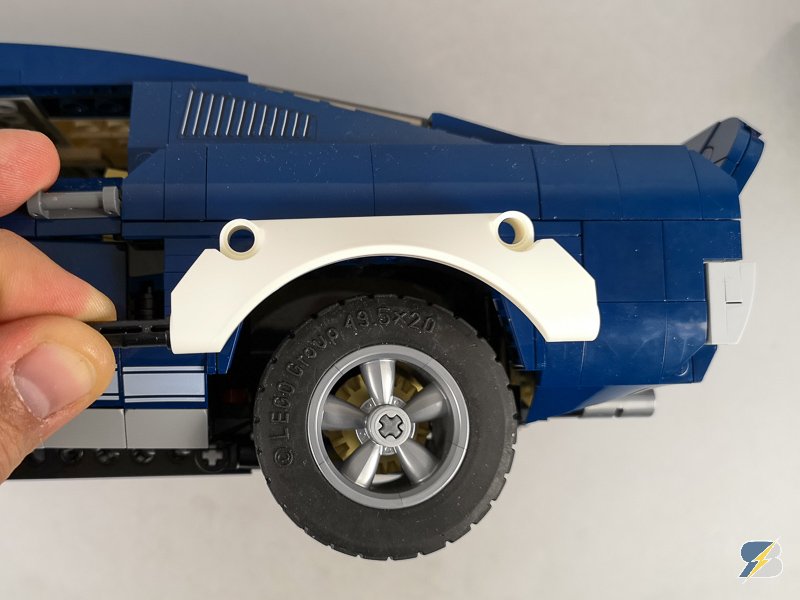
-
Powered Up code block guide
kbalage replied to kbalage's topic in LEGO Technic, Mindstorms, Model Team and Scale Modeling
@RohanBeckett I managed to edit the numbers, now there's a 200 value instead of 100 that shows all rows. -
@allanp that's the logical thing to do but does not necessarily fit in the corporate strategy. I can't imagine the support of 3rd party controllers in the official app even in the best case scenario.
-
@allanp honestly I'm not sure where this whole thing is heading. I'm afraid the team will not ditch the code block-based concept and it will be quite a big challenge to build a simple and usable system on this foundation. The only possible way is see is the creation of specialized composite blocks that can be used and applied relatively easily, e.g. create one composite block for calibration, one for steering, one for a toggle button etc. This way the possibility of tinkering remains within the composite block but they could be used relatively easily by beginners as well. But documentation and tutorials are essential for this variation as well. I'd be happy to see an official mid-level solution with something like the current BuWizz or BrickController 2 apps. No code blocks and complicated concepts, just control elements (joysticks, buttons, sliders) assigned to hubs and outputs where the type of the attached motor can be selected, period. I'm afraid this won't come from TLG but from a 3rd party sooner or later.
-
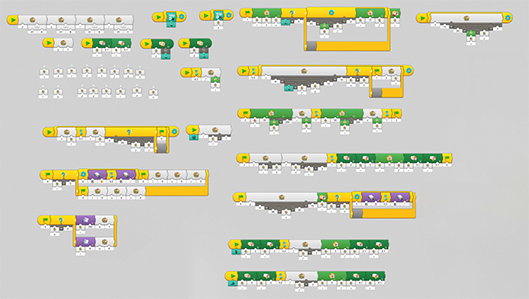
Control+ is still carved in stone, Powered Up has no easy way to control cars. I challenged myself to come up with a code in the Powered Up free play area that replicates the basic functionality of Control+ and some extra: Proper return to center steering Calibration process to set the zero position for the steering Ability to fine tune the zero position with buttons Toggle button to use the unused port(s) of the sets to attach lights Slider or Joystick control Relatively easy port reconfiguration for different sets/creations Well as it turns out it wasn't trivial Spent some weeks with fine tuning the code but now it works (more or less reliably). Please note that I always had issues with coding in school so I'm almost sure it can be done in a more effective and/or elegant way but at least it showed me the challenge anyone could face if tries to create this relatively basic functionality in the current version of the PU app. Here's a video about it: An overview of the code itself (yeah it's not that simple): Here's a link the pdf file if you want to try and play with it.
-
At this point this has to be a shortage of resources, maybe on the designer's side but most likely on the app developer's side. Or the B models are simply not popular enough to dedicate resources to them.
-
42111 - Fast & Furious car
kbalage replied to Kaanere's topic in LEGO Technic, Mindstorms, Model Team and Scale Modeling
FF9 trailer is out, I think I found the perfect candidate from the movie to become a LEGO set:
-
Powered Up code block guide
kbalage replied to kbalage's topic in LEGO Technic, Mindstorms, Model Team and Scale Modeling
@RohanBeckett I found a way to override the theme settings, not the width of the body is set to 100%. The page looks weird on wide screens because the header and menu is much narrower now but I'll leave like this until I figure out a better way. -
Powered Up code block guide
kbalage replied to kbalage's topic in LEGO Technic, Mindstorms, Model Team and Scale Modeling
@RohanBeckett I already removed the side widgets for this page but I cannot override the theme width, and I don't want to break it for the whole site. Tried a couple of custom CSS tricks that promise to override the max width value of the theme but none of them worked so far. -
Interesting. The 2 port - 2 button combination solves a lot of potential issues with usability but it's not very "economical" to have such a big box with only 2 outputs. There's another toy fair next month, hopefully someone will have a closer look :)
-
@Mizyaz lucky you, so you already saw the real thing?
-
I think the Powered Up system has great potential but the app has one major flaw (apart from some others) - it has zero documentation available. I created a code block guide that has all blocks listed in the current version of the app. Here's a video about it: There're two versions available, a simple one that can be scrolled easily and provides quick access to the block's category, name, description and a simple example. The extended version has more information added but the navigation is different due to the size of the table. Hope you'll find it useful, let me know what you think about it.
-
This was the Sian's teaser on the Frankfurt Motor show: And this is a new teaser by them for the LEGO car: Based on this my bet is on a red Sian :)