


Superkalle
-
Posts
6,069 -
Joined
-
Last visited
Content Type
Profiles
Forums
Gallery
Everything posted by Superkalle
-
Flower arrangment Mother's Day
Superkalle replied to persnickety's topic in Digital LEGO: Tools, Techniques, and Projects
Regarding vase, there are always these to be inspired from: http://www.bricklink.com/catalogItem.asp?S=lfv1-1 -
And suddenly, the seed for a EB contest was born
-
I have to agree with the rest of you - some buildings are just not cut out to me made in LEGO microscale since the scale is just too small or the parts just aren't there. (For info, the Burj Khalifa is famous for being the tallest building in the world) Some reference pics:
-
Reported to TLG Just a friendly remark: I'm not sure if English is your primary languge, but when you use "Dude" like that it doesn't sound very nice.
-
Ultra car
Superkalle replied to Zerobricks's topic in LEGO Technic, Mindstorms, Model Team and Scale Modeling
Very, very nice Mr Technics Man -
Thanks guys for all the tips. I ended up taking out three batteries and shortcuting - a friend at work helped me an elegant solution with using a single paper clip set in tension between two poles. See below how it was done. And IMHO, the way the Vestas turn now is the way it should be - more majestic and with a nimble electric whining sound.
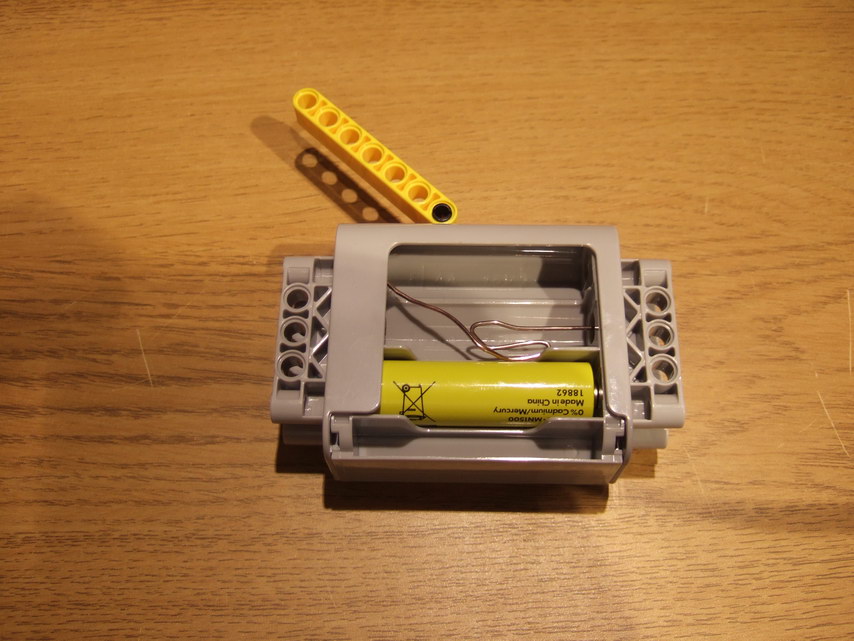
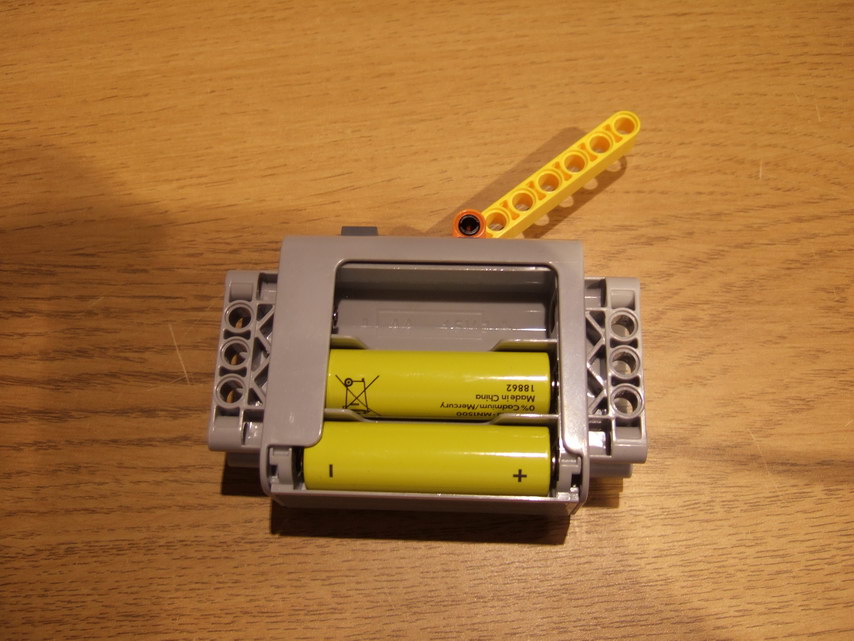
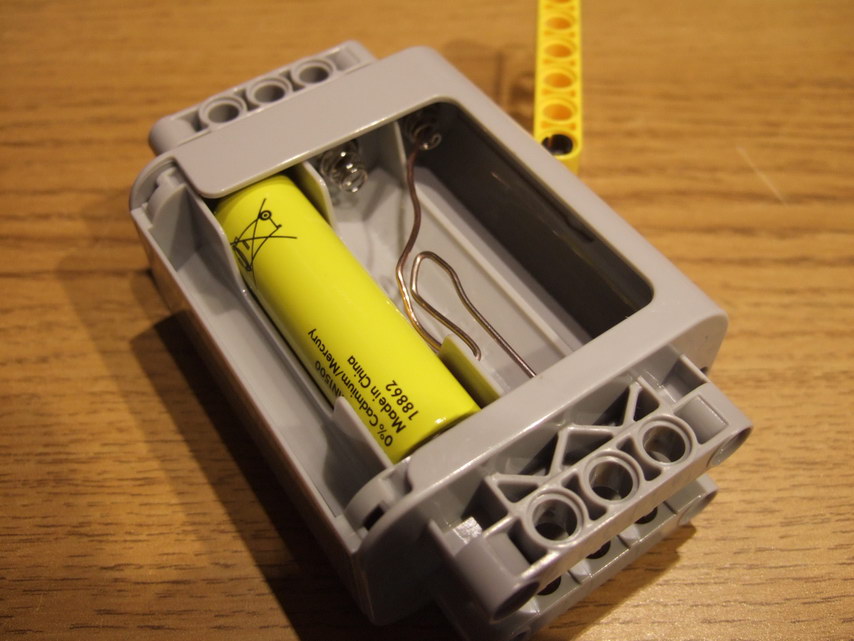
-
Problems with LDD
Superkalle replied to IsaacSka's topic in Digital LEGO: Tools, Techniques, and Projects
Read this topiccarefully and follow all steps. Maybe it can help? -
I thought I was creative when I wanted to rewire the whole contraption No, but seriously - there are two issues that go hand in hand - too fast and too noisy. Changing ratios will only fix one. I was planning to use the Windmill at an exhibition where it will stand in a fairly quite area and the way it sounds out of the box is just too much (I'm actually surprised how much the PF motors sound ). Hi Bartholomew. As this was your first post I'm going to start with saying "Welcome to EB". And thanks for your interesting observations. I need to try this. I'll take the battery box to work and get some soldering/wiring done (no used batteries ) In the meantime, if anyone has tried this themselves and allready know the results, please post here.
-
Thanks guys for your replies. @Alasdair Ryan: Your style of reply does not fit well in a forum for AFOLs. Please try to post in a more mature maner. @Parax: Thanks for the tip about the batterybox. However, it is a tad to expensive for the simple task I want to accomplish. @DLuders: Good idea, hadn't thought of that either I should perhaps clarify that I don't need to be able to vary the speed - all I want is to reduce the RPM of the motor by half. Actually, when I initially thought about this my idea was to add a resistance to the wire, and thus reducing the voltage to the motor. But converting power into heat isn't a very nice solution I suppose. Maybe if I could just take out a few batteries to get a lower voltage to the motor. Could that work?
-
Flower arrangment Mother's Day
Superkalle replied to persnickety's topic in Digital LEGO: Tools, Techniques, and Projects
And then there is this one, official TLG, but glued http://www.bricklink.com/catalogItem.asp?G=llrose -
Flower arrangment Mother's Day
Superkalle replied to persnickety's topic in Digital LEGO: Tools, Techniques, and Projects
Aanchir - what was Brick Red used for? No, but seriously. Another very common brick color (once again the clay brick, not the LEGO brick) in Denmark is the red, so I guess that is the reason why it's called brick red. Could it be the color "rust red"? Here some pics of house in typical Danish design (even though I think the yellow one is actually swedish). -
Hello all you PF and Mindstorms gurus. I have the Vestas windmill in front of me, and it's really noisy and turns too fast. So I was thinking about reducing the output RPM of the PF motor to half it's original speed. Is there any really simple solution that will allow me to do that without involving NXT units or other expensive parts? Note that I don't want to change gearing as the design is fixed and the motor needs to be slowed down on account of the noise. Another question is if there is a way to more generally silence the motor. Can it for example be encapsulated in silicon rubber or something like that without damaging it (dissipation of heat etc)
-
Flower arrangment Mother's Day
Superkalle replied to persnickety's topic in Digital LEGO: Tools, Techniques, and Projects
Yeah, Dark Green is a problem, specially since there is a Dark Green I can only guess that the TLG Bright colors (Danish: "Klar", meaning Pure, Bright) are those perseived as pure, and that it was thought that the Dark Green was seen as just that - dark compared to the pure, Bright Green. But who knows, maybe it was just a mistake back in those days? Anyway, some of the TLG color names make more sence if look around Denmark. Many houses there are brick built, and specially in the 60s and 70s tan bricks was common - hence TLGs name for tan: Brick Yellow. I'm guessing that Dark Stone Grey etc can also be derived from there, but I'm not sure, so if anyone can verify that it would be good. Another interesting color is 298 Cool Silver Drum Lacq, where Drum Lacqured is nothing more then the name of the method used for painting the brick silver (shove all brick into a huge drum, add silver paint, turn it around. Voila!) -
Stacking bricks on top of Flat Tiles
Superkalle replied to Nicolas's topic in Digital LEGO: Tools, Techniques, and Projects
Yepp, that was a clever solution. You learn something new everyday -
Whatever you chose to do, I think it's important that you make a clear note in your post which pieces where omitted or replaced by custom parts. The reasons for this is that if the missing pieces show up in future LDD versions, it's easier to know which parts can then be added/replaced.
-
Agree. It's actually a very neat functionallity in BL that you can type in the ElementID in the search bbox to get the DesignID and Color.
-
Stacking bricks on top of Flat Tiles
Superkalle replied to Nicolas's topic in Digital LEGO: Tools, Techniques, and Projects
Well, it seems I was all wrong about this, and Brickdoctor was correct -
Any reason for Pick-A-Brick online over Bricklink?
Superkalle replied to Iysk's topic in General LEGO Discussion
I agree with SilentMode - "new parts". This is mostly important when building like a big single colored brick wall or so. Even if you buy new bricks from BrickLink, you could be getting a mix of bricks made years ago and recently produce ones. And we all know about the color variation problems that TGL have had. Now I know it's not a guarantee you'll get the same color shade in all different brick sizes, but a least the likelihood increases. -
Stacking bricks on top of Flat Tiles
Superkalle replied to Nicolas's topic in Digital LEGO: Tools, Techniques, and Projects
Hi Nicolas There is not way to directly add a brick like you want to since there is not connectivity. Like Brickdoctor says, you need to add some scafolding, remove a 1x2 tile, put the piece in place, remove the scafolding and the put back the 1x2 tile. Illustrations below. (maybe there is an easier way, but it was the methods I thought of first)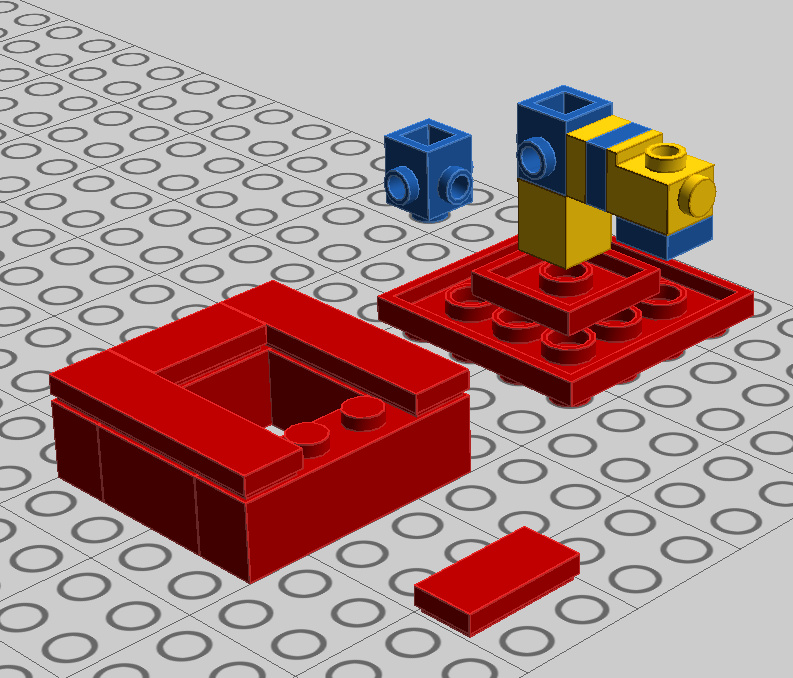
-
Buying through Design By Me
Superkalle replied to Plastikman's topic in Digital LEGO: Tools, Techniques, and Projects
From what I understand the building guide generator they have at TLG is the same as in LDD (actually it is the instructions generated within LDD that are used for the printed DbM instructions). The only difference is that the building instructions that come in the DbM box are formated a bit nicer before being sent to a printer. So this means that if the logic in an instruction is all weired in LDD, it will be so also in the printed version from DbM. So how can you make the instruction logic better? Well, theoretically the instructions should be generated independently from the order in which you placed the bricks on your LDD model. However I've found that when you've build a really big model AND you've been playing around with the design a lot (moving pieces, trying out ideas), the instructions tend to become worse (single bricks appearing in mid space etc). The remedy in those cases is to rebuild the model from scratch, i.e. placing the bricks bottom up and also to build various attachments (that will attach with a clip or so) as modules and then adding them to the model last. Now, regarding sourcing the bricks to the lowest cost, your best bet is to get them from BrickLink. Just import the model into LDD Manager, and it will generate a BrickLink wanted list. Yes, it's a bit of a hassle compared to DbM, but you can get away with a lot less money if you plan your purchases well. And if you ever wondered by DbM is so expensive check out this video from TLG. Now do you think the hand picking of the elements and the double check counting look efficient? http://www.youtube.com/watch?v=NnHD7kDzGgI -
I can't get advanced shading
Superkalle replied to The Yellow Brick's topic in Digital LEGO: Tools, Techniques, and Projects
And before you give up, make sure you have followed all the steps in this topic. -
LDD crashes when loading file
Superkalle replied to -R8-'s topic in Digital LEGO: Tools, Techniques, and Projects
Great find Would it help if one used the 53401 (w/o electr) part instead of 74746 (w elect)? (I'm assuming 74746 is the same as 2865 in BL? EDIT: Just tried and that seemed to work (i.e. replacing the whole track with 53401) EDIT2: For some reason, it seems only the 74746 track is in Universe Mode. I thought the 74746 with electricity in the tracks was the old system? So why isn't the newer 53401 in there? Besides, it seems the 74746 is really badly modelled, since it's missing the connectors to connect tracks with each other. -
G'day and welcome to the LDD forum. Wow, you really start off with a bang. Absolutely Stunning models. I really like the composite pictures with all the different views. Normally LDD MOCs without attached LXF's go into the respective theme forum here at EB, but exceptions are made for designs that push the boundaries for what can be done in LDD. And this is just that kind of exception
-
Hi Aanchir Thanks for pointing this out. The missing items (that have decorations) in the list was simply because I forgot that these were in a new category in the palette, so all HeroFactory parts are missing in the LDD Manager "Brick Finder" (but only here, not anywhere else). The horse is missing out because it's a composite element, and I'll look into why it's not working. While I was at it, I also updated the icon descriptions in LDD Manager. What I'm working at now in LDD Manager are four new features: 1) Generate a LEGO style building guide (using the HTML Building Guide output and re-formating it quite a bit to look like a TLG instruction.) 2) Show the physcial dimensions of a model. This requires quite a bit of matrix transformations and rotations which I forgot almost all about since the school days. If anyone is good at this, let me know, because I can sure use some help. 3) Generate a printable pick-list with images of each brick (in the right color). 4) Show which colors a model can be build in. I.e. you have a model with lots of whites and some red bricks. To which other colors can all the white and red respectively be changed to (i.e. bricks exist in those colors).
-
Eurobricks' 2nd LDD RCB
Superkalle replied to Brickdoctor's topic in Digital LEGO: Tools, Techniques, and Projects
Thanks for volonteering - you got the job! I'll go ahead and send all the tiles to you for further distribution