


Superkalle
-
Posts
6,069 -
Joined
-
Last visited
Content Type
Profiles
Forums
Gallery
Everything posted by Superkalle
-
LDD parts database
Superkalle replied to ashir's topic in Digital LEGO: Tools, Techniques, and Projects
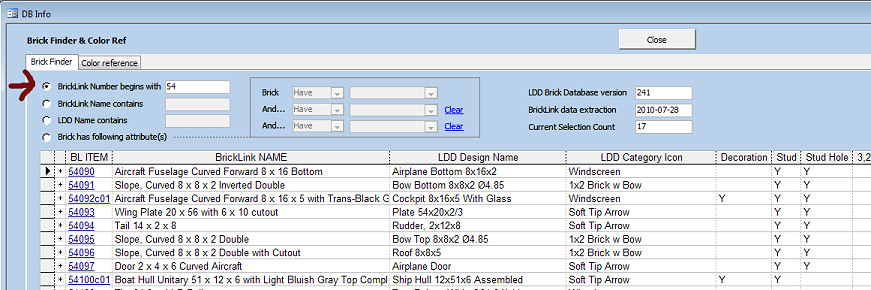
As a side comment, LDD Manager I think has what you're looking for. You can use the "BrickFinder function" to filter/find any kind of brick, either as LegoID or as BrickLink-number (which I prefer over Peeron since BrickLink is so much more commonly used). There is also a function to tell you in which LDD category each brick is in. And no problem with the English . Only thing I'm a bit confused about is when you say say you're frustrated with the lack of parts. You have activated LU-mode, right? A screenshot of LDD Manager BrickFinder dialog: And here one where you can search by connectivity type, pretty neat when you don't know the number, but only how the brick looks: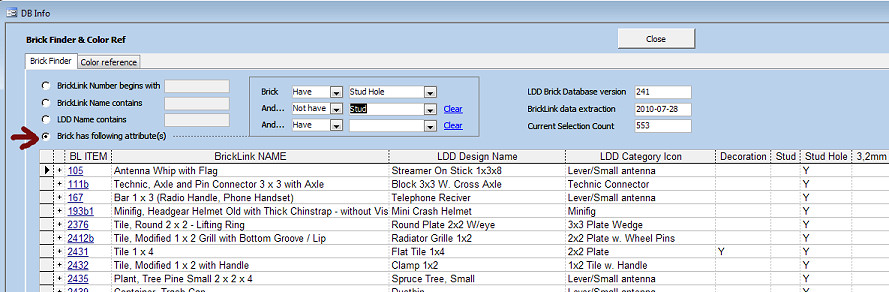
-
[KEY TOPIC] LDD feature requests
Superkalle replied to Superkalle's topic in Digital LEGO: Tools, Techniques, and Projects
Better control of the camera views would be good, I agree. For the handy, there is actually a way to exactly control the camera. Since the last camera position is saved in the LXF-file, you could theoretically edit the LXF-file, open in LDD, take screenshot, edit LXF (move camera slightly) and so on (naturally done programmatically). Here's how the camera control looks in a typical LXF-file: <Cameras> <Camera refID="0" fieldOfView="80" distance="45.073841094970703" transformation="-0.97664004564285278,0,0.21488156914710999,0.095206424593925476,0.89648967981338501,0.43271464109420776,-0.19263909757137299,0.44306463003158569,-0.87554770708084106,-3.8829848766326904,20.219125747680664,-33.864303588867188"/> </Cameras> However, if anyone want's to give it a go, I say: Good Luck -
[KEY TOPIC] LDD feature requests
Superkalle replied to Superkalle's topic in Digital LEGO: Tools, Techniques, and Projects
Hi there benhead. Good ideas, but I'm not sure I understand them all. If the ideas should be possible to understand, they need to be more clearly explained. My comments in blue below: 1.Allow me to build with odd angles!I can build it for real why not in LDD. What kind of odd angles do you mean? Can you please link to some MOCs/pictures that shows examples. 2.Tighter allowances around minifigures! Not sure I follow? Do you have some examples? 3.Allow minifigure hands to be used seperatly! OK, I understand this one However, the minifig hand was never intended as a separate building piece, and that may be why TLG decided not to use in their sets, and hence why it's not in LDD. Interestingly though, the bottom half of hte 2x2 turntable, which is also a "lose" piece has been used in an official Lego set (Tah Mahal for example), but I guess the difference is that the dturntable comes delivered in two halfs in the box, whereas the minifig hands are pre-mounted. 4.Allow me to hinge all parts connected to hinged piece! Que? 5.Allow any part to be in any color even if it does`nt really exist,simple tool for color matching. Hm, that sonds pretty much like what LU-mode does. You do have LU-mode activated, right? 6.Allow me to have the option to enable/disable high definition models(as long as you have the hardware). Agree completely. Let's see what LDD4 will bring us in this departement. 7.Allow me to build a minigun without having to put in the 1x1 plate to lift up the minifigure binoculars so the don`t touch. Show an example please, link to a photo, please. -
[KEY TOPIC] LDD feature requests
Superkalle replied to Superkalle's topic in Digital LEGO: Tools, Techniques, and Projects
OK, gotcha! Regarding dimension lines though - just to make my slow brain full understand: In what situations would they be good to have? Besides giving you information about distances etc, is there any particular design/build situation when they would be handy that you've come across? -
Hi Achir! Welcome to the LDD forum here at Eurobricks. Always good with another lost found soul Well, the 10L shock absorber does not exist....yet. We're all hoping for LDD 4.0 due out in September. In the meantime, there is a workaround using other bricks to build a "custom" shock absorber, but I think it's best that one of the Technics gurus here at the forum show you where it is and how to use it!
-
[KEY TOPIC] LDD feature requests
Superkalle replied to Superkalle's topic in Digital LEGO: Tools, Techniques, and Projects
Some very interesting ideas here. I'm collecting all ideas from all of us here at the forum and forwarding them to the LDD team, and I'll do the same with this list. My comments in italic below * Addition of Lego Technic Engine / Cylinder / Crankshaft assemblies. I believe these are still used in many models, especially the engine crank-shaft elements which can shift an axel by 0.5. As I understand it, these are on the way * A recently used palette (like last 5 elements or MS Office multiple clipboard). I know I could just place the elements on screen and use them as needed, but then I might have to zoom / spin around a lot and loose useful camera views. Nice idea. I think there has been thoughts like this mentioned earlier, but I can remember exactly * Slide / scroll bars around the edge of the screen which can help pan and shift the view. Zooming in and out or Shift + right click is ok, but sometimes it is useful to slide along the principle axis (I believe ML Cad has this). Can you explain this with some example, I'm not sure I understand * With regards to earlier comments about placing multiple elements together; it would be good to have a 'right click' and 'nudge to left element', nudge to right element' (etc) and 'nudge manual...' (brings up dialog box and allows you to specify the nudge as a fraction of a stud, e.g. 0.1, 0.2, 0.3 etc. It has been up before, but is noted again! * Dimensionalise! I use this a lot in autocad type programs; where ive joined multiple objects, perhaps rotated some, and want to know what the final dimensions are. It would be useful to nomimate two connection points and display the distance in stud lengths. Autocad has direct distance (3D length) and planar lengths - e.g. display the 3 X/Y/Z distances between two 3D points Sounds interesting - can you explain some examples when this would be useful. * Object Projection during rotation. When aligning some elements it would be useful to have a vector projected along the principle axis of the object during movement. E.g. with the Hinge plate swivel, two vector lines would project along the 1x2 direction. These axis lines could be used to help final alignment. Good one! * Annotation. Whilst there are bugs etc in LDD alignments, and missing items, it would be nice to add text to say 'elements here should actually be touching'. Or 'Place a 1/2 bush here'. Note localisation, i.e. due to different languages will always be a problem; so perhaps annotation could be like a call out; showing one or two pieces which can be cross out (wrong) or ticked (add here) or rotate (curved arrow). Oh yes, I've been wanting this for a long time too. It would be so great for communiating around model designs too. * Improved element catagory groups (search). Seems to be requested a lot (in different forms), but the icons used to different elements are a little strange. For PaB and DBM it is probably fine to keep. In Universe mode it would be good to have more logical catagories (e.g. train elements, roof elements etc) or allow you to have the same element in multiple groups, or even 'my favorites' which can be stored (a little like the special colour palette files). To start with, the categorisation struction at TLG is more logical than what appears in LDD. The problem in LDD is that to get a gripable number of categories, the had to combine several TLG categories. So what we see in LDD is actually a mix of categories within each category. So first step would be to get LDD display the original TLG categories. I know LDD developers are very careful about creating a separate structure for LDD, since it would mean so much extra work. The interesting thing with LDD is that we're actually in many cases looking directly into the TLG structure, naming conventsions, color codes etc. We'll see what happens in this area in the future, because I know the the LDD developers themselves are not 100% happy with the categories either, but it was the best they could do. I still have to get to grips with the group function. In packages like Autocad, Coreldraw, etc, I expect to be able to select a group of elements, press CTRL + G, and then move / rotate the group as a whole. Perhaps im missing something in the visualisation. The reason the grouping works like it does, is beause it was simple to implement with the time that was at hand. Bascially they just had to add a one way reference/lookup-table (Brick A belongs to Group X). This means that it's very easy to select a group and mark which bricks it includes on the screen. However, going the other way would involve much more work, since you'd have to reverse look-up wich other bricks belong to that group, that a brick might be in several groups, and so on. But hopefully in future versions of LDD, the will have more time to develop a proper grouping function. The group could also be applied to the submodel problem of the instructions. I.e. grouped elements are built together. Even if it means lots of small groups are built at the start of the model, it would still make more sense than now. Perhaps ive not found it yet - but a technic gear align mode would be good. Drag and drop new technic gear to its mate, and have it rotate so the teeth mesh properly (and then keep this rotation angle). For simple gear trains it would be useful. Oh yes, this is highly wanted. Today you have to, as you have noticed, rotate the technic gears slightly for the cogs to engage. At what point will LDD + universe mode shift from a childs design tool (with AFOL additions) into a more serious Lego CAD Design tool? We'll see if LDD 4 will give us some clue about the direction of LDD -
Well spotted, it has been reported to TLG
-
[KEY TOPIC] LDD feature requests
Superkalle replied to Superkalle's topic in Digital LEGO: Tools, Techniques, and Projects
It's a known, and very annoying error. It has been reported, and I sure hope they fix this one! -
I'm closing this topic 1) Was allready posted (as pointed out) 2) Posted in incorrect forum (should have been Minifig customisation)
-
I'm glad it's OK with you. Sorry once again. And keep up the good work. That speeder bike is very, very good. And I like the way you lined it up the photo exactly with the LDD screenshot. BTW, have you seen this MOC by swedish builder teabox. It's named "Caught Speeding":
-
Well, you're absoultey right. It's just that since you posted a pic of the built thing, I thougth it was in the LDD+Real Bricks. If it's not a problem for you, I don't think I'm going to change now. I think you're main chances are with the Speeder anyway (beautiful!). I don't think anyone notices that you have two entries, and if they do, no worries. I'm the judge and I say it's OK
-
Yearly Calender for Lego Events
Superkalle replied to Superkalle's topic in LEGO Events and User Groups
Thanks guys! I'll add these! Yeah, I had a look at them, but most of them are incomplete (you have to jump between them to get the full picture). I wanted to make a complete -
Official Eurobricks Straightshooters List
Superkalle replied to Siegfried's topic in Buy, Sell, Trade and Finds
+1 to Copmike for an awesome litte thing that I got in the mail today. It's surprised like that makes you smile a bit extra -
A warm congratulations to Brothers Brick who turned five years old on the 25th. Check out the amazing journey they've made here
-
If the Sacophagus was indeed an official set, it should off couse be here - it was just that I didn't think so. Anyway, let's await the response from the Doc on the subject
-
Cool how it opens I wouldn't call this an official Lego set though. I suppose the minimum criteria for posting in this topic should be that instructions was/is available to the general public. About that 1x1 round that can't be placed. I can't see how that can be fitted even with real bricks. Have you built the model with physcial bricks? How was the fit? As general information, designers at LEGO uses a rule of thumb that you should be able to slide a piece of paper between bricks in these sort of cases. Can you do that? If you can then there is a problem in LDD. If you can't - Illegal building technique.
-
Voting topic - LDD Only Class
Superkalle replied to Superkalle's topic in Digital LEGO: Tools, Techniques, and Projects
Hi, I have added it. Once again, sorry for the mistake. As compensation, I hereby as contest organizer award you three points because of my mistake. -
Yearly Calender for Lego Events
Superkalle replied to Superkalle's topic in LEGO Events and User Groups
What do you mean - it's right there (but I'll add "Zwolle" for added clarity). -
The Lego Year Overview Calender Ever wondered when the major Lego fan events happen during a typical year? Or when we are likely to see TLG release info about upcoming sets? Or when that Pirates building contest start? Look no further. This calender will give you a good overview of a typical Lego year. Missing any events? Please let us know, but remember this is supposed to be a fairly static topic with events that happen on a regular basis. ================================= Legend - EB Event/Contest - TLG product releases/info - Fan Meet/Convention ================================= January Winter/Spring releases from TLG hits stores (the other major release is in June) Brickvention - Melbourne, Australia February Legoworld, Copenhagen - Arranged by LEGO. Mostly for kids and their parents. Most of the summer lineup of sets are revealed, i.e. sets that hit stores in June. Often at the toy industry fairs such as TIA (USA) or Nurnburg (Germany). March Brickworld Indy - Indiananpolis, Indiana, USA - A regional event. Not to be mistaken for the huge Brickworld event in June. April Eurobricks Event (typically alternating each year between Billund, Gunzburg and Windsor) Klodsfest - Taastrup, Denmark Bricks by the Bay - California, USA DoubleBrick - Moscow, Russia May Kockice Expo- Zagreb, Croatia BrickMagic, Raleigh, NC, USA AFOLCon - Manchester, UK. End April/Beginning of May (at least for 2011) MadBrick, Madrid, Spain June Summer/Fall releases from TLG hits stores (the other major release is in January) Brickworld - Chicago, USA 1000steine-Land - Berlin, Germany. Arte em Peças - Portugal Fana’Briques - Rosheim, France BricksCascade Portland, Oregon, USA July Comic-Con - California, USA. Usually a Star Wars set is revealed (e.g. 2010 the UCS Jedi Starfighter). Brickfête - Toronto, Ontario, Canada - July 28th - 31st ItLUG Lecco 2011 - Lecco, Italy, 16th-17th July. Brickfiesta - Austin, Texas, USA August Brickfair - Washington DC, USA BrickExpo - Canberra, Australia September Lego fan weekend - Skaerbaek, Denmark Most of winter/early spring line-up of sets are becoming known (i.e. sets that hit stores in January) BrickWorld Fort Wayne, Indiana, USA October BrickCon - Seattle, USA Lego World Zwolle, Netherlands Arranged by LEGO. Mostly for kids and their parents. The Great Western LEGO Show - the largest display of models built by LEGO fans in the UK Festibriques - Châtenoy-Le-Royal - France November LEGO Fanwelt - Cologne, Germany. Germanies biggest Lego convention BrickMania - Antwerp, Belgium Classic-Castle Colossal Castle Contest December Hispabrick - Barcelona, Spain


-
Minifg collectors series 2 pics and barcodes
Superkalle replied to Superkalle's topic in Special LEGO Themes
In a toy shop. -
New bricks and removed bricks in LDD 4
Superkalle replied to Odyssey's topic in Digital LEGO: Tools, Techniques, and Projects
Aha, I think I start to understand. You are not referering to LU-mode parts, but to DbM-parts, right? In that case the general rule is that LEGO updates/changes their DbM/PickABrick palette once a year, in early April, so there shouldn't be any risk that these parts will be removed in the septebmer release of LDD 4. but I can't guarantee it off course. -
New bricks and removed bricks in LDD 4
Superkalle replied to Odyssey's topic in Digital LEGO: Tools, Techniques, and Projects
As far as I've been told, there are no plans to remove any bricks in 4.0, but I'll investigate. For your specific model, if there are any parts you think are rare/borderline cases, you can post a list of themhere, and I can try to check it up. -
8045 inspired Police bike
Superkalle replied to JunkstyleGio's topic in Digital LEGO: Tools, Techniques, and Projects
What part of the steps to produce an XML-file does not work? To help you, this is the process: 1) Use or create a BrickLink WantedList number. Note that for you to be able to see the wanted list options in BL, you must first add at least ONE element to the wanted list. For example open http://www.bricklink.com/catalogItem.asp?P=3005 and then click on Add to wanted list. When this is done, you can then run the Step1 in LDD Manager 2) Once you have a wanted list nubmer (like 45934), you can go to Step2 in LDD Manager. Here you have to a) select a model or model group b) enter how many models (typicaly 1) c) enter the wanted list number from above -
8045 inspired Police bike
Superkalle replied to JunkstyleGio's topic in Digital LEGO: Tools, Techniques, and Projects
Let's take it here in the thread. Maybe it can help some other poor soul if we find a solution So, my dear JunkstyleGio, what can I do for you? Explaning your problem -
[KEY TOPIC] LDD feature requests
Superkalle replied to Superkalle's topic in Digital LEGO: Tools, Techniques, and Projects
Excellent ideas. Hopefully many of them will be in 4.0. Can you explain a bit more on the following: [*]The ability to unhide pieces using the Hide tool; You mean clicking on the same button? Please explain [*]The ability to organise the different parts manually; I guess you mean in the brick palette, i.e. move them to other categories etc, or? [*]Someone please explain how to use the Hinge Align tool; Well, to my understanding it's mostly for technic pieces (aligning beams etc). [*]Take screenshots of the model with the background (or turn the background off); Isn't this the same as Ctrl-K - taking a screenshot, which gives you a white background [*]Improved grouping of model pieces. In which way would you like it to work