


Superkalle
-
Posts
6,069 -
Joined
-
Last visited
Content Type
Profiles
Forums
Gallery
Everything posted by Superkalle
-
Is it cheating to not use filler bricks?
Superkalle replied to fred67's topic in General LEGO Discussion
I have to agree with gotoAndLego on this one. I'm not sure I understand the question. Is it cheating? Yes if you're purist. No if you are not. -
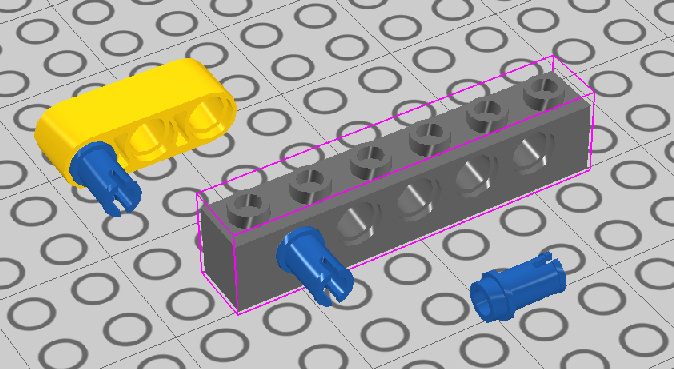
Does anyone know if this connection has ever been used in any official set, i.e. when a technic stud peg has been connected to a technic brick/beam and the "free" end connected to some other element.
-
Forgot: 6005 in Yellow
-
When it comes to wanted colors, I took a somewhat analytical approach. I parsed/downloaded all colors for some 2000 of the most common bricks from BrickLink. Then I threw them in a database and ran some queries. Basically, I've checked "For the basic LEGO colors, which parts have been produced (in a set) in all EXCEPT one color". Basically I wanted to see if there were any basic color gaps that needed filling The basic colors I defined as: - White - Red - Blue - Yellow - Black - Green - Light Bluish Gray - Dark Bluish Gray And the result was (these parts have been produced in all colors except the one listed): Black 6232 Brick, Modified 2 x 2 with Pin and Axle Hole Blue 2339 Brick, Arch 1 x 5 x 4 Blue 30044 Window 1 x 2 x 2 2/3 with Rounded Top Dark Bluish Gray 2436 Bracket 1 x 2 - 1 x 4 Dark Bluish Gray 3938 Hinge Brick 1 x 2 Top Plate Thin Dark Bluish Gray 4150 Tile, Round 2 x 2 Dark Bluish Gray 48336 Plate, Modified 1 x 2 with Handle on Side - Type 2 (closed ends) Dark Bluish Gray 6215 Brick, Modified 2 x 3 with Curved Top Dark Bluish Gray 973 Torso Plain Green 2449 Slope, Inverted 75 2 x 1 x 3 Green 2453 Brick 1 x 1 x 5 Green 2476 Plate, Modified 2 x 2 with Pin Bottom Green 30237 Brick, Modified 1 x 2 with Vertical Clip Green 3033 Plate 6 x 10 Green 32523 Technic, Liftarm 1 x 3 Thick Green 3455 Brick, Arch 1 x 6 Green 3659 Brick, Arch 1 x 4 Green 3830 Hinge Brick 1 x 4 Swivel Top Green 3831 Hinge Brick 1 x 4 Swivel Base Green 42023 Slope, Curved 6 x 1 Inverted Green 44301 Hinge Plate 1 x 2 Locking with 1 Finger On End Green 44570 Hinge Plate 3 x 4 Locking Dual 2 Finger Green 4460 Slope 75 2 x 1 x 3 Green 4623 Plate, Modified 1 x 2 with Arm Up Green 4855 Wedge 4 x 4 Triple Inverted Green 6178 Tile, Modified 6 x 12 with Studs on Edges Green 6180 Tile, Modified 4 x 6 with Studs on Edges Light Bluish Gray 41767 Wedge 4 x 2 Right Light Bluish Gray 41768 Wedge 4 x 2 Left Light Bluish Gray 42022 Slope, Curved 6 x 1 Light Bluish Gray 45677 Wedge 4 x 4 x 2/3 Triple Curved Red 30136 Brick, Modified 1 x 2 Log White 87580 Plate, Modified 2 x 2 with Groove and 1 Stud in Center Personally, I think the parts in Dark and Light Bluish Gray are highly intresting. Besides those, I generally like to see more parts in the "AFOL" colors such as dark tan and dark green. For example 1x2, 1x3, 2x4 plates etc. I'm not that interested in new parts. I think the pleasure and challenge with Lego is to use the parts that exist in new a creative ways. There is supposed to be some limitations in the LEGO system, otherwise it's no fun
-
[Software] LDD Manager
Superkalle replied to Superkalle's topic in Digital LEGO: Tools, Techniques, and Projects
From what I've heard - yes -
Oops, you're right!
-
Yepp, that one has been noted earlier. It's needed also to complete the SW Darth VAder Tie Fighter. But interesting to know it's also used in Exoforce sets. Which one, BTW?
-
LDD Statistics at Eurobricks
Superkalle replied to Superkalle's topic in Digital LEGO: Tools, Techniques, and Projects
Ha, ha. I like that you are self-aware, my good Prateek -
[Software] LDD Manager
Superkalle replied to Superkalle's topic in Digital LEGO: Tools, Techniques, and Projects
According to a press-release from TLG some months ago, LDD 4 is scheduled for release in September. Can't wait Exporting the brick list to any format is possible. Simply copy the entire list, and paste into any program of your choice (Excel, OpenOffice etc). PS: A quick way to select the entire list is to click the small gray square at the top-left corner of the list. Then just hit Ctrl-C as usual to copy. -
I have to agree, this is by far the best plane TLG has ever released. I especially like the the wheel fenders used for air intake. Brilliant. I think your military "painted" version looks plain awesome. Very well done But I would have kept the plated wings for better playability. Out of curioisity - Why did you change to brick built ones?
-
Absolutley fantastic work. Enough said
-
[Software] LDD Manager
Superkalle replied to Superkalle's topic in Digital LEGO: Tools, Techniques, and Projects
Ah...thanks for letting me know. At least it show my "warning system" works However, I'm not planning on updating LDD Manager until LDD 4.0 is out, which is soon thankfully. -
LDD Statistics at Eurobricks
Superkalle replied to Superkalle's topic in Digital LEGO: Tools, Techniques, and Projects
All roads lead to Rome... Yepp, maybe the time has come? -
Simple animations using LDD
Superkalle replied to JopieK's topic in Digital LEGO: Tools, Techniques, and Projects
Exactly - You see what I mean now - The idea was very straight forward. Generate LXF-file, take screenshot (send keys strokes, Ctrl-K), tweak the transformations a bit, generate new LXF-file, take screenshot, and so on. I agree, it's not elegant, but it will work for simpler stuff. And I think it's the only way to go since LDD will not allow us access to the data geometries or an API, so the only way to do it is throught the application. -
LDD Statistics at Eurobricks
Superkalle replied to Superkalle's topic in Digital LEGO: Tools, Techniques, and Projects
You took the words right out of my mouth! -
LDD Statistics at Eurobricks
Superkalle replied to Superkalle's topic in Digital LEGO: Tools, Techniques, and Projects
Update August 18th 181.000 views 2484 posts 450 Official sets in LDD -
Simple animations using LDD
Superkalle replied to JopieK's topic in Digital LEGO: Tools, Techniques, and Projects
Well, give it a try with whatever approach you want and get back here in the forum when you have come a bit further. In the meantime, if anyone else feels like giving it a go, it'd be nice. -
Simple animations using LDD
Superkalle replied to JopieK's topic in Digital LEGO: Tools, Techniques, and Projects
It should be automatic, otherwise its not going to be practical. And I was thinking of small animations scenes for fun - not entire movies The idea is that you build a model in LDD, then define which parts should rotate/move (could for example be a propeller), or wheels rotating, or something simple. Then just start the "animation" program, select LXF-file, click Go and you would get about 1 frames (i.e. PNGs) per 5 seconds. These could be made into an AVI or GIF. So it's only for smaller stuff/animations, maybe like 15 seconds long (which would take about 15 minutes). Why would you need graphical programming? This is only a matter of performing some translation matrix operations, output some XML-code (i.e. LXF)-file etc, open the file in LDD, take a screenshot (SendKeys) etc. It's a crude method, I know, but it's all for fun and for shorter animation. -
Simple animations using LDD
Superkalle replied to JopieK's topic in Digital LEGO: Tools, Techniques, and Projects
A LXF-file is actually a simple zip-file. Use winzip to unzip and you'll find two files, a PNG thumbnail and the XML-file (text). The specification for the file structure can be found here. -
Simple animations using LDD
Superkalle replied to JopieK's topic in Digital LEGO: Tools, Techniques, and Projects
Perhaps I was unclear. With "more info" I meant that if there are some questions, I may have a few tips. However, the basic info how to get started is mentioned in the first post. Can you perhaps start yourself to analyze and get familiar with the LXF-format, create some ideas, and do a simple LXF-creator, and then get back with specific questions? May I propose Windows, since it's the most common platform. -
Simple animations using LDD
Superkalle replied to JopieK's topic in Digital LEGO: Tools, Techniques, and Projects
A simple, crude idea for controlling/generating animations would be small program that produces animation frames. This is how far I've come in my reasoning: Input would be: Model (as LXF-file) together with a list of the elements that should be manipulated and how (rotation/postion change direction). Could also be the camera for a simple case. Algorithm: 1. Open/Parse LXF 2. Make small change in position of defined elements 3. Save file 4. Open in LDD, take screenshot Loop The LXF-format is pretty straight forward XML-based format. Bascially a typical post looks like this: <Part refID="0" designID="3700" materials="21"> <Bone refID="0" transformation="1.0000001192092896,0.00076067680492997169,0,-0.00076067680492997169,1.0000001192092896,0,0,0,0.99999994039535522,0.00044196844100952148,0.95969939231872559,2.4890007972717285"> </Bone> </Part> On the first row is the DesignID (basically the mold) and then materials (i.e. color) On the next row we have the postion/rotation matrix, 9+3 positions Position 1 through 9: x, z, y axis orientation of element Position 10 to 12: Position of brick in space relative origo So basically, a program would have to perform some tranformation operations to the position values, output a LXF-file, open the file in LXF, use SendKeys to take a screenshot, and so on. I've managed to figure out that for a simple brick being rotated around one of the axis, it's basically only some Sin(X) operations needed. I'd love to give it a go myself, but I feel it's stretching my competence a bit too much If anyone feels like having a go, I have some more info that could be useful (and so does LDD Tech guru Bojan). -
That's an excellent blog article. Great read. I actually do the same (with the superimposed images over "Lego" dimension paper). I whish there was such a function in any of the digital CAD tools, that you could import and overlay images in three orthogonal views. Regarding how people design their models, there are actually two articles in the pipeline. The first one was published here on the LDD forum a few days ago, in which Bojan explains his design thinking for the all LDD Circus Arena. Next week Lgorlando will publish one about how he designed his Astoria Hotel (that was frontpaged here at EB a few days ago). It's going to be intresting to see since he used LDD as support for building with physical bricks. Personally, I'm very much in favor of that usage, i.e. using digital tools in symbiosis with physical bricks. I use LDD to ouline ideas and create preliminary MOCs. Then I order the bricks and build with the real stuff. I finalize with updating the LDD model so it matches the physcial model. This way I can tear down the MOC and rebuild it at any time later.
-
In the "LDD 4.0 Wanted Features"-topic, Brickwild brought up an interesing question of creating a mosaic in LDD. I haven't tested it, but maybe a moscaic creator for LDraw could be used, i.e. create a moscaic in LDR-format, and then import it into LDD (even though the LDD import/export function is pretty bad). Found this online-version Here is a tool that apperantly can create Ldraw mosaics. Haven't tested it. Perhaps someone else here on the forum has some tips? The coolest would of course be a utility that can create mosaics directly in LXF-files. Anyone feel like having a go? The LXF-file format is an open XML-based format (specifications here), so it's easy to programmatically create a LXF-file. The algorithm for the moscaic creator would be the hard part (i.e. taking a photo and making it into "brick pixels" based on a given color palette).
-
[KEY TOPIC] LDD feature requests
Superkalle replied to Superkalle's topic in Digital LEGO: Tools, Techniques, and Projects
Hi there Welcome to the LDD forum. Regarding inventory, one workaround is to use LDD Manager. You can import any LXF-file, and it will give you a inventory list that you can print, export to excel and whatever you want. Read more here. -
Brick update August 7th 2010
Superkalle replied to Superkalle's topic in Digital LEGO: Tools, Techniques, and Projects
The only two bricks that has been modified/updated are: 3844 - Helmet 60474 - Plate, Round 4 x 4 with Pin Hole