


Superkalle
-
Posts
6,069 -
Joined
-
Last visited
Content Type
Profiles
Forums
Gallery
Everything posted by Superkalle
-
This one is interesting, because there seems to be a version of the 4506 Hunters hat that is not supposed to take a feather (I think). In BrickLlink there are these versions: x106 - Minifig, Headgear Hat, Forestmen's 88489 - Minifig, Headgear Hat, Forestmen's (Reissue with Blind Hole for Feather) So I'm wondering if the 4506 in LDD is supposed to the one with "blind hole" (what now that means) or not? And an important note to all Now that we got LDD4 and it's so easy to identify at parts number, please always insert a part number when you are reporting bugs and errors. Thanks
-
LDD 4 is released!
Superkalle replied to Daedalus304's topic in Digital LEGO: Tools, Techniques, and Projects
Well, with all these people having trouble, it may very well be we have a bug at our hands. I'm sure that if there is one, TLG will get hundreds of complaints from "ordinary" DesignByMe users and we will get a bug fix real soon. In the meantime, you could also try to manually set these setting to "No" in the preferences.ini file: UseShadersInScene=no UseShadersInPalette=no UseRoundEdges=no -
IMPORTANT ABOUT THIS TOPIC AND LDD 4 I've been talking to Calabar, and our proposal is that everyone goes back and updates their old models and that we thus keep the current topic. This is the proposed update process: Step 1) IF there is a problem with "removed parts" when opening your files in LDD4, then parse you LDD3 file in LDD Manager to remove any "missing parts" errors. I'm almost done with this feature in LDD Manager and will have it ready in a few days. Step 2) Open file in LDD4: a) If there are any parts removed when opening due to illegal placement, try to re-make the model to make them fit againg. There is a new feature in LDD Manager so you can compare two LXF-files (old 3.0 and new opened in 4.0) that allows you to see which parts were removed due to illegal placement. b) Remove/replace any custom parts if they are now available in LDD4 c) Place any parts that could not be placed before due to connectivity error etc Step 3) Check the colors (which is now easy in LDD4 - just click on a part and see if it's the right color. The tranlsation between LEGO color and BrickLink color is in LDD Manager (and also elsewhere on the web). When you have reviewed your 3.0 files, then please edit your ORIGINAL post and also insert a clear "UPDATED TO LDD 4.0" text by pasting this into your post: [color="#8B0000"][size="4"][b]Updated to LDD 4[/b][/size][/color]
-
Fixed bugs in LDD 4
Superkalle replied to alienwar9's topic in Digital LEGO: Tools, Techniques, and Projects
And all you who have reported bugs during the last 6 months should be proud. It's the bugs your sharp eyes have found that have been fixed! -
Hi there Kristjan Welcome to the LDD forum Good find on number 1, haven't seen that error before (if you previous Tower Bridge builders allready have mentioned it, sorry). Number 2 is allready known, The problem is that the fence element is not modelled with any gaps in the lattice.
-
There are two reasons why I'd prefer if you can remove it 1) We had a staff decision at EB not to post pictures that are marked preliminary. And this includea detailed reproductions, which a LDD model is (I doesn't become any more detailed ). 2) The model you made is still a best guess, and this thread is about official sets made from instructions. I hate to be nitt-picking, but I hope that's OK. (PS: The reason I think JunkstyleGio brought up was because I was on his tail too some time ago with the same issue )
-
LDD internet access
Superkalle replied to Andrew Harvey's topic in Digital LEGO: Tools, Techniques, and Projects
Hi Andrew! Welcome to the LDD forums. Good to see you. I have the same problem at work, where we also have a router. Haven't found a cure for it though. -
LDD 4 is released!
Superkalle replied to Daedalus304's topic in Digital LEGO: Tools, Techniques, and Projects
For those with problems, make sure you have tried this: 1. Close down LDD. Optional: Start Task Manager and make sure there is no LDD.exe running. If there is, kill it. 2. Uninstall LDD 3. Delete this entire folder and content: C:\Users\[userName]\AppData\Roaming\LEGO Company\LEGO Digital Designer. This is for Win7. For other OS, it should be similar paths. (you may want to copy the LU Mode activation line so that you can paste it in after LDD is re-installed). 4. Delete this entire folder and content: C:\Program Files (x86)\LEGO Company\LEGO Digital Designer 5. Re-install LDD from the setup file found here 6. Re-insert the LU Mode activation line. 7. Start LDD If this doesn't work, report the error here, and please be carefull to describe exactly what happens and when. Also report your OS, graphics card, if you have updated the graphics driver lately and your OS language. -
Ha, ha. Yes, this is a tough topic to post in - you have to be picky You only forgot the preview pics, so if you can edit those in, it would be awesome. Also while I'm at it, could you please post the correct pic in this post. The post says a croc, but the image a car. Dank u well
-
Super, that's the way we like it
-
Good about updating posts Please, if you have updated your post, make sure you add a clear Updated to LDD 4 Paste this into your post [color="#8B0000"][size="4"][b]Updated to LDD 4[/b][/size][/color]
-
IMPORTANT - Removed bricks in 4.0
Superkalle replied to Superkalle's topic in Digital LEGO: Tools, Techniques, and Projects
I'm just putting the finishing touches on a feature in LDD Manager that will do the search and replace. But I agree, it would have been so much nicer to have it in LDD4 itself. -
IMPORTANT - Removed bricks in 4.0
Superkalle replied to Superkalle's topic in Digital LEGO: Tools, Techniques, and Projects
Thanks for clarifying that Aanchir. @Calabar, here is a pic: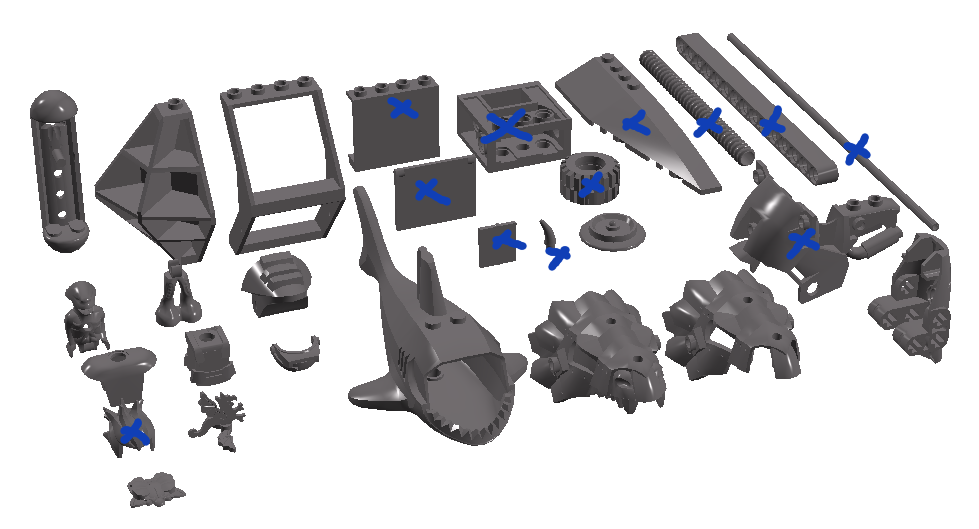
-
IMPORTANT - Removed bricks in 4.0
Superkalle replied to Superkalle's topic in Digital LEGO: Tools, Techniques, and Projects
Not that many actually. Of the 28 parts in the screenshot 13 have new identical corresponding parts in LDD4. This happens because sometimes TLG updates with a new DesignID (mold) that is identical to the old parts. The only difference may be different injection inlets for the plastic (or something like that) or other minute design change. That leaves us 15 parts. Of those, 10 are IMHO useless anyway, like the Alien stuff from Mars Mission, Dinosaur parts, shark body etc. One parts (the train wheel) is now integrated in a complete assembly. So in the end, only two bricks that have been removed that are of any practical use (Of course, this is my subjective opinion ) Those two are: 4737 Lattice Corner 1x4x6 and 4741 Frame Right/inv. 1x4x6 -
Only 4 flexible pieces!?
Superkalle replied to elmerohueso's topic in Digital LEGO: Tools, Techniques, and Projects
Not that I understand. Flex elements are made up of smaller parts called bones, which is the smallest "particle" in the LDD XML structure. To make an element flexible, you need to model it with all the individual bones. This means that flex elements are basically completely new parts in LDD. -
MOC: Fiat Panda
Superkalle replied to Ralph_S's topic in Digital LEGO: Tools, Techniques, and Projects
Interesting Praiter Yed - your view is exactly like mine - I couln't have written it better myself @Ralph - As usual, awesome work Thanks for posting! -
IMPORTANT - Removed bricks in 4.0
Superkalle replied to Superkalle's topic in Digital LEGO: Tools, Techniques, and Projects
OK, post the screenshot and I can deduce which ones are missing. -
Wow, it just looks so good in LDD4 And good job with faking the tubes
-
IMPORTANT - Removed bricks in 4.0
Superkalle replied to Superkalle's topic in Digital LEGO: Tools, Techniques, and Projects
Fair deal - find it attached. And please note that it contains all the removed bricks, and that about 15 of them have counterparts in LDD4, and 15 do not (according to my best judgement) GeneratedLDDFile.zip -
Hello Bojan. Good to hear from you Anyway, haven't noticed this problem, and haven't heard anything about this sort of serious bug. Could it be a localisation problem? I suppose you have your own language set? And what happens if you lower the graphics details in Edit > Preferences? I'm sure you've tried the above, but I got to ask How do you mean. It seems fixed according to this post
-
IMPORTANT - Removed bricks in 4.0
Superkalle replied to Superkalle's topic in Digital LEGO: Tools, Techniques, and Projects
You have to download the excel file to see all the files removed. The list in the post are only the parts that have a counterpart. But I will post the additinal parts here too. I could fix a screenshot of all the removed bricks, but then I have to re-install LDD 3, and who wants to do that 4737 Lattice Corner 1x4x6 4741 Frame Right/inv. 1x4x6 6080 Dragon Ornament 33052 Imitation Jewellery 45173 Shell 3x12w/bow/angle R, Metal 47577 Coat Of Mail 57878 Train Wheel Ø16.6/Ø23 58843 Slide Ø15.83 - 55.78mm 58844 Small Alien, Body 58845 Small Alien, Leg 59577 Shell 2 (3x5x3) 2007 60108 Dragon's Head Top 61638 Dragon's Head Top, 2 W. Armour 61639 Dragon`s Head, 2 "no. 1" 61988 Nxt, Assambled 62606 Shark 8x16 63153 Foot/claw 3x9x3, 08 88701 Visor W. Protec. Fr. Drum Laqu -
Thanks Siggy. I think you are right too. Just wanted my suspcicions confirmed.
-
Does anyone know if this piece (6942) was ever made without a hole through the center. In the newer sets (Like Battle of Endor), the disc has a hole through it, but has it always had this even in the late 90's scala sets?
-
LDD 4 is released!
Superkalle replied to Daedalus304's topic in Digital LEGO: Tools, Techniques, and Projects
Hi CB It should work just like before: Please follow these instructions, and take particular notice on the exact path, as the prefereences.ini file exist in two places on your harddrive (at least for Windows) and you need to edit the right one. -
The wait is over LDD 4.0 is finally out! If you've got LDD3 installed it should auto update. If not, you can download a fresh copy of LDD 4 here. Share and discuss your first impressions of the new LDD here. And if you want more details, check out the rest of the LDD forum here on Eurobricks.

