


Jarema
-
Posts
78 -
Joined
-
Last visited
Content Type
Profiles
Forums
Gallery
Everything posted by Jarema
-
It is hard to anyone if you share only single photo. Have digital model is the best way to make this goal come true. Do you have contact with the model's creator ? As for more photographs.
-
You did great job on this hard topic. From my perspective, as developer. If you can make this app more usable: According to result you can have accomplished, is different style to run external program from own. Try the best way with System.Diagnostics.Process . Carry on user, like that - can generate many nervous mistakes. Your app should do it this string manipulation .
-
No matter what tool, or technique you use to build you great, i think... instruction. OpenGL is only for High Performance Graphics. Because process of rendering it time consuming behavior. You do not need this power for display single Portable Document File. However, as legolijntje say: you can step in random issues, that corresponded with health of your hardware.
-
Year by Year I take many lesson, when developing LICreator. But I go to this software in the end. It is written in Java. So will be platform in-depended, what is in Java technology nature. But I testing and build LDraw Instruction Visualizer only on Microsoft Windows Seven with 64 bit architecture. What this tool can do: %APPDATA% for Windows platform or User Home Directory for others as Storage Can hide | un-hide selected parts Display part description Rotate on selected axis Exports steps as single images and many more ... A use JLDraw as starting point of my journey. It is Simple LDraw models viewer, written and abandoned by Mario Pascucci in 2014 year. I try get new life to this software, and make them better... that software, I currently stop working on... for many reason. At the current level of development, this program can calmly serve as instruction player. Everyone, stay tuned for updates. EDIT 1: This software strongly depend on LDraw file format standard. If model do not have STEP command. You can see, only one step on the list. EDIT 2: LEFT BUTTON for selecting single part RIGHT BUTTON for context menu SHIFT + LEFT BUTTON for select more parts CONTROL + LEFT BUTTON for toggle section ALT + LEFT | RIGHT BUTTON for rotate all parts in currently displayed step MOUSE WHEEL for zoom out | zoom in EDIT 3: Move application source to GitHub repository LDraw-Instruction-Visualizer
-
LIC- Lego Instructions Creator
Jarema replied to Chas's topic in Digital LEGO: Tools, Techniques, and Projects
Due to the fact that LICreator have many internal issues and limitations, that comes from language and technology. Author abandoned this software. But when something get down, then new adventure can start. -
Programing 9V Elector Motors with EV3-G
Jarema replied to Jarema's topic in Digital LEGO: Tools, Techniques, and Projects
Thanks JopieK for fast response. I need another clue. This work for EV3 medium motors. But I have make this work with 9V Elector Motors.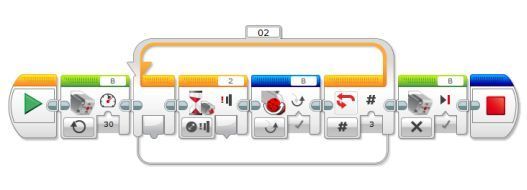
-
What block and programing I must use, to properly handle management of 5119-1 9V Micromotor, and others ?!!
-
The Geometric Shape Generator
Jarema replied to Jarema's topic in Digital LEGO: Tools, Techniques, and Projects
The only place for official documentation is given in the second reference. This documentation will be enriched with new content with the development of the software. -
Transparent Bricks In Stud.io
Jarema replied to mocbuild101's topic in Digital LEGO: Tools, Techniques, and Projects
Try turn off collision detection / Red triangle with exclamation mark / -
The Geometric Shape Generator
Jarema posted a topic in Digital LEGO: Tools, Techniques, and Projects
This is command-line tool for geometric shape manipulation and exporting as LDraw model. Typing this in command-line: LDShapeGenerator.exe --shape rectangular --geometry 1x2x5 --output C:\Windows\Temp\geometry-shape.ldr You got file with content like this: 0 Rectangular 0 Name: Rectangular 0 Author: LDShapeGenerator 1 27 20.0 24.0 20.0 1.0 0.0 0.0 0.0 1.0 0.0 0.0 0.0 1.0 3003.dat 1 27 20.0 24.0 60.0 1.0 0.0 0.0 0.0 1.0 0.0 0.0 0.0 1.0 3003.dat 1 27 20.0 48.0 20.0 1.0 0.0 0.0 0.0 1.0 0.0 0.0 0.0 1.0 3003.dat 1 27 20.0 48.0 60.0 1.0 0.0 0.0 0.0 1.0 0.0 0.0 0.0 1.0 3003.dat 1 27 20.0 72.0 20.0 1.0 0.0 0.0 0.0 1.0 0.0 0.0 0.0 1.0 3003.dat 1 27 20.0 72.0 60.0 1.0 0.0 0.0 0.0 1.0 0.0 0.0 0.0 1.0 3003.dat 1 27 20.0 96.0 20.0 1.0 0.0 0.0 0.0 1.0 0.0 0.0 0.0 1.0 3003.dat 1 27 20.0 96.0 60.0 1.0 0.0 0.0 0.0 1.0 0.0 0.0 0.0 1.0 3003.dat 1 27 20.0 120.0 20.0 1.0 0.0 0.0 0.0 1.0 0.0 0.0 0.0 1.0 3003.dat 1 27 20.0 120.0 60.0 1.0 0.0 0.0 0.0 1.0 0.0 0.0 0.0 1.0 3003.dat This tool using only basic regular bricks. Thanks, to this is 100% compatible with LEGO Digital Designer, BrickLink Stud.io and other digital tools that understand LDraw format. Repository: https://github.com/Jeremy1980/LDShapeGenerator/ Support Center -- go here if you have know more: https://github.com/Jeremy1980/LDShapeGenerator/wiki/ This is example of Cylinder; Trapezoid and three version of Rectangular prism -- 1x2x5 /look at the code above/ , 2x2x2 /knowed as cube/ , 2x5x1 /longest horizontal rectangle/: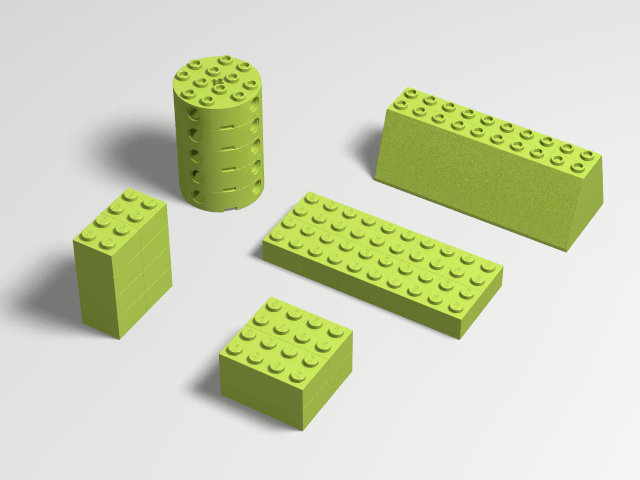
-
How Stud.io import LDD models
Jarema replied to Jarema's topic in Digital LEGO: Tools, Techniques, and Projects
I start like BL Software . So LDD gave me unintentionally more work. -
How Stud.io import LDD models
Jarema replied to Jarema's topic in Digital LEGO: Tools, Techniques, and Projects
When I try migrate my models from LDD Version 4.3.10 Brick Version 2248.1 into coolest Studio.io. Version 1.0 (69) After I converted LXF to LDR|MPD. Grouping of parts is omitted. How fix this issue, or is workaround solution. -
Making a video from a LXF file?
Jarema replied to Itaria No Shintaku's topic in Digital LEGO: Tools, Techniques, and Projects
3D Lego™ models - Useful Links -
How Stud.io import LDD models
Jarema replied to Jarema's topic in Digital LEGO: Tools, Techniques, and Projects
I cut all comment, all blank line for your ldraw.xml version of. But this database do not talk with Stud.io. Add isConfirmed attribute to Transformation for example. Can You describe how programmatically|manually transform LDD format of this file for Stud.io ?!! -
How make ldraw.xml usable for Studio.io ?!
-
How Stud.io import LDD models
Jarema replied to Jarema's topic in Digital LEGO: Tools, Techniques, and Projects
I have on the way to write app that carry on ldraw.xml content. The main question is how detect LDD and|or Stud.io root directory? Or how I can force them to use the same location ? However, I think so that it should be reported as the most anticipated functionality with the release of the next path. -
How Stud.io import LDD models
Jarema posted a topic in Digital LEGO: Tools, Techniques, and Projects
I use Stud.io Open Beta v1.0 (21) with LEGO Digital Designer 4.3.10. This digital model is under Creative Commons license. Did Stuid.io use out-of-date ldraw.xml or I should wait to next release ?!! FIRST IMAGE Import into Stud.io as LDD model. SECOND IMAGE Import into Stud.io model after export from LDD using updated ldraw.xml as LDraw model. -
When you use LEGo dIGITAL dESIGNER. You can simple plug-in element into another element hole. I Like this way how LDD detect place to assemble parts. How MLCAD ;LeoCAD ;Stud.io research this goal.? Where I find this function to turn on ?
-
Can someone point me to topic or software, that can generate cute PDF when LDD finished generating HTML building guide activated by shortcut CTRL+H.
-
1. 10 3. 6 4. 4 5. 3 17: 2 32: 1 Good luck for all the contestants
-
LDD Pneumatic missing parts
Jarema replied to Jarema's topic in Digital LEGO: Tools, Techniques, and Projects
I Try generate custom palette from here http://www.eurobricks.com/forum/index.php?showtopic=78072. But LDDManager do not match any pneumatic parts. My Question is: How manually update LDDManager database ?? -
[Software] BrickPal
Jarema replied to DasMatze's topic in Digital LEGO: Tools, Techniques, and Projects
Why I can not download this tool ? -
LIC- Lego Instructions Creator
Jarema replied to Chas's topic in Digital LEGO: Tools, Techniques, and Projects
Why you see is not error. It is only one list, part list per step. Callout not inherit of this. I do not see parts list. You deleted it. -
I can not find this on my LDD instance part list on the left side of work-area. http://brickset.com/parts/6156699 http://brickset.com/parts/4211508 http://brickset.com/parts/4529226
-
LIC- Lego Instructions Creator
Jarema replied to Chas's topic in Digital LEGO: Tools, Techniques, and Projects
This https://github.com/remig/lic is new repository for LEGO Instruction Creator (know as LIC or LICreator). Tell me if this error still exist.