


imurvai
-
Posts
422 -
Joined
-
Last visited
Content Type
Profiles
Forums
Gallery
Everything posted by imurvai
-

[APP] BrickController2
imurvai replied to imurvai's topic in LEGO Technic, Mindstorms, Model Team and Scale Modeling
Hi, not sure I understand your issue correctly. So in servo mode the motor turns and gets stuck at a certain position? The other thing you experienced is the overshot effect. It happens when the servo needs to turn a big angle and in these cases the servo speed is set to a higher value to get the position faster. In these cases the motor turns a bit more and corrects itself. It happens in the official app as well. -
[APP] BrickController2
imurvai replied to imurvai's topic in LEGO Technic, Mindstorms, Model Team and Scale Modeling
BrickController2 2.4 has been released for both Android and iOS. Changes: - Stepper motor type for Control+ devices. - Accelerator button (and axis) type - mainly good for controlling trains - Minor UI improvements and fixes - eg. dark mode fix for iOS Happy playing! :) -
[APP] BrickController2
imurvai replied to imurvai's topic in LEGO Technic, Mindstorms, Model Team and Scale Modeling
Hmm, in that case BC2 should also work. Could you send me the raw advertisement data for the C+ hub from the nRF Connect app? Cool, happy playing! :) -
[APP] BrickController2
imurvai replied to imurvai's topic in LEGO Technic, Mindstorms, Model Team and Scale Modeling
Hi, @kbalage created a great video tutorial on it (it's an earlier version though, but the main functionality remained the same): -
[APP] BrickController2
imurvai replied to imurvai's topic in LEGO Technic, Mindstorms, Model Team and Scale Modeling
Hi, no need to discover the controllers in the devices screen. If it is functioning in the controller tester then you are good to go and it's ready to be assigned to outputs. -
[APP] BrickController2
imurvai replied to imurvai's topic in LEGO Technic, Mindstorms, Model Team and Scale Modeling
Thanks for the update, I didn't know that C+ requires BT 4.1. - Unfortunately no debugging is possible since I'm releasing release version of the app. - The IR devices are shown only on phones having the infrared emitter, they don't need to be actually discovered that is why all the 4 IR devices are added automatically. - I don't know what is the cheapest mobile that can run BC2, the only requirement is Android 4.4 or above and BT4.1 (apparently). You could try some cheap chinese phone or a second hand one that meets the requirements. -
[APP] BrickController2
imurvai replied to imurvai's topic in LEGO Technic, Mindstorms, Model Team and Scale Modeling
Ah, it's good to know. Thanks for the info. I'll try to fix in the next release. (Unfortunately my device is not compatible with iOS 13 :() -
[APP] BrickController2
imurvai replied to imurvai's topic in LEGO Technic, Mindstorms, Model Team and Scale Modeling
Hmm, I haven't seen such a black screen on any iOS devices. Was it the same in the previous versions too? And what happens when you try to assign a button or joy to an output? That is strange. I haven't tried with LineageOS, but I don't think it is the source of the problem. Could you check if the nRF Connect app can find your hubs? -
[APP] BrickController2
imurvai replied to imurvai's topic in LEGO Technic, Mindstorms, Model Team and Scale Modeling
Hi, Can you send me a screenshot on the controller tester screen when you press a button or move a joy? -
[APP] BrickController2
imurvai replied to imurvai's topic in LEGO Technic, Mindstorms, Model Team and Scale Modeling
I don't know that particular controller but on iOS the controller has to be an MFI compatible one. On iOS 13 and above the XBox One and Sony PS4 controllers are also supported. I found a list of MFI controllers here that should work with BC2: https://mashtips.com/gaming-controller-iphone-ipad/ Personally I'm using a Mad Catz C.T.R.L. controller for iOS. -
[APP] BrickController2
imurvai replied to imurvai's topic in LEGO Technic, Mindstorms, Model Team and Scale Modeling
This is on my TODO list too :) Technically it is possible, I just need to figure out how it is feasible in a user friendly way. Hmm, I'll try to reproduce it too. Thanks for the update. -
[APP] BrickController2
imurvai replied to imurvai's topic in LEGO Technic, Mindstorms, Model Team and Scale Modeling
Thanks for the detailed description these are very valuable inputs, I'll test it with my iOS device too and see if I can reproduce it... 1. that is a good idea and I think fairly easy to add. 2. this is what I'm currently working on :) 3. it was requested by many users so I'll consider implementing it. -
[APP] BrickController2
imurvai replied to imurvai's topic in LEGO Technic, Mindstorms, Model Team and Scale Modeling
Hmm, that lag is weird, even on that powerful phone. Are you experiencing such a lag using the official app? And what about the controller tester screen, is that laggy too? Are there other bluetooth devices connected to your phone when you were playing? IR is not supported in any way in BC2 iOS version. -
[APP] BrickController2
imurvai replied to imurvai's topic in LEGO Technic, Mindstorms, Model Team and Scale Modeling
Hi, to be honest I don't know if the Steam controller works on iOS. The Sony PS4 and XBox controllers are working from iOS 13 that's for sure. -
My therory is what Lego really wants is Stud.io considering that LDD hasn't been developed too much recently.
-
[APP] BrickController2
imurvai replied to imurvai's topic in LEGO Technic, Mindstorms, Model Team and Scale Modeling
Hi, One of the BC2 users reported that the XBox1 controller behaves wierd on the Android version. Now I got an XBox1 controller and managed to reproduce the issue: some Generic1 axis event is continously reported to the app like if it was always activated. In the next release it'll be fixed. The iOS version is not affected apparently. -
[APP] BrickController2
imurvai replied to imurvai's topic in LEGO Technic, Mindstorms, Model Team and Scale Modeling
Yeah, it would be good to add support for NXT/EV3 but unfortunately I have none of them :( -
[APP] BrickController2
imurvai replied to imurvai's topic in LEGO Technic, Mindstorms, Model Team and Scale Modeling
Yeah, until I get the info that would be a reasonable option to add. -
[APP] BrickController2
imurvai replied to imurvai's topic in LEGO Technic, Mindstorms, Model Team and Scale Modeling
Hi, It depends on whether iPad Air 2 can be upgraded to iOS 13. From that version iOS supports the XBox One and PS4 controllers and therefore BC2 can take advantage of them too. -
[APP] BrickController2
imurvai replied to imurvai's topic in LEGO Technic, Mindstorms, Model Team and Scale Modeling
I guess it's BuWizz2. It's an endles misery as I don't know the exact pattern which devices have the outputs swapped and which don't. Once I fix the output for a set of devices it goes wrong for others :( So sorry about that, I'll try to get in contact with the BuWizz team in this regard in the hope they will provide the info... -
[APP] BrickController2
imurvai replied to imurvai's topic in LEGO Technic, Mindstorms, Model Team and Scale Modeling
Yes, you can download it from here -
[APP] BrickController2
imurvai replied to imurvai's topic in LEGO Technic, Mindstorms, Model Team and Scale Modeling
That is strange. The current characteristics are something like these: The blue is the exponential and the green is the logarithmic (actually both are faked inside). Not sure what might be wrong on your end, maybe your controller is not sensitive enough?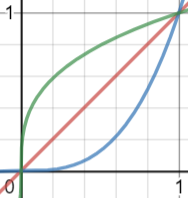
-
[APP] BrickController2
imurvai replied to imurvai's topic in LEGO Technic, Mindstorms, Model Team and Scale Modeling
BC2 2.3 is out for iOS and Android with the following changes: - Fixed the firmware and hardware version indicator for Control+ devices- Added firmware and hardware indicator for BuWizz2 - thanks for Vit Nemecky- Changed the characteristic of exponential and logarithmic joy types -
[APP] BrickController2
imurvai replied to imurvai's topic in LEGO Technic, Mindstorms, Model Team and Scale Modeling
Oh, thanks for pointing out. I'll fix it in the next release. -
[APP] BrickController2
imurvai replied to imurvai's topic in LEGO Technic, Mindstorms, Model Team and Scale Modeling
I also use iOS 12 on iPad air (which is a bit less powerful than your iphone 6). Just downloaded BC2 version 2.2 from the app store and could not reproduce the lag either using buwizz or sbrick. So I have no idea why it is laggy for you :(