


xSergio74
-
Posts
188 -
Joined
-
Last visited
Content Type
Profiles
Forums
Gallery
Everything posted by xSergio74
-
Hi again, another version has just been released and is available from http://sr3dbuilder.altervista.org/ No significant improvement this time, just some fixes, most around the UI. Here is a list of changes. Enjoy! Sergio ________________________ Fixed - Some issue in the standard user interface introduced with last version - Some issues in the new experimental UI - Selecting a brick connected to a hidden one can cause application crash or image corruption - Some useless connections were added on some rounded parts - Preferences about Seams and AntiAliasing quality were not saved Changed - Image quality should be a bit better with a little high contrast between lighted and shadowed zones - Some changes in determining face lighting Added - U key shortcut to switch UI mode
-
Hi, about the presence of the 4488 part in your partlist it is most probably due to the fact of many overwritten installation of different version of my application part library. The setup program does not perform a clean up of existing parts definition or part images. It only add new and overwrite already existing parts in the library causing obsolete parts remaining in folder. A fresh install of the part library (by manually cleaning c:\lDraw folder will help in solving the problem, even if probably both 4600.dat files will remain in the separate folders. About the minifig heads problem, I cannot reproduce it. It works fine on my PC. If you have a specific part number having the problem let me know and I try. Also consider that this kind of problem can also be due to video driver problem if the Z-depth precision of your graphic card is not adequate (16bit instead of the recommended 24 or 32bit) then such kind of issues may arise. After cleaning and reinstalling the program, if this still does not solves, try updating your graphic card drivers by downloading them from its manufacture web site. Hope this can help you... Sergio
-
Hi again, another new version has just been released. Available from http://sr3dbuilder.altervista.org/ Only a little but really interesting new function. Here is a brief as usual: Fixed - The Save function no longer ask for filename if model already have one - Bounding boxes around current group remains even if you get back to your model Added - Extended support for Triple Ring controls in Animation console - A new experimental way of parts displacement, a bit more like LDD one. Refer to english manul (updated but not up to date with application) for a brief on how it works. Not too bad in my opinion for a first try Please read English Manual http://staff.polito....lder%20(EN).pdf for a bit more details --> I really need feedback about the new UI <-- Changed - Some manual updated abour groups usage and the new experimental UI - Some small adjustements in many points And here is a video...
-
Hi, every time I publish a new release of my SW I test it against ALL parts in my database by rebuilding the images of all parts to ensure there are no trouble at least in part loading. I tested both parts giving trouble to you but I found apparently no problem at all... What happens in the dragon assembly is that wings are not correctly connected to body so they cannot rotate; but you can select them one by one and autosnap will position them in the right place. Sergio
-
After more than 2 months of inactivity, here is my new release of the application. Hope it worth the awaiting! A lot of new functionality added in model management this time. You will find them in Groups context menu and in File menu. Read the following: You won't miss this ! Available as always from http://sr3dbuilder.altervista.org/ Please feedback for malfunctioning and hints, especially from registered users... Sergio 0.7.1.5 - Changes to previous version (2012.06.12) Fixed - Instruction Miner should now work faster and with a lot of less bugs - Showing/Hiding the "Model" group with no parts in it causes a crash - Importing model causes no longer Pause Instructions lost - Many group management bugs fixed - AutoOrient option sometimes does not correctly aling grid Changed - Importing a model causes a NEW group with the model file name being created - Some less used Selection Option are now grouped in a dropdown button - Hierarchic hide/showing model is now faster (and safer) - The Instruction Miner window is now resizeable Added - Save a group/subgroup to model file (registered version) - Importing model with groups - Analyze a single group/subgroup into Instruction Miner - Clone a group/subgroup (registered version) - Allow the Instruction Miner to show only parts above your curson allowing a better model analysis (registered version) - Group Reference Brick to allow quick positioning/connection of a group/subgroup - You can now move Groups and SubGroup across the Group tree - Group tracking while hovering groups tree - Added <CTRL-G> accelerator to show Group tree - Select parts by shape - Save your current selection to a new model (registered version) - Exporting to .DAT functionality including definition for Flex parts. Notice: a very big file is generated, but you can open it from lDView to create the .pov file for POV-Ray rendering. The flexs have BAD behavior in lDView but will render fine in PovRay A manual update will follows in next weeks. Just the time to write it !
-
Hi again, another application release with some important fixes and a small but quite useful new feature. Available from http://sr3dbuilder.altervista.org/ No video this time. Following the list of changes... Fixed - One more fix in Part Assembly management: loading a model with assemblies and adding a new one causes a fusion between the last present in the model and the new one - Auto snap functions does not work at position (0,0,0) - Adding and removing controls in animation console after loading a model already having controls can cause program and animation crash - Displacement Caddy is now resizing better at least when adding new parts Changed - The quick search tabs for slopes and technic types have been deeply reorganized. Hope you like it... Added - Enhanced Hinge solver capabilities: selecting as first part a block with extend capabilities (like a Linear Actuator extendible part) allows part extension and avoid rotating second selected block. Please note that the extensible parts will extends with no limit, also outer of fixed part.
-
Hi everybody, a new version of my application has just been released. Available NOW from http://sr3dbuilder.altervista.org/ As always, a video is better than 1000 words so here is a link to a new presentation video (a bit long: over 6mins). Important: the video contains some brief instructions on how to use new application features so have a look at it. Enjoy!! Sergio
-
But if you don't want to get crazy with connections, rotation axis, part alignment etc, why don't you use SR 3D Builder? Here is the same animation built in 15 minutes!! And you also save the money...
-
Hi, the application allow to create a tab delimited part list with bricklink codes and related color codes. Bricklink export is still not implemented. Anyone have the specs of file format for bricklink files? Sergio
-
Hi everybody! Here is another preview video of what you can expect from next release: Be patient... and talk about with your friends! Sergio
-
So here we are again!! A new version of the application is NOW available on my website: http://sr3dbuilder.altervista.org/ and the following is the preview video: Notice: unregistered users can create a mono-piston motor only. For details about new features (not too much to say the true) refer to History tab on my website!! Enjoy building! Sergio
-
This functionality is still not available !! Enjoy... and be patient a little more... (only for registered users)
-
SR3D on Mac ?
xSergio74 replied to Povl H. Pedersen's topic in Digital LEGO: Tools, Techniques, and Projects
Hi, I'm sorry, but the application is not built to be run on MAC (nor under Linux even if with WINE you can gain something good) The only way to run it seems to install VMWARE FUSION 4 on your iMac and DirectX and it's working great ! Images and suggestion courtesy of Benoit JACOBY. Sergio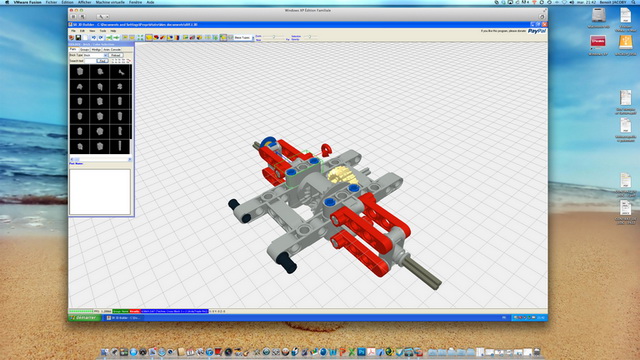
-
Hi, I usually don't flame anybody, don't worry !! About fixing code, as you can see there are only a very little news compared to fixes in the last 2 releases (after the release of the registered version of the application) About broken windows, I read the suggested article, but I cannot mind to something like that in my application. This does not means that there aren't: can you make me a sample please ? On the other side, I CORRECTLY evidence that my application may contains some flaws and bug BEFORE anybody apply for a registration code. And, furthermore, you can try the application before registering for using it and you can have a fill of its capabilities, limits and bugs. Even most operating system are released while containing bugs and are fixed on the fly... and you pay much more for them!! But if you want to use them you (or at least a lot of people) pay and you are not told about some bugs in them!! It is my choice to favorite the deployment of new features while fixing bugs. Anyway usually major and most tedious bugs are fixed as soon as they are discovered or reported to me. Also don't forget that the application is primary tool to build and test mechanism. Actually building instruction is still a second scope for it so this part of the code maybe a bit buggy. Another thing to consider is that not everybody use the application the same way so a bug for someone is considered a BIG bug and for someone else it is a small one. And finally consider that, believe or not, I'm the only person behind this project (with the exclusion of the lDraw team (www.ldraw.org) that creates and makes available parts for this and a lot of other similar applications) So what left to say... its your choice to use the application or not. Nothing is hidden, no bad surprise. You know what to expect... ...and please, do not compare it with a videogame: you are registering to use an ADVANCED CAD SYSTEM that, in the specific, it is deeply optimize to use LEGO parts. byes Sergio
-
Hi everybody, another updated version of my application is now available. http://sr3dbuilder.altervista.org/ Nothing really new, just a bunch of significant fixes. Here is a list of changes: Fixed - On a fresh installation the creation of a folder with a wrong name does not let the application start - The "pin long with friction" part has problem in rotations and animations - Closing the application with the "X" cause the application to crash - Editing a model with assemblies and adding new ones cause wrong assemblies identifiers - Occasionally some subparts fails to load from a previously saved model - Importing a model cause main model name override Changed - Linear actuators now move with in more natural way Added - <CTRL-F> shortcut to put the cursor in the Search text box - Location and resizing mode of the toolbox are now saved and restored on application startup - Updated part list availability (december 2, 2012) Enjoy Sergio
-
Hi again, a new 0.6.0.8 version of the application has just been released fixing some flaws like application crash when trying closing it and some other issues you can read about in the history of changes tab on my webpage: http://sr3dbuilder.altervista.org/ Here are some new videos: bye bye and happy Halloween Sergio
-
Hi, you can find a list of what need registration with the "history" button. A comparison chart is a good idea indeed. Probably Manuals links are outdated due to server change. I will fix ASAP. A portable version (unzip and play) will be released hopefully in one month since it is on my road map. Thanks for notice... Sergio Edited: Now links to manual are working again Sergio
-
So here I am again to announce the looooooooong awaited NEW release of my application. There are many news, starting from the new website, now moved to http://sr3dbuilder.altervista.org/ so please, update your bookmarks Now to the application news: there are not too many, but they are all really interesting. Here is a brief: Added - Support for simplified racks mechanism (where a rotation axle is coaxial to gear) - Support for suspensions (still not the spring) - Support for Linear Actuators - The Animation Console that allows you to create a console with your model animations starting points and animating it in a 'real way' - Support for reciprocal animation referred to a block to be considered fixed - Support for worms to rack connection - Support for building with Linear Actuators and shock absorbers Fixed - Many fixes in hinge animations: now only some unusual composed hinges should not work - Racks slidings now limits to effective rack length - Notification at part list rebuilding end - Pressing Cancel when closing the application and asked to save, the application closes without saving your model - Selecting a part involved in Connection Solver cause occasionally application crash Changed - You now need to press CTRL with double click to instant move your selection to a new position A demo video will be added later in this weekend to show all new features... But there are also some maybe bad news for someone of you: to use most of the addiction you need to get a registration code for the application with a contribution of 35€. The ones of you already made a donation of 25€ or more, will get this code for free; other people donating a lesser amount may integrate their donations to get registered. The amount is about what you pay for a medium or small Lego set so I hope it is not going too much for any of you ;) Enjoy building
-
Hi, if a part is not found, then the application should fill a part error list that you can show in the View.ErrorList menu option. If the application hangs while loading your model, please submit it to me so I can check it. In the while, ensure that in the View.Preference dialog box the use Hires primitives is disabled and try loading your model. Please feedback... Sergio
-
Hi, never tested on such big models! It works good enough with models up to 8-10000 parts (over 80 fps) on a 3 year old graphic adapter, but never tested with more bricks. I can say that the application is very well optimized from graphic side, but some huge undo/redo operations with a big amount of parts can lead it to crash. As suggestion, install my application, create or download a big model from my application forum (there is the over 5000 parts millenium falcon available), duplicate it as needed to reach your desired part count and then evaluate performance. Also remember that technic parts are by far much more complex than standard brick parts, so a model with 2000 technic parts maybe it is huge as a 4-5000 one containing mostly bricks. byes Sergio
-
Hi, try the following: - Temporary rename the folder where MLCad / Ldraw are installed to something else - Reinstall SR 3D Builder - When asked for the folder to install the part library to, select something different from the folder where MLCad / Ldraw are installed by default (i.e c:\lDraw2) - wait for installation completion - Start SR3DBuilder - when asked for the part library folder, choose c:\lDraw2 and wait for part list rebuilding (a pair of minutes or less) - Close and Restart SR3DBuilder - Everything should work now... - You can now rename the folder where MLCad / Ldraw are installed to its default (c:\lDraw) If everything works, then please make a ZIP file of your lDraw part library installation and upload it to a public file sharing (rapidshare, megaupload, ...) so I can analyze it and fix my application... Thanks Sergio
-
Hi, the usage of these two programs depends on what you are going to do: - If you need something to play for fun, then LDD is the best choice - If you need something allowing you to project models, creating renders and/or good instructions, then MLCad is a must. Anyway, as told by someone early in this topic, you can also use SR3DBuilder as editor. It uses the SAME part library used by MLCad and also the file format is nearly the same (you can exchange model files between the two programs) so all MLCad additional utilities are still usable. The advantage of SR3DBuilder is a pretty good 3D user interface, not as simple as LDD, but by far much more rich in functionalities, starting from its ability to reproduce animation of even complex technic schemas. It worth a try... Sergio
-
LDD update 4.1.8 released
xSergio74 replied to Superkalle's topic in Digital LEGO: Tools, Techniques, and Projects
Hi, At every new release of these application it is always the same story: some new parts are made available, while some other disappears ! I'm sorry, but I find really annoying (just for not to say "unacceptable") that part in my mocs can appear or disappear upgrading from a release to the next. A "serious" application (if a game could be considered serious) should at least preserve its compatibility with pre-built models, or at least give the user a way to preserver their "hard" works. Just imagine work with a word processor and when upgrading to a next version you find in your documents some missed paragraphs... !!!! And you have not get an advice about which paragraph will no longer be readable... Not all users are kids that enjoy just building whatever is available at the moment: among them there are some (or many) AFOLs that really dislike loose their works or part of them... Anyway, this is just my personal opinion... Sergio -
Hi, here are just a pair of video of what you can expect from next release: the animation console ! Don't worry, September is not too late... Sergio
-
Help on some parts
xSergio74 replied to nilson's topic in Digital LEGO: Tools, Techniques, and Projects
Hi, if you are able to run LDD, you should also be able to run SR3DBuilder on your computers since graphics requirements are nearly the same. Please let me know some details on your graphic card and I try to help you. Also ensure to follow the instruction on SR3DBuilder download page to install application pre-requisite and let it work the correct way. You can also private email me if you want... byes Sergio (author of SR3D Builder)