Search the Community
Showing results for tags 'LDraw'.
-
 Please read the guidelines! GUIDELINES Type the number, name and theme of the model (I prefer Brickset themes) at the top of your post. This topic only makes sense if you give a link to your model, so other people can download it Put a picture of the virtual model in your post. Say if there are errors, if there are, tell what the errors are. Not too big pictures, please follow the EuroBricks guidelines. One set in one file. So not one set in 2 files, or 2 sets in file. The set should be build using the original instructions. Exporting models from ldd is forbidden unless you have the permission from the original author. Pleas do check everything very, very carful (also the inside of the model), because the export is not very accurate. Models like Montly Mini Builds or Club models are allowed. software files/programs that are allowed MLcad SR3D Builder Leocad Bricksmith BrickDraw 3D LDCad
 -
Did someone can point Me to source where I find informations about margins, font, paper size for Desktop publishing of LEGO Instruction Book. I have implement this functionality in my software. Any idea how DO IT this is welcome.
-
 Over at brickset a new version of the LDraw "All In One Installer" (AIOI) was anounced: http://brickset.com/...1-now-available On ldraw.org the full package is available: http://www.ldraw.org/article/104.html Before running this new AIOI I have some questions regarding my existing (and working) setup: I have downloaded and installed the latest parts update als complete package a few weeks ago (http://www.ldraw.org...test-parts.html) ... would the new AIOI overwrite this? I have downloaded various unofficial parts over the past months ... I want to keep them and does the new AIOI overwrite this? I run MLcad 3.4 ... 3.5 is out now. What are the differences/improvements? I run LPub 4.0.0.11 ... This seems not to be supported any more and the newer LPub3D 1.2.3.443.2 is part of the AIOI. If I run the new installer, will my old LPub will still be available in parallel to the new LPub3D? These are my major questions. I would be happy about clear answers and experiences of others upgrading a running LDraw setup. Thanks in advance, HoMa P.S. And a big big thank you to all the volunteer workers who helped out to update the LDraw world!
 -
Hey, A new LDraw parts update is published on the LDraw website. I received the following message regarding the new update: So, it was a long wait (2015 is almost over already ), but it's a relatively big update. A quick look at the new parts shows that there are especially a lot of new minifig parts and printed parts. Have fun!
-
Today, a new major update of LPub3D was released. I suspect not everyone here is following the LDraw forums, so I figured I'd make a topic here too; it's a big update. It has some great new features (including a big speed upgrade) and a huge list of bug-fixes and other little improvements. Quoting Trevor: You can read the whole announcement and changelog here or say thanks to Trevor for his great work.
-
 I wrote a Java application to convert an LDraw model to Sunflow. Thank you to msx80 for giving me the idea with Blurender Thank Bublible I use some of your metallics materials in my application. It is not complete yet but I have tested on several models without problems. There are still things to optimize and probably bugs. Currently no progress bar, keep an eye on the console to see the progress of the work. Screenshot: Only the "render" button not "ipr" saves the image in the same directory as the stage Sunflow. (not true with the latest version) In the LDraw tab you can set : - LDraw path - Common used texterea is a solution to optimize the final mesh Examples : These models comes from here 3063 - Heartlake Flying Club 30210 - Frodo with cooking corner 30210 - Frodo with cooking corner Download : Version e - here Version d - here Version c - here Version b - here Version a - here
 -
One year ago I presented a virtual version of submersible JAGO (see here). Now I am able to proudly present a real life brick built version of JAGO. And some new renders (Pov-Ray, based on LDraw) too. For the brick built version I had to manipulate some original parts: Dome 4x4 #86500 and Round Plate 6x6 #11213 are not available in yellow. So I had to re-color these parts by using a color spray can. JAGO is a submersible primarily dedicated to exploration and research in marine sciences. See homepage JAGO. Hope you enjoy it. Regards Papacharly
-
 For attending my duty („ ... you must (if you win) share how you did the render…”) I prepared some comments on my entry for the rendering contest. Hope these comments will inspire you to create and poste some more nice renderings or even will encourage you to engage with rendering. Superkalle proposed to open a new topic fort his. So please feel free to poste further questions/comments/remarks here. I would highly appreciate if other participants in the rendering contest would poste some tips regarding their entries here too. Papacharly
 -
Hi everyone! This is my entry for the LDD/LDraw contest that EB is holding at the moment. This thread is basically everything I said in my entry post, but with more pictures and explanation. This is the CoMplex 4S (CM4S, ), not exactly my dream house, but a very nice house I wouldn't mind living in. My main goal was to give it a very modern look, and I think I did a pretty good job with it. This house comes in 1444 pieces, includes a 'Fancy CM4S' minifigure, and loads of detail everywhere! First off, is my sports car. I tried to give it a modern look, included red leather car seats, to make it look expensive. Also there, is a autumn-time tree, with nice colors and is shaped very nicely. Second, the smallest part of the house, the kitchen. Normal kitchen things, a sink, countertops, drawers, and a fridge with a water/ice dispenser. Up next is the dining room, with a really nice table, some nice chairs, and a small flower pot on the table. Off to the back are a few drawers with silverware. Above the dining room is the bedroom/bathroom. The bedroom has a really cool bed with drawers on each side, with a lamp on top. There's also more drawers, containing clothes. In the bathroom, the usual toilet, sink, and a really cool shower. The last part is the entrance and living room. The living room has a TV with a fireplace underneath, with a couch, plant, and stairs up to the doors of the bathroom/bedroom. On the roof is a chimney (that doesn't connect ) and some solar panels. That's pretty much it! I hope you like this, and vote for it when the contest is over on April 15th. Thanks for looking! If you want to see everything else I didn't mention, feel free to check out this LXF file. (updated) -Sci
-
Greetings! I'm not a usual poster in this side of EB, but with the EB LDD/LDraw 2014 Contest I thought I may as well post my model here for the benefit of those who don't hang out in the LDD/LDraw section. The images link to (slightly) larger-sized ones. You can download the .L3B File here: .L3B File Comments and Criticism is welcome. Thanks for viewing.
-
Greetings! Once again I present to you a LDraw MOC made in SR 3D Builder for the Free Build category of Eurobricks' just finished LDD/LDraw 2014 Contest. I didn't have time to do the roofing well or even the basement, which I originally had plans to make, but if I get around to doing them later I will post updates. One of the great things about creating digital buildings is that you don't need to destroy the old before you build the new, so you can get back to your MOC whenever you want. Anyway, here goes: This first picture is, well, pretty self-explanatory I guess. It's the main floor of the building, the only one that I've built thus far. I wanted to try something new with the walls and I had used the overlapping 2 x 2 Round Plates many times for roofing, but I thought it would be interesting to try as the wall itself. Here's the Kitchen: Living Room: Bedrooms from different angles: Finally the complete build with a slapped together roof: I had a fun time working on all the furniture, but may have taken a bit too long with it. Anyway, here is the is the SR 3D Builder file, which is also available in the corresponding topic in the LDraw forum. Hope you enjoy this build. I took care to try to make the MOC fully buildable with real LEGO pieces. I checked on Bricklink for them. Some are not very common though and I may have accidentally included one or two parts that weren't, but overall it should be buildable. By the way, in case you haven't, do check out the contest entries in the LDraw forum, some are really, really good.
-
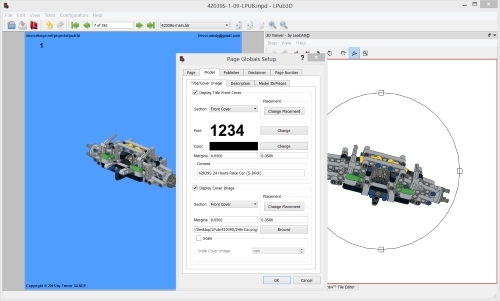
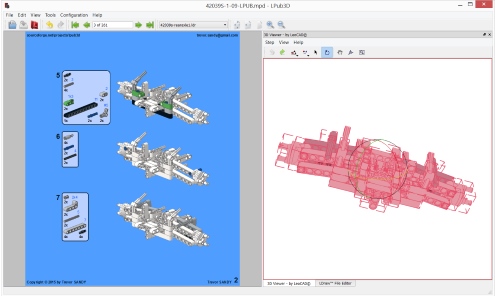
Greetings, If anyone is interested, I've made some additions to LPub and posted version 1.0 to LPub3D on SourceForge.com. Here are most of the added features/enhancements: LPub3D 1.0.0.320.2 ------------ -Integrated 3D Viewer powered by LeoCAD -Set ROTSTEP (step rotation) meta using 3D Viewer -Fade previous step's parts -Use any LDraw colour as fade colour -Manage colour parts for complete part fade -Unlimited PLI part annotations -Split the BOM (divide parts over number of BOM occurrences) -Formatted front and back cover pages -Automatically generate formatted cover pages -POV/L3P high-quality rendered instructions -Customizable front and back cover pages -Text and picture (e.g. logo) front and back page attributes -Customizable content page header and footer -LDraw editor line numbers -64/32-bit automatic installer -Automatic check for updates -Qt 4.8.6 -Bugfixes and robustness improvements Screenshots:
-
 Hi people. If you need a quick and dirty LDraw model viewer that works on any platform, JLDraw is for you. Small, fast, portable, with some interesting functions. Some features: Uses 3D acceleration if supported by your graphic card Works fast on aged computers (tested on: 2007 notebook with integrated Intel video card; 2008 Mac PowerBook; 2010 desktop with entry-level ATI Radeon card; many others) Uses standard LDraw part library without uncompressing the "complete.zip" part library file (put downloaded library in same folder where is the program and "it works™") Support for both unzipped LDraw library and zipped library without reload program Rotate, pan and zoom with buttons or with mouse Center view right-clicking on a brick (as LDD) Select parts to view part type and color Hide parts to see internal structure Orthogonal or perspective view Lighting or flat shading Polygons, lines or both displayed Can save a screenshot of "what you see" (PNG format) Checks model and parts for invalid part/colors/sub-parts/sub-models Requires: Java Runtime 6 or later 3D capable video card (work with integrated cards. With entry-level 3D cards is FAST!) LDraw part library "complete.zip" in same folder where is the program or your LDraw folder 1Gb RAM Some numbers: Loads and render a 1300 parts Technic model in few seconds Rotation and zoom performs at minimum 40fps with an entry level 3D card (ATI Radeon HD5450). Try it: Latest release 0.2.0.2 (2014-09-14) SourceForge Project Page
 -
I am having trouble with LPub recognizing one of the assembly steps in an LDraw .mpd file. It's the step where the two sub assemblies are shown just prior to being assembled. They are separated, and have arrows showing how they get assembled. Here is the message I get: Invalid LDraw Line Type: main model.ldr:22 0 GHOST 1 72 0 0 -220 1 0 0 0 1 0 0 0 1 Multi Sheave Boom Head Left Side.ldr There are 8 pages of instructions, and the problem is when trying to render page 7 in LPub. Here is the file: http://bricksafe.com/pages/JDC/ It's called the Multi Sheave Boom Head Assembly.mpd
-
JAGO is a submersible primarily dedicated to exploration and research in marine sciences. Check it out here: http://www.geomar.de.../jago/overview/ I virtually built it by SR3D Builder (LDraw system) and rendered it by Pov-Ray. Regarding the “Shark-Render” I used media and scattering for generating the “foggy” appearance of the underwater scenery. The sharks are from Lego 4506 Deep Sea Predators (posted by C3POwen in "Official Lego Sets made in LDraw"). Papacharly
-
I was able to purchase the brand-new and very rare Lego Nanofighter 0.0000007965 Millenium Falcon !! The size of this new nanofighter fits exactly to the scale of the 10030 Imperial Star Destroyer. So my goal was to rebuild the famous Star Wars Scene from Episode V when Han Solo docks the Millenium Falcon to the Star Destroyer. Luckily I own 3 sets of 10030 as well as one set of 10221 Super Star Destroyer. So I was able to setup this movie scene in real life. As you can imagine, it was quite a bit fiddly to assemble this nanofighter. Especially assembling the laser cannons was a challenge. However, by using a magnifying glass and a pair of tweezers I was able to accomplish this mission. Have fun! original movie scene: Remake: Hi-Res Image
-
There's a new LDraw update, version 2014-02. For the people here that don't like to read, here's the page that sums up all the new parts. If you do like a little more information, the following text sums it up pretty well: Source It also includes my first parts
-
“Feuerstuhl” is german slang and usually used as expression for a heavy motorcycle. The direct translation to the English language is “Chair of Fire”. But this translation does not reflects the meaning of the german term “Feuerstuhl” which implies power, speed and roaring sound. Feuerstuhl is highly inspired by the built sc-3w-06 designed by Vince_Toulouse (see here). Its virtually built by SR3D Builder and rendered by Povray. HiRes images here.
-
Virtual Movie Scene “Snowspeeder vs AT-AT” from Star Wars Episode V “Battle on Hoth”: Wedge Luke fights an AT-AT. Scenery and models (75049 Snowspeeder and 75054 AT-AT) virtually built with SR3D Builder. String (Rope) built with MLCad/LSynth. Povray render. Povray-file generated with LDView. Pure Render. Hope you like it! Edit October 16th: Now it is Wedge's "orange" Snowspeeder!
-
I just came across this little fun project by user "DasMatze". (So, let me be clear, this is NOT my work) The link takes you to the LDraw forums, here's the EuroBricks topic, but I thought that people here might be interested as well. It's a game where you have to build a model as if you are a minifig. The models are based on LDraw files. You can read more about it, following the link above.
-
I just received the following announcement from LDraw.org: Not mentioned in the announcement but worth mentioning: some non-Lego parts are already uploaded to the LDraw Parts Tracker awaiting confirmation to be included in the official library. You can also read the announcement at LDraw.org.
-
I love the aircraft builds of Jon Hall, as well as I highly appreciate that he shares instructions. So I am able to virtually rebuild his aircraft and use it for rendering. Many thanks to Jon! Here please find some LDraw files of his aircraft models: E-11 Liberator Crimson Storm Skyhammer Patriot Scarlet Fury E-73 Wyvern In this context I proudly present my latest render: A group of E-11 Liberator getting attacked by some Crimson Storm. Please note: This is not a real air fight. It’s an airshow! So definitely no Lego Minifig was harmed or even killed while being engaged in this “air combat”. Pov-Ray render. Props, muzzle flash and smoke, as well as sky and fog also generated with Pov-Ray (no “photoshoping”). Aircraft built with SR3D Builder. High Resolution Image of "Great shot, Blondie!" Have fun! Papacharly
-
 Hi, I don't know if there's a specific thread for this but I couldn't find one, so I hope it's ok me starting a new one. I do a lot of Lego in computer using both LDD and LDraw (Bricksmith editor), but what I'd like to try and do is create some higher quality images than the ones I manage to get out of LDView. I only have a Mac laptop. Could you give me any advice on the software/tools I need to get hold of? (Tried looking for Pov-ray but that doesn't seem to have a current mac release? Also, a lot of the tools seem geared exclusively for Windows which I can't run) Cheers NathanR
 -
I recently installed LDraw and I have no clue how to open it and how to use it. Help!
-
NB: starting from october, 2015, this software become unmaintained. It will not receive updates nor bugfixes. My time is limited and I lost any interest in this project. Sorry. ------------------------ Hi all. I'm pleased to announce: JBrickBuilder a LEGO builder in Java for LDraw part library. JBrickBuilder at work. Some feature: simple building, like LEGO® Digital Designer™ Useful for small-to-medium models (up to 2000 parts with old low-profile PC, over 3500 parts with newer PC) In Java, fast and cross platform Requires OpenGL, but can use entry level video card. Use connection "snap" for easy building Uses standard LDraw library Update checks and notifications for program and connection database Can load DAT, LDR, MPD and some other LDraw-compliant file formats (LCD, L3B, ...) Can save in LDR and export to MPD, including all custom blocks and unofficial parts Support for flexible parts (experimental) Support for building steps and player (experimental) Program is in beta, some functions are planned. Current release: 0.4.1b (2015-06-12) Program is on Sourceforge: - Program - Manual (english, PDF) - Other information (connection model, development docs) Short video with flexible part editing demo: Please read the manual, program is easy to use, but some functions requires a bit of practice. Thank you. Mario