


Superkalle
-
Posts
6,069 -
Joined
-
Last visited
Content Type
Profiles
Forums
Gallery
Everything posted by Superkalle
-
Minifig torso with all decorations!
Superkalle replied to hrontos's topic in Digital LEGO: Tools, Techniques, and Projects
This is an AFOL forum (Adult Fans of LEGO). Please review capitalization and punctuation before you post. Also, when quoting, remove the images if possible - just to conserve real estate (I've done it for you know) . Thanks EDIT: I noticed you posted the same message in another topic (cross-posting), and in the processed bumped a 6 month old topic. I took the liberty of removing that one. Please follow the guidelines of this site! -
LDD 5, what features do YOU want?
Superkalle replied to BasOne's topic in Digital LEGO: Tools, Techniques, and Projects
A smile does all difference. And if I haven't said it before, welcome to the forum. -
how can i get the two bricks back in LDD
Superkalle replied to SNIPE's topic in Digital LEGO: Tools, Techniques, and Projects
Yeah, like's been said - TLG hasn't been too keen on this. But it is not only because of breaching the EULA (i.e. you are not allowed to extract data or alter the software files in any way). It is also because of the consquences that can be; Not only hardcore LDD/IT geeks read this forum, and if kids start altering LIF-files or finding scripts that minimize the Web-pane, or shut off the auto-update feature or other fun stuff, then this could create problems that TLG simply don't want (i.e. people calling the support because of problems with mods of various kinds). Another thing is off course that creating "all-in-one" lif-files create a problem when and if bricks are updated. What if you open a LXF created with brick gemoetries and brick definition in one of these "all-in-one" file and TLG then release an update. Then you would need to update tha "all-in-one" as well. Who does that, and when? It doesn't take much imagination to see the potential problems here, also for us fans when sharing files. -
Great work. Had nothing to do, so I did the flexi-stuff. A bit tricky it was You can download the file and update your post if you want. 8109_update.lxf
-
Minifig torso with all decorations!
Superkalle replied to hrontos's topic in Digital LEGO: Tools, Techniques, and Projects
It's really fun to see all the decorations like this Anyway, the answer to your question is in Aanchirs reference file, which can be found here. I know he is working on updating the file with the new stuff in 4.1.8, but because BrickLink has not yet parted out the all the new elements, it still "in work". How all the decorations map to real LEGO bricks can be found via LDD Manager. If you import Aanchirs file into LDD Manager you will see the corresponding BrickLink item, and you can then doubleclick to see it and in which sets it was used. Also note that Aanchir has gone through the trouble of mapping up also heads with faces on both sides. And note that if you LDD Manager you must put the correct decoration on both sides, otherwise it will not be converted to a BrickLink item, so the easiest is to copy the elements from Aanchirs file. Also note that Aanchirs file only contains the decorations that can actually be mapped to the corresponding element. For example, decoration 92824 belongs to the kitten 6251, but this has (yet) not decoration surface in LDD, so it can't be "applied". -
LDD update 4.1.8 released
Superkalle replied to Superkalle's topic in Digital LEGO: Tools, Techniques, and Projects
Since this version I think. (didn't someone report this as an error, I have a vague memory of it?). It is a tricky one though, since a stud will be allowed to connect from both sides at the same time, something that is not "allowed" with real LEGO (i.e. illegal technique). (3176 for example has the same type of "problem"). So be careful if you intend to use the 55300 in you LDD MOCs with two studs connected at the same time, since this may in the future render an error when opening the file. Attaching a stud on one side only should be future proof though. -
Minifig torso with all decorations!
Superkalle replied to hrontos's topic in Digital LEGO: Tools, Techniques, and Projects
Aanshirs color reference files have all decorations (even the hidden ones) mapped to the corresponding real bricks, i.e. bricks that have been produced. So I have to agree with Hrontos that maybe his file should not be moved to the reference section since it's more on the fun side . -
LDD 5, what features do YOU want?
Superkalle replied to BasOne's topic in Digital LEGO: Tools, Techniques, and Projects
Yes you are, but there is no reason shout "SCHOOLBOY ERROR" and the like when you are in a forum with peers. We are on your side you know Also, the issues you brought up have been discussed before in the forum, just so you know you are not the only one feeling frustrated about them. Then about the loading of thumbnails - you know the thumbnail is a 3D object you can rotate, right? Just like the bricks in the brick palette. That's why it takes time to load it. Honestly I don't understand the purpose with interactive objects in the startup window and I think it'd be enough if they just show the pre-rendered PNG thumbnail from the LXF-file - just to speed things up. -
Hey, you're really churning out a whole bunch of models now About the red technic bush, it will fit if you rotate the "fuel tank" assembly upwards a bit (which forces you to move some other bits and pieces as well, so it's a bit awkward). About the technic long pin, I see you've bumped in to that problem. Yeah, it's because the designers at TLG are using illegal techniques, even if they are not supposed to. These kind of problems were worse a few years ago, but it seems TLG has gotten better laterly. Still it's interesting you find one as late as 2009.
-
[Software] LDD Manager
Superkalle replied to Superkalle's topic in Digital LEGO: Tools, Techniques, and Projects
Thanks for the screenshots becuase this seems to be another problem. I initially thought it was when it tries to launch LDD from the main windows (where you have all the models and model content). I'll look into it, but since I haven't heard anyone else having the problem, I'm wondering if its not a system environment problem related to LDD Manager. -
Don't be sorry. Better to say you did it on purpose you to see how quickly anyone of us LDD geeks would spot it
-
[Software] LDD Manager
Superkalle replied to Superkalle's topic in Digital LEGO: Tools, Techniques, and Projects
Thanks for pointing it out. Found the error! -
LDD 5, what features do YOU want?
Superkalle replied to BasOne's topic in Digital LEGO: Tools, Techniques, and Projects
I'm not sure why you joined this forum You're two first posts have been filled with nothing by negative "this is basic engineering" and "SCHOOLBOY ERROR" kind of comments. You are naturally free to have an opinion, I just don't understand the purpose since you anyway have decided that LDD is crap. Try some of the Ldraw based softwares and maybe they are more to your liking -
I never thought of that. Is it really so? Did ADHO15 get it the wrong way around?
-
Date when a brick first appered in set?
Superkalle replied to Superkalle's topic in General LEGO Discussion
Thanks for pointing it out to me, I hadn't thought of it. Now, if only one could get/extract when a part first appears in a new color. And imagine a service from TLG - something like "receive an e-mail when we release a new brick/color combo" It's actually a very good idea. And at least it will solve the problem for me since I can do some queries on my own PC. Got to think some more about this. EDIT: Just remembered. BrickLink keeps changing the ItemIDs, which makes it problematic. An item called x177 in the first data extraction might be called 89039 the next time. Hm, maybe if the ElementID (part/color code) could be used? Got to think some more... -
LDD update 4.1.8 released
Superkalle replied to Superkalle's topic in Digital LEGO: Tools, Techniques, and Projects
Well, then I'm lost, because that's how I figured it worked Does anyone have an old UnplaceableBrick-file that displays a red brick? -
Date when a brick first appered in set?
Superkalle replied to Superkalle's topic in General LEGO Discussion
Yeah, I know about that list. The problem with it is that 1) you have to manually browse it wading through pics of bricks with stickers on them, Duplo and god knows what. 2) you can't see if a brick has been released in a new color (it only lists the brick ID the first time it is released) -
When new sets arrive, the first thing I start looking for is if there are any new cool bricks. I love the thrill of finding if a brick has finaly arrived in the color that allows me to complete the dream MOC. What I'm looking for is either new brick designs, bricks that appear in a new color for the first time, or old rare colors have been re-issued (and finaly become affordable). OK, so now all I'm wondering is: Is there any way to find this out besides manually scanning each and every set at BrickLink? For example, I've been trying to compose some sort of search at BL that would pick out bricks that have appeared in a new color for the first time. For example 85970, that recently was released in tan. I've tried just about everything but can't figure out how to do it. The dream solution would be a list of Brick IDs together with color, when it first appeared and in what year. Something like this: 85970 - Tan - 2011 85970 - White - 2010 93274 - Red - 2011 30374 - Green - 2011 2436 - Dark Red - 2003 etc, all bricks
-
LDD update 4.1.8 released
Superkalle replied to Superkalle's topic in Digital LEGO: Tools, Techniques, and Projects
Gotta do some thinking... Ok, done thinking. No, it should be only the brick removed that will be red. In the classic case you mention with the jumper plate, 1x1 cone and light saber blade, only the light saber blade will removed and colored red, i.e. the Unplaceable file would look like below (a mockup since the blade would be removed if opened like this). But you are right that the Unplacable file will contain all bricks, including the ones removed colored red. So I guess the way you used it was to open it in an editor and search for the red color code to locate the brick. So in that sence the Unplaceable file is off course useful (i.e. you dont need LDD Manager to spot the problematic brick).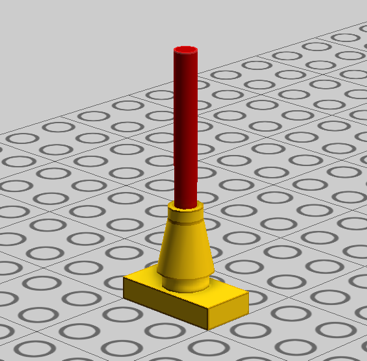
-
[Software] LDD Manager
Superkalle replied to Superkalle's topic in Digital LEGO: Tools, Techniques, and Projects
Please post whatever you got. I need all the help I can get to find bugs To be honest though, I haven't made any changes to this feature, but stuff happens -
LDD update 4.1.8 released
Superkalle replied to Superkalle's topic in Digital LEGO: Tools, Techniques, and Projects
Yeah, I agree it's not particularly user friendly But I think it's important also to remember under which condititions LDD Extended Mode was released to us fan, and that is as strictly as-is, free of charge, with no support and as more of beta software. Basically they are letting us see and use bricks they wouldn't otherwise bother to show. Just to give the background to how this whole Extended Mode was released in the first place. Also to clarify about the UnplaceableBricksDump.lxfml: When you open an LDD file, two things can happen 1) The file contains bricks that are illegally placed (i.e. overlapping collison volumes). This can be because you managed to place a brick in a way that was accepted during design, but when LDD re-parses the layout during opening, it finds the error. It can also happen if a brick has been updated between versions and collisions boxes have been increased in size. The latter is very rare since colission boxes most often are reduced rather then enlarged. 2) The file contains brick that no longer exist in the brick palette (like the example with the chain link in 4.1.8). The UnplaceableBricksDump.lxfml is only created in case 1). For 2), it will not work since the missing bricks is simply not in the brick database/palette. The problem is however, that UnplaceableBricksDump won't do much good in case 1) either, because when you try to open it, the problematics bricks are removed. So what is the UnplaceableBricksDump? It's a file used during development debugging when it is possible to open a file with physics controll turned off. In those cases, you will be a able to see the removed bricks as red, and all the others as yellow. But for us normal users that don't have the developers tools, this won't do much good. So how do you work around all this? The easiest way is off course to compare the file before and after opening in LDD, and then you can catch both 1) and 2) above. For this you can use LDD Manager. There is a feature for it called "Compare Models" that simply gives you the part content difference. Now, how come bricks are removed from the palette at all? Well, from what I understand there are at least three reasons: 1) The brick has been deemed redundant or is not applicable anymore. There has been some cases before. 2) The brick has some fault in it, and is put to side while being "repaired" (i.e. it's in the to-do backlog and before it's fixed TLG won't put it back) 3) A mistake was made and the brick was omitted when the brick palette was created. In these cases it's naturally put back in the next release. It should be noted that we are talking a handful of bricks out of almost 2000 and the majority of the cases, they are put back in the next release. And for what it's worth, the quality of the brick database is getting better and better so I think we will see less and less of this problem in the future. Sure, I find it extremely aggravating when a brick has been removed, even temporarily, but I though I'd just explain what I know. -
[Software] LDD Manager
Superkalle replied to Superkalle's topic in Digital LEGO: Tools, Techniques, and Projects
I'll look into the categories. But I'm not sure I understand what you mean about the colors. Where are they missing? -
Fixed now. I actually wrote with one "o" just to see how long before anyone would notice
-
And the votes are in... The winners have now been decided for last months LDD contest. This time we have three different winners; One by public vote, one by a raffle and one staffs pick. Congratulations all to a rare 30121 Grem polybag. Click here to see the contest rules and the winning entries.