Classicsmiley
-
Posts
279 -
Joined
-
Last visited
Content Type
Profiles
Forums
Gallery
Everything posted by Classicsmiley
-
 41006 Downtown Bakery - Theme: Friends [bricklink] [brickset] 41006.lxf (LDD 4.3.6) Errors/Omissions: Mini-doll legs, torsos, and heads missing in LDD (no substitutions made) All stickers missing (parts left blank) Print missing from 2x2 slope 3039pb62 (part left blank)
 -
LDD 5, what features do YOU want?
Classicsmiley replied to BasOne's topic in Digital LEGO: Tools, Techniques, and Projects
When you save a screen shot, it's saved as a PNG with a transparent background. Just use your favorite image editor to add the background... -
Also, it looks like many of the colors are incorrect.
-
http://www.brickset....il/?Set=60013-1 Coast Guard Helicopter
-
Another update: 4.3 parts?!
Classicsmiley replied to JopieK's topic in Digital LEGO: Tools, Techniques, and Projects
It's from this set: http://www.brickset.com/detail/?Set=75022-1 -
Many dragsters have parachutes to help slow them down at the end of the track. I imagine those pieces are packed up versions of those parachutes.
-
Another update: 4.3 parts?!
Classicsmiley replied to JopieK's topic in Digital LEGO: Tools, Techniques, and Projects
Thanks for the list! It looks like you missed 12609, though. -
LDD 5, what features do YOU want?
Classicsmiley replied to BasOne's topic in Digital LEGO: Tools, Techniques, and Projects
Sorry, my winking smiley face didn't do its job in conveying my sarcasm. I'm familiar with what default mode is; it's just that I never, ever use it... -
Another update: 4.3 parts?!
Classicsmiley replied to JopieK's topic in Digital LEGO: Tools, Techniques, and Projects
Are you familiar with the features available to zoom, pan, and re-center your view? -
LDD 5, what features do YOU want?
Classicsmiley replied to BasOne's topic in Digital LEGO: Tools, Techniques, and Projects
Default mode? What's that? -
LDD 5, what features do YOU want?
Classicsmiley replied to BasOne's topic in Digital LEGO: Tools, Techniques, and Projects
I'd really like the ability to put in an element ID, and get the design ID in the correct color. -
Another update: 4.3 parts?!
Classicsmiley replied to JopieK's topic in Digital LEGO: Tools, Techniques, and Projects
This is by no means an exhaustive list. I'm not familiar enough anymore with the minifig accessory categories, and I'm certain there are many other new parts.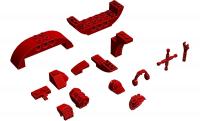
-
Lego: Legends of Chima Online Giveaway
Classicsmiley replied to Savage Oppress's topic in LEGO Media and Gaming
Does anyone else have a code that they'd like to give away? -
You can seat a minifig by using the hinge tool on the legs.
-
There are a couple of different LEGO CAD programs out there. The official, LEGO-Company-created one is LEGO Digital Designer. http://ldd.lego.com There are also a number of fan-created tools based around the Ldraw standard. http://www.ldraw.org
-
Are you talking about http://www.bricklink.com/catalogItem.asp?P=4218 and http://www.bricklink.com/catalogItem.asp?P=4219 ? Those are both in LDD right now. Just search for 4218 and 4219.
-
LDD 5, what features do YOU want?
Classicsmiley replied to BasOne's topic in Digital LEGO: Tools, Techniques, and Projects
Isn't that what the ESC key, or maybe Ctrl+Z is for? If I accidentally move a part (and haven't "put it down" anywhere), I just hit ESC, and it goes right back where it was. If I did put it down, I hit Ctrl+Z to undo. I don't think it's that big of a deal. As for the rotate tool, it's just a matter of clicking on the desired joint/hinge/connection a few times, to verify that you're moving the correct axis and/or assembly. I'm more bothered by camera-relative model rotation; I really wish they'd go back, or at least add an option in Settings to change it to absolute. -
In LDD, you can either go to Help > About, or hit the F3 key. The about screen shows 4.3 up at the top, and it shows the complete version number down just below the blue brick, in much smaller text.
-
No need to ask a mod; just ask your questions, and one of the several helpful people around here will try to help you out. So, here are the initial trouble-shooting questions that come to my mind... What operating system are you using? (Windows XP, Windows 8, Max OSX, etc.) Do you have LDD already installed? (It sounds like you do, and yes, 4.3.6 is the most current version right now.) Can you start a new model successfully? What are the exact steps that you are taking that lead to the error message?
-
Thanks for putting this together. I've been using LPub since you had to add the meta commands manually, but I'm still looking forward to learning new things!
-
[Software] LDD2PovRay
Classicsmiley replied to Superkalle's topic in Digital LEGO: Tools, Techniques, and Projects
Ok, thanks. I was doing some experiments last night where I'd used the numpad 5 key to center the model in the frame, and was getting both foreground and background blurring, so I'll give this a shot. -
Rotating an Object in MLCAD
Classicsmiley replied to bats's topic in Digital LEGO: Tools, Techniques, and Projects
Yes, it appears I gave you incorrect information. I just checked, and it looks like it's not possible in v3.4. I checked Ldraw.org, and it's been confirmed as a bug, but no fix timetable is known. One person mentioned that they were going back to MLcad 3.3, and hoping they didn't need the Undo feature... http://forums.ldraw.org/read.php?11,6132,6132#msg-6132 -
[Software] LDD2PovRay
Classicsmiley replied to Superkalle's topic in Digital LEGO: Tools, Techniques, and Projects
Is there a way to control what part of a model is in focus if I use focal blur? -
Rotating an Object in MLCAD
Classicsmiley replied to bats's topic in Digital LEGO: Tools, Techniques, and Projects
Are you familiar with MLcad's grid settings? I usually customize the rotation angle for the finest grid, and set it to either 1° or 5°, depending on my needs. Also, when I have entire assemblies that need to be rotated, I usually put them in a sub-model, so that I can control the rotation point a little more easily. Also, you can directly type in the location and angle of a piece. Just right-click on the piece, and select "Enter Pos. + Rot..." Good luck! -
Buffer-Exchange in MLCAD
Classicsmiley replied to bats's topic in Digital LEGO: Tools, Techniques, and Projects
If you are using things like buffer exchange, rotation steps, etc., you're probably doing it to create instructions. Therefore, the output that you end up with is what you are really interested in. The behind-the-scenes file does tend to get a bit messy. :) That's why you can hide individual pieces or sections of a model, to help you keep track of things while you're actually building.