


roland
-
Posts
372 -
Joined
-
Last visited
Content Type
Profiles
Forums
Gallery
Everything posted by roland
-
[Software] LDCad - LDraw cad
roland replied to legolijntje's topic in Digital LEGO: Tools, Techniques, and Projects
It works for me, and nothing has been changed in that section of code for this version. Be sure the 'shadow location' is given and valid in the prefs/ldraw/search paths dialog for the official library. Also be sure 'Shadow files' is enabled in prefs/ldraw And the compass is set to PS If all fails you could try resetting the configuration by deleting main.cfg in %appdata%/LDCad/config -
[Software] LDCad - LDraw cad
roland replied to legolijntje's topic in Digital LEGO: Tools, Techniques, and Projects
I've released the final 1.6 version. It contains mostly bugfixes and some scripting tweaks. And a new animated example featuring the 8852 set. http://www.melkert.net/LDCad/download -
LDCad Animations
roland replied to IstakaCiti's topic in Digital LEGO: Tools, Techniques, and Projects
Actually that's all ready an option it's called the export frame available through the export menu (alt+e) -
LDCad Animations
roland replied to IstakaCiti's topic in Digital LEGO: Tools, Techniques, and Projects
Very nice, the lights are a nice addition. Did you use the aniTools stuff for this one? If not, it is better to wait with that for the final 1.6 version (in a couple of days) as I made some changes to how it handles joints which isn't backwards compatible (sorry about that, but the new setup is much more logical ) -
LDCad Animations
roland replied to IstakaCiti's topic in Digital LEGO: Tools, Techniques, and Projects
The 8860 one did get a bit out of hand indeed :) Thanks for sending me your model and script. 8071's script is basically a prototype of the aniTools stuff, the generic way of doing things is mostly the same (elements, actions, joints, actors etc). Maybe I should rewrite 8071 to also use the new module. -
LDCad Animations
roland replied to IstakaCiti's topic in Digital LEGO: Tools, Techniques, and Projects
The 8860 example uses that intensively. But I'm planning to add a simpler example for the final 1.6 release. Still looking for a small model for that so any suggestions are welcome :) -
LDCad Animations
roland replied to IstakaCiti's topic in Digital LEGO: Tools, Techniques, and Projects
Nice seeing someone actually using animation :) If you need any help or have some suggestions on how to improve things, let me know. -
Announcing lxf2ldr
roland replied to SylvainLS's topic in Digital LEGO: Tools, Techniques, and Projects
If there is no "GENERATED" meta it will (re)generate the dynamic part upon opening it in LDCad, Otherwise it will only regenerate when you change something. I understand, you could probably use LSynth through an external call to generate it for you. I recommend embedding the needed LS*.dat part inside the resulting (mpd) model though. -
Announcing lxf2ldr
roland replied to SylvainLS's topic in Digital LEGO: Tools, Techniques, and Projects
If you need info on the LDCad side let me know. In short it uses bezier control points combined with 'atom' parts and spreading rules. -
I remember a subplot of a "Malcom in the middle" episode. Hal and the youngest son were building a whole city of mixed LEGO / playmobil, Lois destroys it like godzilla in the end :)
-
ldr to lxf convert - question
roland replied to tomfyhr's topic in Digital LEGO: Tools, Techniques, and Projects
I think you shouldn't split pos and rotation, but use them as a single 4x4 matrix to do the coordinate transformation in one go by using the rotation/flip I wrote above + some scaling in a second static 4x4 matrix. edit: and re normalize the rotation (3x3) part of the result afterwards. As you only want to scale the positions and not the ldraw parts :) Wait a minute I misunderstood the problem, I think you should use the LDraw.xml file as parts in LDD have different base orientations then LDraw parts. You just need to transpose all those matrices inside LDraw.xml to go from ldr to ldd. -
ldr to lxf convert - question
roland replied to tomfyhr's topic in Digital LEGO: Tools, Techniques, and Projects
Have you tried rotating 180 deg around x and flipping x ? This corrects the Y is up/down and right/left handed orientation. -
I don't have the script used in that tutorial anymore, but the generic idea is also used in the 5510 example. You can use any text editor for editing the lua scripts, I used programmer's notepad in the tutorial.
-
Weird the (i assume) laptop screen gives problems. Could you give me the model and or resolution so I can look into it some more? The best way to get started with animation is by looking at the examples I made for some of the sample models included with LDCad (e.g. 5510 or 5580 for the simpler ones). I've also made a couple of tutorial youtube clips And maybe the most important thing is to get familiar with the lua scripting language. http://www.lua.org/manual/5.3/ Hope this gets you started.
-
Is this on Linux as I know of one user having a similar problem a couple of years ago. In his case the GTK dependencies were missing / incomplete. If on Windows it could be a filesystem thing, did you use the setup or the loose archive. If you used the archive make sure you have write access to the folder the exe is located in. If this doesn't help could you send me the contents of the logs folder (if any), located in %appdata%\LDCad\logs when using the setup or in a subfolder besides the exe otherwise. edit: (read your message wrong) this is probably due to a monitor using a non standard dpi setting or something, you could try pressing the tab key and then enter to accept without using the button. But if all dialogs are scaled wrong you will sooner or later run into problems again. What kind of monitor / resolution are you using?
-
LDD isn;t suitable for such big models (I think mostly because of the connection calculations it does). If you are willing to migrating to LDraw my LDCad might be an option as the size of models is basically only limited by the speed of your GPU. I've worked with models up to 180000 parts with it, the key trick is to use submodels wisely so you do the actual editing on <50000 part models. This assuming you have a decent <5 year old graphics card.
-
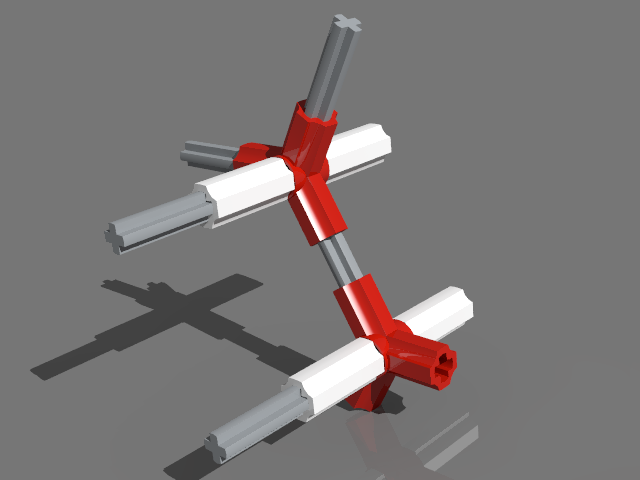
did a quick test using this: as a node, and this script: function onRun() local ses=ldc.session() if not ses:isLinked() then return end local xDiff=120 local yDiff=-69.282 local zDiff=120 local xCnt=10 local yCnt=5 local zCnt=10 local subModelName='node.ldr' local sel=ses:getSelection() sel:remove() local posOri=ldc.matrix() local sf=ldc.subfile() for x=0,xCnt-1 do for y=0,yCnt-1 do for z=0,zCnt-1 do posOri:setPos(x*xDiff, y*2*yDiff+genTools.IF(x%2==0, yDiff, 0), z*zDiff) sel:add(sf:addNewRef(subModelName, 16, posOri)) end end end end This is a very simple one, node might not even be confirm the 'rules' in this thread ? But it being an examples and all :) Things will get more complicated if the node needs rotation etc. It generated 500 nodes (6500 parts) zipped test model + script (needs LDCad 1.6 Beta 2): http://www.melkert.net/action/download/patScript.zip
-
I'll try to setup something useful this weekend.
-
If you want to generate (huge?) repeating patterns using a single submodel you might want to look into scripting using my LDCad. edit: I could write an example if you're interested.
-
[Software] LDCad - LDraw cad
roland replied to legolijntje's topic in Digital LEGO: Tools, Techniques, and Projects
By default the editing pin sits on top of the first ldraw line of the pasted source code. This is why, when you copy a selection, the program sometimes asks if you want to move the first selected part to the top of the to be copied clipboard text. If you coping inside the same model you could also use ctrl+d which will preserve the main selection item. Things might work a bit different when groups are in the (nested) selection as that limits some of the internals in certain situations. You are right I forgot to announce the Beta 2 versions, I only made one on the LDraw.org forum. -
error Line 78 - MLCad
roland replied to neonic's topic in Digital LEGO: Tools, Techniques, and Projects
Probably an invalid/unsupported character, are you using weird submodel names or something? You could try opening it in e.g. LDView or my LDCad to see if it's MLCad specific or not. -
Making a video from a LXF file?
roland replied to Itaria No Shintaku's topic in Digital LEGO: Tools, Techniques, and Projects
Just the parts: http://www.ldraw.org/parts/latest-parts.html A Windows installer with many common tools http://www.ldraw.org/article/104.html -
Fully animated 8860 set
roland replied to roland's topic in Digital LEGO: Tools, Techniques, and Projects
Looks great how long did it take to render in total? Did you find a place to put the original online, you could also split it into two using 7zip without compressing. Did not even know about Ackerman, did wonder why it was using a 3piece steering plate :) If you interested in the mechanics script the animation and its model are included with LDCad 1.6 Beta 2a -
Fully animated 8860 set
roland replied to roland's topic in Digital LEGO: Tools, Techniques, and Projects
The original OpenGL export I made was only 70MB and has excellent quality (h264, youtube uses this codec for most clips). You can make it even smaller while retaining the quality by using the HEVC (h265) codec but older hardware might not be able to play it. -
Fully animated 8860 set
roland replied to roland's topic in Digital LEGO: Tools, Techniques, and Projects
Already looks very nice indeed. FYI I made my original export using ffmpeg using the h264 (bluray codec) settings.