


kbalage
-
Posts
1,832 -
Joined
-
Last visited
Content Type
Profiles
Forums
Gallery
Everything posted by kbalage
-
 42099 was tuned for speed. With the proper gear reduction it had actually more power to climb than the high center of gravity did allow.
 -
Well if you buy a remote and the red button that normally means "stop" in every other scenario would increase the power to 100% instead then I guess you would return the remote as faulty... Usable software for novice users should not be a guessing game by design. That's one of the fundamental issues with the current Powered Up app, why would you want to force users to figure out the irrational and unexpected behaviors of the app instead of designing it in a simple and logical way from the ground up?
-
I think you are missing the point here... it seems to be "easy" because you already figured out that the remote block has a numerical output of +1 and -1 for the + and - buttons. But this still does not resolve the case of the red button since that has a value of 127, so any time you press it (which is easy to do accidentally) that will give full power to the motor. So this is very much like a limited workaround rather then a well designed and easy to use solution to handle the controls on the remote.
-
@Tcm0 this is the simplification approach the PU dev team chose to follow and it is not necessarily a bad one. I still think the example of the -1 multiplier, or the fact that you cannot simply add a toggle button to turn on/off the specific output or the complicated way to assign the remote's buttons shows that it is created with a coder's mindset. Anyway, I would be still super happy if such simple blocks would already cover the basic controls and controllers, but for me this is not the most logical/simple way to create the setup sequence.
-
I'm sorry but I disagree. There's a huge crowd out there who does not want to touch Powered Up because it requires coding and understanding coding principles like start blocks, loops, variables, conditions etc. A straightforward step by step configuration in the app is fundamentally different from coding, even if the latter has examples and error messages. The basic user experience needs to be simplified to a level that becomes comparable to the physical assembly of a Power Functions motor/controller/remote combination.
-
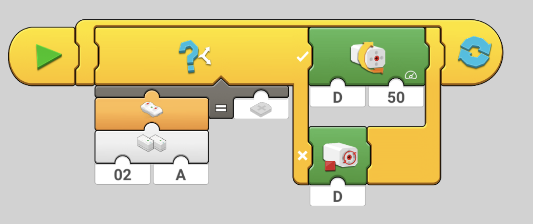
True, but that's again another line of code, meaning for the 2 statuses of a single button I already needed to create 2 lines of code. I could also do something like this: But this is still way too complicated for an average person with no coding experience to figure out. A more user friendly approach would require a totally different interface, probably starting from the hub's outputs: Select port A, then choose a controller you added previously (virtual or physical) from a list, e.g. assign port A to controller buttons on side A. Not only the + or the - or the stop button, all of them. Then select the behavior for the motor, is it bang-bang control, gradual speed control, or servo control. And basically that's it, with 3 clicks you have gradual speed control for your train, or bang-bang control for your car, or servo steering for your car, no coding knowledge required at all. If someone would prefer to fine-tune the settings or add advanced functions, then with another click you could "reveal" the code behind your settings and tweak accordingly, or use the blocks as I did above to set up a custom code.
-
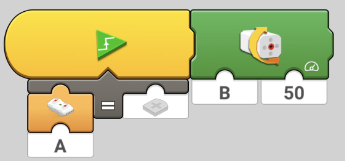
As usual there's no documentation unfortunately. There's a block for the remote that can configured to use side A or B. The output value is either numeric (1 for +, -1 for -, 127 for the red button), or if you add it to e.g. an EqualOperator block, then the "equals to" field shows +, -, red button, or the green button (that one does not work yet). This way you can use the buttons on the remote to trigger any kind of action, like this: Here if the value for the plus button on the A side of the remote changes from false to true (so when it is pressed), then the motor on port B starts to spin at 50%. This is a very simple example, but you can build complex conditions and the buttons can literally trigger anything. Of course the logic comes from coders' perspective so there's no single simple "do this until the button is pressed" block (hopefully there will be), but adding a while loop monitoring the button status can solve things.
-
Actually you don't use the controller as a control device for the app, you configure the behavior of the controller in the app to control motors/lights/whatever you feel like. This makes the controller a highly customizable physical device to control even complex stuff with a press of a button. This does not mean that the controller should not have basic functions without the app, or should not be in fact configurable and usable without the app, but I don't think the approach "completely misses the point". Let's take BrickController 2 as an example. A fascinating app that enables you to control tons of different LEGO and 3rd party hardware, but you need the app for configuration and to act as a bridge. Any hardwired setting for the LEGO controller like the default train behavior is very limited. Configurability is key, and you need an app for that considering the high variety of options. Once it's set up the ideal would be to be able to use it without the app, but I hope this will come once the hubs will able to run standalone code. There was a lot of discussion about PU and its shortcomings, or how TLG should have handled the transition. I think (and these things are my personal opinion, nothing confirmed by TLG) there were 3 main reasons causing the difficulties we see today: Originally it was not meant to be a replacement for Power Functions. STEM/STEAM is a popular buzzword nowadays, so TLG wanted to make every LEGO electronics programmable. This means no simple controls, everything app and code-block based. Control+ for the ones who are fine with the stock set and stock controls, Powered Up for the advanced tinkerers who are already familiar with Boost and want to implement things they learnt there in other (mostly Technic) builds. The development of PU started at least 2 years late considering the planned phase out of Power Functions. They wanted to have a unified hardware platform for all the electronic products, and they chose WeDo 2.0 for this purpose. This is not necessary a bad thing as compatibility is great, but with this decision a lot of core features of Power Functions was lost. Because of these things PU was introduced with the stock profiles in the app for the non-Technic sets and Control+ for the Technic sets. Then came the free coding area without documentation for the advanced users, still nothing for the people willing to switch from PF but having simple controls. A typical indication of the intended target audience was the implementation to control PF with the PU color & distance sensor, that was really high level geek stuff impossible to decipher without a deep dive into the PF IR protocol. But the fan community had a different opinion - people still want a simple to use replacement for Power Functions. I think after a while this was heard and understood, but at a huge company like TLG changing plans is like navigating a cargo ship, whatever you try to do at the rudder will only have a visible effect much later. Changing Powered Up from the advanced Boost 2.0 tinkerer platform to something easier to use than Boost is not an easy task. We can see the first baby steps with the double rounded steering and throttle control blocks, but further simplification will be needed. Running some code on the hubs is again required to create some configurable standalone functions. All these things require awfully lot of development time, and considering that Power Functions is gone already leaves the average customers without an easy to use option. At this point this is what I always suggest to folks who ask me what system to go with - if you need simplicity, by Power Functions parts. 42095 is still available, and you can buy most pieces on the secondary market (except the servo which became shockingly expensive). If you want to use PU hardware and/or advanced remote control functions and you have zero coding experience, then get familiar with Boost, learn to use stuff there, and then you'll be able to do most things in Powered Up as well. If you are looking for a LEGO set with coding and robotics, then 51515 is the way to go (which also has an awful documentation btw). And meanwhile if there's a 3rd party company who'll be able to provide a good alternative solution might be the winner of the whole situation...
-
Well the thing is - this is the only relevant thread for advanced Powered Up-related discussions on Eurobricks and was used for a lot of non-train focused (but related) topics in the past. There is a Control+ thread in the Technic section but despite the obvious overlapping most people simply don't find it because they think Control+ and Powered Up are two different things.
-
@Lok24 & @Daedalus304 I appreciate that this is the train section of Eurobricks so most people here are focusing primarily on LEGO trains and would like to see features implemented for them. But on the other hand I think if we are trying to raise awareness and push TLG to implement features, that's more successful if it has a potentially high user base and it is useful for stock sets, not only MOCs. What you are trying to achieve is very easy to do through the app at the moment, using the controller as an input. I agree it would be very convenient to be used without the app, but adding a single restrictive feature for a very specific setup with e.g. a custom firmware is a lot of work and would be used by a relatively small amount of people (compared to the amount of customers who bought PU-equipped sets). Adding e.g. the ability to assign the output mode to the ports of the hub as @blondasek mentioned and be used directly with the controller could be used in more cases, like: trains - select between gradual and bang-bang control, e.g. the ability to turn on/off lights while gradually controlling motor speed faster cars (e.g. 42124) - bang-bang control for speed, servo control for steering slower vehicles - (e.g. 42114) - gradual control for speed, servo control for steering As there were a lot of cars released with Powered Up and a lot of parents would like to see their kids only using the remote and not the app, this is a better solution to "fight for" as more people would benefit from it. Btw bang-bang control can be used for cars regulating the speed and it works relatively well, and 2 button steering works ok too. I would still prefer proportional joystick control, but that's another story.
-
That would still not help to define the motor type. From a practical point of view, how many people would require a 2 port hub with only gradual speed control on both channels? It'd help with a specific case for the Crocodile locomotive, but what else? @blondasek The VM plans were announced at Brickcon last year with a closed beta starting this year, but I guess the ongoing pandemic situation delays a lot of things. Unfortunately I don't know more about the plans, but based on previous discussions simplification and improved usability is the priority. I'll advocate the controller flexibility if I'll have a chance :)
-
That'd help, but as you said it's only the start. Unfortunately the implementation of the gamepads is far from being good in RI, the speed heavily depends on the performance of the smart device.
-
@blondasek the challenge would be to set the behavior of the motor. You'd need to define somehow if you want to have bang-bang control for a specific motor, or gradual speed control, or servo control. That's why it is currently working through the app where you can define the parameters for the motors. The expected standalone mode where the code can be loaded to the hub could be a solution for this, let's hope that it'll be included. Otherwise I'd love to see a controller with proportional joysticks and buttons that can be configured via the app, and then used in standalone mode with the hubs. I'm not sure that one will ever become reality...
-
Technic 2021 Set Discussion
kbalage replied to LvdH's topic in LEGO Technic, Mindstorms, Model Team and Scale Modeling
This forum is a Recognized community by TLG, and agreed to follow the rules so no obviously confidential images are allowed. -
Don't think so. That hub is reserved for Spike Prime and Mindstorms with a different coding approach.
-
Control+ General Discussion
kbalage replied to Jim's topic in LEGO Technic, Mindstorms, Model Team and Scale Modeling
As he said he has 2 motors working and 8 not working. @mortil - maybe you missed my question, did you try to reach out to LEGO support with your issue? If you did, what was their answer? And another troubleshooting tip, try to hook up the problematic motors to a hub according to an official set's configuration and test them with the Control+ app to see if they have the same behavior. -
Control+ General Discussion
kbalage replied to Jim's topic in LEGO Technic, Mindstorms, Model Team and Scale Modeling
Well as you said we talked about this issue already 6 months ago and you still have this problem unresolved. Apparently there's no easy explanation or fix for this, did you already try to ask LEGO support about it? -
Control+ General Discussion
kbalage replied to Jim's topic in LEGO Technic, Mindstorms, Model Team and Scale Modeling
Then as I said before, narrow down which motors are the problematic ones and ask for a replacement from LEGO. -
Control+ General Discussion
kbalage replied to Jim's topic in LEGO Technic, Mindstorms, Model Team and Scale Modeling
@mortil another test you could try to eliminate the potential root causes - set up the most simple code to run the motor without the slider, just the simple motor power block at max speed and run it to see if it is the same behavior. -
Control+ General Discussion
kbalage replied to Jim's topic in LEGO Technic, Mindstorms, Model Team and Scale Modeling
Oh yeah I remember :) I'd try to match the motors and hubs running freely and test them. Hub A with motor A, hub A with motor B, etc. You'll be able to see then if it is about the motor or the hub. Once you have the problematic ones narrowed down get in touch with LEGO and let them know that you have some defective ones, they should give you a replacement. -
Control+ General Discussion
kbalage replied to Jim's topic in LEGO Technic, Mindstorms, Model Team and Scale Modeling
@mortil does the same motor shuts down if you remove it from the MOC? If it only shuts down in the MOC then it has to do something with the resistance of your construction and the protection kicks in. The protection in the PU hubs kicks in sooner than we used to see with PF. Here's a comparison driving the same PU and PF motors with PU/PF power sources (timestamped the video to the relevant part): -
42120 Hovercraft
kbalage replied to Ngoc Nguyen's topic in LEGO Technic, Mindstorms, Model Team and Scale Modeling
A great and highly functional B model: -
42121 Hydraulic Excavator
kbalage replied to Ngoc Nguyen's topic in LEGO Technic, Mindstorms, Model Team and Scale Modeling
Here's my video review of the set (with some Star Wars cameos): -
Lol, I saw the same ad a dozen times :) Great build, love it!
-
42116 Skid Steer Loader
kbalage replied to JintaiZ's topic in LEGO Technic, Mindstorms, Model Team and Scale Modeling
Here's my video about both the A & B models. Fun fact (besides the somewhat unnecessary but still present black bush) : The B model uses 2 LBG frictionless pins but the A model only has one, so the second one comes from the spares. I can't recall any other Technic set where the B model used the spare pieces.