


Superkalle
-
Posts
6,069 -
Joined
-
Last visited
Content Type
Profiles
Forums
Gallery
Everything posted by Superkalle
-
LDD 4.3.5 is out
Superkalle replied to Superkalle's topic in Digital LEGO: Tools, Techniques, and Projects
Adding to the wize words allready said, there are (at least) two ways to view the "red bricks" in UnplaceableBricksDump: 1) Unzip the LXF and then view the LXFML in a text editor and search for materialID 21 2) Import the file into LDD Manager and look at bricks that are red Sure, these will not tell you where the offending bricks is, but at least you get to know which bricks were removed. -
LDD 4.3.5 bugs
Superkalle replied to Superkalle's topic in Digital LEGO: Tools, Techniques, and Projects
It's an important point. Found this on the topic: http://techcrunch.com/2012/04/11/move-over-1024x768-the-most-popular-screen-resolution-on-the-web-is-now-1366x768/ Quote: Among those who will be happy to hear these numbers is surely Microsoft, which long ago decided that it would target 1366×768 as the standard resolution for Windows 8. For the next version of LDD, I'm also hoping for a review of the GUI, including re-organizing the screen. Possibly making the color palette available all the time (like the brick palette is today). And with the increased width of screens today, maybe it can be put out to the side. -
LDD 4.3.5 bugs
Superkalle replied to Superkalle's topic in Digital LEGO: Tools, Techniques, and Projects
Thanks for the info -
LDD 4.3.5 bugs
Superkalle replied to Superkalle's topic in Digital LEGO: Tools, Techniques, and Projects
The story continues (thanks for great discussion ) The macaroni-piece is a special case, since the bracing on the updated brick was placed in such a way that it could only be connected "in two ways". When I'm talking about "reinforcement bars" on the underside of the bricks, I'm referring to the ones like the 3x4 wedge plates. The difference here is more minute changes to the reinforcement, and I can't see how they would alter how the brick is used even with the best of imagination. Agree - The wigs I don't know if there is a difference in the physical bricks (but I can see there is a difference in LDD) - The treads have minute reinforcement when looking at the physcial bricks that are virtually impossible to notice for any normal builder. It's only a matter of difference bracing for increased strength and will not affect any kind of usage. - The large arch is OK, because there you can see the difference on the underside allowing you to connect a stud - The smaller arch however has not difference at all between them. The only difference I know of is that the LEGO logo was turned 90 degrees on the stud. - Same with 3x4 wedge plate. Only difference in bracing that will not affect building in any way (IMHO) - S-brick I agree on. One of them allows a middle stud connectivity. - Quarter cylind bricks I agree on too (but there I spotted a bug in LDD, since the old one allows placement of studs in places it shouldn't. Reported.) Agree, difficult to know the difference. -
3D program for posing minifigures?
Superkalle replied to kibosh's topic in Digital LEGO: Tools, Techniques, and Projects
Meaningless comment -
LDD 4.3.5 is out
Superkalle replied to Superkalle's topic in Digital LEGO: Tools, Techniques, and Projects
I usually get one from the LDD team to post here, but because of some of the bricks was added by mistake (like the 3x3 plate) in I was asked to wait a while 'til all is sorted out. -
Hi Great looking truck I'm moving this over to the Technic forum
-
[Software] LDD2PovRay
Superkalle replied to Superkalle's topic in Digital LEGO: Tools, Techniques, and Projects
Whatever? Please remember this is an AFOL site. On topic: have you checked through the topic for your problem? I have a vague memory it has been discussed. -
Nice heads up. I managed to find this on YouTube: http://www.youtube.com/watch?v=ELcMaUyRuQQ
-
LDD 4.3.5 bugs
Superkalle replied to Superkalle's topic in Digital LEGO: Tools, Techniques, and Projects
Made a considerably trimmed down LXF of potential remove items. (and added Qui gons hair) IdenticalElements7.lxf Also revised my proposed criteria for judging potential bricks to remove to simply be: Is the bricks fully interchangeable in respect to usage/function as well as visual appearance (looking at a physical brick) when used/applied? -
The race A render by bbqqq using Hrontos LDD2PovRay tool. Comment here

-
Odd, I can make it fit.
-
LDD 4.3.5 bugs
Superkalle replied to Superkalle's topic in Digital LEGO: Tools, Techniques, and Projects
How do you mean not fully painted? This is what I got when I tried.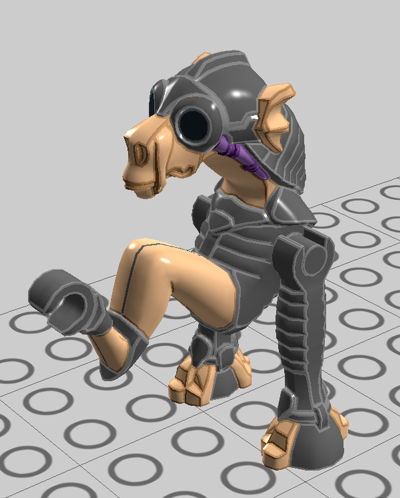
-
LDD 4.3.5 bugs
Superkalle replied to Superkalle's topic in Digital LEGO: Tools, Techniques, and Projects
Looking at visual apperance in LDD as critiera is certainly tricky since the Level of Detail in LDD isn't the best, and has varied over the years (more recent bricks seem better). So any judgement should probably be made only on physical bricks. Having said that, I propose the following questions as criteria: 1) Is there a difference in usability between the bricks? This would include even the most minute details like the stud cut-outs in the slope/roof bricks and the number of anti-studs on the underside of the 6x6 tile. If there is a difference - both should be kept. 2) Does the community distinguish between the variants, i.e. does sellers on BrickLink separate between them. If so, both should be kept in LDD, even though they look identical (on the LOD level that LDD is). Example, the small tires 59895 and 3139. 3) Is a brick merely a DesignID replacement at TLG? I.e. they basically just assign a new DesignID to an existing brick and it's completely impossible to spot any difference. Then one could go. Anyway, based on your discussion on the bricks above Aanchir, which are possible to remove from LDD. Can you compile them into a short list? -
[Software] LDD Manager
Superkalle replied to Superkalle's topic in Digital LEGO: Tools, Techniques, and Projects
No, it will open the generated LXF in LDD, and then you have to save it manually in the "UserPalettes" folder. The reason for this is that I want LDD to open the file and verify so that all bricks were correctly placed etc. Then you can save it. LDD acts like a kind of "quality filter" in this case. -
LDD 4.3.5 is out
Superkalle replied to Superkalle's topic in Digital LEGO: Tools, Techniques, and Projects
Yeah, and you can even rotate the models in the Start Window. Check it out. Problem with these functions is that loading 3D-data takes a lot longer then loading just 2D images, so it slows down the application -
LDD 4.3.5 bugs
Superkalle replied to Superkalle's topic in Digital LEGO: Tools, Techniques, and Projects
I've attached a list with seemingly identical bricks I've been compiling over the years. Which of these do you guys think are candidates for removal? IdenticalElements6.lxf -
LDD 4.3.5 bugs
Superkalle replied to Superkalle's topic in Digital LEGO: Tools, Techniques, and Projects
That was actually kind of funny Anway, just so we are all talking about the same things DesignID - same as mold design, i.e. a particular shape of a brick (called ItemID in BL) MaterialID - color ElementID - a certain DesignID and MaterialID combination. (e.g. 5183315). BL calls these "Part Color Codes" Part number is not a good term to use, since in many industries, a part number is what LEGO calls ElementID, but AFOLs tend to use it to mean DesignID. (yeah, you might have to read that sentence twice ) So, DesignID's are always shown in LDD. These map to about 80% with BL counterparts. The rest are BL bricks like "x874". ElementID are not shown except for in LDD mode (like Hrontos says). Last year I ran some comparison test between the ElementID's in LDD vs. BL, and found that about 60% differ. LDD seems to use ID*s that are not known (for the public). In LDD Manager I use BL ID's, because they are based on data at the back of instruction guides, and therefore use the DesignID's that can be used when ordering bricks from LEGO (which is basically the only time you have any use of them). The BL Element ID's are correct to about 98%. I've seen this when ordering bricks for LUGBulk. So to conclude, LDD ElementID's I don't know where they come from and how useful they are. The BL ones I know are correct to about 98%. So LDD Manager uses BL ID's. -
Well, yeah there is a rule of max 800 pixels width, so to keep loading times and page layout in control. I agree that it's annoying for people who have good info to share, but don't want to spend time resizing pics. But if you have the time, it would be appreciated. Otherwise, maybe you can write some "article" text here, and then at least put links to the pics in appropriate places. Maybe that can be a good compromise (even though there is nothing as nice as a little eye-candy off course). EDIT: Just noticed the BS folder is "not yet public". Strange, I looked at it the other day
-
LDD 4.3.5 bugs
Superkalle replied to Superkalle's topic in Digital LEGO: Tools, Techniques, and Projects
This thing with duplicate parts is an interesting question. In LDD Manager, I have had problems because of this, since different LDD parts variants need to be mapped to different BrickLink ones. Sometimes, there are more variants in LDD then in BrickLink (like the 2x2 plate). Sometimes it's the other way around (for example BL do not distinguish between molds/DesignIDs for the transparent vs. solid 1x1 cone.) For many LDD users, I think the main concern is that it's confusing and annoying, but like Aanchir says, it has no practical implications. And in some cases it's important to have two versions because BrickLink distinguish between them, and you need to specify right in LDD to get the right one at BrickLink. However, I agree that there are some parts that can actually be removed in LDD even for advanced users, because not even LEGO themeselves treat them differently. Once again, the 2x2 plate is an example. If you order the 2x2 from LEGO, you actually use the old DesignID (3022). So, why do they even put out new DesignID's at LEGO. The general rule is that a new DesignID is assigned when a physcial change has been made to the design of the part and a new mold needs to be made. This can even be minute differences that users won't even notice (like a different shape reinforcement bar on the brick underside). To make it complicated, sometimes LEGO keeps the same DesignID even though there is actually a new physical design. This is off course not good, because it means that BrickLink will list two parts, where LDD only has one. There are a couple of examples, like the "2578 shield box". EDIT: examples of bricks that can be removed in LDD: 94148 2x2 plate 6188 1x1 Nose Cone TR. 594891x2 tile engraved -
[Software] LDD Manager
Superkalle replied to Superkalle's topic in Digital LEGO: Tools, Techniques, and Projects
Yes, you get a list of the bricks that could not be converted/imported from BrickLink (most often because the brick doesn't exist in LDD). -
[Software] LDD Manager
Superkalle replied to Superkalle's topic in Digital LEGO: Tools, Techniques, and Projects
I uploaded a new version now for some beta-testing. Let me know if anything doesn't work. Besides updating to fully support all the news bricks in 4.3.5, I also made a big upgrade to the "LXF Generator"-functionality that will allow you to make file to place in the Custom Palettes folder. https://docs.google.com/folder/d/0B9Ysf2u0fN8pbzcwVmxWSWthdFE/edit And this is what a generated LXF looks like (In this case set 4757, Prisoner of Azkaban):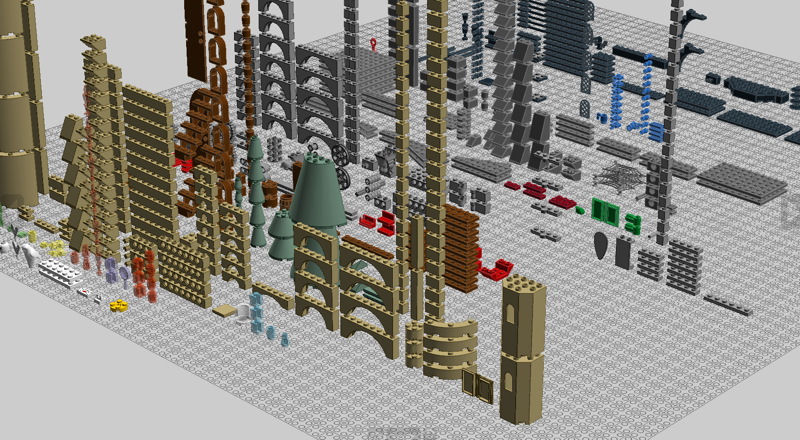
-
LDD 4.3.5 bugs
Superkalle replied to Superkalle's topic in Digital LEGO: Tools, Techniques, and Projects
It's a know limitation and you can find more of those examples. LDD does not test how a brick get to it's position, only if it will fit once there. -
Excellent work If you would have the time to eventually make a post here with some pics embedded, and some text it would be MUCH appreciated.
-
LDD 4.3.5 is out
Superkalle replied to Superkalle's topic in Digital LEGO: Tools, Techniques, and Projects
I'm developing the function in LDD Manager now, and it works very nice. At the moment it will accept any list of LDD or BL bricks or colors with quantities in any combination (i.e mixing LDD and BL ID's). It also now support all assemblies (something it didn't do before), and also decorations (when using BL IDs). It will also allow (as before) to import any BL set inventory, also now including quantities, to produce a LXF with all the bricks necessary to recreate official sets. All the bricks are placed programatically in a nice matrix on the scene, so you can open the LXF to verify the content and review the bricks before placing them into the CustomPalette folder. I'm also looking at preparing a number of LXF files with some different variations (this is basically using the function for "color warnings" that allready is in LDD Manager). For example a LXF with all bricks where "Lots for Sales" > 5 AND "Known Colors" > 0. This means you can see directly in LDD which bricks exist in which colors. It is basically the same as "LDD" mode, only that this is based on bricks that are actually available.