ApophisV
-
Posts
3,125 -
Joined
-
Last visited
Content Type
Profiles
Forums
Gallery
Everything posted by ApophisV
-
That some volunteer (*cough* DoubleT *cough*) has to sleep on the hard, tiled floor without of pillows or blankets! :-P :-P :-P
-
As the Captain so nicely said: "there is no invalid technique"! :-) Actually I don't think that this will "warp" the plastic more than a normal connection between bricks, if you think about it, the material Lego bricks are made of is designed for the purpose to be stretched tiny bits (otherwise no brick would lock to another brick's studs!) and return to its original size after removing the attached part. Surely your parts will become harder and brittle when they are connected to each other for a long time (meaning several years), but that doesnt depend on the techniques you use! I wouldn't worry too much about valid or invalid techniques but start to try out which techniques work best for you and with what building style you have the most fun and can build your best MOCs! Lego is a toy you should play with and not worry about it's flawlessness all the time! ;-)
-
Great improvements! *y* The front doesn't really appeal to me though. The round shape of the first version was much better in my opinion. As Suvie I would suggest a more bulky and round shaped front instead of the pointed one. And there is one other thing: By making the front hull longer the wings seem to sit exactly at the middle of the ship's sides. In the old version they seemed to be attached closer to the front than to the rear which made the overall shape looking like some "two bladed fork". Now its more looking like a "standard design" because the wings are sitting on the place you most probably would expect spaceship wings to sit which makes the new Jeopardy looking less original. Try to put the wings 2 or 3 studs more in direction of the front and make the front itself shorter - you will get an really cool, unique and agressive looking fighter! Well, enough grumbled, you surely also need some positive feedback now ;-) First of all: I completely have to disagree with Yoda's "the monotony of colours" comment since I really love the color scheme! Grey, Darkgrey and Yellow look just beautiful together! Generally you made the ship more bulkier which is just brilliant! One can clearly see the idea behind such a craft: "Let's build a powerful, fast and heavily armed and armored ship to kick some badasses and don't care for the look, it's a flying tank, not a Ferrari!!!" I'd rather buy this ship than a cute chrome Naboo Yacht thing >:-) The weapons are as perfect as before, those additional guns are looking as great as the main guns! Man, I love those technic-technique! ;-) Finally, the greebling is also well done! I esepcially like those small yellow dragon-wing-helmet pieces! :-D
-
In the comics, most things Jean Grey does when appearing is dying or resurrecting.... *wacko* :-P
-
Thanks alot!!! :-D We will put all efforts in keeping this place the nice virtual home it became for so many people the last two years! *wub*
-
I don't get it either, your explanations fits exactly to our BTS-Forum... *wacko*
-
Good boy! :-P ;-)
-
We don't have to delete the topics we made? :-/ Otherwise we could set the whole board to delete every topic in every forum after 30 days of no replies?! X-O Would be kinda the same, right?
-

StarGate:SG1 and StarGate:Atlantis
ApophisV replied to Peoples_General's topic in Culture & Multimedia
I like it very much! And I already did some Stargate MOCs some time ago. Have never seen Atlantis though because I have no TV here at my flat... |-/ EDIT: But my DVD collection is growing, no boxes but single DVDs! :'-) -
Now all topics should show up! And it's a read-only archieve! Everything cleared up?
-
My entry: http://eurobricks.hosting.ipsyn.com/eurofo...?showtopic=4129
-
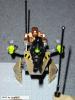
LDU-1 Niobium Light Defensive Unit, build from 7700, 7708 and 7711 Another view: A speeder I build with the rest of the sets: And finally the only part of the whole thing I really like: The gun! >:-) Gallery after moderation The mecha didn't come out as nicely as I hoped, mainly because I had to add too many parts because of stability reasons which left less parts for the design.. |-/ Critics and comments welcome!
-
Actually this is the forum where all the threads from the special months like the Potter Month went to. This forum is not supposed to be an active one but it's meant to be an archieve for the threads of the post special months. Hope that cleared things up.
-
Sweet! I love the head and the dragon pieces, his shield looks a bit small though ;-)
-
If you select at the bottom of the category page the option to show all topics from the beginning (instead of the last 30 days) there will show up many, many threads! Actually I don't think we want to loose all our old threads, or am I wrong with this?
-
You're welcome! :-) Actually I think it would be great to have more tutorials for other progams too, as soon as I have the time for it I will make one for Paint Shop Pro too. If there are some volunteers for doing them for other progams (Photoshop,...) just PM me! ;)
-
Bought 7700 - Stealth Hunter for me and 4417 - Aero Pod for Aredhel!
-
As you see the Lego-Smilies are back! :-) I haven't finished uploading them so far since I have to dig through my HD to find all and I will have to sort some of them out. I haven't figured out how to sort the smilies in the "Clickable List", that's why they are still in a confusing order... I will let you know as soon as I add more! -Apo
-
It appears to be a combination of bley and old gray. That is right, there are two reasons for this: - I mixed several of my Star Wars sets for this creations, both old colored ones (AT-AT,...) and some with the new colors (Millenium Falcon,...) - I really like the look one can achieve by randomly taking old or new grey. It looks more realistic to me since a space vehicle (espcially those that are able to do atmospheric flights too) will look "dirty" after some time of usage. (And as I said to Aredhel while building: "Whoaw, this is probably the biggest scrap heap I ever constructed!" :-D )
-
Resize your pic! Its too big. -l2k- Please look at the picture resizing tutorial!
-
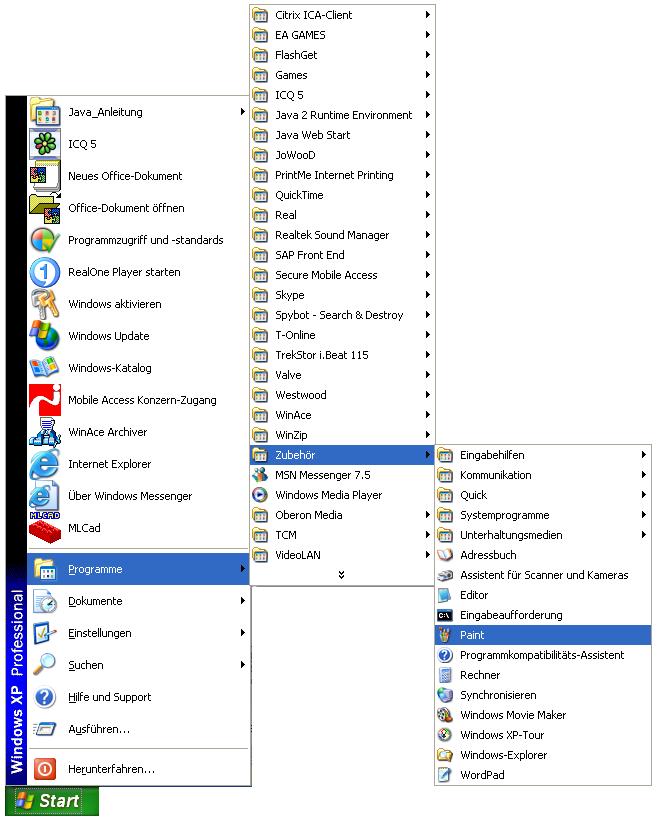
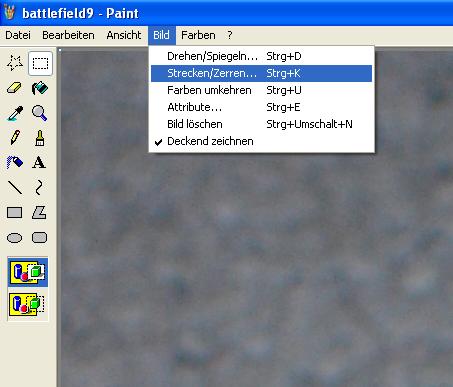
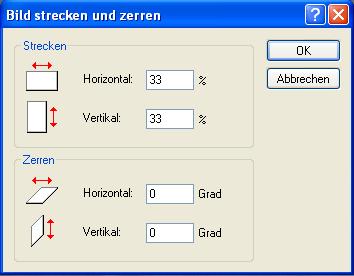
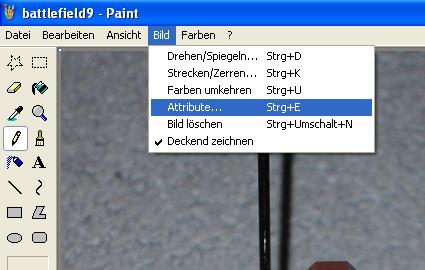
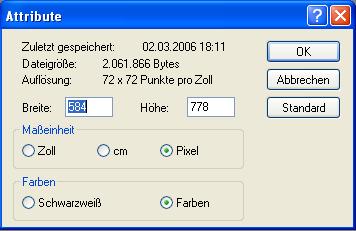
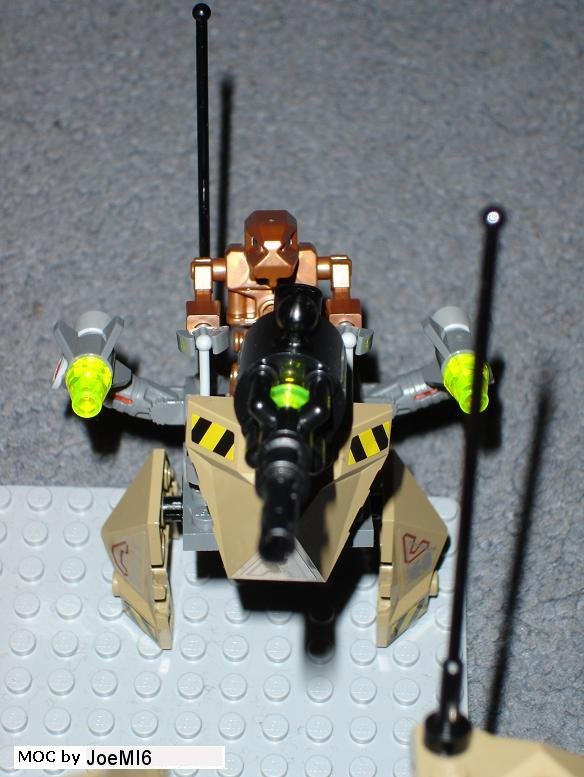
Since resizing pictures to Internet-friendly sizes seems to be a problem for many people I thought I would do a small tutorial, so here we go: For simple resizing you don't need anything else than Microsoft's on-board graphic program MSPaint (users of other OS' have to find it themselves ). I made the whole tutorial on a German version of WindowsXP, so there might be some confusing words, but I think it shouldn't be a problem for you to figur what the entries are called in English or whatever your Windows language is. As example I use JoeMI6's Exo-Force MOC. Go to your Start menu and try to find the entry pictured below (probably Start / Programs / Accessories / Paint) Now go to File / Open... and open the image you want to change. After opening it you might want to check what the dimensions of your image are. This can be done via Image / Attributes. You will see window similar to this one: You can see now the dimensions of your image, width x height. The shrinking itself will be done with another function of the program, but this screen is important since you have to know what the original size of your picture is. Close this window without of changing anything and go to Image / Stretch/Skew.... This screen will open: Now you have to enter the percentage you want the image to be shrunken. An example: If the picture is originally 2400 x 1800 and you want it to be 800 x 600 you have to enter 33% for both values at the upper "Stretching" fields. After clicking on "OK" you will see the result. Check the dimensions again at the Image / Attributes window. They should be smaller now and the result should be something like this: Now you can save the image, you might save the changes in a new file if you want to keep the original High-Resolution image (That is at least what I do) Now a final word about dimensions: As a long time user of a 1024 x 768 resolution for me pictures that are not larger than 800 x 600 pixels (or 600 x 800). In some cases images of a size of 1024 x 768 pixels are okay, but this is only the case for large models with lots of details. For small creations sometimes even 640 x 480 works perfectly! Hope all of this is understandable, please let me know if there are any problems with this tutorial so I can edit it to make it easier to understand! :smile:



-
Jon: Dana and me also need one parking space if can still manage this! Even if we (erm... me... :$ ) will create lots of chaos in your weird traffic! :biggrin:
-
Every seller converts it like he wants to. There are some sellers here in Germany that always convert with the same course like e.g. 1 $ = 0,90
-
Star Wars Episode III as my Good-night-DVD....
-
google.com is a bot that searches our board for relevant entries for their search engine. It is integrated into our new board system.