

papacharly
-
Posts
183 -
Joined
-
Last visited
Content Type
Profiles
Forums
Gallery
Everything posted by papacharly
-
Hope, this is sufficient snow and ice to be in compliance with the theme:
-

EB Xmas Raffle 2018 - Your Santa MOC winners thread
papacharly replied to CopMike's topic in LEGO Town
Many, many thanks, CopMike. Manatee E has arrived. You won't believe how absolutely amazing it is to get 18.5 grams of colored plastics ! -
EB Xmas Raffle 2018 - Your Santa MOC entry thread
papacharly replied to CopMike's topic in LEGO Town
Ooops, just realized that I posted in the wrong thread. May anybody shift it to the winners thread? Thanks. -
EB Xmas Raffle 2018 - Your Santa MOC entry thread
papacharly replied to CopMike's topic in LEGO Town
Yeah, the 4th had been with me. May the force and the luck also be with you! My manatee is based on the manatee designed by the TheBritWrites -
EB Xmas Raffle 2018 - Your Santa MOC entry thread
papacharly replied to CopMike's topic in LEGO Town
Many thanks to Cop Mike and peaceful christmas to all galaxies -
Greatest manatee of all time arrived yesterday: Prize A !!! Thanks, CopMike!
-
EB Xmas Raffle 2017 - Your ideal Christmas tree entry thread
papacharly replied to CopMike's topic in LEGO Town
Here comes my ideal christmas tree. The story behind my christmas tree is the so called christmas truce around christmas 1914 (World War 1). In the week leading up to the 25th, French, German, and British soldiers crossed trenches to exchange seasonal greetings and talk. There were joint burial ceremonies and prisoner swaps, while several meetings ended in carol-singing. Check out the full story on Wikipedia. -
Mecabricks + Blender Showcase
papacharly replied to Scrubs's topic in Digital LEGO: Tools, Techniques, and Projects
Wow, Scrubs, I'm deeply impressed. Are you sure it's a rendering? It's hardly possible for me to find any sign that this is a rendering. Maybe the scratches on the green curved parts at the same angle of around 45 degree are a tiny bit unlikely. Great job! -
if you check "xml" in LDview a lot of ldraw parts get replaced by lgeo parts. lgeo parts are more nicely shaped, e.g. with rounded edges. Lgeo parts are intended to generate a higher level of realistic renders. You can see this on your renders above. Furthermore Lgeo uses its own color definition file (=> lg_color.inc). Which means that Ldraw colors and Lgeo colors may not be the same. Regarding the missing number I think it's just a human error. So luckilly you have no problem. It's just the way Ldraw and Lgeo works... Using pov-ray you may easily tweek all colors to your needs. Search the pov file (no xml) for the following code: #ifndef (LDXColor0) // Black #declare LDXColor0 = LDXOpaqueColor(0.019608,0.07451,0.113725) #end If you wish to have it real black change it to: #ifndef (LDXColor0) // Black #declare LDXColor0 = LDXOpaqueColor(0,0,0) #end If you wish to change the lgeo colors you have to modify lg_color.inc. regards papacharly
-
Pov Ray 3.7 Transparency problem
papacharly replied to Gunman's topic in Digital LEGO: Tools, Techniques, and Projects
Did you already gave a try to the following? Clear the pov-ray command line. Then add +fn +ua: +fn generates png file output +ua generates transparent background For my pov-ray 3.7 it works fine. Hope, it works the same way on your system. regards papacharly -
75144 Snowspeeder [Star Wars] Download MPD-File Errors: - no stickers - minifigs have wrong patterns
-
EB Xmas Raffle 2016 - Your ideal Snow entry thread
papacharly replied to CopMike's topic in LEGO Town
Thanks so much, Cop Mike! I also received these great minifigs equipped with proton packs. ... and some missing ingots too However, I am happy with it, thanks again and don't care about the ingots. -
EB Xmas Raffle 2016 - Your ideal Snow entry thread
papacharly replied to CopMike's topic in LEGO Town
Yeah, yeah, yeah! Thanks for this wonderful flying manatee ! -
Glad you like it, thanks. Indeed, in 2007 there were 11 bottles of whisky found underneath Shackleton's antartic refuge at Cape Royds, McMurdo Sound. But this whisky was hidden in the years 1907 to 1909 during Shackleton's Nimrod expedition. The goal of this expedition was to reach the south pole.
-
Me too!! Thanks for your reply.
-
Shackleton's Endurance in Minifig Scale In August 1914, Sir Ernest Henry Shackleton started an incredible expedition to the Antarctic.This voyage is also known as the Imperial Trans-Antarctic Expedition. Endurance was the name of the ship in which Sir Ernest Shackleton sailed for the Antarctic. On board were 28 men and 69 dogs. Shackleton planned to cross the Antarctic on foot. But shortly before its arrival in the Antarctic the Endurance became locked in ice and was finally crushed. Thus the legendary survival of Shackleton and his crew began. Length 166 studs (131 cm) / Width 50 studs (39 cm) / Height 103 studs (81 cm) Built with LDCad 1.6 alpha 4 / Rendered with POV-Ray Shackleton's Endurance by Papacharly by Papacharly
-
EB Xmas Raffle 2016 - Your ideal Snow entry thread
papacharly replied to CopMike's topic in LEGO Town
Desire - Waiting for Snowfall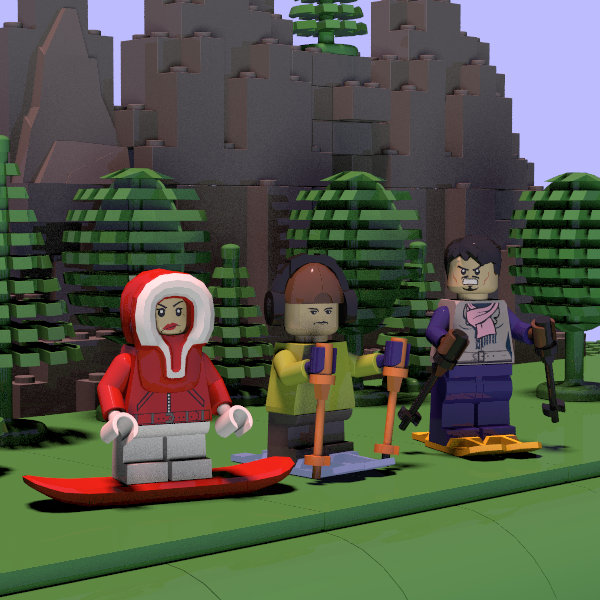
-
10252 Volkswagen Beetle [Creator] Errors: no sticker MPD-File
-
LDraw POV-Ray animations
papacharly replied to roland's topic in Digital LEGO: Tools, Techniques, and Projects
Hard to realize that my povray knowledge is kind of old-fashioned, as I still stick to ambient instead of emission. Seems I have to learn again and reconsider my technique (some day) ... Possible solutions for avoiding this hard separation are given in this topic. And kudos to you for doing all the work with respect to LDcad!! Great tool. -
LDraw POV-Ray animations
papacharly replied to roland's topic in Digital LEGO: Tools, Techniques, and Projects
Roland, from my understanding (1) ambient is a simple, but effective and good method to add lighting to black shadowed areas. You may state this method is kind of a fake. (2) radiosity is an high Q and advanced ray tracing method to calculate the influence of scattered light from all parts to all other parts, respectively to shadowed areas too. So this method simulates reality. Obviously this is a time consuming procedure. (3) emission is not meant to replace ambient light or radiosity. If you add emission to parts, these parts will emit light, they act as a light source!! As bricks usually do not glow, I think its better to not use emission. The same is true for your plane (floor). BTW: A good method to only see e.g. the influence of the plane (or any other part) is to switch off all other lights (light sources, sky sphere, glowing bricks,…). Feasible standard values (without radiosity) usually are ambient 0.3 and diffuse 0.7. If you use radiosity instead you may set ambient to 0 and diffuse to 1. This is your setup (test_pc.pov, incl_pc.pov) without emission and radiosity, but with ambient 0.3 and diffuse 0.7: Not sure I understood your requirement “single default setup …” in the right way: If you use the same settings for rendering, rendering either with or without radiosity definitely has to lead to different results. If you would not see any difference after rendering it would make no sense to add radiosity. Sky sphere: I do not use sky sphere as a light source. It generates some kind of homogeneous respectively unnatural lighting from all directions. I prefer setting up specific light sources. It may make sense if you wish to create some patterned sky, respectively if you explicitly intend to show parts of a patterned sky in your renders. So what’s the reason for using sky sphere? What are you aiming for? BTW: An excellent povray tutorial with lots of examples can be found here. -
LDraw POV-Ray animations
papacharly replied to roland's topic in Digital LEGO: Tools, Techniques, and Projects
I agree to SylvainLS: Rendering radiosity settings, especially HQ radiosity settings consumes a lot of time. Especially if you not just have a single render but a sequence of many renders. I use very simple global settings for most of my renders: global_settings { assumed_gamma 1.0 } Usually I do not use radiosity for my renders at all. My experience is that radiosity does not much improve the visual impact of a lego render. The main issue for a render with respect to a natural look is lighting! So if your lighting is poor, your render looks kind of artificial. However, in the case that I use radiosity settings I use very fast and low Q settings: radiosity { pretrace_start 0.08 pretrace_end 0.02 count 50 error_bound 0.5 recursion_limit 1 } So what’s the reason that you are not satisfied with your render? Which feature is less optimal? May you please provide a render? regards Papacharly -
10030 UCS Star Destroyer [star Wars] Download MPD-File (OMR compliant) Done with LDCad 1.5. Dat file for Display Sticker generated with Sticker Generator by R.Melkert and imported into the mpd file as unofficial part via MPDCenter. To show sticker in LDCad place the sticker image file alongside the model file. The structure of the mpd file follows the instructions. So we have 135 submodels and around 600 steps. Errors: hopefully none
-
10174 UCS Imperial AT-ST [star Wars] I am glad to present the 10174 UCS AT-ST. … and I can tell you: For me this was a tough nut to crack! Especially connecting the side parts of the drivers cap to the main model made me kind of desperate: It was necessary to fine adjust several angles successively in small steps by trial and error so as to get a best fit. After each step I had to check the result by visual means. Although I had not been able to avoid some small collisions I am finally satisfied with the result. Download MPD-File (OMR compliant) Done with LDcad Rubber band generated with Philo’s “Rubber Belt Generator” Errors: Missing display sticker regards Roland
-
#33 - 3 points #21 - 1 point #30 - 1 point
-
Please search for file lg_color.inc. Usually you can find it in LDraw/LGEO/lg. You can open this file with povray. You will find the following terms close to the beginning: /**************************/ /* FINISHES & NORMALS */ /**************************/ #declare lg_solid_finish = finish { ambient 0 #if (lg_quality > 1) diffuse 1 brilliance 1 phong 1 phong_size 40 reflection { 0.025 falloff 1 exponent 1 } #end conserve_energy } For disabling reflection please manipulate the reflection term as follows: reflection { 0.0 falloff 1 exponent 1 } Save this file and render again. Does it work? Regards Papacharly