


Jim
-
Posts
17,203 -
Joined
-
Last visited
Content Type
Profiles
Forums
Gallery
Everything posted by Jim
-

Technic 2019 Set Discussion
Jim replied to dimaks13's topic in LEGO Technic, Mindstorms, Model Team and Scale Modeling
O wow....didn't think of that LoL. Thanks buddy. -
Technic 2019 Set Discussion
Jim replied to dimaks13's topic in LEGO Technic, Mindstorms, Model Team and Scale Modeling
Do we have list with part counts? And maybe the RRP (price) per set? (of all the 1H 2019 sets) -
Technic 2019 Set Discussion
Jim replied to dimaks13's topic in LEGO Technic, Mindstorms, Model Team and Scale Modeling
Agreed. There is no official agreement, but TLG keeps track of the reports. When I fail to "deliver", Eurobricks will be removed from the Technic review list. And this goes for other themes as well. You can call it a Gentlemen's Agreement. That's a WIP.....here's proof of that.... -
Technic 2019 Set Discussion
Jim replied to dimaks13's topic in LEGO Technic, Mindstorms, Model Team and Scale Modeling
Yes, I already finished building the Porsche. And I am working on the other sets and written part of the review(s). To curb your enthusiasm....the reviews will be less elaborate as other reviews. Of course, they will all contain enough pictures and a summary with my thoughts (pros and cons) -
Technic 2019 Set Discussion
Jim replied to dimaks13's topic in LEGO Technic, Mindstorms, Model Team and Scale Modeling
Yeah, the stickers are way too white. Overall the car looks great (imho), but they messed up the printing and stickering. -
Technic 2019 Set Discussion
Jim replied to dimaks13's topic in LEGO Technic, Mindstorms, Model Team and Scale Modeling
I am talking about getting replacements after publishing the reviews, definitely not before. Just to make my copy of the set "complete" with proper panels. -
Technic 2019 Set Discussion
Jim replied to dimaks13's topic in LEGO Technic, Mindstorms, Model Team and Scale Modeling
True that. -
Technic 2019 Set Discussion
Jim replied to dimaks13's topic in LEGO Technic, Mindstorms, Model Team and Scale Modeling
Are you talking about the review set? Depends on how you define "for free". I get the set in exchange for my valuable time, so I wouldn't call it for free It's called "Quid pro quo" -
Technic 2019 Set Discussion
Jim replied to dimaks13's topic in LEGO Technic, Mindstorms, Model Team and Scale Modeling
We already knew the mudguard would be printed. The main issue is that they are printed BADLY! As if a kid applied stickers. Can’t share any pictures yet. I see that these ones look okay. But mine are horrible. -
[MOC] Blade Runner Spinner
Jim replied to Jeroen Ottens's topic in LEGO Technic, Mindstorms, Model Team and Scale Modeling
You started off with a great concept. I don't see any reason to abandon that project. You can always finish the Spinner later. -
[MOC] Blade Runner Spinner
Jim replied to Jeroen Ottens's topic in LEGO Technic, Mindstorms, Model Team and Scale Modeling
"we are not looking for futuristic unrealistic scifi designs" I reckon the Spinner falls into this category. I know I stated that the BMW B-model concept would be okay, but this one is way too much SciFi. Maybe you can build a plane or a helicopter -
Technic 2019 Set Discussion
Jim replied to dimaks13's topic in LEGO Technic, Mindstorms, Model Team and Scale Modeling
-
Technic 2019 Set Discussion
Jim replied to dimaks13's topic in LEGO Technic, Mindstorms, Model Team and Scale Modeling
What about them? Still waiting for the sets to arrive. I reckon that will be Wednesday. -
Technic 2019 Set Discussion
Jim replied to dimaks13's topic in LEGO Technic, Mindstorms, Model Team and Scale Modeling
You probably mean 2019 models -
[BRICKPI] BrickPi General Discussion
Jim replied to Jim's topic in LEGO Technic, Mindstorms, Model Team and Scale Modeling
That did the trick! Thanks for the tip! -
[BRICKPI] BrickPi General Discussion
Jim replied to Jim's topic in LEGO Technic, Mindstorms, Model Team and Scale Modeling
Yup, that was my big mistake. I did follow the tutorial, but I somehow still got sidetracked. Now I need to look at the stacked BrickPi. I have changed the serial numbers, but I still get the error that ev3dev2.DeviceNotFound: Motor(spi0.1:ME) Maybe I need to swap the two serial numbers. -
[BRICKPI] BrickPi General Discussion
Jim replied to Jim's topic in LEGO Technic, Mindstorms, Model Team and Scale Modeling
I was as simple as looking at these two useful posts again. I have no clue why I took that massive detour. But my motor is running... m = LargeMotor("spi0.1:MA") m.on_for_rotations(SpeedPercent(100), 5, brake=False, block=False) All it took was adding this line import ev3dev.brickpi3 as ev3 I feel like -
[BRICKPI] BrickPi General Discussion
Jim replied to Jim's topic in LEGO Technic, Mindstorms, Model Team and Scale Modeling
O nooo, I think I have been following the wrong white rabbit. I have taken the wrong pill. For ev3dev, there's a different import statement: import ev3dev.brickpi3 as ev3 -
[BRICKPI] BrickPi General Discussion
Jim replied to Jim's topic in LEGO Technic, Mindstorms, Model Team and Scale Modeling
I changed the 0 to a 1 and now I don't get any errors anymore.....except the BrickPi has not been found. try: BP = brickpi3.BrickPi3() # Create an instance of the BrickPi3 class. BP will be the BrickPi3 object. print("BrickPi3 connected and running") except brickpi3.FirmwareVersionError as error: print(error) except: print("Communication with BrickPi3 unsuccessful") Resulting in... Communication with BrickPi3 unsuccessful Maybe I need to call it a day -
[BRICKPI] BrickPi General Discussion
Jim replied to Jim's topic in LEGO Technic, Mindstorms, Model Team and Scale Modeling
I am following this instruction. -
[BRICKPI] BrickPi General Discussion
Jim replied to Jim's topic in LEGO Technic, Mindstorms, Model Team and Scale Modeling
I have probably narrowed my issues down to this command: spi.open(0,1) This command doesn't work, but when I change it to: spi.open(0,0) ...it does work. The second number is the device id and apparently, I don't have a device with id 1. Another strange thing is that I when I run my program from VS Code, I get a permissions error. But when I use sudo python3 test.py from the terminal command line, it does work. -
[BRICKPI] BrickPi General Discussion
Jim replied to Jim's topic in LEGO Technic, Mindstorms, Model Team and Scale Modeling
Sigh....why do I still get this error: File "build/bdist.linux-armv7l/egg/brickpi3.py", line 21, in <module> IOError: [Errno 2] No such file or directory Installed /usr/local/lib/python3.5/dist-packages/brickpi3-0.0.0-py3.5.egg Processing dependencies for brickpi3==0.0.0 Searching for spidev==3.3 Best match: spidev 3.3 Adding spidev 3.3 to easy-install.pth file Using /usr/local/lib/python3.5/dist-packages Finished processing dependencies for brickpi3==0.0.0 running install_egg_info Copying brickpi3.egg-info to build/bdist.linux-armv7l/egg/brickpi3-0.0.0.egg-info I kinda understand the message. I copied the example files to my program, but I didn't include the build folder. So I somehow need to make sure that my program can find that build folder...or something like that?!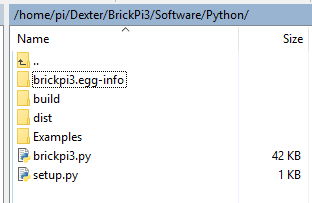
-
[BRICKPI] BrickPi General Discussion
Jim replied to Jim's topic in LEGO Technic, Mindstorms, Model Team and Scale Modeling
I do notice that all the ev3dev modules are located in python3 instead of python3.5. Maybe that is causing the issue. -
[BRICKPI] BrickPi General Discussion
Jim replied to Jim's topic in LEGO Technic, Mindstorms, Model Team and Scale Modeling
This might do the trick: sudo python3 setup.py install I will continue to Rubber Duck here. The previous step indeed solved my spidev issue, resulting in a new issue. This is more or less the same issue as the spidev. Traceback (most recent call last): File "/home/robot/ev3dev-test/Examples/Test_Connected.py", line 16, in <module> import brickpi3 # import the BrickPi3 drivers File "build/bdist.linux-armv7l/egg/brickpi3.py", line 21, in <module> IOError: [Errno 2] No such file or directory ---------- Exited with error code 1. I have run the following command: sudo python3 setup.py install And I do see the following file in my user/local/lib/python3.5 folder: brickpi3-0.0.0-py3.5 -
[BRICKPI] BrickPi General Discussion
Jim replied to Jim's topic in LEGO Technic, Mindstorms, Model Team and Scale Modeling
I think I managed to install spidev, but somehow the brickpi3.py still doesn't see the spidev module. I think I see what the problem is. The module gets installed in Python2.7. I do have two version in the lib folder, Python 2.7 and Python 3.5.