legoisfun
-
Posts
17 -
Joined
-
Last visited
About legoisfun

-
[REVIEW] 51515 - Robot Inventor
legoisfun replied to Jim's topic in LEGO Technic, Mindstorms, Model Team and Scale Modeling
Anyone? How to embed a custom sound to the firmware, so I can use it with the default MINDSTORMS apps? -
[REVIEW] 51515 - Robot Inventor
legoisfun replied to Jim's topic in LEGO Technic, Mindstorms, Model Team and Scale Modeling
Ok, for Python it’s clear, but what about blocks (scratch)? Do I need to make a custom firmware with extra sounds? -
I’ve found the issue: connections for B and C motors should be crossed on the EV3 brick: left motor to B port and right motor to C port. And I’ve connected them straight: left to C and right to B. Have no clue why LEGO has chosen this variant of connection, which is a little bit more messy in my opinion. You were absolutely right! Such a newbie mistake I’ve made.
-
I’ve connected EV3 brick to my PC via USB for debugging - IR sensor works as it should - i see correct readings (distance and heading) when IR beacon is ON. So, something is wrong in IR Target - it’s a special block, which includes some math under the hood. Thanks, I’ve double checked all ports - connected properly.
-
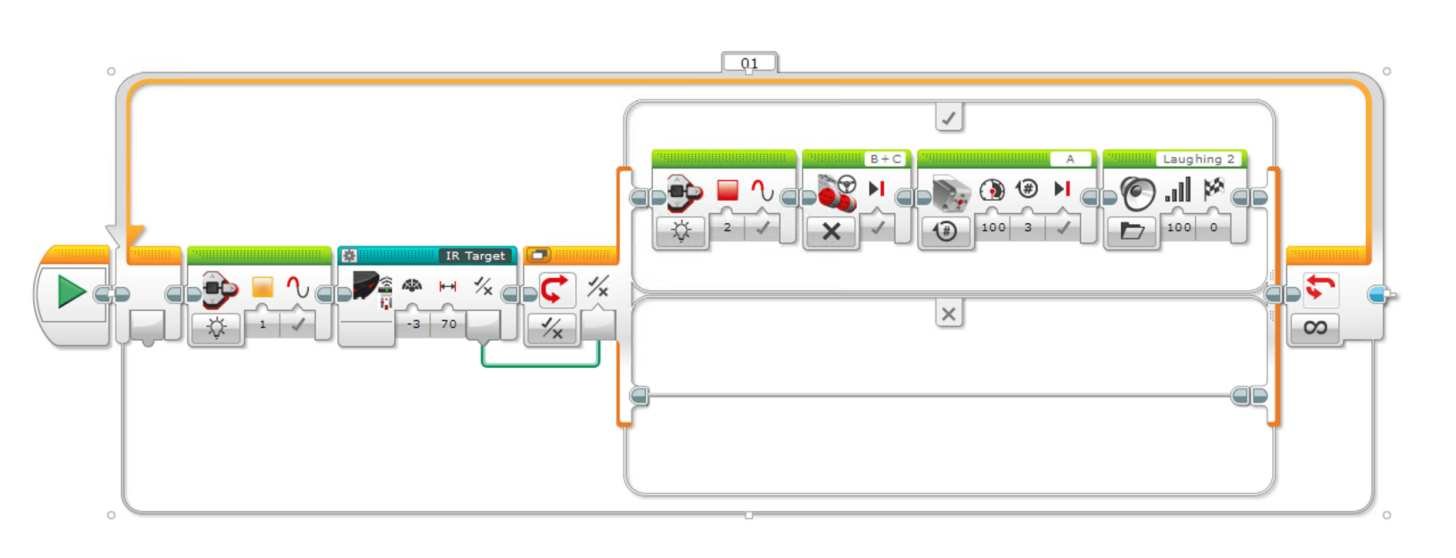
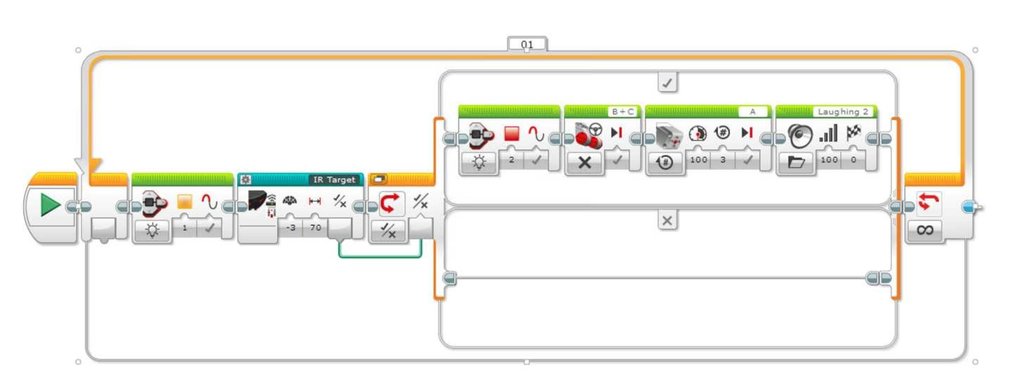
Even lifted it takes a lot of time to properly position it, so something is wrong – I bet on IR light reflections. I use the program provided by LEGO in EV3 Home app, so I wasn't making it or changing. Not possible with EV3: connectors are physically won't fit, so messing with polarity is unlikely. Plus motors are driven by a protocol, so with a wrong wiring motors won't work at all. Here is the code supplied in EV3 Home: It's also possible that there is an error in IR Target code: maybe LEGO made some changes to brick firmware or/and EV3 Home app and forgot to check default programs, which are provided in EV3 Home.
-
Hi, I’m quite new in EV3 programming and exploring it by building factory models. Assembled the EV3RSTORM robot today (I use the code provided by LEGO in the EV3 Home app), which should seek for the IR Beacon. Instead it goes crazy when I turn on the IR Beacon: it goes backwards, then turns 90 degrees and moves away from the IR beacon. This behavior is not as in demo videos in EV3 Home app where it turns in IR beacon direction and chooses distance before shooting red balls. I’ve double checked connections, check the IR sensor readings - the sensor correctly identifies direction and distance of the IR beacon, but when I run the provided app EV3RSTORM goes crazy. I’ve managed to grab the robot in my hand and manually adjusted distance and direction of the IR beacon (in other hand) - it identifies the IR beacon and shoots when there is the direct line of sight. Maybe it’s because of reflections? There is no direct sun light in my room - windows are closed. Floors are quite regular (not extra glossy). When I turn off the beacon, EV3RSTORM stops immediately which is the correct behavior based on the code in the app. Any ideas how to fix?
-
It’s a pity that there is no instructions.
-
Hi, it’s tied to my Apple ID, so before I remove it from the IPA, it’s not possible to share it. No ETA, I’ll come to it when I have free time.
-
BTW Mould King M-0005 Black Servo is also not proportional when used with Lego Speed Remote Control! Mould King has definitely changed internals and my tests show that hub plays no role in this issue.
-
Would be nice to use Powered Up remote. I think it can be used (PUP remote’ to adjust the speed: red buttons can act the same way as in original “speed remote”.
-
I've received MK M-0019 hub and the servo MK M-0009 (black). The servo is not proportional :( Hub works OK, haven't checked battery life yet. Don't like this transparent design and green led instead of blue.
-
I've managed to make a backup of WeDo 2.0 app, so now I have an ipa file :) I'll check how to make it accessible for everyone in case people need it.
-
Mobile apps retired, unfortunately. I don't have Android and for iOS there is no apps anymore. I find that a tablet is way more usable for a child than laptops. So, very strange decision from Lego.
-
Hi everyone, WeDo 2.0 mobile apps are retired from App Store and Google Play, so it's not possible to download them anymore. Lego has confirmed it today :( Luckily, I have WeDo 2.0 app on my iPad, but don't know yet how to keep it in case iPadOS reinstall. iPadOS/iOS fetches apps from App Store and they are not backed up by iTunes.
-
Just the hub :) I'm curious if there are any internal upgrades.