Hanso
-
Posts
411 -
Joined
-
Last visited
Content Type
Profiles
Forums
Gallery
Everything posted by Hanso
-
I have send you the file directly, including the instructions how to modify the switch. Have fun. /Hans
-
Really cool. Love the details. And compliments how you created the paving! /Hans
-

Automatic railway crossing (with Lego Mindstorms NXT)
Hanso replied to Hanso's topic in LEGO Train Tech
Yes, it is pricey. But it is the only way to have the flashing lights and sound, all with standard Lego (okay, I count HiTechnic as true Lego). /Hans -
Hi all, I have designed a modular switch drive. The powering can be either by a PF motor, a Mindstorms NXT, a Mindstorms EV3 L motor or Mindstorms EV3 M motor. To overcome the friction of the 'click' in the switch, I have to confess that the switched need to be adapted to remove the 'click'. If you're interested, please let me know (I can send you the LDD file). Best /Hans
-
Very nice indeed. /Hans
-
Automatic railway crossing (with Lego Mindstorms NXT)
Hanso replied to Hanso's topic in LEGO Train Tech
The PC application "knows" the train location on the layout. This is done by RFID tags under the rails (Codatex). The Codatex RFID reader reads the unique tag id and passes this information to the PC application. The application is flexible, that is: you can configure that if a specific card id is passed, the barriers have to close and at another card id they open again. Hope this explanation helps. /Hans PS And yes, it is a quite pricey solution. But it is the perfect combination of writing software, playing with Lego and trains ;-) -
Hi folks, It is one of my earlier builds that I want to share with you: an automatic railway crossing. The LDD sketch: The barriers of the crossing are powered by two medium PF motors. I use two PF receivers: one to control the PF motors of the barriers, and one to control the lights. The two PF lights are crosswise connected to the PF receiver. By this means, I am able to get flashing lights and add sound. All of this above is controlled by a Lego Mindstorms NXT and an Hi-Technic HR link (in case you don't know: with the HR link you can translate Mindstorms commands into PF commands). In the video below you can see and hear the result: In the video below you can see the result in a small train layout. A PC application controls the two trains (both having a Mindstorms NXT + HiTechnic sensor to control the train) and also the Mindstorms NXT that controls the railway crossing. Hope you like it. /Hans
-
Double Lego Horizon Express 10233 with improved coupling
Hanso replied to Hanso's topic in LEGO Train Tech
Yes, I have tried it with one motor. It is too heavy, especially in the curves. With the two locomotives powered, the train drives really smooth (as you can see in the video). An additional advantage is that you have also the lighting in the rear loco easy done. /Hans -
Double Lego Horizon Express 10233 with improved coupling
Hanso replied to Hanso's topic in LEGO Train Tech
I agree that it would be more reliable. But it would also require a long cable to get the power to the other side, remember that the train is 7 wagons long. I cannot say that I have problems with the signal, but it requires me to direct the sender correctly, that's true. /Hans -
Double Lego Horizon Express 10233 with improved coupling
Hanso replied to Hanso's topic in LEGO Train Tech
Dear Davidmull, I have a motor in each loco, but don't use a reverse switch. I just switch the two bogies under the second loco, so it is in fact driving backwards. Simple and effective ;-) Best, Hans -
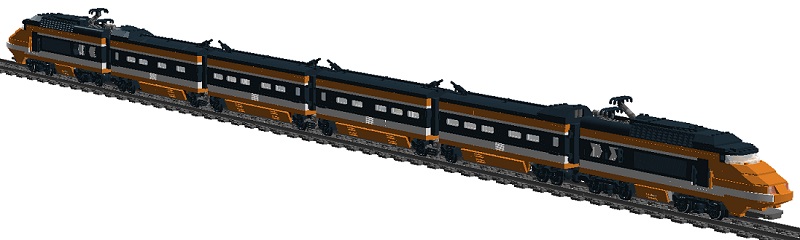
Hi all, Since I'm a newbie around, maybe this topic has been around in the past. What I wanted to share with you, is my own design of an improved coupling. A video of a total of 7 wagons can be seen at Youtube: And the LDD version with 6 wagons: I use two motors, two rechargeable batteries and two PF receivers. Channel A is to control the speed of the train and channel B is for switching the lights on and off. The back of the train has red transparent bricks for the lights. Enjoy. Best, Hans
-
I'm new on Eurobricks. Just wanted to share the project that I'm doing in the evening hours with a couple of colleagues: Sioux.NET on Track. See more at https://siouxnetontr...wordpress.com/. Sioux .NET on Track is one of the expertisegroups of Sioux Embedded Systems in Eindhoven, a group of enthusiastic colleagues who come together after working hours to get experience with Microsoft.NET (mostly C# and WPF). To make learning fun, we develop an application for making a full automated Lego train, using Lego Mindstorms and Lego Power functions. One of the things I managed to do, is to use the NXT as a remote control for the EV3. You can see a small movie at our Youtube channel: It is not a finished product, but you can have the source code for free. The current part that I'm working on, is the Candy Rotation Stock. See a video of the prototype here: Please feel free to leave a comment here or at the Blog. Let me know what you think. Best, Hans Odenthal
-
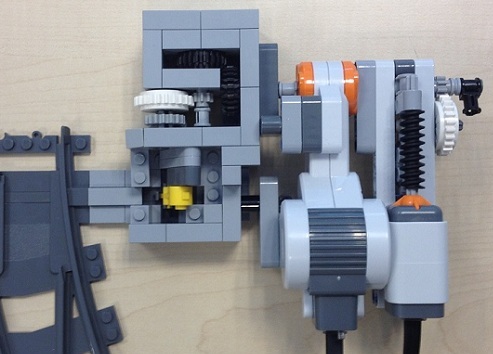
Hi Folks, I am new to this Forum, so maybe I am telling you nothing new. But I have also created an automated switch, in two flavours: 1) PF controlled 2) Mindstorms controlled (as you can see, it has also a feedback mechanism) Together with a small group of colleagues, I am building a fully automated train layout. We will use about five NXT controllers, and the software will be written in the programming language Microsoft C#. Two trains will run in parallel, the computer should prevent collisions. We have been at Lego World 2012 in Zwolle (The Netherlands) with a first version of the train layout: it runs with one train only, and the switches were not functional yet. You can find an impression here: http://www.youtube.c...SiouxNETonTrack.
-
Thanks for creating the LDD file. I have bought two trains myself, and creating a new longer version of it. A little bit different than Lazarus. Enjoy!