


Pybricks
-
Posts
81 -
Joined
-
Last visited
Content Type
Profiles
Forums
Gallery
Everything posted by Pybricks
-
 Nice @Andman. Since you tagged Pybricks earlier, I'll post a code example as well: from pybricks.pupdevices import Motor from pybricks.parameters import Port from pybricks.tools import wait # Run the motor at 500 deg/s motor = Motor(Port.A) motor.run(500) # Print the load in mNm while True: print(motor.control.load()) # Wait to so we can read the value wait(100) The load already varies smoothly so no averaging is needed. This is used in the video above as well.
 -
While the hubs don't have hardware current sensors for each individual port, Pybricks lets you measure the estimated load torque. It works by keeping track of the extra torque applied by the feedback controllers to maintain your requested speed or position. Depending on what you need, this can be pretty accurate. It can even detect a paper load :)
-
Pybricks Q&A
Pybricks replied to Pybricks's topic in LEGO Technic, Mindstorms, Model Team and Scale Modeling
Yes, you can read about the StopWatch class here. It can read the time since the program started. You could use it to wait for a certain amount of time too. So a simple clock example could look like this: We might add a menu where you can choose a hub name while you installl the firmware. To store more than a name, you could just store any arbitrary program on the hub and start it with the button.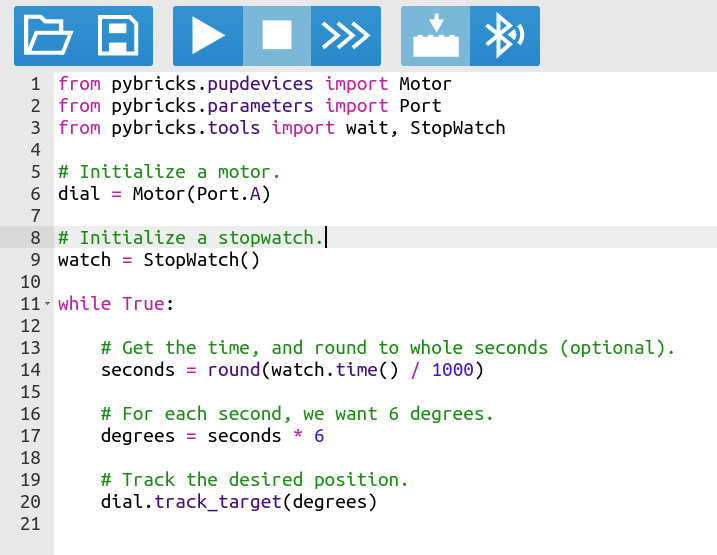
-
Pybricks Q&A
Pybricks replied to Pybricks's topic in LEGO Technic, Mindstorms, Model Team and Scale Modeling
We are planning to let the hubs communicate between each other and with other devices (phones, PC, etc.) using the standard Nordic UART Service. There are a lot of tools for this already out there, which should make it a little easier to integrate with tools like you mentioned. Of all the hubs, only the SPIKE Prime Hub and MINDSTORMS Inventor Hub have a file system, by the way. But you can still give each hub a unique name to tell them apart. -
Pybricks Q&A
Pybricks replied to Pybricks's topic in LEGO Technic, Mindstorms, Model Team and Scale Modeling
The City Hub, Move Hub and Technic Hub only have Bluetooth Low Energy (BLE). This means that connecting to a PS4 controller (Bluetooth Classic) is not possible. The latest Xbox controller has BLE, so this could theoretically work. This is a bit further down the backlog, though. You can see our plans for Bluetooth here. But if the goal is to get rid of the phone, how about the Powered Up remote? We are currently working on this. It's already working on one hub --- three to go. Hub-to-hub communication is planned as well. We're hoping to get that done this year. To keep things simple, we only "support" everything that you can find in the documentation panel in the Pybricks Code app. New features will eventually be added there, along with a changelog. So there's no need to keep track of GitHub unless you are super curious, but you're definitely welcome to. This would be nice, but it's hard to provide exact dates when we're all volunteers :) -
Hi everyone --- Pybricks here! Q&A We've seen a lot of forum members occasionally mention Pybricks. We've seen a lot of cool projects around here as well! We're excited to join the discussion, so we hope it's okay that we open a dedicated topic. To make things easier for you, we're happy to answer all your questions about Pybricks. Questions about Powered Up and MINDSTORMS are welcome too. You're also welcome to post ideas and requests for new Pybricks features. Feel free to get creative here! We're currently working hard to make Pybricks more accessible for beginning users. This is another reason we want your feedback. What is Pybricks? If you haven't heard about Pybricks yet, here it is in a nutshell: Pybricks lets you run MicroPython scripts on all Powered Up and MINDSTORMS hubs. MicroPython is like Python, just smaller and faster so it can run on the hubs. Your script runs autonomously on the hub, and you can even save it permanently. This means code runs much faster, and you don't always need to be connected to a smart device. We've also made it really easy to use many of the hidden features of all hubs, motors, and sensors. For example, it's really easy to calibrate your color sensors, or adjust the control settings of your motors. You can write your code on Windows, Mac, Linux, Chromebook, and Android. There's no need to install complicated tools; all you need is a browser with Bluetooth support, like Google Chrome, Chromium, or Microsoft Edge. You can try Pybricks via https://pybricks.com/