


ruppie
-
Posts
53 -
Joined
-
Last visited
Content Type
Profiles
Forums
Gallery
Everything posted by ruppie
-

Powered Up - Our own creations, fully compatible with LEGO
ruppie replied to ruppie's topic in LEGO Train Tech
Do you have cross checked the peaviour of the "simulated hub" how notifications behaves if using nrf connect insted of lego for test. I have read a while ago, that therea are some issues about what is correct way to work with notifications within ESP BLE framework.especially with Arduino Havent had the tim to follow,or check i worked with nrf52840 before. Possibly plain espressif framework must be used or even another plattform... we will see;-) But thats the intererting details, i still think that the basic concept will work ;-) -
Powered Up - Our own creations, fully compatible with LEGO
ruppie replied to ruppie's topic in LEGO Train Tech
@GianCann: II think it depends of the timing wizhin the application: When to send which type of information, and do i have it only onetime or must it send until ... More important i think it depends on the correct contenty of the message. If i am right you have tried two send an; "Section 3.8. Hub Attached I/O Type Message": According two your message type code 0x04h ? It looks like an" HUB attached IO information message" with 15 bytes size. The possible mistake was the size of your array is 16 bytes. byte CharValue[]={0x0F, 0x00, 0x04, 0x00, 0x01, 0x26, 0x00,0x00,0x00,0x00,0x10,0x00,0x00,0x00,0x00,0x10}; LEGOCharacteristic.setValue(CharValue,15); In the end from my point of view the app crashes due to a possible unhandles exception due to wrong message format and / or contents i think ?! Will check if i have time ;-) -
Powered Up - Our own creations, fully compatible with LEGO
ruppie replied to ruppie's topic in LEGO Train Tech
@GianCann: : 2 small additions i forgot 1. since there is already hardware designed in the smallest details and, above all, with a very small dimensions. By following the "Tear down" thread it makes me wonder why they have made the decision two split Bluetooth and common tasks into two separate controllers . I expected something like the STM32WB familiy that has a very usefull dual core architecture. If iam right you have just started some basic investigations (see your github about STM32) ?! if you are interested have a look at this: https://midatronics.com/shop/development-boards/mkr-sharky-i/ or sharky . from my point of view they have a more usefull form factor compared to the https://www.st.com/content/st_com/en/products/evaluation-tools/product-evaluation-tools/stm32-nucleo-expansion-boards/p-nucleo-wb55.html Besides the fact that i liked the old peripheral library more and did not have much expereince with CubeMX, it still is a good starting point expecially because of this https://www.st.com/en/embedded-software/x-cube-ble1.html . Because i don't know your developming environment for STM32 (KEIL ?) , but do you know that plattform.io supports Cubemx too, or that you can use Visual Studio witjh a extension "Visual GDB" - >https://visualgdb.com 2. what you want to achieve is very, very complex. : For that reason i alsways try to concentrate on the basics first and try. Besides that a strong advice from my side; Even if it looks complex and oversised : "Use an RTOS" , because of it makes it "easy" to spit your application in separate well designed tasks = do one thing and clean code idea, In addition splitting it up in separate tasks allows it having a system of components that are indepenent and for that reason the y can be tested in independent clean environments in case you got lost at some point: For that reason i will lay back for a while and studie some basics accroding to this book; https://www.elektor.de/freertos-for-esp32-arduino Just some ideas i wanted to share, because you have asked abaout my background and experiences -
Powered Up - Our own creations, fully compatible with LEGO
ruppie replied to ruppie's topic in LEGO Train Tech
Most important: Because you are on your well deverved vacation, ou should relax and don't read computer message posts ;-) About: possibel product / project ideas;: As discussed with Werner (LOK24) today something that is missing so far, without the need designing new hardware is someting ke a "Man in the midle" . A device that can work as some type of recorder and player for powerd up "programms" hat are stored as json files as i was told by him. Why not using the "M5 Stack System" or even better this: https://www.hardkernel.com/shop/odroid-go/, to do so as starting point and developing base . A very usefull to establish the "Play " function may be the legoine lib of cornelius munz. Because we can connect now to the powered up ap we can then add some type of "record function " to stare the command stream on the sd card for later use, Marc -
Powered Up - Our own creations, fully compatible with LEGO
ruppie replied to ruppie's topic in LEGO Train Tech
@ Mr Hobbes: please have a look nte the beginning of the "Tear down post" . If iam right they don't use a nordic BLE device ?! Unfortunately i don't have a LEGO Trainhandset to test on my side, but according to the expereinces i made with the Mouldking Remote conrol, i was not able to sniff traffic about it to , so far. Sometimes it us strange. My expereinces are all about the Technic HUB, my own build remote control (adafruit nrf52840 express) ESP32 and LEGO app only. -
Powered Up - Our own creations, fully compatible with LEGO
ruppie replied to ruppie's topic in LEGO Train Tech
Unfortunately you haved mixed up some issues and people ?! I was the guy asked you for looking/ review at your ESP example Code about color sensor and serial protocol before i will ask additional questons , because the therotical concept is quite clear. But i wan't to have something for code compare to identify where i have made the mistake , never mind . The guy that ask something about the bluetooth laver was"Mr Hobbles" i guess But thanks again for your time you have spent in your holiday ;-) Marc -
Powered Up - Our own creations, fully compatible with LEGO
ruppie replied to ruppie's topic in LEGO Train Tech
Basically its all about the advertised BLE Service and Characteristics. Longer answer is: : It depends on the expected profiles (question and answer sequence) after connect that is espected by the handset or the apps. As dscribd in the LEGO wireless documentation, all PU devices curently use same service and only one same characteristcs .In the past the problem was about the handshaking sequence after connection, for example older versions of the control+ app won't run if read connection profile, read by port info commands was not as expected, Best practice is to follow handshake and opperation send and receive BLE sequences by using a BLE sniffer. There is a good description on how do do this with wirehsark n the nordic homepage. Note: I had fifficulties with the bLE plugin by using wirehsark versions newer than 3.0.7 ;-) Example:Control+ app: By using older versions, connection processes never finished because software always reconects and restarted handshaking seuence if not found port tinformations as expected for a specific profile, by means that nothing or wrong type of motor / sensor has been connected : By using newer versions , the connection and handshaking seuence is always finished , displaing expected conection diagram .For same reason the handsets for train hub did not connect with Technic Hub , or did not allow, any type of Motor. But this was more an issues about "custom build profiles" and product bindings .A type of tight restrictions to force strong product bindings due to marketing reasons , i guess.. When you do customisings on your own you must focus only on the basics :I would like to point you again to my Remote control solution:https://fritzing.org/projects/ble-remote-control-for-lego-topgear-rally-car This will work with ESP32 as HUB , too. It is a very lean design in Hardware and software because it is only designed and made for a single use case "Controlling car with specfic, well known requirements.. For that reason there was no need to investigate the ports before. Or in short words: What would be the advantage do do so . Or what would be the worst case if ...? I have answered both questions with : "Nothing", because i am in control about all and the only "end user".For that reason i can keep my designs simple ;-) Basically you can always follow two basics path_ 1. Try to stay as open as possible, this will make the hardware and even more, the software very complex, because you have two think about plenty conditions and use cases. 2, Try to follow the "do one thing" ore clean code design path: You focus on a well designed path, at least you will provice several versions or variations of your firmware to provice different use cases, -
Powered Up - Our own creations, fully compatible with LEGO
ruppie replied to ruppie's topic in LEGO Train Tech
Hi, my problem is not to understand the basic concept, how it should work. ;-) I habe to rewiew my code , i think i have a timing problem somewhere in the state machine - To shorten this a litle bit i asked for the simple example as reference, but enjoy your holiday fisrt i am not in ahurry about it . The other thing is;: if i am right the original LEGO HUB is based on STM32F....- So, depending of the version, and other peripjeral you use you can usally use a number of serial peripherals in pareallel. By using a RTOS Midleware and make usa of UART Interupt handlers, i don't think that it is abig issue ,as i can remember from my STM32 projects ~10 Years ago. Because i just switched from Arduino BLE 33 Nano to ESP32 i will take the chance to rewrite my code and rewiev the resources you send. Simply leave me when back from vacation. -
Powered Up - Our own creations, fully compatible with LEGO
ruppie replied to ruppie's topic in LEGO Train Tech
what you want to achieve is very, very complex. No its not, because i have proven befor that archiving and building a remote control can be very simple. Most important: AWhenever possible i follow the "Do one Thing path". My gprimary goal is not to fullfill every possible requirement some one may have. Marc but I don't understand the need since there is already hardware designed in the smallest details and, above all, with a very small dimensions. The idea behind is very simply: Just as an interesting task for a non comercial hobby ;-) There are plenty of people not satisfied with original technical base: -> lack of power -> Current protection switches off drives very easily -> Missing rogramm / custom space, sd card... Or with the word of others: The missed some kind of "man in the middle" . Assume that the ESP32 simple act as some kind of communication endpoint for the LEGO App , for different solutions. Not ecessarily to replace given LEHO Hubs, more as an alternative / addition path. For that reason , for makers, for builders, hobiiest like me, it would be nice if it is possible to build an alternative based on given parts , like LEGO The intention is neither two create a PCB or complete new design, build up a product that can be sold. The question is: How to use all availabe (and affordable) parts and put them together to build an alternative . Example: I while ago i a have build my own Remote control for the lego topgear car.: https://fritzing.org/projects/ble-remote-control-for-lego-topgear-rally-car now i would like to use Control+ App profile with my "Own Hub" At least as hobby task and to learn something ;interesting-) Marc -
I would like to point you towards another dirction: Why not building our own technical base for control system that is at least compatible with LEGO APPS. Have a look here: Because it is a branch of the ongoing discussion here, i have created own topic. As i mentioned there: Even interesting for the "Phybricks initiative" because Microphyton ist still avsailable for a number of controllers. Marc
-
What about an electronic system that is fully (in wide areas) flexible to fullfill a huge number of requirements but most impoirtant: "It is fully compatible with all (at least Technic Hub) HUB's and the LEGO applications used ? The Idea behind: 1. The LEGO wireless protocoll has been published 2. . Some nice guy have bublished some usefull Technical details about LEGO Serial Protocoll. The only thing we have to do, as with the plastic bricks: We have to put them together. I will start , the picture in Link_ Proof of Concept: powerded Up compatible HUB System (ome kind of digital twin) It consists of: a) Microcontroller board provided by a framework to make it possible to build an BLE perihereal that is able to connect to actual LEGO powered up / and or control+ apps --> A dual role mode is possible by means of atype of recorder that reads and stores "Programs" end in realtime and write them to other LEGO hubs later on by using its orn file system. --> May be updated with dispkay or interfaces by means of web servers..... b) Because controller boards shown do have only one serial port to communicate with powered up serial interface, a serial interface multiplexer is used c) A Number of Motor driver oard, according to available power and driver pins of the board d) a number of step down converters if main power supply is choosen with respect of requirements of Motor and motor drivers. Inspired by the work of philo :https://www.philohome.com/wedo2reverse/protocol.htm And the work of GianCann; I began my my development of my own HUB a while ago: At first i choose Arduino 33 BLE Board because it accepts a whide range of supply voltage , without need to use DC step down converters in case of usage of higer voltage Power supplies for the motor drivers. Due to so,e issues about ArduinoBLR Lib acccording to advertising and Scan response data , i continued testing based on ESP32 Controller: As an important milestone i was able to connect to "powered up" app as well as control+ app, even it is only a simple connection test without any event handler for data exchange, /* Based on Neil Kolban example for IDF: https://github.com/nkolban/esp32-snippets/blob/master/cpp_utils/tests/BLE%20Tests/SampleServer.cpp Ported to Arduino ESP32 by Evandro Copercini updates by chegewara */ #include <Arduino.h> #include <BLEDevice.h> #include <BLEUtils.h> #include <BLEServer.h> // See the following for generating UUIDs: // https://www.uuidgenerator.net/ #define SERVICE_UUID "00001623-1212-EFDE-1623-785FEABCD123" #define CHARACTERISTIC_UUID "00001624-1212-EFDE-1623-785FEABCD123" BLEAdvertisementData oAdvertisementData = BLEAdvertisementData(); BLEAdvertisementData oScanResponseData = BLEAdvertisementData(); const char advLEGO[] = {0x02,0x01,0x06,0x11,0x07,0x23,0xD1,0xBC,0xEA,0x5F,0x78,0x23,0x16,0xDE,0xEF, 0x12,0x12,0x23,0x16,0x00,0x00,0x09,0xFF,0x97,0x03,0x00,0x80,0x06,0x00,0x61,0x00}; const char ArrManufacturerData[8] = {0x97,0x03,0x00,0x80,0x06,0x00,0x41,0x00}; std::string ManufacturerData(ArrManufacturerData ,sizeof(ArrManufacturerData)); const char ArrScanRsponseData[] = {0x05,0x12,0x10,0x00,0x20,0x00,0x02,0x0a,0x00,0x0c,0x09,0x54,0x65,0x63,0x68,0x6e,0x69,0x63,0x20,0x48,0x75,0x62}; std::string ScanResponseData(ArrScanRsponseData ,sizeof(ArrScanRsponseData)); // Set your new MAC Address uint8_t newMACAddress[] = {0x90, 0x84, 0x2B, 0x4A, 0x3A, 0x0A}; void setup() { Serial.begin(115200); Serial.println("Starting BLE work!"); //esp_base_mac_addr_set(&newMACAddress[0]); BLEDevice::init("Technic Hub"); BLEServer *pServer = BLEDevice::createServer(); BLEService *pService = pServer->createService(SERVICE_UUID); BLECharacteristic *pCharacteristic = pService->createCharacteristic( CHARACTERISTIC_UUID, BLECharacteristic::PROPERTY_READ | BLECharacteristic::PROPERTY_WRITE ); pCharacteristic->setValue("Hello World says Neil"); pService->start(); // BLEAdvertising *pAdvertising = pServer->getAdvertising(); // this still is working for backward compatibility BLEAdvertising *pAdvertising = BLEDevice::getAdvertising(); pAdvertising->addServiceUUID(SERVICE_UUID); pAdvertising->setScanResponse(true); oAdvertisementData.setShortName("Lego Hub"); //oAdvertisementData.setManufacturerData(ManufacturerData); //oAdvertisementData.addData(advLEGO); //pAdvertising->setAdvertisementData(oAdvertisementData); oScanResponseData.setManufacturerData(ManufacturerData); oScanResponseData.addData(ScanResponseData); pAdvertising->setScanResponseData(oScanResponseData); pAdvertising->setMinPreferred(0x06); // functions that help with iPhone connections issue pAdvertising->setMinPreferred(0x12); BLEDevice::startAdvertising(); Serial.println("Characteristic defined! Now you can read it in your phone!"); } void loop() { // put your main code here, to run repeatedly: delay(2000); } In the future i will test with Adafruit Feather express , and play arround with other frameworks like mbed. In addition Adafruit Package can be used on Arduino BLE 33 if usefill. More interesting: All Boards shown, excpecially ESP32 supports internal storage and Microphyton --> Maybe intersting for the Phybrick Community ?!. I got currently a litle bit stuck by implementing the serial protocoll, but i think we have usefull technical base to play with. We can use; --> LEGO App with, oriinal powered up equipment , as well as a wide range of other types of motor drivers, motors and sensors, Just my ideas as starting point wouzld be nice to share with yours ;-) One disadvantage of new Technic Hub is the low power of the ports: You can no keep software compatibility, with only few compromises .If you like you can use even motor drivers like shown here: https://www.pololu.com/category/11/brushed-dc-motor-drivers Would be nice sharing your ideas about it, have fun, feel free, and happy building Marc
-
Would be nice to see ;-)
-
Another source with some technical details: https://github.com/pybricks/technical-info To me very usefull according to typecodes of devices and some explanations about serial protocol.
-
Hello Philo, i got a little stuck on investigating the serial protocol. For Test and further investigation I have connected an L Motor to my Arduino33 NANAO BLE. I was able to reveive the Init Information, but was not able to switch over to "measurment mode" to revceive values from Motor sensors. Do you have investigated the start sequence a little further , what is necessary to receive measurement values ? Thanks in advance. Marc
-
Hi, that was not the question. I know that i can do reverse engineering to this example, but a dosumentation for this would be more convinient.
-
Hello, is the BLE Protocol available for BuWiz,too like for LEGO and SBrick ? I wan't to build my own remote as i did for the LEGO Topgear Car Thanks in advance
-
Hello, most important: From my side also a big thank you to all of you contributing here. It helps me a lot uring the implementation of my BLE RC Handset fpr the Rally Car ;-) Another issue: I got the following error code: x05h-0x00h-0x05h-0x6Dh-0x05h I have not found code : 0x6D in Error code Table ?!, Can someone explain meaning of: "0x6Dh 0x05h" Greatings Marc
-
Hello. actually apps are not my primary interest, for that reeason i build a Bluetooth Car control, that i am using with LEGO Rally car as shown here at the end of review comments. Feel free to ask whatever you lie, if you like .
-
Technic 2020 Set Discussion
ruppie replied to dimaks13's topic in LEGO Technic, Mindstorms, Model Team and Scale Modeling
Possibly the LEGO train handset behaves like the apps: After connection the app reads several infomations from hub. Besides the hub specific informations , it gets the connection profile, showing, wgich type of motor is connected to speciic ports. That is why application does not start (not connected) when found no or wrong combination of motor and ports). For that reason i think iz is more about a question of the handset firmware, that have do be accept Technic hub, with different motors. You have to understand, thats there is no important technical reason behind: The wireless bluetooth protocol is equal to all members within powered up famiy. But by reading hub types and names information including port connection messages you can identify , allow, block several combinations, Marc By the way: It would be better if LEGO would provide more combinations of Remote handsets at least one that is usable for cars and one tailor made for the Liebherr and other sets to come, Never mind: I am buikding my own LEGO control plus control handsets , based on given RC equipment or Gamepads, without need for third party appa or bridges, f you are interested have a look at the end of Rally car review here aand send private meaasege with questions ;-) -
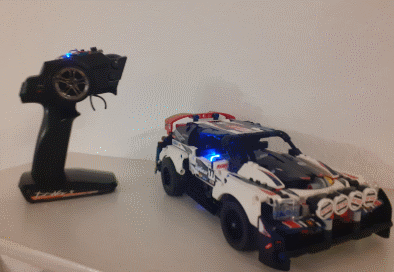
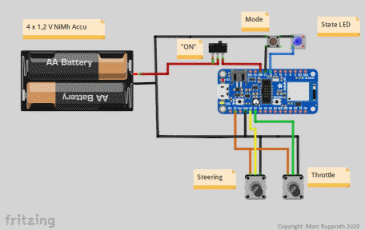
Hello all, to make a long story short: I have just created my first "Worbase" about Bluetooth Low Energy Handheld Control sets To do so i have replaced the build in Controller with Adafruit nrf520840 feather express, it fits nicely in the casing, during development and test it is more convinient, place it outside on top. Pros: --> Car works as expected with respect to limitations according to electrical power (current rating) and mechanical tolerances. If i have time, and documentation article was published, i will explain in more detail "somewhere else", ask if interested , about what you want to know. Greatings Marc
-
Hello all, there is an Interesting an ongoing discussion about"What modern LEGO / Brick Hubs hould look like, to control motors in a desirable way. Because we usally don't know much about current developments at LEGO and it competiors , the other solution is: we create the automation systems for our bricks on our own. Beside sthe fact that my project are still at a "pen and paper stage" i have notived the follwowing: https://www.crowdsupply.com/keith-packard/snekboard https://keithp.com/snek/snekboard/ If it looks interesting to you contact the designer and send him all your wishes and requirements you want. Thanks Marc
-
Hello, besides the fact what is the current output limitations of the iven LEGO Hubs, do you have any information /idea what is the maximum allowed current rating for wire , plug, socket contats , thanks in advance. I ask, because someone may have the idea to build an compatible Technic Hub on his own ;-) Marc
-
Lets say, i am a product manager / project leader for a number of actual technic sets like: - Rally car - Crawler / Buggy - Liegherr I would have demanded a set of tailor made hand held controls for each of them. The technical design base for all systems is equal, by means of hardware and firmware. The only challange is to create different "faces" with usefull control elements within a usefull handy case. I did not expect, one remote control, that must match all types of requirements like big RC programmable multichannel transmitters. Maybe this is another interesting product idea for a high level expert customers. Or in other words: Do one thing , but try to do it right. Actually it seems that the product designers got lost into their own world of "everthing is possible" ?
-
If i am right the stall(maximum) current of these motors is 3~4 Amps. ?! I am not sure what is the maximum allowed current load for the new cable and connector pins of plug ans socket. If i am right somewere has left a message that the maximum current of the technic hub ports is actually limited , below 1A as i remember .
-
Yes, you are right i try to explain more precise what i mean: 1. Missing LEGO BLE Handset, like inside the Train Sets. I don't understand, why the did'nt created at least a simple one, exactly tailored for the cars and the Liebherr. 2. Missing "normal" RC Control Technic HUBs, supporting same set of motors, using same 2,4 Ghz Sub frequency bands, and more important,same communication protocolls as listed here; https://oscarliang.com/pwm-ppm-sbus-dsm2-dsmx-sumd-difference/. The "other" Brickset manufacturers regulary earn applause, in case the y have put "any" type of RC 2,4 GHz control into the set But: I have concerns that each of them uses their own, properitary protocol.our bricksets shall be as flexible as possible: I would like to see Sets where i can use at least my own RC -Set , as know from midrange price RC Modell cars. Marc