


FreeBee
-
Posts
168 -
Joined
-
Last visited
Content Type
Profiles
Forums
Gallery
Everything posted by FreeBee
-
ahhh i hoped it was CET off to bed then
-
Hi Alban, Nice to hear from you. I totally agree with removing the offset from the hard-coded area. I also would like it to be default 0 and I can't find a good argument to put it customizable in the options.
-
The best one i have seen is from Mijasper. Click the pic:
-
I don't know if I'm the only one but when I browse the net (especially brickshelf) I come across layouts of other people and think: "WOW i wish i saw the whole picture of the layout." Here are some sample layouts: Bdarrow's layout: i wish i could see through the mountain. PlasticFantastic's layout : Is it as big as i think? Can't get the big picture. Maybe you know of others then please share.
-
Welcome at trains I love it. It's very adorable but also very realistic. Great build. keep on the right track.
-
Updates will come. And the clearance is present , but I cant drive'8-wide trains. 'Sorry, Here's my future table set up. I will use a lot of small plates to keep it flexible for expansions or movings! Yep, you are right. I had a lot of planning and thinking before i came up with this layout. The bridge ain't finished yet and will take a long time , but for now it will do i think. I will make a video with driving trains as soon as possible. You can have both : Click here for the BBM-file. I bet you would like that, i will probably devide it into blocks for easier riding. I know so i will only drive small or max 6 wide-trains on it. Because of the relative small layout i will prefer only 2-axle wagons and loco's.
-
I wanted to show the process of my little legoroom. All the rails are still on the floor but tables are on the way. I just put it down so i could what see what would be a nice layout. Pictures taken from some other angles: This is the to-be-sort-out side: On these shelves i will place my classic space: And a bonus: Picture take while modifying rails in the backyard. Just a little cutting , filing and soldering.
-
a layout is always in progress: so this is where i stand now:
-
No i didn't make it, i found it on Brickshelf Original design by CountBlockula. I back-enginered it have made an exploded view and a part-list. What about the name POLLegO.
-
Could this be an option?:
-
Here's another link for snot roads(not my Brickshelf page or my work)
-
Great feature Alban, U need to fix something in php: The link return to main window doesn't function correct. When clicked from the part-tracker it opens the main page in the left frame. As for the discussion about the parts in the release go for the minimum requird parts. In other words only include the rail and needed td-files. All the others are downloadeble by the tracker or perhaps with add-on packs.
-
Talk about landscaping !!!
-
Hi CBFasi, Search for 7wide Especially Ben Beneke has some great ones.
-
Hi j3Tang, Welcome , the track piece is real (part 1976) only it's not electric. It is for RC-trains. A couple of people have tried making it work for 9V using coppertape. Sidenote to this is that someone made above crossover by modding 4 default points, it's Ondrew Hartigan. If you want to know more about more about modding parts like this or with coppertape i suggest you read this thread.
-
And a man did what ... he needed to do with the xml-files XML for 2861halfcurve XML for 2859halfcurve They work like a charm. point for the futere: correct the last gifs. The last doubleplate of the branchline should be a single.
-
wow Missouri they look great. thanx. I will have a look into the xml myself. (a man's gotta do what a man ...)
-
Didn't had any time yet to start on my first mod (convert curve to 1/2Curve). And also still collecting the neccesary tools. (why do I always lend them out ) @Captain Zuloo Respect, I also don't really like cutting lego but i'll make an exception for traintracks. @lego9vtrainfan It was a pleasure to start this thread @ zyrex Show us your progres when have your copper tape @roj2323 Great to see you joining this discussion. I can sure need all the advice you can give. Seeing your modifications on brickshelf years ago caught my interest at once. It gave so much more possibilities for trainlayouts. My first question is: I will try to make the stubby-switch. I think it will give me the most possibilties combined with other pieces. One possibility is the remake of an original point with a half-curve and a parrawellogram. And the possibility of a compact crossover with 2 switches an a parrawellogram. But do i really need a parawellogram or can i also use a 1/4Straigth. I know it won't line up exactly but will it be very noticeble? If I really do need a parrawellogram , what would be the best way to make one? And also a new link: 45' Crossing I will add all the links in the thread in the first one to keep it as a reference.
-
I searched the forum but didn't find a topic of it so here it is: Making/Modifying 9V track. I am still trying to workout with bluebrick what would be a nice layout for my legoroom. While I was puzzling I noticed that the room was not small but that a layout takes up a lot of room. Especially the switches take up a lot. So how to reduce the space they occupy? The best sloution I could find was modifying the points. (I know it's like cursing in church for some but ....) These are the links I found so far: Making a crossover from 2 straight tracks. Convert RC-tracks to 9V. 9V switch in parts, Best of two worlds. Create your own 9V Flextrack. Added from the thread and found after first post: Brickshelf Ondrew Hartigan 9V Mods Brickshelf Legotastic 9V Mods 9V 45'Crossing RC 7996 to 9V discussion (lugnet) I am still thinking if I should make or I think I'll start of this weekend with a test. The test will just be a curve of 22.5' that i will convert to 11.25'. I'll make foto's and keep you informed of the progress. So what are your thoughts about modifying? Which part can you think of to make? And do you know a good link with info?
-
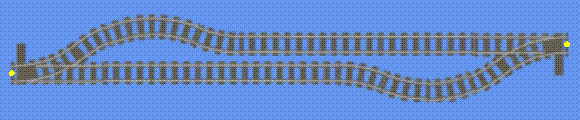
Maybe like this ?
-
Hi all, Kicking this thread up because i need some help. I am planning on modifying some real track at home and thought it would be handy if they were also in BB. But my photoshop- and xml-skills are very rusty at the moment. Below is the idea of what i want to make: IMG XML IMG XML Simply said i want to shorten brancheline of the switch to 33,75 degrees (a curve 22,5' and halve curve 11,25'). I know it's not finished so if anyone wants to edit the gifs and xmls then please do.
-
HNY to all. @ Missoury : great addition all those trains. But maybe u can turn the first ones 90 degrees ? Here is also a new addition: 6350 Pizza To Go: GIF XML
-
What a fun thread: Allways thought i was a bucket and yes i am:
-
Well done, it is so recogniceble. Only thing I don't like are the towertops and the flags. The parts for the windows in the towertops are to small. And the flags are too big for my liking. But again i like the wole.
-
My tips are: - start with a original lego model and rebuild it - look for pictures on the net if u want to clone a real train - look around at other builders (get ideas from them) and the best tip i can think of is read : getting started with lego trains