inkpanther
-
Posts
71 -
Joined
-
Last visited
Content Type
Profiles
Forums
Gallery
Everything posted by inkpanther
-

Construction trouble with LDD
inkpanther replied to Lalla's topic in Digital LEGO: Tools, Techniques, and Projects
SylvainLS posted a solution above. :) -
Construction trouble with LDD
inkpanther replied to Lalla's topic in Digital LEGO: Tools, Techniques, and Projects
Oh, my bad... I quickly put together a couple of bricks but apparently didn't use any plate underneath. -
Construction trouble with LDD
inkpanther replied to Lalla's topic in Digital LEGO: Tools, Techniques, and Projects
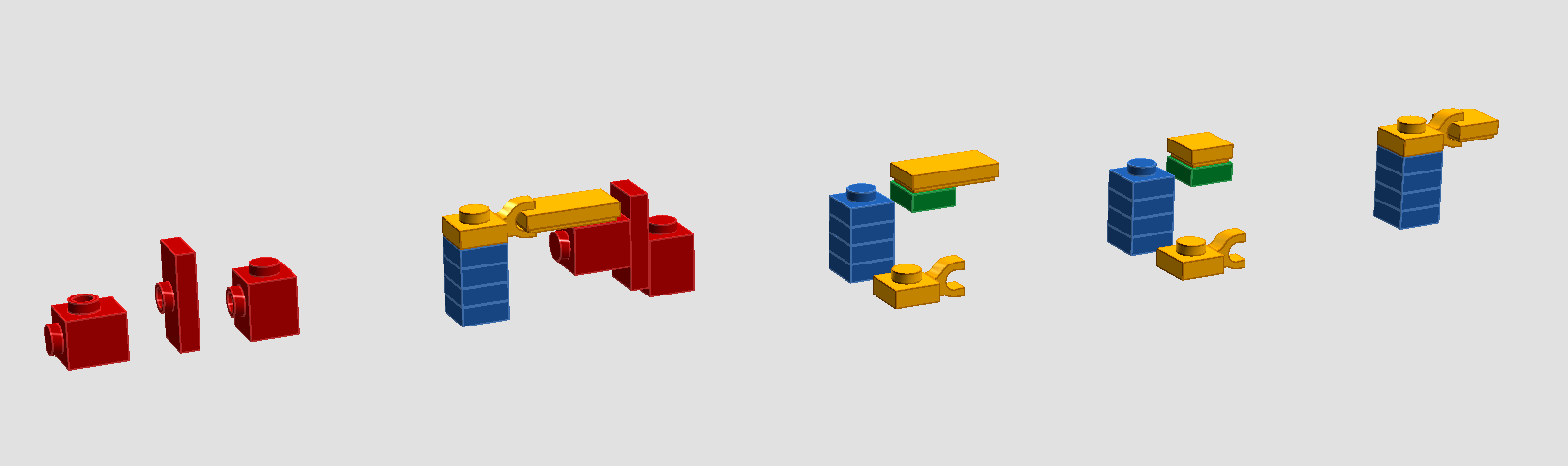
Temporarily connect 1x1 with that long 1x plate using another brick and then try rotating the brick blow. -
Help requested in LDD connection
inkpanther replied to JunkstyleGio's topic in Digital LEGO: Tools, Techniques, and Projects
Sure: http://bricksafe.com/files/inkpanther/shared-lxf-files/sorcery 1.lxf -
Help requested in LDD connection
inkpanther replied to JunkstyleGio's topic in Digital LEGO: Tools, Techniques, and Projects
For example like this. ;)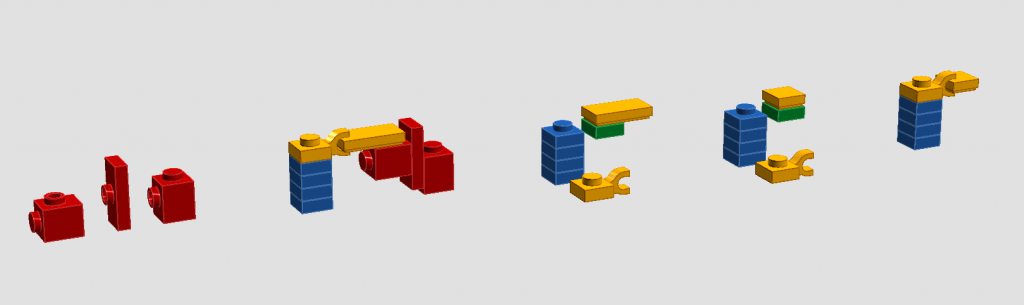
-
Yes, you can change lighting. You'll have to edit scene.sc file in order to achieve this. Default scene.sc is located in the Bluerender directory. However, it's a good idea to use separate scene files for every build. Just copy the default scene.sc and paste in the same location as your lxf file and and name it the same (so you have your_build.lxf and your_build.sc next to each other). Bluerender will detect it automatically. Ground plane is just a ground under your build, background is basically a sky. Depending on angle, you may see only the ground, a thin line at the top of your image or large part of a "sky". It's possible. But again, you'll have to customize scene.sc. Read posts from here onward, your answers have already been answered to some degree. ;)
-
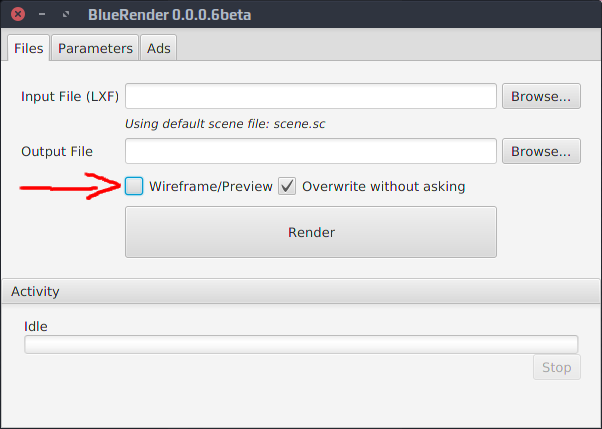
You probably have selected Wireframe/preview option.
-
To me it only looks like the program is completely confused because 6585 parts are not connected by studs. This whole thing flexes in all directions when you try to rotate any axle. Try putting 6585s on a plate and this wont happen anymore.
-
LDD doesn't support interactions between gears. You can't turn one gear to turn another and another. There's a tool called Hinge tool (shortucut: H) which allows you to rotate bricks. You have to rotate one of gears in order to avoid collision of its teeth with teeth of the second gear. In practice this means that you have to rotate an axle on which the gear is going to sit. In case of 12 tooth gears you have to rotate it 15 degrees.
-
http://bricksafe.com/files/inkpanther/bluerender/simple vanilla.lxf aa 12 4.41m 1.4gib jump to 1.9gib.png :P
-
LDD Pythagoras woes
inkpanther replied to quilkin's topic in Digital LEGO: Tools, Techniques, and Projects
Just place a new plate, put whole frame on it, remove the plate. Because this new plate will be aligned with the grid, the frame will also become aligned. -
LDD Pythagoras woes
inkpanther replied to quilkin's topic in Digital LEGO: Tools, Techniques, and Projects
My guess is that two decimal points are not enough for such large build and at some point things go off too much. I started building it from top to bottom and LDD didn't let me attach only the base. It is possible but you either have to use axles or reattach to the pin one of technic bricks separately which will result in small misalignment. Here's the file (misaligned parts are between green plates). -
Detection of Colision
inkpanther replied to Jarema's topic in Digital LEGO: Tools, Techniques, and Projects
What you are describing is called part snapping and it makes parts automatically connect. MLCAD and LeoCAD don't support it from what I know. In Stud.io you can turn it on and off with a menu bar button labeled Snap. Collision detection is a mechanism that detects when two or more parts overlap, exist in the same space. I have no idea how any of them are achieved. -
Want to move on from brickshelf
inkpanther replied to Takanuinuva's topic in Digital LEGO: Tools, Techniques, and Projects
Well, it should, assuming you opened a page where it's displayed using full size image. But! Why would you want to save them manually? It still is going to be a pain to save all pictures this way. I think you should give BSBackup a try if other users are suggesting it. Judging from the picture it's a pretty straightforward tool: you select a place on your disk where you want to save pictures, and you write in a username so the program knows what it's supposed to download. Edit: I may have incorrectly assumed that you are using a Windows machine, but if you're using Mac or Linux the program wont work... -
Want to move on from brickshelf
inkpanther replied to Takanuinuva's topic in Digital LEGO: Tools, Techniques, and Projects
It may be a bit offtopic and not very useful for mass saving pictures, but almost all pictures on the web can be easily saved. Click on a selected picture with your right mouse button and select an option saying "save image as..." or something very similar. There's no need to copy it into paint. :P -
New software by BrickLink - Stud.io
inkpanther replied to Superkalle's topic in Digital LEGO: Tools, Techniques, and Projects
Stud.io seems to work with Wine 1.8.5 just fine (probably with exception of Pov-Ray). I've got perhaps a silly question: does point 7 of license look like an NDA clause, or is it just me? -
Technic beams in Photoshop or InDesign
inkpanther replied to MarickH's topic in Digital LEGO: Tools, Techniques, and Projects
Lego bricks have precisely defined dimensions so it shouldn't be too difficult to draw them. Alternatively, some LDraw cads provide orthographic views of your build, which would probably work better than LDD for creating a logo. -
New software by BrickLink - Stud.io
inkpanther replied to Superkalle's topic in Digital LEGO: Tools, Techniques, and Projects
Integration with BrickLink is a great feature. But it's difficult to judge the application from only two screenshots. -
Thanks guys, I'm glad you like it.
-
A helicopter I made in LDD. It's not a recreation of any particular real world model. This is basically my first thread in this forums showing off my MOC, so please be gentle. ;) Pictures created using Bluerender with SunFlow Mod.
-
Doesn't seem to be so useless to me. ;) It's not the number of parts that causes problems, it's the size of the render itself. I'm using a computer with 4GB of memory myself, and while it works fine with regularly sized renders, it struggled with huge ones. Besides, I haven't used Xmx option for a long time, but lately I'm having some problems with modded version, and increasing amount of memory available to java was the only way to alleviate the issue.
-
I don't know, probably... ;) The documentations is a bit convoluted in regards to 32/64 bit stuff and I could have quoted something incorrectly.
-
Previously, you said "But anything larger than that just gives me the completed window with the 900 or something number of minutes it took to render." ;P Anyway, I'm not an expert (feel free to call me an idiot, just explain when and how I'm wrong while you're at it) but I think it basically says that it run out of available memory, which would suggest that a) your machine has not enough physical RAM or b) your rendering settings are so high that it needs access to more RAM than default limit it is set to. I don't know specs of your machine, but I suspect that if system monitor shows that absolutely all of available RAM is being used while rendering something in BR, then it probably has not enough of physical memory. Otherwise, you can try changing default line in bluerender.bat from to -Xmx parameter sets maximum Java heap size. By default maximum heap size of 1/4 of physical memory up to 1 GB is used, so try setting something higher.
-
You should be able to achieve this by editing scene file. Reducing quality of AA and lowering number of light samples should give you a quick low quality preview. Number of pieces shouldn't be a problem. What you're describing is probably an effect of a wrong viewing angle or viewing distance - if you can see underside of building plane, then the result is black screen rendered in below 1 second (900ms is 900 milliseconds).
-
Well, that depends... BTW, regarding error about paths being wrong - you can open scene.sc file in any text editor and fix it yourself (scene.sc in in the main bluerender directory). Actually, editing your own scene files gives you much more control over rendering process. You can change a range of settings like types of light sources, camera zoom, quality of lighting or antialiasing. If you put a copy of a scene file in the same directory as your build and name it the same (so you have build_name.lxf and build_name.sc next to each other), Bluerender will automatically use this .sc file instead of one from default directory. This way you don't lose rendering setting you used previously if you want to render something else.