


ord
-
Posts
234 -
Joined
-
Last visited
6 Followers

.thumb.jpeg.ee9f4c610e20ae266cdf7b2b392449f6.jpeg)
About ord

Recent Profile Visitors

-

General Part Discussion
ord replied to Polo-Freak's topic in LEGO Technic, Mindstorms, Model Team and Scale Modeling
Yes it's smooth according to Sariel's video, thankfully (in a previous video it looked like it wasn't). -
General Part Discussion
ord replied to Polo-Freak's topic in LEGO Technic, Mindstorms, Model Team and Scale Modeling
To be clear, I am supporting previous reports that the links are 11L each (i.e. 10L centre to centre of pin holes). So it should be relatively easy to connect gear racks to the rims using 2L or 2L thin liftarms, with 4 of 12 connections being with axle holes to make it a rigid connection. -
General Part Discussion
ord replied to Polo-Freak's topic in LEGO Technic, Mindstorms, Model Team and Scale Modeling
I had a closer look at the images and it appears that the pin holes on the rim are 11L from the centre, which would mean (if I'm seeing this correctly) the large 'banana' gear racks would fit snugly inside them, with 12 equispaced holes aligning to all of the holes on the rim but 1L 'in'. Interesting! -
General Part Discussion
ord replied to Polo-Freak's topic in LEGO Technic, Mindstorms, Model Team and Scale Modeling
This is good news. Can now replace 60-tooth turntables coupled with 12-tooth gears at the (4.2) grid point with these for a ratio increase from 5:1 to 8:1. I don't mind the offset because it makes it easy to make parallel gear trains to reduce backlash. Some nice new parts in this set. Looking forward to what other bike styles people will make from them. The ratchet gear looks particularly useful, though its friction seems quite high based on the video on lego.com where he stops spinning the pedals and the wheel stops almost immediately. -
Pneumatics General Discussion
ord replied to 9v system's topic in LEGO Technic, Mindstorms, Model Team and Scale Modeling
Yeah they do. I stop them at 2bar (~30psi) though and haven't tested much higher. -
Pneumatics General Discussion
ord replied to 9v system's topic in LEGO Technic, Mindstorms, Model Team and Scale Modeling
I guess it could be, but they are brand new from Lego. I'm hesitant to use silicone because of discussion in this thread. Have you had success with it? I do wonder what the original grease in Lego pneumatics is made from... -
[WIP] Mindstorms 51515 Plotter
ord replied to ord's topic in LEGO Technic, Mindstorms, Model Team and Scale Modeling
@OLivier1234 please see my reply to Carsten back on page 1 of this thread. The code is in a hidden comment there. Good luck! -
Pneumatics General Discussion
ord replied to 9v system's topic in LEGO Technic, Mindstorms, Model Team and Scale Modeling
They're all similar (and similar to my other cylinders). It's the 5.5L pumps that seem to be the odd ones out - moving them is almost effortless. -
Pneumatics General Discussion
ord replied to 9v system's topic in LEGO Technic, Mindstorms, Model Team and Scale Modeling
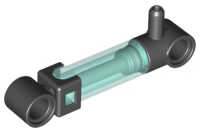
I think the volume is the same since they both have a 2L stroke. The new ones (for me anyway) are noticeably harder to push/pull, and I think when doing this hundreds of times per minute this becomes an issue. -
Pneumatics General Discussion
ord replied to 9v system's topic in LEGO Technic, Mindstorms, Model Team and Scale Modeling
Has anyone noticed much higher friction in the 6L pumps compared to the old 5.5L pumps? I ordered some 6L pumps from Pick A Brick for my compressor but the motors struggle to pump them (even with extra down-gearing), making compression slow and the batteries drain fast.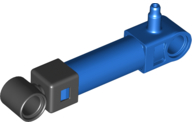
-
Zero's workshop
ord replied to Zerobricks's topic in LEGO Technic, Mindstorms, Model Team and Scale Modeling
That is something I'd love to get my hands on. I still reference Sariel's Technic Builder's Guide but it's 13 years old now. Will your book be hard copy or digital? -
Technic Parts We Would Find Useful
ord replied to gyenesvi's topic in LEGO Technic, Mindstorms, Model Team and Scale Modeling
A pneumatic elbow fitting, something like this: -
[MOC] Cartesian Parallel Robot
ord replied to ord's topic in LEGO Technic, Mindstorms, Model Team and Scale Modeling
Hi, the code is written in pybricks, so if you want to use it you have to install pybricks on your hub from https://pybricks.com/. Specifics of what each line means can be found in the documentation at https://docs.pybricks.com/en/latest/. -
[MOC] Cartesian Parallel Robot
ord replied to ord's topic in LEGO Technic, Mindstorms, Model Team and Scale Modeling
Here's the code. Note that it's raw and a bit messy - I never intended to publish it. from pybricks.hubs import TechnicHub from pybricks.pupdevices import Motor from pybricks.parameters import Port, Stop, Color, Direction from pybricks.tools import wait from math import sin, pi, fabs, sqrt print("START") # Initialize the hub hub = TechnicHub() # Initialize the motors motor_x = Motor(Port.A, Direction.COUNTERCLOCKWISE, [20, 75]) motor_y = Motor(Port.B, Direction.COUNTERCLOCKWISE, [20, 75]) motor_z = Motor(Port.C, Direction.COUNTERCLOCKWISE, [20, 75]) #motor_suction = Motor(Port.D, Direction.CLOCKWISE, [12, 36]) # Initialize variables old_x = 0.0 old_y = 0.0 old_z = 0.0 # Flash light def flash(): hub.light.on(Color.GREEN) wait(100) hub.light.off() # Find zero def reset_motors(): print("Finding origin...") motor_x.run_until_stalled(-100, duty_limit=30) print("x zero set.") #flash() motor_y.run_until_stalled(-100, duty_limit=30) print("y zero set.") #flash() motor_z.run_until_stalled(-100, duty_limit=30) print("z zero set.") #flash() motor_x.reset_angle(0) motor_y.reset_angle(0) motor_z.reset_angle(0) #motor_suction.reset_angle(0) # Move end effector def move(x, y, z, speed): global old_x global old_y global old_z rel_x = x - old_x rel_y = y - old_y rel_z = z - old_z segment_length = sqrt(pow(rel_x,2) + pow(rel_y,2) + pow(rel_z,2)) time = segment_length / speed if time == 0: time = 0.01 x_speed = fabs(rel_x) / time y_speed = fabs(rel_y) / time z_speed = fabs(rel_z) / time #print("Time = " + str(time) + "; Segment length = " + str(segment_length) + "; Speed = " + str(x_speed) + ", " + str(y_speed) + ", " + str(z_speed) + "; Move to " + str(x) + ", " + str(y) + ", " + str(z)) if x_speed > 1: motor_x.run_target(x_speed, x*10, then=Stop.COAST, wait=False) if y_speed > 1: motor_y.run_target(y_speed, y*10, then=Stop.COAST, wait=False) if z_speed > 1: motor_z.run_target(z_speed, z*10, then=Stop.COAST, wait=False) wait(time * 12000) old_x = x old_y = y old_z = z # Move each axis +/- def axes_demo(speed): move(7,7,0,speed) move(0,7,0,speed) move(0,0,0,speed) move(0,7,0,speed) move(0,7,5,speed) move(0,7,0,speed) # Circle (diagonal) def circle(speed): move(6.0,5.3,4.3,speed) move(4.9,6.5,3.5,speed) move(3.7,7.0,2.5,speed) move(2.1,6.5,1.5,speed) move(1.0,5.3,0.7,speed) move(0.7,3.5,0.5,speed) move(1.0,1.7,0.7,speed) move(2.1,0.5,1.5,speed) move(3.5,0.0,2.5,speed) move(4.9,0.5,3.5,speed) move(6.0,1.8,4.3,speed) move(6.3,3.5,4.5,speed) # Circle (diagonal reverse) def circle2(speed): move(6.0,1.8,4.3,speed) move(4.9,0.5,3.5,speed) move(3.7,0.0,2.5,speed) move(2.1,0.5,1.5,speed) move(1.0,1.7,0.7,speed) move(0.7,3.5,0.5,speed) move(1.0,5.3,0.7,speed) move(2.1,6.5,1.5,speed) move(3.5,7.0,2.5,speed) move(4.9,6.5,3.5,speed) move(6.0,5.3,4.3,speed) move(6.3,3.5,4.5,speed) # Circle (diagonal reverse raised) def circle3(speed): move(6.7,1.8,4.8,speed) move(5.6,0.5,4.0,speed) move(4.2,0.0,3.0,speed) move(2.8,0.5,2.0,speed) move(1.7,1.7,1.2,speed) move(1.4,3.5,1.0,speed) move(1.7,5.3,1.2,speed) move(2.8,6.5,2.0,speed) move(4.2,7.0,3.0,speed) move(5.6,6.5,4.0,speed) move(6.7,5.3,4.8,speed) move(7.0,3.5,5.0,speed) # Circle (top plane) def circle4(speed): move(7,3.5,5,speed) move(6.96,4,5,speed) move(6.85,4.5,5,speed) move(6.66,5,5,speed) move(6.37,5.5,5,speed) move(5.95,6,5,speed) move(5.46,6.4,5,speed) move(4.92,6.7,5,speed) move(4.33,6.9,5,speed) move(3.5,7,5,speed) move(2.67,6.9,5,speed) move(2.08,6.7,5,speed) move(1.54,6.4,5,speed) move(1.05,6,5,speed) move(0.63,5.5,5,speed) move(0.34,5,5,speed) move(0.15,4.5,5,speed) move(0.04,4,5,speed) move(0,3.5,5,speed) move(0.04,3,5,speed) move(0.15,2.5,5,speed) move(0.34,2,5,speed) move(0.63,1.5,5,speed) move(1.05,1,5,speed) move(1.54,0.6,5,speed) move(2.08,0.3,5,speed) move(2.67,0.1,5,speed) move(3.5,0,5,speed) move(4.33,0.1,5,speed) move(4.92,0.3,5,speed) move(5.46,0.6,5,speed) move(5.95,1,5,speed) move(6.37,1.5,5,speed) move(6.66,2,5,speed) move(6.85,2.5,5,speed) move(6.96,3,5,speed) move(7,3.5,5,speed) # Suction movement def suction_move(x,y,z): move(6.8,1.2,5,100) #wait(500) move(6.8,1.2,z,100) wait(200) # Suction on motor_suction.run_target(500, 180, then=Stop.BRAKE, wait=False) wait(1000) move(6.8,1.2,5.3,100) #wait(500) move(x,y,5.3,150) #wait(500) move(x,y,1.5,150) #wait(500) # Suction off motor_suction.run_target(500, 0, then=Stop.BRAKE, wait=True) wait(100) # Video part 1a def part_1a(): # Bottom square move(0,7,0,60) wait(500) move(7,7,0,60) wait(500) move(7,0,0,60) wait(500) move(0,0,0,60) wait(1000) # Move z move(0,0,5,300) wait(500) #move(0,0,5,300) #wait(500) #move(7,0,0,300) #wait(500) #move(0,7,5,300) #wait(500) #move(0,7,0,300) #wait(500) move(7,0,5,300) wait(1000) # Two circles then home move(6.3,3.5,4.5,250) circle(140) circle(140) wait(500) move(0,0,0,100) # Video part 1b def part_1b(): move(0,7,0,100) wait(3000) axes_demo(70) wait(1000) # Top circle move(7,0,5,100) wait(1000) circle4(100) wait(2000) move(6.3,3.5,4.5,100) circle(130) circle(130) wait(600) move(0,0,0,140) # Video part 2 def part_2(): move(0,0,5,300) wait(500) suction_move(0,2.8,3.0) move(0,2.8,5,150) suction_move(3,2.8,2.0) move(3,2.8,5,150) suction_move(0,4.8,1.0) move(0,4.8,5,150) suction_move(3,4.8,0.0) # Push tray wait(1000) move(1.5,7,1.5,80) move(1.5,7,0,80) move(1.5,0,0,50) wait(200) # Back right top corner move(7,7,5,400) wait(500) # PROGRAM HERE reset_motors() hub.light.on(Color.WHITE * 0.8) wait(5000) part_1b() #part_1b or part_2 here print("END") -
Robust looking switching - it seems to lock into positions nicely. Can't wait to see the full video.