Search the Community
Showing results for tags 'circuit cube'.
Found 3 results
-
 Hi! I want to share with you results of my recent works, which you may find interesting/useful: Motorization of 42164 Off-road Buggy with Circuit Cubes Web-browser remote control for Circuit Cubes supporting return-to-center steering. Controlling Circuit Cubes using Lego remote with smartphone as hub. 1. Motorization: Despite the small size of Circuit Cubes squeezing Bluetooth Hub and two Cubit Motors into 42164 Off-road Buggy was quite a challenge, but it turned out to be possible - you can see results below: In case you wanted to build the model (free instructions available at rebricable.com) or use CC to drive your own MOC here are some notes about challenges and their possible solutions: A. Rear drive for 42164 There is not much space at the rear of 42164 - initially I hoped to put hub and motor symmetrically but it was impossible. Transmission of power from the engine to the wheels can be done using 3x 16-tooth wheels, but the resulting buggy speed was a bit low (wheels with small diameter do not help here). The solution that kept neat arrangement of the hub and motor was to use new 20-tooth and 12-tooth gears and chain to gear up the drive. It might be possible to swap hub and motor and move hub 1 stud to the bottom, to use 24-tooth and 8-tooth gear for further speed-up, but this reduces access to hub on-off switch. The power of cubit motor is absolutely sufficient (someone used CC to drive 42128 ), the only thing which can stop the buggy is extremely poor grip of the wheels. B. Return-to-center steering Fortunately putting motor in the front of buggy was quite easy, contrary to making working return-to-center steering. As this can be useful for somebody, here are a few approaches that didn't work, and the final one, which does: First idea was to keep original way of steering 42164 by leaning it left or right with use of the motor directly moving the front axle. This does not work, as the rear spring in buggy is too strong and rotating front axle to one side rather moves the entire front of buggy up, than leans it to the side. Fixing front axle horizontally (no more leaning) + 1x4 gear rack +16-toooth gear to steer the wheels and two rubber bands to return them to center. But Cubit Motor when not powered is practically impossible to rotate even by hand, so no rubber will make it move. I tried to use 16-toooth with pin-hole instead of axle-hole to make clutch, this would, however require to have rubber bands weak enough to allow running motor to steer the wheels, but strong enough to return wheels to center, when motor is not powered. I don't know if this is possible even in theory, but even if it was, finding proper rubber bands would be probably hard. As the mechanical return-to-center was hard to implement, other option is to do the steering to remote control side. Since the original CircuitCubes app does not have this feature, I decided to write custom remote control application using HTML/JavaScript, which would allow to use in in the web-browser in smartphone. But here comes another problem: Cubit motors do not have rotation sensor and rotating the motor by given angle requires powering it for precisely determined time interval. The required precision is of order of a few milliseconds and... it some times works, but sometimes not exactly. To reduce impact of this imprecision I used 8-tooth gear instead of 16-tooth, but still there were annoying situations where centering failed. So the question was: how to make return-to-center which would ignore small errors of the motor rotation angle? Solution is to make some part of the rotation idle and affect the position of wheels only when the angle of the motor's axle is big enough. The motor has attached thin 3-beam, which after some rotation touches the tip of , moving the wheels (see picture below). When it retracts towards middle, two elements center the steering rod. Misalignment due to rotation error sometimes happens, but it is rare enough to not to spoil the fun. 2. Web-browser remote control for Circuit Cubes supporting return-to-center steering The app allows to control 2 motors using Circuit Cubes Bluetooth Hub, the code is available in github repo. You can select channels where motors are connected, revert the direction of rotation (as it also depends on how connection was done), and adjust the speed of motors. Default setting of steering motor speed (125) make it strong enough to move the wheels steering rod and counter the rubber connectors, and slow enough to allow precise movement for the defined return time (90ms). 3. Controlling Circuit Cubes using Lego remote with smartphone as hub. As you can see the application has additional button to connect Lego remote. It turned out to be possible to implement small subset of Lego Wireless Protocol, just to receive button events. This allows smartphone to be a relay for communication from Lego remote to Bluetooth Cube. The only drawback is small delay, but it is not very noticeable. I am mentioning this topic separately, since my adventure with programming Circuit Cubes started from a thread on Lego Train Tech forum, where such relay was made using C++, Legoino and M5 Atom microcomputer (thanks for sharing your code @Asper!). It wouldn't be much work to expand my current application to control trains, and smartphone as a main hardware is more accessible than M5 Atom. If somebody would like to do it I am open for cooperation.

-
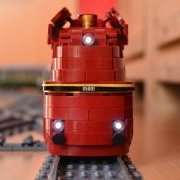
Hello, it´s OcTRAINber-Time.... WIP story and progress of "my" Köf II: I wanted to build a Köf for a long time. Yes, I know, it's not a special locomotive and has been done well in Lego. But not by me. From the beginning, it was clear to me: a locomotive must be able to drive alone, not a freight car with an engine behind it as a drive! This is not really feasible for a Köf in scale 1:41 with pure Lego means. 9V motor would be a solution, but since I am not a 9V driver, have 0 track material for it, the 9V solution is out for me. All known conversions with PF/PF Lego Technic are too big for me and would not fit to scale next to my other models. About a week ago came the announcement for the competition OcTRAINber 2021: small shunting locomotives or maintenance cars etc. were the topic. I combine: I have an unused Circuit Cube engine lying in front of me, I want to build a Köf and there is just a suitable Wettberb. Ok, then I'll build the Köf now and put other topics on the back burner for now. Ok, let's go.... at the beginning is the research. The Köf II is really very small. Link to a sketch, I come there in my scale to about 16 studs length without buffers / coupler Circuit Cube + motor is small, but somehow the Köf II is even smaller. So I thought about the placement of the motor. The first try went wrong. The motor builds up too deep at the bottom and grinds on the top of the rail. This does not work with switches and level crossings. Ok, so set the motor higher and roughly mark out the outer edges. The disadvantage of this motor position are the many necessary gears (friction losses), the advantage is, I can drive both axes. You can also see nicely how small the Köf is to become. One day later: I didn't like the many gears and I also had a crazy idea for the front. It needs space and therefore the engine has to give way: Motor is now 90° tilted. I have fewer gears in use and can still drive both axles. Nice. But the installation there is also difficult and I need MORE space on top for pretty design.... So radically new approach thought out. Motor comes down again, but turned to the side, so that it has 1/2 plate distance to the top of the rail. Advantage: one gear less (even less is not possible^^), both axles can be driven, lots of space on the top. Disadvantage: does it hold? The whole thing is also not so nice from a constructional point of view, because I have to leave the grid inside for the motor, too. The cabin sits all the time also already 1/2 plate in the grid shifted (in height), so that everything becomes very interesting. This was the moment when I also had to test the whole thing with real stones: yes, it works and the thing drives: Now I have a LOT of ;-) Space and can be filled with stupid ideas. But that's another story.... Thomas
-
The circuit cube bluetooth kit with it's tiny motors keeps spreading within the AFOL train community (e.g. see this review or this wonderful model). I see two drawbacks with the current version of the official app: only one module can be connected it needs some kind of (expensive) smart device So I asked Tenka (the manufacturer of these kits) for details about the protocol. They kindly shared the documentation and so I started implementing a "bluetooth hub". Using the information from the legoino project my program connects to one LEGO Powered Up remote and up to two circuit cube modules. It runs on a tiny Computer ("M5 Atom") which measures 3x3 studs. So you still need an additional device, but this is tiny and inexpensive and can be placed somewhere on the layout - or even built into the trains. In the videos this is the small grey box connected to the USB power supply. In one mode you can control the official kit: as long as the buttons of the remote are pressed the motors spin with the maximum velocity: The other mode is useful for trains: when a button is pressed the velocities of all motors connected to the corresponding module are increased/decreased: This is currently a "proof-of-concept" - the source code is available in github but using it will require some (basic) knowledge about programming Arduino-like devices.