


AJB2K3
-
Posts
129 -
Joined
-
Last visited
Content Type
Profiles
Forums
Gallery
Everything posted by AJB2K3
-
From what I can see it's advertised as 2.4GHz. remote devices. they have an app so I assume they could be Bluetooth but haven't got the will power to look into it.
-
Just going to drop this here but I wonder how hard it would be to add support for CADA devices.
-
Ive Just found Cada set C51094W Looks like a good set and half the cost of my last CADA RC set @ GBP £24.99 but...... it not on their site.
-
Sorry been awayhor a bit sorting out holiday and my lego mindstorms/Spybots. I see VLL is now added, how do I use it or what is needed?
-
Hello. Don't use IP blocking to stop DDOS. IP Blocking only works on IPV4 and when IP's revolve address innocent people get blocked and guess what, I was one of those who's IPV4 address was blocked. Only just been able to access the site today for the first time since Friday.
-
@Mr Hobbles PF2 was lego's internal name, the range was branded as PoweredUp! hence why the community refers to it that way. I gave up on my blockly version as @Bliss is making a better version.
-
@Bliss As you have now noticed, the Wedo 1.0 is not a USB Serial device but a HID device which overrides the need for a driver and so you need the lower lever python to control it. The tilt sensor is not a true analogue device, it will only return 4 different values. As to the Switches, they are all "Analogue" as you have said. they all will return a variable result. Now for identification you have to be careful as if you connect multiple in parallel the initial non pressed reading value goes up because resistors in parallel have a reduced value. Half the value of R1 + half the value of R2 and so on even for the grey buttons
-
As far as I am aware, the only real difference is the addition of the resistor for identification.
-
Yes, The resistor is so that the software can work out which tool is connected. I remember seeing the data somewhere but cant even find it on Philo's home Here is some basic info on the CM touch sensors. https://www.plastibots.com/index.php/2008/12/10/554/
-
There are actually 4 touch sensors with different values. The grey touch and the 3 different Cybermaster touch sensors have different values so cm sensor reading is analog not 0/1 I now have the barcode truck complete but need to make new cables and the included motors are fubar
-
It is because the whole time of the VLL/IR and Radio is based on the 2400 baud rate. Any faster and the pulses loose timing and the definite cant understand the signals. Its the same as if someone is talking to you way to fast and you cant understand what they are saying.
-
[CM null] Requesting serial port... index.html:1 Chooser dialog is not displaying a port blocked by the Serial blocklist: bluetoothServiceClassId=00001124-0000-1000-8000-00805f9b34fb, name='88:4D:7C:E9:50:F4' index.html:1 Chooser dialog is not displaying a port blocked by the Serial blocklist: bluetoothServiceClassId=00001200-0000-1000-8000-00805f9b34fb, name='88:4D:7C:E9:50:F4' index.html:1 Chooser dialog is not displaying a port blocked by the Serial blocklist: bluetoothServiceClassId=00001124-0000-1000-8000-00805f9b34fb, name='C0:44:42:C7:F1:B9' index.html:1 Chooser dialog is not displaying a port blocked by the Serial blocklist: bluetoothServiceClassId=00001200-0000-1000-8000-00805f9b34fb, name='C0:44:42:C7:F1:B9' DeviceLegoRcx.js:215 Signature: ff 5a a5 DeviceLegoRcx.js:158 Sent: fe 00 00 ff a5 5a 44 bb 6f 90 20 df 79 86 6f 90 75 8a 20 df 62 9d 79 86 74 8b 65 9a 2c d3 20 df 77 88 68 97 65 9a 6e 91 20 df 49 b6 20 df 6b 94 6e 91 6f 90 63 9c 6b 94 3f c0 85 7a DeviceLegoRcx.js:275 collected: 00 ff 5a a5 4a DeviceLegoRcx.js:63 [CM CM1] Connected. We have a stable connection CM null] Requesting serial port... index.html:1 Chooser dialog is not displaying a port blocked by the Serial blocklist: bluetoothServiceClassId=00001124-0000-1000-8000-00805f9b34fb, name='88:4D:7C:E9:50:F4' index.html:1 Chooser dialog is not displaying a port blocked by the Serial blocklist: bluetoothServiceClassId=00001200-0000-1000-8000-00805f9b34fb, name='88:4D:7C:E9:50:F4' index.html:1 Chooser dialog is not displaying a port blocked by the Serial blocklist: bluetoothServiceClassId=00001124-0000-1000-8000-00805f9b34fb, name='C0:44:42:C7:F1:B9' index.html:1 Chooser dialog is not displaying a port blocked by the Serial blocklist: bluetoothServiceClassId=00001200-0000-1000-8000-00805f9b34fb, name='C0:44:42:C7:F1:B9' DeviceLegoRcx.js:215 Signature: ff 5a a5 DeviceLegoRcx.js:158 Sent: fe 00 00 ff a5 5a 44 bb 6f 90 20 df 79 86 6f 90 75 8a 20 df 62 9d 79 86 74 8b 65 9a 2c d3 20 df 77 88 68 97 65 9a 6e 91 20 df 49 b6 20 df 6b 94 6e 91 6f 90 63 9c 6b 94 3f c0 85 7a DeviceLegoRcx.js:275 collected: 00 ff 5a a5 4a DeviceLegoRcx.js:63 [CM CM1] Connected. main.js:529 Generated code: { shouldStop(); const dev = deviceManager.getDeviceByName("CM1"); if (!dev) throw new Error("Device lost"); await dev.snd(1); } DeviceLegoRcx.js:215 Signature: ff ae 51 DeviceLegoRcx.js:158 Sent: fe 00 00 ff 51 ae 01 fe 52 ad DeviceLegoRcx.js:275 collected: e8 17 ff ae 51 main.js:529 Generated code: { shouldStop(); const dev = deviceManager.getDeviceByName("CM1"); if (!dev) throw new Error("Device lost"); await dev.snd(2); } DeviceLegoRcx.js:215 Signature: ff a6 59 DeviceLegoRcx.js:158 Sent: fe 00 00 ff 59 a6 02 fd 5b a4 DeviceLegoRcx.js:275 collected: ae 51 ff a6 59 We have sound playback on the cyber master, Nice work!
-
Using CyberMaster: true DeviceLegoRcx.js:63 [CM null] Requesting serial port... index.html:1 Chooser dialog is not displaying a port blocked by the Serial blocklist: bluetoothServiceClassId=00001200-0000-1000-8000-00805f9b34fb, name='88:4D:7C:E9:50:F4' index.html:1 Chooser dialog is not displaying a port blocked by the Serial blocklist: bluetoothServiceClassId=00001124-0000-1000-8000-00805f9b34fb, name='88:4D:7C:E9:50:F4' index.html:1 Chooser dialog is not displaying a port blocked by the Serial blocklist: bluetoothServiceClassId=00001124-0000-1000-8000-00805f9b34fb, name='C0:44:42:C7:F1:B9' index.html:1 Chooser dialog is not displaying a port blocked by the Serial blocklist: bluetoothServiceClassId=00001200-0000-1000-8000-00805f9b34fb, name='C0:44:42:C7:F1:B9' DeviceLegoRcx.js:215 Signature: ff 5a a5 DeviceLegoRcx.js:158 Sent: fe 00 00 ff a5 5a 44 bb 6f 90 20 df 79 86 6f 90 75 8a 20 df 62 9d 79 86 74 8b 65 9a 2c d3 20 df 77 88 68 97 65 9a 6e 91 20 df 49 b6 20 df 6b 94 6e 91 6f 90 63 9c 6b 94 3f c0 85 7a DeviceLegoRcx.js:275 collected: 00 ff 5a a5 4a b5 75 8a 73 8c 74 8b 20 df 61 9e 20 df 62 9d 69 96 74 8b 20 df 6f 90 66 99 66 99 20 df 74 8b 68 97 65 9a 20 df 62 9d 6c 93 6f 90 63 9c 6b 94 21 de e8 17 DeviceLegoRcx.js:313 [CM null] No reply for cmd a5 (attempt 1) (anonymous) @ DeviceLegoRcx.js:313 Promise.then enqueue @ DeviceLegoRcx.js:69 rcxCmd @ DeviceLegoRcx.js:198 _handshakeCM @ DeviceLegoRcx.js:147 connect @ DeviceLegoRcx.js:108 await in connect connectRcx @ deviceManager.js:133 document.getElementById.onclick @ main.js:640Understand this warning DeviceLegoRcx.js:158 Sent: fe 00 00 ff a5 5a 44 bb 6f 90 20 df 79 86 6f 90 75 8a 20 df 62 9d 79 86 74 8b 65 9a 2c d3 20 df 77 88 68 97 65 9a 6e 91 20 df 49 b6 20 df 6b 94 6e 91 6f 90 63 9c 6b 94 3f c0 85 7a DeviceLegoRcx.js:275 collected: ff 5a a5 4a b5 75 8a 73 8c 74 8b 20 df 61 9e 20 df 62 9d 69 96 74 8b 20 df 6f 90 66 99 66 99 20 df 74 8b 68 97 65 9a 20 df 62 9d 6c 93 6f 90 63 9c 6b 94 21 de e8 17 DeviceLegoRcx.js:313 [CM null] No reply for cmd a5 (attempt 2) (anonymous) @ DeviceLegoRcx.js:313 Promise.then enqueue @ DeviceLegoRcx.js:69 rcxCmd @ DeviceLegoRcx.js:198 _handshakeCM @ DeviceLegoRcx.js:147 connect @ DeviceLegoRcx.js:108 await in connect connectRcx @ deviceManager.js:133 document.getElementById.onclick @ main.js:640Understand this warning DeviceLegoRcx.js:158 Sent: fe 00 00 ff a5 5a 44 bb 6f 90 20 df 79 86 6f 90 75 8a 20 df 62 9d 79 86 74 8b 65 9a 2c d3 20 df 77 88 68 97 65 9a 6e 91 20 df 49 b6 20 df 6b 94 6e 91 6f 90 63 9c 6b 94 3f c0 85 7a DeviceLegoRcx.js:275 collected: ff 5a a5 4a b5 75 8a 73 8c 74 8b 20 df 61 9e 20 df 62 9d 69 96 74 8b 20 df 6f 90 66 99 66 99 20 df 74 8b 68 97 65 9a 20 df 62 9d 6c 93 6f 90 63 9c 6b 94 21 de e8 17 DeviceLegoRcx.js:313 [CM null] No reply for cmd a5 (attempt 3) (anonymous) @ DeviceLegoRcx.js:313 Promise.then enqueue @ DeviceLegoRcx.js:69 rcxCmd @ DeviceLegoRcx.js:198 _handshakeCM @ DeviceLegoRcx.js:147 connect @ DeviceLegoRcx.js:108 await in connect connectRcx @ deviceManager.js:133 document.getElementById.onclick @ main.js:640Understand this warning DeviceLegoRcx.js:324 [CM null] Command failed after 3 attempts: a5 (anonymous) @ DeviceLegoRcx.js:324 Promise.then enqueue @ DeviceLegoRcx.js:69 rcxCmd @ DeviceLegoRcx.js:198 _handshakeCM @ DeviceLegoRcx.js:147 connect @ DeviceLegoRcx.js:108 await in connect connectRcx @ deviceManager.js:133 document.getElementById.onclick @ main.js:640Understand this warning DeviceLegoRcx.js:63 [CM null] CM did not respond. Power it on. hmn first two bytes are missing but getting the 5 flashes like I did in the other topic.
-
LOL, he already knows and has the samples on his discord Still no response I thought I had made progress here Try focusing on the beep function of the RCX and getting that to trigger on the cybermaster
-
I'm writing a book on repairing and restoring 90's era lego electronics. @Bliss No worries, you are doing a better job with yours than I did with mine.
-
It was supposed to be have not got the space
-
I have not got space for a 100” screen otherwise I would
-
You should be able to scroll the workspace to see more without zooming out
-
This is interesting thanks, I was wondering about adding circuit diagrams to my book
-
I also ran a test. While Both tower and chassis flash, IDE reports no response. Using CyberMaster: true DeviceLegoRcx.js:63 [CM null] Requesting serial port... 5Chooser dialog is not displaying a port blocked by the Serial blocklist: bluetoothServiceClassId=00001124-0000-1000-8000-00805f9b34fb, name='C0:44:42:C7:F1:B9' 5Chooser dialog is not displaying a port blocked by the Serial blocklist: bluetoothServiceClassId=00001200-0000-1000-8000-00805f9b34fb, name='C0:44:42:C7:F1:B9' 5Chooser dialog is not displaying a port blocked by the Serial blocklist: bluetoothServiceClassId=00001124-0000-1000-8000-00805f9b34fb, name='88:4D:7C:E9:50:F4' 5Chooser dialog is not displaying a port blocked by the Serial blocklist: bluetoothServiceClassId=00001200-0000-1000-8000-00805f9b34fb, name='88:4D:7C:E9:50:F4' DeviceLegoRcx.js:300 [CM null] No reply for cmd a5 (attempt 1) (anonymous) @ DeviceLegoRcx.js:300Understand this warning DeviceLegoRcx.js:300 [CM null] No reply for cmd a5 (attempt 2) (anonymous) @ DeviceLegoRcx.js:300Understand this warning DeviceLegoRcx.js:300 [CM null] No reply for cmd a5 (attempt 3) (anonymous) @ DeviceLegoRcx.js:300Understand this warning DeviceLegoRcx.js:311 [CM null] Command failed after 3 attempts: a5 (anonymous) @ DeviceLegoRcx.js:311Understand this warning DeviceLegoRcx.js:63 [CM null] CM did not respond. Power it on. main.js:785 Using CyberMaster: false main.js:785 Using CyberMaster: true DeviceLegoRcx.js:63 [CM null] Requesting serial port... DeviceLegoRcx.js:300 [CM null] No reply for cmd a5 (attempt 1) (anonymous) @ DeviceLegoRcx.js:300Understand this warning DeviceLegoRcx.js:300 [CM null] No reply for cmd a5 (attempt 2) (anonymous) @ DeviceLegoRcx.js:300Understand this warning DeviceLegoRcx.js:300 [CM null] No reply for cmd a5 (attempt 3) (anonymous) @ DeviceLegoRcx.js:300Understand this warning DeviceLegoRcx.js:311 [CM null] Command failed after 3 attempts: a5 (anonymous) @ DeviceLegoRcx.js:311Understand this warning DeviceLegoRcx.js:63 [CM null] CM did not respond. Power it on. DeviceLegoRcx.js:63 [CM null] Requesting serial port... DeviceLegoRcx.js:300 [CM null] No reply for cmd a5 (attempt 1) (anonymous) @ DeviceLegoRcx.js:300Understand this warning DeviceLegoRcx.js:300 [CM null] No reply for cmd a5 (attempt 2) (anonymous) @ DeviceLegoRcx.js:300Understand this warning DeviceLegoRcx.js:300 [CM null] No reply for cmd a5 (attempt 3) (anonymous) @ DeviceLegoRcx.js:300Understand this warning DeviceLegoRcx.js:311 [CM null] Command failed after 3 attempts: a5 (anonymous) @ DeviceLegoRcx.js:311Understand this warning DeviceLegoRcx.js:63 [CM null] CM did not respond. Power it on. DeviceLegoRcx.js:63 [CM null] Requesting serial port... DeviceLegoRcx.js:300 [CM null] No reply for cmd a5 (attempt 1) (anonymous) @ DeviceLegoRcx.js:300Understand this warning DeviceLegoRcx.js:300 [CM null] No reply for cmd a5 (attempt 2) (anonymous) @ DeviceLegoRcx.js:300Understand this warning DeviceLegoRcx.js:300 [CM null] No reply for cmd a5 (attempt 3) (anonymous) @ DeviceLegoRcx.js:300Understand this warning DeviceLegoRcx.js:311 [CM null] Command failed after 3 attempts: a5 (anonymous) @ DeviceLegoRcx.js:311Understand this warning DeviceLegoRcx.js:63 [CM null] CM did not respond. Power it on.
-
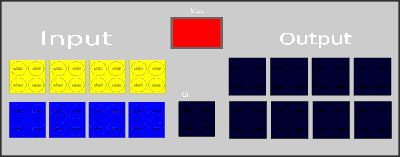
I've always wanted a virtual interface b like the old software so started work on one.
-
Wow, looks so much cleaner than my attempt. Sorry having a brain fail moment. Is the BT adapter acting as a bridge to pas the raw data from the interface to the host computer?
-
You can’t if you don’t have a serial adapter for the phone
-
This Is the problems I found with my cross platform offline version. Trying to build the online version ment rolling out webusb which has its issues. @Bliss Thats why I chose to only open the port when running code otherwise you get access blocks/crashes. As bliss once said, my version is a dependency nightmare as its built for python and trying to find and install the correct dependencies in a pain and only getting worse as I add more function. In order to access the devices I am using both pyserial to access devices using a USB adapter but then have to use a the low level pyusb to access devices using PID and VID USB devices as they don't have working USB drives. A point of note about the Wedo1.0 hub - Apparently it doesn't act as a typical serial device but instead acts as a USB HID device. Even with the dependencies and knowledge I still cant get the USB tower to operate.