


MrLuWillBeLive
-
Posts
10 -
Joined
-
Last visited
About MrLuWillBeLive

-
Custom LDD bricks and fixes
MrLuWillBeLive replied to Equilibrium's topic in Digital LEGO: Tools, Techniques, and Projects
Hey polymaker,The Brick Studio isn't compatible with the GPU from AMD on my computer,It appears to go into no-response after starting,But it working with the GPU from NVDIA,Can i do anything? -
Blender to LDraw
MrLuWillBeLive replied to mmcb's topic in Digital LEGO: Tools, Techniques, and Projects
Use the PartDesigner(from Stud.io) to create it,then copy the .dat file from "C:\Users\admin\AppData\Local\Stud.io\CustomParts\parts" -
form the studio custom part library (also it will in there "C:\Users\admin\AppData\Local\Stud.io\CustomParts\parts")copy file to the blender ldraw library
-
Custom LDD bricks and fixes
MrLuWillBeLive replied to Equilibrium's topic in Digital LEGO: Tools, Techniques, and Projects
In my experience,They need to be placed in the LDRAW library folder. -
Custom LDD bricks and fixes
MrLuWillBeLive replied to Equilibrium's topic in Digital LEGO: Tools, Techniques, and Projects
This is the LDraw File Format Specification:https://www.ldraw.org/article/218.html In the "Line Types" part,Line Type 1 part says: Sub-files can be located in the LDRAW\PARTS sub-directory, the LDRAW\P sub-directory, the LDRAW\MODELS sub-directory, the current file's directory, a path relative to one of these directories, or a full path may be specified. Sub-parts are typically stored in the LDRAW\PARTS\S sub-directory and so are referenced as s\subpart.dat, while hi-res primitives are stored in the LDRAW\P\48 sub-directory and so referenced as 48\hires.dat So, if u want to import a part with subfile into blender,be careful your subfile exists in the \ldraw\parts\s folder.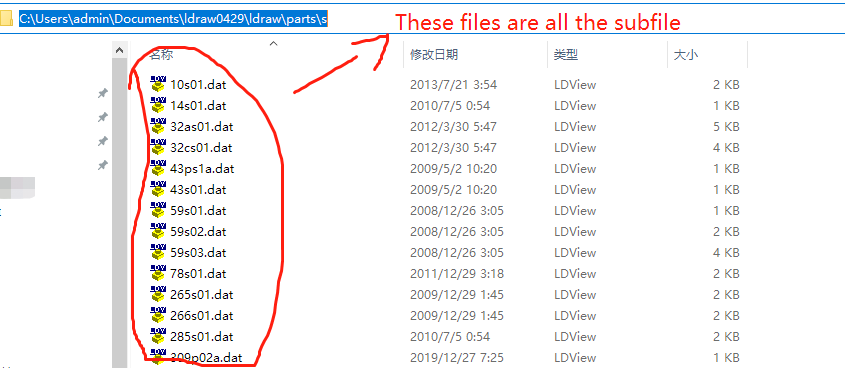
-
Custom LDD bricks and fixes
MrLuWillBeLive replied to Equilibrium's topic in Digital LEGO: Tools, Techniques, and Projects
Hey Stephan, have you solved the problem with import *.dat subfiles in Blender ? -
Custom LDD bricks and fixes
MrLuWillBeLive replied to Equilibrium's topic in Digital LEGO: Tools, Techniques, and Projects
[CUT]
-
Blender - LDD Plugin
MrLuWillBeLive replied to M2m's topic in Digital LEGO: Tools, Techniques, and Projects
For example,you can use the Part Designer,click the "Import",selcet the "STUDIO PART",then selcet and export a "new" part(It's same of the stu.dio part,if it only exists in the stu.dio part library) but in this way to make a new .dat part,it is not simple and elegant as a part from ldraw part library -
Blender - LDD Plugin
MrLuWillBeLive replied to M2m's topic in Digital LEGO: Tools, Techniques, and Projects
If you creat the LDD-Mod-Parts model into a .DAT file,then copy it to the Plugin's LDraw Parts Library booooom,now you can import the new model to the BLENDER also,you can from stu.dio's new part copy the .dat file to the same file address,then it will work when you export a .ldr file from stu.dio with some mod part -
Blender - LDD Plugin
MrLuWillBeLive replied to M2m's topic in Digital LEGO: Tools, Techniques, and Projects
In Fact,that have a blender Plugin for Import LDraw https ://github.com/ TobyLobster/ImportLDraw