


crizz11
-
Posts
13 -
Joined
-
Last visited
Content Type
Profiles
Forums
Gallery
Everything posted by crizz11
-
yeah i already tried that and the same parts in the instructions for the FX don't actually fit into the Trix. Was an abvious thing too i thought but it just does not fit. With the Trix R72 there is no gap between the 2x6 plate (421002) and the Plate 1 x 8 with Door Rail (4210967). If you push really hard it will go in but then it bends the whole track and won't sit flat on the table. I am thinking it's such a close fit and looks good that i might just shave some off the edge of those two parts. Other issues are in step 3 with the 2x4 plate's not fitting either and then in step 4 with those two parts not fitting in that gap either. I have found some suitable parts to fill the gap the best i can.
-
Hi All, i can find the reference instructions on how to ballast TrixBrix R88 curve tracks but i can't find it for their R72. The R72 instructions here https://l-gauge.org/wiki/index.php?title=Reference_Instructions are only for FX Track's R72 which are different to TrixBrix R72. I know Trix make their own R72 ballast plate buit i would rather not use these. Does anyone have instructions for how to ballast TrixBrix R72 curve or know where i could find them please? thanks.
-
A review of the first elements from the FX Track system
crizz11 replied to zephyr1934's topic in LEGO Train Tech
EDIT: I get it now and using it fine in Studio. Thanks for your help everyone. oh i thought it was meant to ALSO look like this. Or are these only for use in ldraw or studio? -
A review of the first elements from the FX Track system
crizz11 replied to zephyr1934's topic in LEGO Train Tech
I have extracted the fx zip into the parts/LgaugeColor/ folder but i still only see like below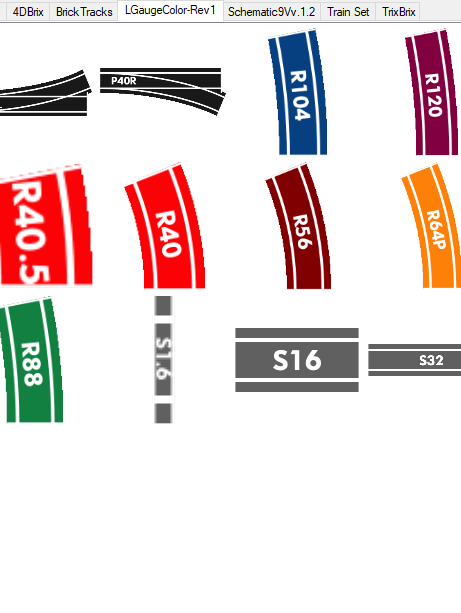
-
A review of the first elements from the FX Track system
crizz11 replied to zephyr1934's topic in LEGO Train Tech
ok i downloaded the LGaugeColor-Rev1.zip and extracted that into the parts folder, and can see the tab in the app. Where do i extract the fx zip to though please? -
A review of the first elements from the FX Track system
crizz11 replied to zephyr1934's topic in LEGO Train Tech
ok thanks mate i found the zip, i unzipped it into the parts folder under the bluebrick 1.9.1 folder, i can see the tab for FX in the application but when i click on that tab i don't see any track elements in there. -
A review of the first elements from the FX Track system
crizz11 replied to zephyr1934's topic in LEGO Train Tech
Just confirming, are there 8 studs in between these two parallel tracks when you use two P40L's? Also which Windows software has FX tracks in it for layout design please? thanks.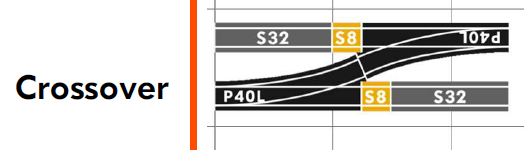
-
A review of the first elements from the FX Track system
crizz11 replied to zephyr1934's topic in LEGO Train Tech
Thank you for your quick response. Do you mean use two FX P40 switches? one on each loop? (in different areas slightly of course) for easier transition from one loop to the other, to save having to reverse to get back onto the other loop. -
A review of the first elements from the FX Track system
crizz11 replied to zephyr1934's topic in LEGO Train Tech
Hi everyone, this is all very exciting and i can't wait to convert my layout to FX tracks and convert all my trains to use FX motors. I have a few questions though in relation to my layout and how 9v would work. 1. I have two loops running around my layout. One with R72 curves and the other with R88. These are currently joined via a R104 double crossover from Trixbrix https://trixbrix.eu/en_US/p/Double-Crossover-R104/84 . Question is how do you provide power around a 2 loop layout? Do you need a transformer connected to each loop (2 transformers)? 2. I'm guessing i also have a big problem with the R104 double crossover in that it will be very hard if not impossible to have it powered using the copper tape method? thanks. -
ok mate, thanks for the reply
-
Hi shadowmadman, great mod of this tram into a monorail. did you ever release any instructions on how its done please? thanks.
-
Hi All, i purchased 3 of these black Mould King power bricks to use with trains but im struggling to figure out how to control nicely. I can assign a joystick button to the output that has the train motor plugged into it which is good it gives me forward and reverse on the joystick for the train movements. However with joystick you need to obviously hold your finger on the joystick for the whole time you want the train to be moving and it is also very fast and unless you have a lot of carriages its easy for the train to derail at that speed. Is there any way to control the speed using the slider control, even at the first step along the slider the train is fast. thanks.
-
Hi all, just getting back into Lego and wanting to have a go at a MOC of a real world old train station. What is considered the best technique for reproducing a red brick wall please? Would it be using something like 98283 Lego 1x2 Bricks Dark Red Modified With Masonry Profile (or 1 x 4 version of that 15533) which seems the easy way out and less technical technique. Or would it be better to use something like 22885 Brick, Modified 1 x 2 x 1 2/3 with Studs on 1 Side and put 1x2 and 1x1 red tiles onto them in a brick work pattern? EDIT: or 52107 Brick, Modified 1 x 2 with Studs on 2 Sides if i wanted to do decorating on interior side of the wall with tiles etc) thanks