


zweifuss
-
Posts
111 -
Joined
-
Last visited
Content Type
Profiles
Forums
Gallery
Everything posted by zweifuss
-

Custom LDD bricks and fixes
zweifuss replied to Equilibrium's topic in Digital LEGO: Tools, Techniques, and Projects
I think I made progress with the 32296 tire, it looks better now in LDD. I played around with the meshes... but the ridges still look messed up. -
Custom LDD bricks and fixes
zweifuss replied to Equilibrium's topic in Digital LEGO: Tools, Techniques, and Projects
That's awesome, was Sonic not in LDD before? Nice work separating all the colour maps out, looks perfect. -
Custom LDD bricks and fixes
zweifuss replied to Equilibrium's topic in Digital LEGO: Tools, Techniques, and Projects
@polymaker I know this is a 'pie-in-the-sky' request, but could an algorithm be developed to generate collisions based off the geometry? This is coming from a 3D-modeling noob here, so please ignore this request if it's ludicrous. I guess if that's ridiculous, would it be possible to import collision boxes from a similar part, so that the task of creating collisions can be simplified? I'm wondering how the LDD coders did these collisions, surely they had a script or program to generate the basic blocks, and then they just manipulated them by hand after... -
Custom LDD bricks and fixes
zweifuss replied to Equilibrium's topic in Digital LEGO: Tools, Techniques, and Projects
@polymaker Only some new parts don't show up in the list... it's very odd. For example 41865 and 42862, the Wedge 3 x 3 Sloped left and right, don not. But the Monorail parts done by @Equilibrium all show up. I checked and the .G files are definitely in the Primitives\LOD0 folder and the XML files are in the Primitives. edit - Ok just noticed @Stephan put in 41865 instead of 48165 in the 'LDD New Parts' list... the correct number is 48165. I actually created my own with your tool, and now it's in the list. 41865 is an actual part number that just so happens to not be in LDD as well, it's a 'Wheel Small Wide Hard Plastic Slick, Hole Notched for Wheels Holder Pin'. I re-created the 42862 and 48165 parts using Brick Studio and they now show up in the list. -
Custom LDD bricks and fixes
zweifuss replied to Equilibrium's topic in Digital LEGO: Tools, Techniques, and Projects
@polymaker thank you for releasing the alpha .2 to github. One question - when you pick 'create from brick...', where does it populate that list from? Because all the parts the people have added throughout the last couple months and I've saved to the folders don't show up in this list, even though I can see them in LDD. When you pick 'Generate LDD Files', does it save the new part to some kind of a list? Hope my question makes sense! Thanks again for your work, this is awesome to have. I will try to fix the 32296 tire by modifying the mesh. Another question about tires and hubs... can you explain the Connections? What do the SubType numbers correspond to? When I pick the pulldown meno in 'connection parameters' it doesn't pull in any numbers. -
Custom LDD bricks and fixes
zweifuss replied to Equilibrium's topic in Digital LEGO: Tools, Techniques, and Projects
I have also been able to compile it from the source. There is a free version of visual studio available which I used. I know polymaker is not done with it yet but it's very usable. -
Custom LDD bricks and fixes
zweifuss replied to Equilibrium's topic in Digital LEGO: Tools, Techniques, and Projects
@Equilibrium I agree... I was bothered by the fact that the bricks (not yours) were imported with beveled edges and then exported without the outlines. I played around with Blender a bit and was able to get this result for the 48165 wedge: But as you can see there are still gaps in the geometry. I am a 3D modeling amateur so I have a lot to learn still, but I'd like to contribute with quality parts and collisions as well. The key is to keep poly-count low as well, and to enable smooth shading on the model before exporting to OBJ I find... but I'm still having issues with certain parts, especially this one tire is giving me headaches, 32296. I don't know the trick to make the sides not have all those ugly outlines in them, I think Brick Studio draws outlines on areas where I don't want them, I'll have to play around with the mesh a bit more to fix it. as you can see, its smaller cousin 41897 is much neater looking: I have a lot to learn but I'm getting there! As you can see 22969 (the rim above) I exported it without smooth shading and you see the blocky result on the round object. -
[RANT] Stud.io
zweifuss replied to ExeSandbox's topic in Digital LEGO: Tools, Techniques, and Projects
Yes it is quite funny. If you do some googling you can find the password easily. Apparently it's in a DLL file. The. Io file is just a zip container for a bunch of. Ldr files. I also find the software quite sluggish and prefer to build in ldd or ldcad which runs way faster. -
Custom LDD bricks and fixes
zweifuss replied to Equilibrium's topic in Digital LEGO: Tools, Techniques, and Projects
Not all the new blocks don't have collisions... just some. I wish there was a better way to generate them, it seems like a really tedious process to make collisions. At least with the current build of Brick Studio. -
Custom LDD bricks and fixes
zweifuss replied to Equilibrium's topic in Digital LEGO: Tools, Techniques, and Projects
I've managed to make a quick-and-dirty one using Brick, Round 3 x 3 x 1 1/3 Dome Top - Open Stud (49308) as a donor and editing some stuff out. I imported 65617 from the unofficial ldraw library. Not sure if it's good enough for an official release though, but I've managed to put it on a plate and they seem to go together. No collisions done yet though. I'm thinking P/N 24599 (Brick, Round Corner 5 x 5 x 1 without Studs) would be a better donor brick to work from for a more robust file, but that would take some time to do. I think I'll let the experts do it... I'm just a hobbyist. If you want mine though you can send me a private message.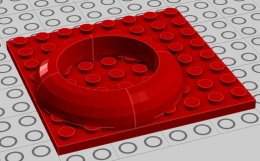
-
Ninjago Movie Screen-Accurate Mech Recreations
zweifuss replied to GLAP23's topic in LEGO Action and Adventure Themes
Actually if anything the tire looks too narrow. I will try again and compare to movie screen shots. There are a lot of good ones. I guess I could also use Ninja Ripper on the game. I'm still fascinated by the fact that they created these Mech monsters for the movie different from the sets. Yes they do look more impressive, but it seems like a lot of extra work that isn't that appreciated by about 95% of the audience. -
Ninjago Movie Screen-Accurate Mech Recreations
zweifuss replied to GLAP23's topic in LEGO Action and Adventure Themes
Sorry to bump this thread again, but thanks to another thread on these forums (https://www.eurobricks.com/forum/index.php?/forums/topic/170286-custom-ldd-bricks-and-fixes/), I've been able to use an LDD brick creator software by @polymaker to create the giant tire for the Quake Mech. What I did was I started with the 59521 wheel, and I imported a mesh I had stretched around a bit of the 23798 wheel in Blender (scaled X/Y by 1.8, and scaled Z by 1.4). So this giant wheel has a floating connectivity of an axle right in the center. Here are some pictures... does it look pretty accurate to the movie, or is it maybe too big? -
Custom LDD bricks and fixes
zweifuss replied to Equilibrium's topic in Digital LEGO: Tools, Techniques, and Projects
I agree with this... if this is to move forward, all the added parts need to have authorship/history embedded in them. Are there places in the header that this info can be inserted in? On that topic, have the LDD developers ever credited LDRAW library for any of their parts? Where is that information found? -
Custom LDD bricks and fixes
zweifuss replied to Equilibrium's topic in Digital LEGO: Tools, Techniques, and Projects
OH ok, so the connectivity on those two half-antistuds needs to be removed basically, to fix this part.... It'd be nice if we had a collaborative platform where anyone can make an edit, and not have to wait for someone like @jester to fix the part. -
Custom LDD bricks and fixes
zweifuss replied to Equilibrium's topic in Digital LEGO: Tools, Techniques, and Projects
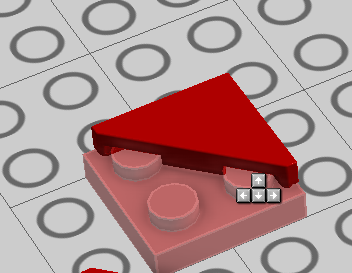
Yes you're right, you can't put these tiles on any plates... even after the fix. The two corners that are half-studs are probably not configured for connectivity. I can do this: But I can't do this: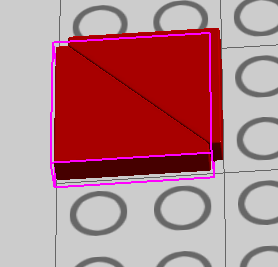
-
Ninjago Movie Screen-Accurate Mech Recreations
zweifuss replied to GLAP23's topic in LEGO Action and Adventure Themes
Could one of you put the lxf of the bus up? I'd really appreciate it. Fun project to do with my son during isolation. Unless there are a lot of colours that don't exist? -
Custom LDD bricks and fixes
zweifuss replied to Equilibrium's topic in Digital LEGO: Tools, Techniques, and Projects
Wow that's awesome, in LDD! Very cool... so, can this be added to the Official Sets in LDD topic, or would that be against the rules since it's modified LDD? Will be an interesting discussion...think about all the sets that can be updated now. -
Custom LDD bricks and fixes
zweifuss replied to Equilibrium's topic in Digital LEGO: Tools, Techniques, and Projects
Wow thanks @jester and @Stephan, I have been able to install it thanks to your instructions. I have been following this thread for many years now and I'm soooooo happy to finally have something I can use. This is wonderful stuff... Since I've gotten into digital Lego, I still find LDD to be the most easy to use and user friendly environment, so it's nice to see it updated. LDCAD, Studio, and MecaBricks are nice and all, but I still think Lego's own program has that fine line between usability and fun, which other programs have not been able to duplicate. Nothing beats dragging and dropping and hearing that satisfying 'click' sound when building. Now the questions is what happened to the OP, @Equilibrium? AWOL? I would have really liked some of those pieces being worked on... @Scrubs, sorry to hear someone has nixed your parts you created! I am a bit new to the scene, but I understand we are all builders and love this hobby, and we should all collaborate towards a common goal! I love what you're doing with your site, and I visit it frequently. I hope things get sorted out and we can all be on a parallel path towards an amicable solution. I'd hate for this fledgling project to be halted when it's come so far! What I'd really like to see are SAILS for all those wonderful ships, now that would be a dream come true, and for that matter all those flexibly sail-like parts like dragon wings, etc. One can only dream! Keep up the amazing work everyone and I hope to see a lot of cool new things in this thread. -
Custom LDD bricks and fixes
zweifuss replied to Equilibrium's topic in Digital LEGO: Tools, Techniques, and Projects
This is great news, except your link for the new parts just goes to http://C. edit: nm it's fixed now, thanks! -
Ninjago Movie Screen-Accurate Mech Recreations
zweifuss replied to GLAP23's topic in LEGO Action and Adventure Themes
You guys with your IRL models, very wonderful, I love this thread. Can't wait to see the mechs realized in real life some day too, probably will require a lot of custom paint and stickers, but they'll be beautiful. -
Ninjago Movie Screen-Accurate Mech Recreations
zweifuss replied to GLAP23's topic in LEGO Action and Adventure Themes
You just have to import the LXF files into Bricklink Studio, that's it. A lot of these you can't really do in real life because the colours don't exist, sadly. These don't really have instructions per-se, but you can generate them using LDD, that's probably your best bet. -
Ninjago Movie Screen-Accurate Mech Recreations
zweifuss replied to GLAP23's topic in LEGO Action and Adventure Themes
Beautiful work as always, I keep checking this thread every week or so for updates. Glad you are doing well and keeping on, even though the world seems to be at a standstill right now, these models bring a smile to my face. Lego Digital Designer really chokes on these models though, have you considered moving to a more modern and up-to-date program, such as Studio (from Bricklink) or LDCAD? -
Ninjago Movie Screen-Accurate Mech Recreations
zweifuss replied to GLAP23's topic in LEGO Action and Adventure Themes
You know what, I suggest just trying to do it on your own for now. It looks like you've hit a dead end for resources. The companies won't let you look at intellectual property like that. Most of the surfaces are visible on the resources available, it's just a matter of being creative at this point, which I'm sure you have much of. Who knows, maybe your final design may actually be better than the original designers, I think the important thing is that the outside looks the same, not the internal structures. Are there any updates on other ones? What about the shark mech? Also, I have time over the holidays so I may be able to construct a correct dragon snout for you based on the drawings, no promises but there is potential. Also, there is a way to export the parts into LDD, so we can construct parts using other tools and export into the LDD library..https://github.com/Polymaker/ldd-modder/releases. This person seems to be progressing nicely on this tool, so it would enable you to keep using LDD even with custom parts. -
Ninjago Movie Screen-Accurate Mech Recreations
zweifuss replied to GLAP23's topic in LEGO Action and Adventure Themes
I gotta say, I'm always still impressed at your efforts, if you do the real Garma Mecha, wow, you better get some kind of trophy for that. It might take you a year to do it but your efforts will not be in vain. I haven't had time to try the dragon snout again, too busy with family life to play around with blender. But I know there's a way to super-impose images while modelling, so there is a way I can use your references if I get back into it again. As I said before, please continue with all this, it really makes my day when I see new stuff on this thread. -
Big fan of Lego ninjago movie
zweifuss replied to Mrlikeslegothings's topic in LEGO Media and Gaming
I like the aesthetic of the movie. The content and writing though feel very.... derivative, for lack of better description. My 4-year-old doesn't like it either. It just didn't click with him. It's unfortunate because the designs are fantastic, and give off a Big Hero 6 vibe. I felt a lot of the voice acting was lacking as well, and many jokes fell flat.