

BatteryPoweredBricks
-
Posts
155 -
Joined
-
Last visited
Content Type
Profiles
Forums
Gallery
Everything posted by BatteryPoweredBricks
-
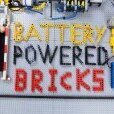 I thought I'd drop this here for anyone curious as to how the original Dacta Control Lab software operated (I'm using the Windows 95 version). Again, it wouldn't be possible without many of you in this thread for sharing information. I'd be glad to hear any constructive criticism, I'm sure I made my fair share of mistakes in the video. It was quite a challenge for me to sync up voice-over, screen-capture, the video of the test pad and it's associated audio together into something cohesive. But I can say with some confidence it's quite possibly the best video on YouTube on the subject (if not the only)! I am intensely curious about any and all information on the Control Lab and it's use in schools. Don't hesitate to reach out if you have anything you'd like to share. Here's a picture of the full test pad, some of the light reflections on the tiles make it look like a render
 -
I would very much like the coordinates of this particular dark alley where you found this deal Any pics?
-
Getting started with 12 volt trains
BatteryPoweredBricks replied to Reker1000000's topic in LEGO Train Tech
Subbed! I will watch these with great interest. The 12v era is well before my time, I spent my time as a kid drooling over the 9v era trains and monorails. The 12v system has always intrigued me but I've never seen videos go in depth about each component and how they were used. I've seen the same neglect when it comes to older Mindstorms components and I'm trying to fill that void with my own videos. I like videos I can watch anytime where I don't have to read everything on the screen so I'm glad you are doing voice over instead of just words on the screen, it's a lot more work but it is much appreciated by people like myself. Thank you for uploading these, I can't wait to check them all out! -
I didn't see the replies for until late last night, I forgot to follow the topic. I see now my first instinct should have been "what does Philo have to say on the subject" Thanks for the replies, it led me down the right path. I'm still trying to figure out what the exclamation mark means for the Bluetooth sensor block (Philo's has it, during troubleshooting I tried without it). What did the trick was using a switch block in tabbed mode and each action being assigned to a number. Everything is working great! Now I can do the same thing for the other 2 NXTs .
-
I'm trying to create what I thought would be a simple program for communication between 2 NXTs. When a touch sensor is pressed on the master NXT, send a BT message to a slave NXT to run a motor for half a second in one direction, and the opposite direction when the sensor is released. This also needs to be done for another sensor and motor between the two NXTs. Once that is working I want 2 more touch sensors on the master to send BT commands to tell the second NXT to send Power Functions commands from a HiTechnic sensor. I'll post what I have so far in NXT-G. If need be I can use NXC to program them, I'm just unsure how the HiTechnic PF commands work in NXC and I'm not the best programmer (I'm more of a hardware guy not so much software). I've used NXT-G to send train PF commands to a PF servo at power level 7 in each direction or return to center. The problem I have is most of the BlueTooth commands aren't being received. It just randomly works when it wants to, which isn't often. In my limited understanding I'd say it's on the receiving end since I'm using 4 loops to read the commands (It would eventually be 8). All this is for an automated monorail layout. It will be controlled by a Lego Dacta Control Lab Serial Interface controlling motors which press and release the NXT touch sensors on the Master NXT. When one of the touch sensor states change it would send commands via BlueTooth to the slave NXT to control the motors for the switchtracks. The direction switches for the monorail will use a PF servo to change directions or stop the monorail motor. Why go through all this trouble? Because I like a good challenge and am obsessed with the Dacta Control Lab and its accompanying software. I'm am fully aware there are more simple ways to do this. BlueTooth communication is the only thing holding me back at this point. Without it I will have to use the main NXT to control the switchtracks which means they have to be very close to the main control center. All of this would be duplicated between 2 other NXTs. I hope I have explained everything in a somewhat intelligible way, feel free to ask any questions you have or tell me I'm crazy. The main question I have here is do I need to switch over to NXC or is this possible using NXT-G? Master Program Slave Program
-
Very cool idea! I like the music choice on the video as well
-
Another update: I've been repairing tons of wires lately, making full sets for Mindstorms sets I want to review or custom length wires for projects. Testing the wires throughout the process with a multi-meter is kind of a pain and slows things down. So I made my own 9v wire tester and it really speeds things up! If there ends up being enough interest I may make a guide to making one, I think It could be done more efficiently than the absolute mess of wires in this version @allanp Thanks for the tip! I do have many contacts that need to be cleaned, I'll have to look into that soon!
-
And now the guide is available in video format! I'm just glad I made it AFTER reading through the guide posted by lcvisser, some features are a bit hidden Thanks!
-
Thanks for the kind words, I was floored when I found this wire and had to share the news far and wide . That's true, I had some connectors I threw out because they were so bad off. Most of my connectors came from large eBay lots, some from goodwill sellers. I wasn't sure how widespread the issue of corrosion on the actual contacts were for others. Always on the lookout for guides to post to help out the Lego community. I'll always have a soft spot for the 9v / RCX era of Lego electronics and it's cool to see I'm not the only one after all these years (there are dozens of us!)
-
Update! Not long after uploading these videos the price of the wire went down significantly! The 50 foot rolls are now $30 which is what I paid for a 25 foot roll before. Again you get three pairs so a 50ft roll nets you 150ft of 9v wire (although 50ft will have the gray markings on one side). I ordered two 50ft rolls just in case the price changes again . https://www.amazon.com/gp/product/B07PPSKVNN/ref=ppx_yo_dt_b_asin_title_o01_s00?ie=UTF8&th=1
-
Update! Not long after uploading these videos the price of the wire went down significantly! The 50 foot rolls are now $30 which is what I paid for a 25 foot roll before. Again you get three pairs so a 50ft roll nets you 150ft of 9v wire (although 50ft will have the gray markings on one side). I ordered two 50ft rolls just in case the price changes again . https://www.amazon.com/gp/product/B07PPSKVNN/ref=ppx_yo_dt_b_asin_title_o01_s00?ie=UTF8&th=1 I can't wait to take some of my Technic models off the shelf (like my RCX / Power Functions Code Pilot Truck) and make new wires for them! I've also been making many custom length cables for MOCs.
-
Thanks for the scan! All of the Technic Control Centers I have were purchased second and never included guides. I recently found a guide for version 1 but it wasn't nearly as detailed as the one you provided. Cheers!
-
That's a good idea. They do have black ribbon cables but that probably came about later, after IDE drives started using smaller 80 conductor wire. I think I still have a black floppy cable that could work, I'll have to look.
-
Thanks for all the kind words everyone , I was very happy to finally find a good solution and be able to share it with the AFOL community. I have a ton of sensors I could experiment on. If I do end up doing a video on opening sensors I'll post it in my Mindstorms repair forum post.
-
Massive thanks to 1963maniac for these scans! These are the catalogs I spent so much time as a kid looking at. I can only imagine what I would have built if my parents had an extra thousand dollars laying around (just look at the prices for this stuff!). So happy to have scans of the Lego Dacta Control Lab 1 and 2 sets. I'm still very interested in finding similar pages for the Intelligent House set which came out in 96. That set was very special to me too. I remember telling anyone who would listen about it when I was a kid I may try to reach out to Pitsco or Lego Educational directly to see if they have any scans or old catalogs still around. It's a long shot but it never hurts to ask! See the full album (13 pages) in the link below https://www.flickr.com/photos/158645564@N07/albums/72177720298019356/with/51995598662/
-
These videos are well over 10 years in the making. The main thing holding me back from making a guide to repairing and testing Lego 9v / Mindstorms connectors and sensors was finding the absolute perfect wire to use. That day has finally come. I'm using a 6 conductor, 24 gauge wire with a thin and very flexible silicone insulation. The problem I've always had with replacement wire was the oversized insulation thickness and inflexibility (not to mention that hideous white line down one side. Once split into 3 pairs it works out to about 44 cents per foot if you get the 25 foot roll. https://www.amazon.com/gp/product/B07PPT11QN/ref=ppx_yo_dt_b_asin_title_o01_s00?ie=UTF8&th=1 I know there are plenty of guides out there but I've always been frustrated by them. I've been making my own Lego 9v wires for over a decade and soldering for over two decades. I wanted to pass on all I have learned in a somewhat rambling video . I only solder the connections to the back of the sensors, everything else uses the same system Lego used. I hope the Lego community will find these videos useful. Any constructive feedback is welcome.
-
I have seen many guides on replacing the wire for a Lego Train 9v connector but I've never been satisfied with them (at least the ones I've seen). After searching (not necessarily actively) for almost 10 years I've finally found the best wire to use. For these connectors I don't use a soldering iron at all, just a pair of wire cutters, 2mm and 2.5mm flat head and a small phillips head screw driver. For added bonus points I even used the ferrite noise suppression choke. I tend to ramble a bit but there is a lot of years of experience I'm trying to get out in these videos Replacement wire (BNTechGo) Be sure to select 24ga, available in various lengths and conductor number (2, 4 or 6 recommended) US https://www.amazon.com/gp/product/B07PPT11QN/ref=ppx_yo_dt_b_search_asin_title?ie=UTF8&psc=1 UK https://www.amazon.co.uk/BNTECHGO-Silicone-Ribbon-Flexible-Parallel/dp/B07PPSKVNN/?th=1 Replacement wire (AliExpress) Be sure to select 24ga in 2, 4 or 6 pin configuration https://www.aliexpress.us/item/3256802536140546.html?spm=a2g0o.order_list.order_list_main.5.75ff18022kEDJL&gatewayAdapt=glo2usa Any constructive criticism is welcome, I'm still trying to find my footing when it comes to making YouTube content. These videos are for the Lego community so your opinions are important to me. UPDATE: After a year and a half I've created an updated video for repairing wires. It covers far more than just the train wires but each type of wire has a dedicated chapter. I think it explains things a lot better and is more tightly edited. The original video is still up which is the video below.
-
I have so many questions , I'll send a DM if that's alright The first link is the software I'm using in the video, so glad someone saved it after all these years! The Brothers Brick article was in my bookmarks but I had only glanced at it before having to reboot my PC and forgot about them , thanks for the reminder! The 1032 was always my favorite of the two, I mean it had a motor! My dad even used a toggle switch and an AC adapter to save batteries . The earliest programmable system Lego had that I'm aware of is the Interface A, It's the system they were using in the Seyour Papert video in my first post. I have an Interface A and several motors / sensors but do not have the ISA card, cables or software to run at this time. Maybe one day!
-
I've been slowly working towards this for about 5 years but finally have the space and most of the equipment to make it happen. I want to make in depth videos about early Lego Dacta / Educational sets, starting with the 9701 Lego Dacta Control Lab Building Set. I was Home schooled as a kid and we often received educational catalogs in the mail. I've searched high and low for physical copies or scans of these catalogs and found nothing. If I remember correctly it was Pitsco catalogs I spent the most time drooling over. The sets I had as a kid were the 1030 and 1032 Technic sets that taught about simple machines but my experience with Lego Dacta ends there. I've already acquired everything I need for the Control Lab video as far as Lego pieces, curriculum, instructions and software. What I'm asking for here is any and all links to information on Lego Dacta from say, 1985 to 2000 or so. Any videos, forum posts, first hand stories etc. would be helpful. I can't even find the actual MSRP of these sets, there is a lot of conflicting information. I am intensely interested in finding the old Pitsco catalogs I was so obsessed with almost 30 years ago if anyone has any information. I've already started down the Seymour Papert rabbit hole and obtained two of his books (Mindstorms Second Edition 1993 and The Children's Machine also 1993). It's been very interesting to see his work in Lego Education as well as the LOGO programming language. I'd be very interested in other pioneers in this vein. Any information will be greatly appreciated. It's difficult to find good information on these topics which is why I'm devoting my time and resources to the project. I do not expect my videos to gain much traction in the YouTube algorithm, these videos are for people like me, I'm fine with that :) I was able to source enough parts to build the first 3 models from the "Technology Investigations and Inventions" curriculum Test video using OBS to capture video from my windows 98 computer and webcam. I'm trying to figure out the best way to show the model as well as the programming screen. I've pretty much accepted they will be borderline unwatchable on mobile devices The two Lego Dacta sets I was lucky enough to has as a kid A video I found on Vimeo about Seymour Papert, really cool stuff! "Here is a promotional video produced by the Father of Educational Computing and the Maker Movement, Dr. Seymour Papert, for the LEGO company circa 1987. It introduces learning through robotics construction and Logo programming in an inner-city Boston public school, The Hennigan School."
-
I spent many hours as a kid drooling over the Lego Dacta / Educational set as a kid, it is truly a dream come true to be able to build some of those sets as well as design my own solutions using them. I keep shortening the intro to my videos over time as the human race's attention span collectively shortens . The full intro is 18 seconds and the outro is 43 seconds long, which is plenty long enough to affect audience retention. You can see the full versions on the 8479 RCX Code Pilot video I did a few years ago on my channel. It's something I go back and forth on, maybe I'll just shorten it for short videos and keep the full intro / outro for longer videos. Building it wasn't too difficult but it took several hours of shooting with the help of my younger brother to film it. Editing also took a ton of time / effort, especially the outro. At any rate thanks for the kind words . The couch will be a modular solution from Home Reserve (comparable to LoveSac but much cheaper). It will be a full corner couch once I get it all built. But I probably could leave a few inches for some Lego train track behind it, one of the perks of being single
-
I think the main barrier for most is the computer hardware (or software in this case). I already have a custom built Windows 98 computer for running old software and games (as well as a DOS / Win 3.11 computer). In this case I am using a virtual machine running windows 98. My laptop doesn't have a serial port so I'm using a USB to Serial adapter. I've had a few Control Lab Interfaces for many years now, and through a dim age of mine from Lego there have been some new software built to us the Control Lab with Windows 10. I plan on trying a few out and making videos on my findings. The motorized switch tracks are not my design, I meant to put text on the screen to say that there is a link in the description to build them (still trying to get this YouTube thing down . Here is the video I used to make them.
-
This was such a fun project! I'm using the Lego Dacta Control Lab software to control the track switches on a Lego train layout. The software really lends itself to this kind of thing. I'm sure there are better ways to do this with Arduino's or Raspberry pi's but part of the fun is doing it with 100% Lego products / software. I've only scratched the surface for what the software can do, so I'm sure there are some amazing ways to put this to use. Sadly this may be my last train layout project of this size since I should have a couch for the living room in a few weeks . I'd really like to find a way to use a maximum of two outputs on the control lab to control the trains themselves. The idea I have is use a third Powered Up hub (with all 3 running pybricks) and using color sensors to send commands to the other hubs for speed control. Then having 2 motors controlled by the Control Lab to present different colors to the sensors. I'm not even sure if this is feasible with Powered Up hubs and pybricks, but I know I can do the motor controlled color changer. I have a strange obsession with using Lego Mindstorms / DACTA from multiple generations and interfacing them in creative ways . If you have any suggestions, send them my way. The whole idea of the Control Lab controlling the train speed is that the entire layout could be automated with the Control Lab software. I could press a single button on a page that I designed and have a whole series of events follow. I absolutely love that the Control Lab software enables you to create a control page from scratch with custom buttons and switches that can control a single function or start a subroutine for an entire automated process. Thanks for reading, cheers! Here is a rambly video saying much of what I said above, but if you can believe me, it was better than the scripted version
-
I just wanted to say thanks to everyone in this thread for contributing software / information. This is absolutely a childhood dream come true to be able to use the official Lego Control Lab software to make my own projects. I was home schooled growing up and educational catalogs were always around the house. I spent a LOT of time drooling over sets like this. It's been a blast so far and I'm just getting started
-
Thanks for the kind words, I take great pride and care with these projects. I've built dozens of power supplies over the years, the first was filled with different sized batteries in a metal enclosure as a kid. My first project featuring "magic smoke" . I have 3 custom built power supplies around my house powering anything that would take a DC power supply and is within reach. I always end up with 2 or 3 surge protectors full of AC adapters if I don't build them (yes I need 3 wireless routers in my computer room). From what I've seen older devices are much more likely to use an onboard rectifier / regulator with a simple "wall wart" transformer to power them. Maybe it was an industry-wide change later in the 90's to move to AC adapters that did their own AC to DC conversion. I could use DC to power my lego devices but I hate the thought of two diodes doing all the work and the other two sitting there with nothing to do . I don't know the minimum spec of the diodes Lego used throughout the years but I've never heard of anyone frying anything by using DC power adapters (within reason) either. I have a bunch of AC transformers from seeking them out over the years in thrift stores so I might as well go with them.
-
I built this several years ago but I'm just now getting around to posting about it online. I have a TON of Lego PBricks / Train Regulators / controllers that use a 9-12V~ transformer. I don't know about you all but AC adapters and transformers drive me up the wall, especially as a project demands more and more of them. I decided to find a somewhat beefy transformer and create an enclosure with power jacks for all my of Lego devices (I've done a similar thing in my garage for all of my DC devices such as routers, USB hubs, HDMI splitters etc.). Maybe it will inspire someone to build a similar project and simplify setting up at conventions or at home. Towards the end of the video I also give a tip for a much more simple solution for fewer devices and requires no soldering. If you know of any other Lego devices that used 9-12V~ transformers I'd be interested to find out (I think I got them all?). Also any constructive criticism on the technical aspects are welcome, I've already thought of a few critiques Something I just thought of while watching a David Koudys video on YouTube, something like this could be used to keep firmware / programs on RCX bricks instead of leaving batteries in for whenever the "next time" you'll use them will be Although I've been uploading videos to YouTube for well over 10 years I am still very much a newbie. Still working on lighting, sound, color correction etc. so any constructive criticism is most welcome