


UrSuS
-
Posts
28 -
Joined
-
Last visited
Content Type
Profiles
Forums
Gallery
Everything posted by UrSuS
-
I agree, I hate that "headgear" mold they they still use from Panda. I wish bear would finally have some dedicated mold with cut face like used in Chinese new year mascot figures or in collectible figures series. Like here for comparison:
-
More figures
-
Everyone has probably seen these already
-
Custom LDD bricks and fixes
UrSuS replied to Equilibrium's topic in Digital LEGO: Tools, Techniques, and Projects
I guess Lego designers use our LDD version :) https://brickset.com/article/68334/possible-design-flaw-found-in-2022-super-heroes-set -
Custom LDD bricks and fixes
UrSuS replied to Equilibrium's topic in Digital LEGO: Tools, Techniques, and Projects
Yes, it was Start Capped, found it Based in Lego instructions (mainly book 3 of 75978) I have updated collisions and connections of these parts: https://files.fm/u/jzj5ashcp -
Custom LDD bricks and fixes
UrSuS replied to Equilibrium's topic in Digital LEGO: Tools, Techniques, and Projects
I was trying to reproduce 75978 model in LDD and found out that part 87693 can't be moved out out ot the clip to the left side. I tried to look myself, but can't understand what is missing. Can somebody fix it? -
Custom LDD bricks and fixes
UrSuS replied to Equilibrium's topic in Digital LEGO: Tools, Techniques, and Projects
@Jaco it's present! Have you tried "LDD Extended" theme? -
LDD Brick Editor Development
UrSuS replied to polymaker's topic in Digital LEGO: Tools, Techniques, and Projects
Still haven't got the response in scale settings, but I was able to create this part. Can you check if it's ok? https://files.fm/u/8f687kjzf Here is the part I've used, haven't included copyright: https://www.ldraw.org/parts/official-part-lookup.html?folder=parts&partid=2641a -
LDD Brick Editor Development
UrSuS replied to polymaker's topic in Digital LEGO: Tools, Techniques, and Projects
@jester Yes, that was clear to me. I just wanted to check what values are you using? For me for that particular part from LDraw import scale "0.04" seems to work fine. And I was exporting to .dae that seems doesn't have export scale. But also as I shown in screenshot above studs from LDraw model have different height, so they need to be replaced with LDD studs, correct? -
LDD Brick Editor Development
UrSuS replied to polymaker's topic in Digital LEGO: Tools, Techniques, and Projects
Here is what I get when import scale is "1" and .obj scale is "0.5": When import scale is "0.1" and export is "0.5": Also I've noticed that studs from LDraw model are different, as I understand for LDD I need to delete those and use studs from this LDD 3x3 plate? -
LDD Brick Editor Development
UrSuS replied to polymaker's topic in Digital LEGO: Tools, Techniques, and Projects
Thank you for helping me! Yes, found it and removed. Also there was a checkbox in import that can be unchecked. But that didn't help. After I unchecked "Smooth faces" checkbox result became better, but still edges are not "highlighted" like for original parts (bright red color on screenshot). So scale should be set to 0.04? -
LDD Brick Editor Development
UrSuS replied to polymaker's topic in Digital LEGO: Tools, Techniques, and Projects
Ok, based on reply here https://github.com/Polymaker/ldd-modder/issues/16 I understand that's much easier to import/export .dat in blender. I was playing with blender and do I understand correctly that I should use Scale "0.04" in blender LDraw import plugin to have the part in proper scale in LDD Brick Editor? One more question: why my part is so "blurry" in LDD and it doesn't have sharp edges like standar LDD parts? https://prnt.sc/1asd7k6 And last question: how can I rotate camera? -
LDD Brick Editor Development
UrSuS replied to polymaker's topic in Digital LEGO: Tools, Techniques, and Projects
Hi! I suggest to add some links to the header (https://github.com/Polymaker/ldd-modder) Is there a way to import Ldraw .dat files? Or maybe you can point me to some tutorial on this? -
Custom LDD bricks and fixes
UrSuS replied to Equilibrium's topic in Digital LEGO: Tools, Techniques, and Projects
Now I was able to find them! Thanks!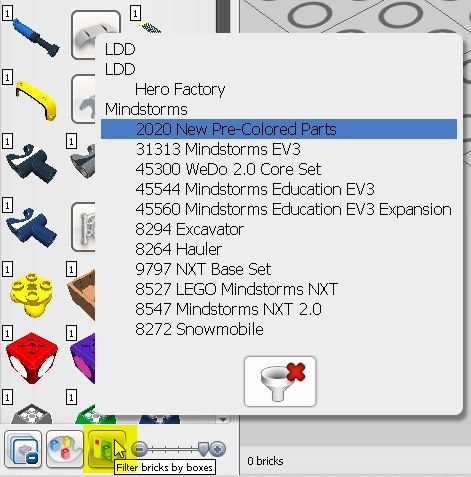
-
Custom LDD bricks and fixes
UrSuS replied to Equilibrium's topic in Digital LEGO: Tools, Techniques, and Projects
Yes, fount it! Sorry. Should I see all those decorated bricks unders some "set" when I switch to Mindstorms theme? Does not seem Mindstorms theme has changed. -
Custom LDD bricks and fixes
UrSuS replied to Equilibrium's topic in Digital LEGO: Tools, Techniques, and Projects
Can someone please explain how to manually find new decorated bricks in LDD? I have installed the latest parts pack and when I open "210501.lxf" file I can see 90498 part with Millenium Falcon sticker, but I can't find manually this part in "Bricks" section of LDD. Also in main topic it's not described how to proceed with "Palettes" folder that goes with parts pack, especially with "2020NewPreColoredParts" folder. -
Custom LDD bricks and fixes
UrSuS replied to Equilibrium's topic in Digital LEGO: Tools, Techniques, and Projects
Hi guys! I've started following new parts addition in autumn. You're doing great job! Can I ask how to contribute by converting ldraw parts into ldd format? Or if it can't be unveiled now, maybe someone can convert this part for me? https://www.ldraw.org/parts/official-part-lookup.html?folder=parts&partid=2641a -
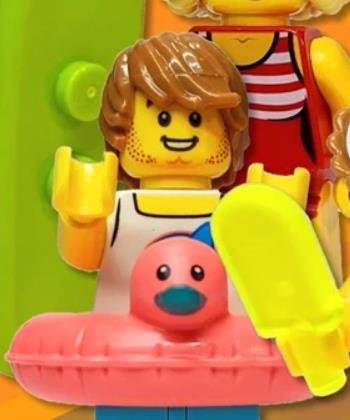
Can somebody identify the face (head print) of this guy, that already appeared in August/September 2020 is it BAM exclusive?
-
This is the masterpiece! Can you please share instructions for the palms top part?
-
New BAM minfigure parts have arrived https://www.instagram.com/p/CJyLBdvpItG/
-
Custom LDD bricks and fixes
UrSuS replied to Equilibrium's topic in Digital LEGO: Tools, Techniques, and Projects
Thanks a lot! As I understand latest .rar includes all the new parts created so far? Tested on last .lxf and got error: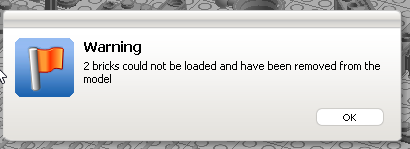
-
Custom LDD bricks and fixes
UrSuS replied to Equilibrium's topic in Digital LEGO: Tools, Techniques, and Projects
@Stephan can you please check why all files pointed to dropbox from "LDD New Parts" topic are deleted? Are you planning to upload new version? -
Parts I was able to identify from BAM picture from Lego Discovery center. Combined with some Bricklink stores inventories I have marked unique parts with red: 53075pb02 11 Black Dog, Dachshund with Black Eyes and Nose and Tan Markings Pattern (BAM) 970c00 39 Dark Turquoise Hips and Legs 973pb4011c01 11 Black Torso Shirt with Dog French Bulldog Head and Space Helmet Pattern (BAM) / Black Arms / Yellow Hands 970c00 71 Magenta Hips and Legs 36036 154 Lavender Lower Body, Skirt 20877 103 Bright Light Yellow Minifigure, Hair Female Short Swept Sideways 3626cpb1277 3 Yellow Minifigure, Head Dual Sided Female Black Eyebrows, Pink Lips, Eyelashes / Sunglasses with Purple Frames Pattern - Hollow Stud 973pb2733c01 5 Red Torso Female Swimsuit with 5 White Stripes Pattern / Yellow Arms / Yellow Hands 970c03pb10 5 Red Hips and Yellow Legs with Red Short Swimsuit Pattern 90397 34 Lime Minifigure, Utensil Surfboard Standard 3898 1 White Minifigure, Headgear Hat, Cook's (Toque) 3626cpb1210 3 Yellow Minifigure, Head Female Glasses with Silver Frames, Brown Eyebrows, Eyelashes, Pink Lips, Open Mouth Smile Pattern - Hollow Stud 973pb3863c01 1 White Torso Chef with 8 Buttons, Long Red Neckerchief, No Wrinkles Pattern / White Arms / Yellow Hands 93568pb004 150 Pie with White Cream Filling and Sprinkles Pattern Pattern (BAM) 13785 88 Reddish Brown Minifigure, Hair Female Ponytail and Fringe 3626cpb2379 3 Yellow Minifigure, Head Dual Sided Female Black Eyebrows, Eyelashes, Medium Nougat Lips, Smile, Teeth, Open Eyes / Closed Eyes Pattern - Hollow Stud 973pb3165c01 104 Bright Pink Torso, Female Top with Yellow Neck, White Undershirt Pattern / Bright Pink Arms / Yellow Hands 970c00pb0995 110 Bright Light Orange Hips and Legs with Worn Reflective Stripes Pattern 57763pb02 39 Dark Turquoise Chameleon with Black and Dark Azure Stripes Pattern 87991 150 Medium Nougat Minifigure, Hair Tousled with Side Part ? 973pb3572c01 1 White Torso Tank Top with Yellow Neck, Dark Azure Sailboat, Bright Pink and White Stripes in Yellow Circle Pattern / Yellow Arms / Yellow Hands 970c00pb0575 156 Medium Azure Hips and Legs with Yellow Boots Pattern 28421pb04 220 Minifigure, Utensil Swim Ring / Floatie Duck Inflatable with Black Eyes and Dark Turquoise Bill Pattern (BAM) 3626cpb2607 3 Yellow Minifigure, Head Dual Sided Female, Black Eyebrows, Red Lips, Large Smile Showing Teeth / Small Lopsided Grin Pattern - Hollow Stud 973pb3545c01 1 White Torso Shirt with Orange Pocket Pattern / Light Aqua Arm Left / Bright Light Orange Arm Right / Yellow Hands 970c00pb0973 1 White Hips and Legs with Black Outlined Belt, Dark Bluish Gray and Orange Stripes Pattern 30222 16 Trans-Neon Green Popsicle 3626cpb2308 3 Yellow Minifigure, Head Dual Sided, Black Eyebrows, Lopsided Grin Pattern / Smile Showing Teeth - Hollow Stud 99250pb01 5 Red Minifigure, Neckband with Gold Medal Pattern 973pb3547c01 5 Red Torso Tracksuit with White Zippers and Mountain Logo Pattern / Red Arms / Yellow Hands 970c00pb1093 11 Black Hips and Legs with White Boots, White Side Strips and Mountain Logo at Knee and on Sides Pattern 12895pb01 1 White Minifigure, Headgear Cap, Captain with Black Visor and Gold Braid Pattern 973pb2834c01 2 Tan Torso Knit Sweater Pattern / Tan Arms / Yellow Hands 970c00 63 Dark Blue Hips and Legs 13808 115 Pearl Gold Minifigure, Utensil Saxophone
-
Some upcoming parts for Halloween https://shop.legolanddiscoverycentre.com.au/collections/halloween/products/lego-build-a-mini?variant=32359145930787
-
New parts have arrived! https://www.promobricks.de/lego-space-mops-torso-dackel/105648/