


Kevin Flemming
-
Posts
57 -
Joined
-
Last visited
Content Type
Profiles
Forums
Gallery
Everything posted by Kevin Flemming
-
 I've gone through and added every standard decoration currently available in LDD to separate torsos and heads, in order of how they are in the decoration menu. The best way I've found to use these, is to grab which ones you want, separate them from the rest, select them all and Ctrl-C to copy. While LDD is open, it will remember what you have copied into the clipboard. Open your current project and Ctrl-V to paste in your desired pieces. Or you can simply press Ctrl-I (that's "i") and import the decorations files as a whole. This import method might cause some lag or crashing on weaker systems though, as you will be pasting over 300 pieces into your current project. If you are copying an existing official LEGO set, then it's better to look at the instructions, and use the former method to grab what you need beforehand. Just personal experience from using LDD for years. Torsos: Link to shared file: http://www.mediafire.com/file/d9c95cbs3uyj5x6/Kev%27s_Decorated_Torsos.lxf Some of the backs have been done, but not all. To be honest, I'm burnt-out after doing 340 of the buggers lol. Not all colour schemes are 100% correct, as most are from memory, and I'm not going to look through over 300 torsos to find the right colours. But fear not, friends. Ones that don't have the correct colours have been painted logically (dark decal has a lighter torso, and vice versa) to make them relatively-easy to find. Heads - Updated (22/06/18): Link to shared file: http://www.mediafire.com/file/8e8u88mc1h1618y/Kev's+Decorated+Heads+-+Updated.lxf Update: I've now sorted the heads into a couple of categories. From top to bottom of screenshot: Back of head decals, Female decals, Male decals, and Monster type decals. Hope you find these useful. Anything beats the awful menu that has a mind of it's own, right?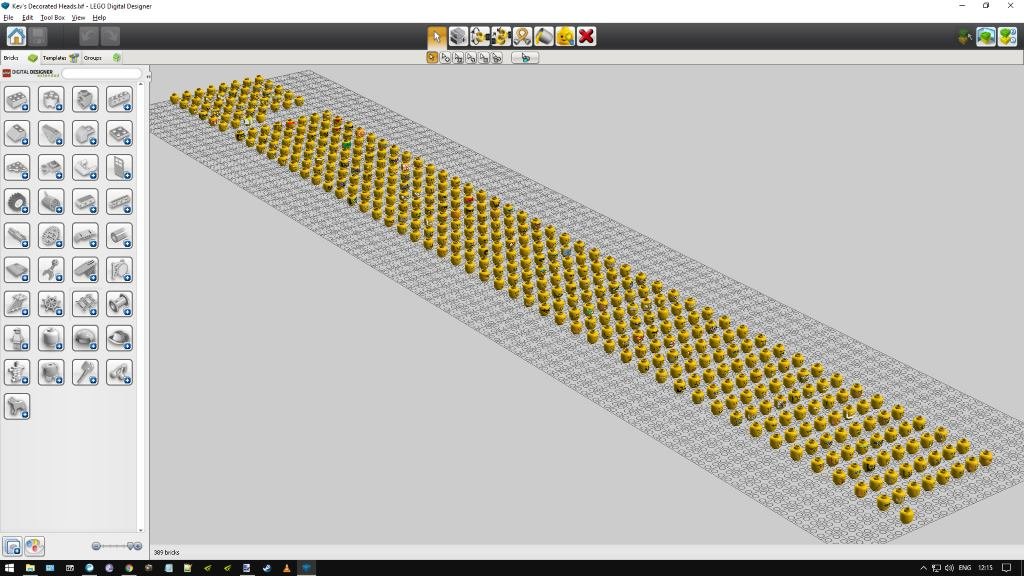
-
That's very tidy. Nicely done! As others have mentioned, the main entrance is especially tidy. Always striking to see angles other than 90 degrees. Do you mean the top of the parking meter? It's a Technic Catch w. Cross Hole (4107800) on top of a Light Sword Blade, with a Connector Peg w. Knob inside.
-
[Removed]
Kevin Flemming replied to Kevin Flemming's topic in Digital LEGO: Tools, Techniques, and Projects
. -
.
-
Works fine for me. Able to click on the Download button and receive the file. I'm the UK, if that makes any difference. EDIT: I've downloaded both the PC and Mac versions, and uploaded them to my MediaFire account. So if you still can't download them, feel free to get them from here: https://www.mediafire.com/folder/3okg6n7ej5pee/LEGO_Digital_Designer
-
Extendable Shock Absorbers Hack
Kevin Flemming replied to pocketpc's topic in Digital LEGO: Tools, Techniques, and Projects
Same here. File is most likely out-of-date and incompatible with the latest version of LDD.