Rane
-
Posts
10 -
Joined
-
Last visited
Content Type
Profiles
Forums
Gallery
Everything posted by Rane
-
I had to go look that one up. Didn't know a Tie Torpedo Bomber was a thing. Very cool looking ship! You matched the original very well.
-
Very well done!
-
I remember looking at that Egyptian sphinx set when I was a kid. I thought it was so cool. I have a few old sets bought recently just for the sentimental value as well.
-
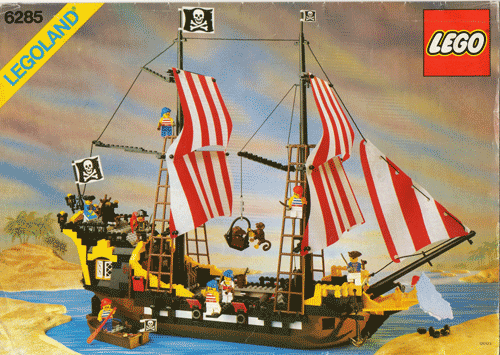
Black Seas Barracuda. My mom got it for me along with a castle set at a yard sale. I loved it. Built and rebuilt it bunch of times. I still have the tattered old instruction manual.

-
I looked into this a while back. The trick is getting the stiffness of the official Lego fabric. The suggestion I found was gesso. Gesso is used to treat paint canvas before painting. It stiffens the fabric, and preps the surface for painting. For our purposes, it also prevents fraying and allows it to be printed on with a printer. It should be available at any art supply. For fabric, I've seen gabardine and calico suggested. I'm not sure all gabardine or calico is the same, though. You may have to check samples and use your best judgment. Here's a thread on the subject. Pics are long dead, but info is still good: http://www.eurobrick...showtopic=87124 I haven't tried any of this personally yet, so YMMV.
-
[MOC] My version of Luke's X-Wing T-65 in gray used look
Rane replied to Florian_Wayne's topic in LEGO Star Wars
That looks awesome! I've always liked this version of the X-Wing. I like your cockpit solution. I do wish they they made that old 4x6x2 (4474) canopy in trans grey or trans clear. It's the perfect shape for this set, but looks weird in yellow, blue or red. -
Yep. All 7500 pieces completely gone. I do have backups, but I still got -really- lucky. If I had accidentally clicked version 2.4 of my file instead of version 2.3 I would have lost over 5 hours of work that hadn't yet been backed up. As it stands, by what feels like a miraculous act of God, I lost nothing. Here's what happened. I went to open a recent file and opened the wrong one. Rather than wait for it to fully load the file before I opened the correct one, I just clicked open again and opened the file I wanted. As I began to work in and save the file, I suddenly noticed the name on the top bar was wrong. It said I was working in the file I had accidentally opened previously. I closed and reopened everything and discovered that LPub had over-written the first file that I had opened when I impatiently opened the next one while the first was still loading. Anyway, I got off really lucky. Just figured I'd leave a warning for everyone else. Anyone know where I can submit a bug report?
-
LPub: Repeating a submodel/callout
Rane replied to peedeejay's topic in Digital LEGO: Tools, Techniques, and Projects
Ah, I see. I did end up doing just that. I was horrified at the thought of having to go back and swap all the sub-models at first, but it turned out that of the over 600 sub-models in my creation, most of the duplicates were small enough that they'd just be call-outs anyway. I ended up only having to replace about 6. I like LPUB, but it is thoroughly unforgiving. Your only option is to adapt to how it wants you to do things. It's not a problem once you know, but it makes no effort to ease you into the leaning process. lol -
LPub: Repeating a submodel/callout
Rane replied to peedeejay's topic in Digital LEGO: Tools, Techniques, and Projects
Cool! In the mean time, I actually got lucky. I only had a handful of sub-models large enough to need dedicated pages. The rest are all call-outs, so I was able to just duplicate and replace the affected models without too much trouble. I read this a couple of times, but couldn't make sense of how it could help. If I have a sub-model and rename it, isn't it still the same sub-model? I can duplicate it under a different name so that there's a copy for each instance of the sub-model. Then just swap in a duplicate for each of the sub-model's repeated instances (which is what I ended up doing). Just renaming the sub-model doesn't seem to help (so far as I could tell). -
LPub: Repeating a submodel/callout
Rane replied to peedeejay's topic in Digital LEGO: Tools, Techniques, and Projects
Hey guys! Bumping an old thread to add further info and with the hope that someone might have a solution... The sample file above is great, but doesn't solve my problem (or the OP's, if I understood correctly). Call-outs (as demoed in the sample file) seem to work just as you would hope. That is, they repeat for every instance of a sub-model being used in a set, even if used many steps later. However. If you don't convert your sub-model to a call-out (say it's too big) it does that "x2" (or however many) in the corner and refuses to repeat your assembly page again. Also if you "add assembled image to parent page" it only does it the first time. There doesn't seem to be a way to do it for the subsequent uses of the same sub-model. Unless I'm mistaken, It looks like the only way to around this is to never use a sub-model twice. P.S. I'm just learning this after finishing organizing all the sub-models, and steps for a 7500 pieces set. >:(