Search the Community
Showing results for tags 'error'.
Found 9 results
-
When I was writing a topic I noticed I couldn't upload pictures anymore. When I choose a file and upload I get an error message to ask for assistance. I messaged an admin but I did not get any response. I also tried to make the images smaller to reduce the size but that also failed. I'd really appreciate it if anyone can help me!
-
 So I recently got a new computer, which necessitated upgrading to Windows 10. I was able to find workarounds for most of the annoyances that caused (as evidenced by the Windows 7 style taskbar in the image below), but when I installed LDD and tried to launch it, it came out looking like this: Crazy scanlines all over the place, and an error message I can't read. You can't really tell in this picture, because it's been shrunk, but each line is only about one pixel in width, they're just grouped together real close in places. The lines stay there when I actually open the build editor. They seem to be in a fixed pattern rather than appearing randomly or moving around. As far as I can tell, the program seems to function more or less normally, but I can't see 90% of what's happening on the screen. I can't even tell if the font is displaying normally or not. I've already tried reinstalling it and repairing the installation, but the problem persists. What is happening, and how do I fix it?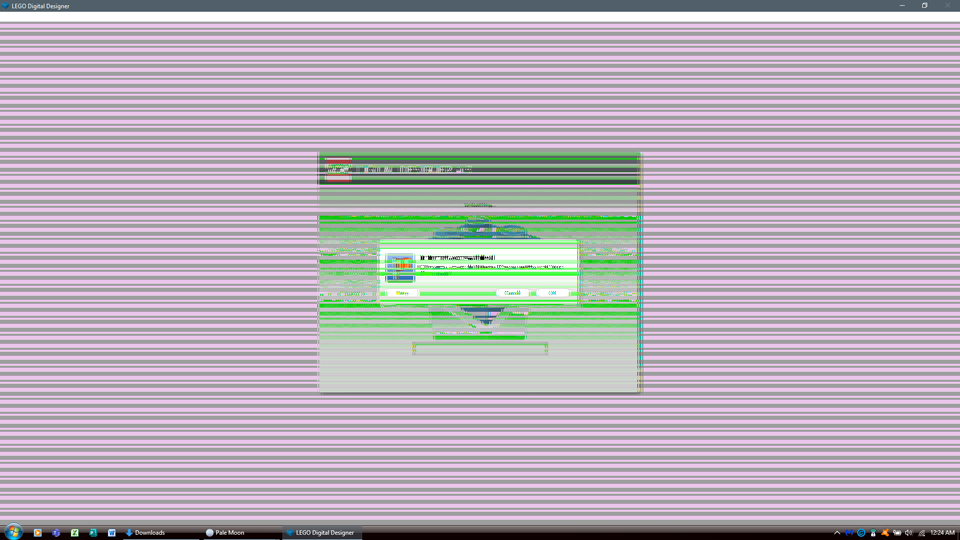
-
I'm having some trouble with the Technic forum lately. Old reviews appear to be cutoff, this one for example: Also the 8110 Unimog, and 8436 crane truck, and probably others too. I did read the 8436 review a few months ago (read before the forum upgrade), not the others though as far I remember. I think it might have to do with the forum upgrade, but I don't know, anyone else having the same issue?
-
 Hello, yesterday I encountered a strange problem when importing a .ldr file into LeoCad. It simply wouldn't show my 2 x 3 plate with hole, ldraw part 3176.dat. The part renders fine in MLCad, LDCad, LDView and the like, but it shows only the 4 studs in LIC (instruction creator) and LeoCad's part window, while not showing at all in the rendered models using the latter two. You can see the difference in the two images attached. My question is - is this a known phenomenon? Are more parts affected than just this one? How can a part like this be used in LeoCad or LIC? Thx m.
-
Earlier today, I went to visit Eurobricks, I only got the 403 Forbidden error. What on earth was up with that? Did anyone get the same error?
-
So today I went to start off and plan a MOC in LDD and then when I went to save my build the screen froze and wasn't responding, therefore I had to shutdown my computer to get my computer to respond again, and it kept happening when I went to try and save something the next time. I can save documents and files on stuff like Microsoft word, basically everything but LDD. Do I need to update LDD for the file to save? If so please inform me because I am pretty frustrated. Thanks!\ -Xan
-
 Hi I have recently returned to using this software as I have a need now. I was prompted to download the update. I did so and all seemed well. Started creating and LDD crashed and couldn't save and gave me a long line of script if I showed details which I do not understand. Looked online for help and no joy. I tried a restart of my mac and also tried deleting LDD and re-installing that. I still have the same issue. A secondary problem I have enconted there are no templates the section under all 3 catergories are empty. Please help
 -
I've been using the font size option on the rich-text editor (mostly to indicate whispering in Heroica), but many times clicking on the drop-down arrow will crash the tab I'm using. It's rather annoying, not to mention the amount of re-typing I have to do each time it happens. Is there anything that can be done to remedy this? (I'm using IE--yes, I know--on Windows 7, if that helps.)
-
Whilst rooting through my lego box, I have found something very peculiar... Not one, but TWO Red Futuron minifigs with what appear to be molding errors on their backs. These must have gone unnoticed for many years, but it means they won't be able to survive long in space without oxygen packs. Anyway, they dont fit studs and I have no Idea how they appeared. Can any of you guys shed some light on this mystery?