Windows 10 & LEGO Digital Designer 4.3.8 Installation -- some info y'all may need
I have just spent some time trying to trouble-shoot an installation of LDD 4.3.8 on Windows 10 (on a Think Pad T430 laptop), and I have learned some things that may help others.
I did NOT have any graphics problems, I only had file/directory/internet problems.
The documentation on this software is sorely lacking!
(If this post belongs somewhere else, please tell me, but I think it belongs here because most of my web searches on this quest led me back here.)
This info may help in particular if you have an "Administrator" (vs. everyday users) involved in your Windows 10 setup &/or if you are using PCs on a network, such as a school network (been there, suffered that).
First of all, note that most prior LDD installation info states that the usual directories that are created/used by LDD are:
C:\Program Files (x86)\LEGO Company\LEGO Digital Designer and
C:\Users\[uSERNAME]\AppData\Roaming\LEGO Company
...but note the differences and caveats below in my experience with Windows 10.
In Windows 10:
After Installation
After installing LDD, the following files and folders will exist:
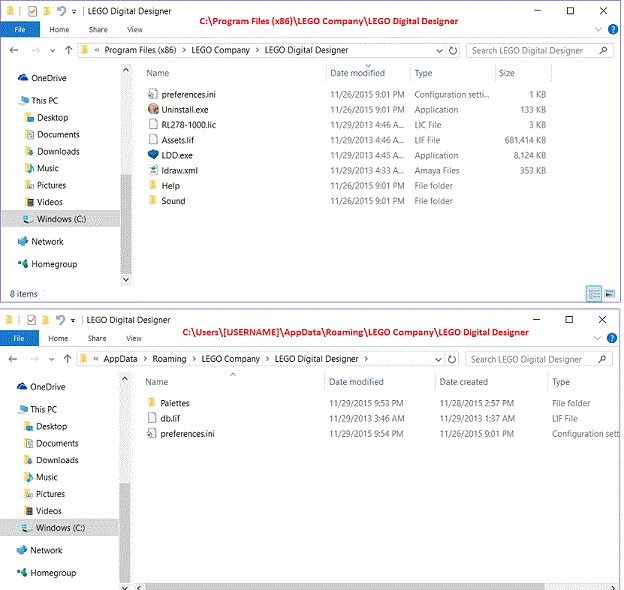
C:\Program Files (x86)\LEGO Company\LEGO Digital Designer\ which contains:
LDD.exe -- the main LDD application / program
Assets.lif -- the initial parts library or brick database?
preferences.ini -- sometimes this file needs to be edited to resolve problems, but notice that there may be another preferences.ini in the Users directory for each user (see below)
RL278-1000.lic -- the software license
ldraw.xml -- the LDD-to-LDraw conversion rules (some people need to edit this if they are importing LDraw models)
/Help -- mostly graphics for parts of the software interface
/Sound -- sound-effect files, such as the "click" noise when you stack bricks in LDD
At First Launch
When a user runs LDD the first time, the application does a few things:
Connects to the internet to check for updates (new or updated bricks/parts for the parts library / database). (It also does this every time it is launched, and will "hang" if there is any problem with your internet connection, with browser traffic hand-offs, or with LEGO's servers.)
Starts downloading those updates (while showing "Installing bricks") (and giving the user no choice but to wait, really).
Creates folders and files per user (for the current user) in:
C:\Users\[username]\AppData\Roaming\LEGO Company\LEGO Digital Designer\ (This could include C:\Users\[admin]\AppData\Roaming\LEGO Company\LEGO Digital Designer\ ...if you run it as admin.) and contains:
db.lif -- the actual parts library or database of "bricks" (In my install, this started at 670,199 KB and reached 735,973 KB after downloading 37.68 MB + 39.00 MB + 15.97 MB. Took a while.) (In my install it also shows an impossible/wrong date for both creation and modification of this file.)
/Palettes -- a list of general parts categories, not sure how these are used
preferences.ini --- See above! Sometimes this file needs to be edited to resolve problems, but notice that this one is in the Users directory and there is another preferences.ini in the Program Files (x86) directory.
I am still not sure exactly how the parts/bricks library/data-pile thingy works, but I suspect that the db.lif in each user's folder is initially copied from the Assets.lif in the main program folder, and then checked/updated each time the program is run. This means that every user on a given machine has to sit through the parts-library updates, and wait an especially long time for this when they run the program for the first time.
If you are a sysadmin and you figure out some workaround for this, you could perhaps be a hero (at least to sysadmins that have to work in schools).
Or maybe the LDD developers could be heros by making a few changes in LDD:
Give the installer some options about where the parts library will be stored (perhaps where it can be shared among users and updated by sysadmin on a schedule?)
Give the user a choice to run or abort that bloody check-and-update at launch.
Allow parts-library updates to be checked/run/downloaded entirely separately.
Or, yeah, I could go learn how to use LDraw.
Y'think that's any easier to install?
;-)



 Windows 10 & LEGO Digital Designer 4.3.8 Installation -- some info y'all may need I have just spent some time trying to trouble-shoot an installation of LDD 4.3.8 on Windows 10 (on a Think Pad T430 laptop), and I have learned some things that may help others. I did NOT have any graphics problems, I only had file/directory/internet problems. The documentation on this software is sorely lacking! (If this post belongs somewhere else, please tell me, but I think it belongs here because most of my web searches on this quest led me back here.) This info may help in particular if you have an "Administrator" (vs. everyday users) involved in your Windows 10 setup &/or if you are using PCs on a network, such as a school network (been there, suffered that). First of all, note that most prior LDD installation info states that the usual directories that are created/used by LDD are: C:\Program Files (x86)\LEGO Company\LEGO Digital Designer and C:\Users\[uSERNAME]\AppData\Roaming\LEGO Company ...but note the differences and caveats below in my experience with Windows 10. In Windows 10: After Installation After installing LDD, the following files and folders will exist: C:\Program Files (x86)\LEGO Company\LEGO Digital Designer\ which contains: LDD.exe -- the main LDD application / program Assets.lif -- the initial parts library or brick database? preferences.ini -- sometimes this file needs to be edited to resolve problems, but notice that there may be another preferences.ini in the Users directory for each user (see below) RL278-1000.lic -- the software license ldraw.xml -- the LDD-to-LDraw conversion rules (some people need to edit this if they are importing LDraw models) /Help -- mostly graphics for parts of the software interface /Sound -- sound-effect files, such as the "click" noise when you stack bricks in LDD At First Launch When a user runs LDD the first time, the application does a few things: Connects to the internet to check for updates (new or updated bricks/parts for the parts library / database). (It also does this every time it is launched, and will "hang" if there is any problem with your internet connection, with browser traffic hand-offs, or with LEGO's servers.) Starts downloading those updates (while showing "Installing bricks") (and giving the user no choice but to wait, really). Creates folders and files per user (for the current user) in: C:\Users\[username]\AppData\Roaming\LEGO Company\LEGO Digital Designer\ (This could include C:\Users\[admin]\AppData\Roaming\LEGO Company\LEGO Digital Designer\ ...if you run it as admin.) and contains: db.lif -- the actual parts library or database of "bricks" (In my install, this started at 670,199 KB and reached 735,973 KB after downloading 37.68 MB + 39.00 MB + 15.97 MB. Took a while.) (In my install it also shows an impossible/wrong date for both creation and modification of this file.) /Palettes -- a list of general parts categories, not sure how these are used preferences.ini --- See above! Sometimes this file needs to be edited to resolve problems, but notice that this one is in the Users directory and there is another preferences.ini in the Program Files (x86) directory. I am still not sure exactly how the parts/bricks library/data-pile thingy works, but I suspect that the db.lif in each user's folder is initially copied from the Assets.lif in the main program folder, and then checked/updated each time the program is run. This means that every user on a given machine has to sit through the parts-library updates, and wait an especially long time for this when they run the program for the first time. If you are a sysadmin and you figure out some workaround for this, you could perhaps be a hero (at least to sysadmins that have to work in schools). Or maybe the LDD developers could be heros by making a few changes in LDD: Give the installer some options about where the parts library will be stored (perhaps where it can be shared among users and updated by sysadmin on a schedule?) Give the user a choice to run or abort that bloody check-and-update at launch. Allow parts-library updates to be checked/run/downloaded entirely separately. Or, yeah, I could go learn how to use LDraw. Y'think that's any easier to install? ;-)