bob21115
-
Posts
12 -
Joined
-
Last visited
About bob21115

-
What did you get for the Football/ Soccer coaches' legs? The Picture, like the Horse Rider, looks dark blue. My LEGO store didn't have any dark blue legs. They did have some dark blue in the back from a previous release, and they got them for me. I've seen 2 posts on Facebook with Solid Black Legs.
-
Went to my local LEGO store, but they hadn't received the April BAM minifigures yet. Was anyone able to get them yet?
-
2018 Q1 Missing Black Torso 6222216 / 88585: BLACK MINI UPPER PART NO. 1947 These 2 are in the picture from a March 2018 post above. Neither is used in any other BAM release. Also, there are a number of Items from the 2018 Q1 list in the picture. This would go with the Black Legs and the Azure DJ on the 10th Minifig, and the Lifeguard Torso could move over to the girl's head hair with the cat. https://www.bricklink.com/v2/catalog/catalogitem.page?P=973pb2012c01#T=C&C=11 This is a Harry Potter Torso. Only including it because it's in the picture above and black. https://www.bricklink.com/v2/catalog/catalogitem.page?P=973pb0164c01#T=C&C=11
-
The torso and legs are a little darker on my Chicken Roller Skater. EDIT: It could just be the age difference, but the Wings and Head are the same color as the new chicken. Edit 2: I just noticed one of the skates is on backwards, and the Chicken on the left has the wrong head. Both fixed.
-
@wadapanDid you update 2019 Q1 from the post above
-
Saw this in a post from May of 2018. The White Ninjago Torso, bottom left. Wondering if it's the second missing white torso from 2018 Q2 https://www.bricklink.com/v2/catalog/catalogitem.page?P=973pb1595c01&idColor=1#T=C&C=1
-
@wadapan Sorry, since I'm new, I can't IM yet. 2018 Q2 Missing Med Azure Torso. Just like the jersey, I found this in this old EuroBrick Post https://www.bricklink.com/v2/catalog/catalogitem.page?P=973pb1112c01&C=156#T=I&C=156
-
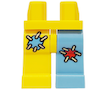
Is this maybe one of the missing torsos for 2018 Q3 6228368 / 38917: BRIGHT YELLOW MINI LOWER PART, NO. 1240 970d37pb01 Image from gomekslego Flickr
-
@wadapan , in the 2017-2019 Q's lists, I see a baseball bat 6221020 that's all white. I can't find an all-white baseball bat.
-
I was able to export all my BrickLink BAM Want List for 2017-2019 into XML format. I compressed them and made them available to download below. In the remarks, I added the Year, Quarter, Column, and description Example 2019 Q4 3 Legs This inventory item is from the Q4 of 2019 its the legs for the 3rd Group of items for 2019 Q4 I borrowed the import instructions from a Reddit post: Link to the Reddit Post Link to Bricklink Import files. EDIT Found a few errors, They are fixed. To upload an XML file to a Bricklink wanted list, you need to first open the XML file in a text editor, copy its contents, and then paste it into the Bricklink "Upload Bricklink XML format" area. This will add the parts list to your chosen wanted list. Here's a more detailed breakdown: Open the XML file: Locate and open the XML file containing the parts list. It's recommended to use a plain text editor like Notepad to avoid potential formatting issues. Copy the XML content: Select all the text within the XML file (Ctrl+A or Cmd+A) and copy it (Ctrl+C or Cmd+C). Navigate to Bricklink: Go to the Bricklink website and log in to your account. Navigate to the "Want" section and then to the "Upload" page. Choose XML format: Select the "Upload BrickLink XML format" option, which is usually the second option. Paste and proceed: Paste the copied XML content into the designated area. Then, click "Proceed to verify items". Verify and add: Review the items on the verification page. If everything is correct, click "Add to wanted list". I hope this saves you some time. Shawn
-
@Josh06 This is how I've used WAPADAN's inventory list If the item has an image, I right-click the image and open it in a new tab. The image name is the Bricklink Item No. IE 3626pb0775.png. I will paste 3626pb0775 in the search, and the item will be listed. I've had 3 issues with this method. 1. On some hair pieces, nothing is found. Using Chrome as a browser, I use Google Lens on the image, and the results will list the Bricklink link to the Hair Piece. 2. It only works if the item has a picture. 3. It's a lot of work. I've used this method to create Bricklink Want lists for each quarter release 2017 -2019. It looks like Bricklink is working on the ability to share want lists and collections. Once this is an option, I can share them here.
-
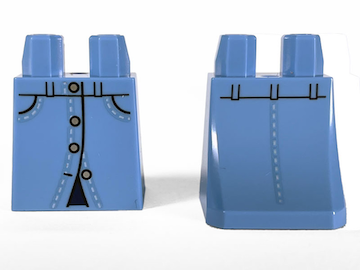
@wadapan I believe the missing Mini Skirt for 2021 Q2 334425 / 76778: MEDIUM BLUE MINI SKIRT, NO. 26 https://www.bricklink.com/v2/catalog/catalogitem.page?P=36036pb024&C=0#T=C&C=42