


AJB2K3
-
Posts
109 -
Joined
-
Last visited
2 Followers
About AJB2K3

-
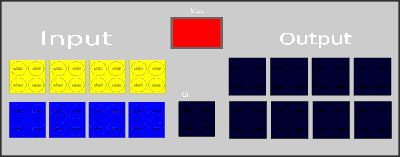
I've always wanted a virtual interface b like the old software so started work on one.
-
Wow, looks so much cleaner than my attempt. Sorry having a brain fail moment. Is the BT adapter acting as a bridge to pas the raw data from the interface to the host computer?
-
You can’t if you don’t have a serial adapter for the phone
-
This Is the problems I found with my cross platform offline version. Trying to build the online version ment rolling out webusb which has its issues. @Bliss Thats why I chose to only open the port when running code otherwise you get access blocks/crashes. As bliss once said, my version is a dependency nightmare as its built for python and trying to find and install the correct dependencies in a pain and only getting worse as I add more function. In order to access the devices I am using both pyserial to access devices using a USB adapter but then have to use a the low level pyusb to access devices using PID and VID USB devices as they don't have working USB drives. A point of note about the Wedo1.0 hub - Apparently it doesn't act as a typical serial device but instead acts as a USB HID device. Even with the dependencies and knowledge I still cant get the USB tower to operate.
-
I found out why the tilt sensor wasn't returning the values I was expecting. It is not a gyro, it is just a few pins that get shorted with a bearing. Once I discovered this the reading make sense.
-
Nice, I'm having so much trouble trying to get code "samples" to work that I have accieved a grand total of 0 progress since adding Wedo 1.0
-
https://github.com/Ajb2k3/ULI This is my offline version and so far I have 2 interface B, 1 RCX and WeDo 1.0 all operating from the same program. This unfortunately (I have just learned) uses Blocking commands which cause delays in the response of the program and the Interface B. I'm looking to implement non blocking asynchronous code but my brain has stopped braining. A broker is a light weight software that just receives and transmits messages between devices. It doesn't act on the message just sends them on. I still have to suss out implementing the Cybermaster, spybot and others but apparently with spybot then you get PF.
-
I actually have on my desk a stand alone MQTT setup that doesn’t need external web access. It runs all the software on a single raspberry pi 4 with just local network only. I built it for testing M5Stack sensors and was built from a guide in the raspberry pi magazine
-
I failed all my exams except for science. I resat my English and passed it 10 years after leaving school.
-
I'm not sure If I have mentioned this before but I power my interface With a 1500mAh 3 S LIPO battery.
-
I got a bit board and added WeDo1.0 to my test software. Turns out that gemini can handle code for it without problems.
-
@Bliss Its possible using pymqtt.
-
@Bliss Is it my programming or is the rotation sensor not very accurate?
-
OMG this is growing amazingly. You said you didn't want to use port letters because of variables? Oh and BTW the flower Icon is actually a gear.