


MTBRICKS
-
Posts
35 -
Joined
-
Last visited
Content Type
Profiles
Forums
Gallery
Everything posted by MTBRICKS
-
Help with lego coding
MTBRICKS replied to MTBRICKS's topic in LEGO Technic, Mindstorms, Model Team and Scale Modeling
Cool, thanks. The jpg is still not working, but the link is. Thanks for taking the time. Now everything should be OK. -
Help with lego coding
MTBRICKS replied to MTBRICKS's topic in LEGO Technic, Mindstorms, Model Team and Scale Modeling
Thanks for the previous comment btw, I found the 2 motors to the right like you said, and now it works flawlessly. Thanks a lot. And what did you say about the loop? I also saw one video the other day witht he old version of powered-up that had the loop there. -
Help with lego coding
MTBRICKS replied to MTBRICKS's topic in LEGO Technic, Mindstorms, Model Team and Scale Modeling
Sadly, I cant make the picture work. Thanks for the comment though, Ill see what I can do with it. -
Help with lego coding
MTBRICKS replied to MTBRICKS's topic in LEGO Technic, Mindstorms, Model Team and Scale Modeling
Thats what Ive been doing this whole time. It just doesnt work that way. Even if I just replace the button for AB with the joystick, it doesnt work. As for the screenshot, can you make use the windows cutting tool to make it as small as possible and reupload? It could get through that way. -
Help with lego coding
MTBRICKS replied to MTBRICKS's topic in LEGO Technic, Mindstorms, Model Team and Scale Modeling
I cant see the picture, but in any case, I want both AB to only go forward/backward (its the 2 integrated motors) and the motor C (external) to do the steering. Is there something I can do or you can do to make the picture work? I can only see a small icon steering.jpg. Cant even click on it. -
Help with lego coding
MTBRICKS replied to MTBRICKS's topic in LEGO Technic, Mindstorms, Model Team and Scale Modeling
What do you mean they work? They dont. And I barely got through the screenshot size limit so I dont know about another srceenshot. -
Help with lego coding
MTBRICKS replied to MTBRICKS's topic in LEGO Technic, Mindstorms, Model Team and Scale Modeling
Yes, I know about that website. It helps me figure out what each block does, but it doesnt tell me where the blocks go. By joysticks I mean the button that comes in green, yelllow etc. that has 4 arrows and one big joystick in the middle you can drag to any of those sides, actually all over the place. When I assign a button to using the motor, it works, but when I assign the joystick, it never does anything, regardless of where Im dragging it. And I really want to control my car in "hold to move" style, which is just impossible with an on/off button. And I must say its a shame that the joysticks have a semi circle ending while the buttons have a triangle ending. If the joysticks had triangle ending I would know exactly where to put them in order for them to work. I have added a screenshot. The first code works (button), the second one doesnt (joystick). And yes, I have that one button (ID 0) in the other tab just as I have the joystick (ID 6) in that tab.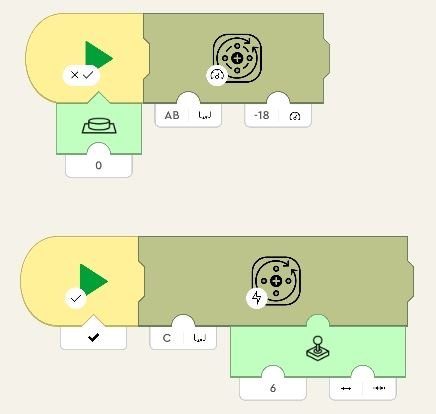
-
Noted. I have just copy-pasted it there. I originally wanted to post there but the mindstorms and scale modeling things didnt seem like the proper title. Thanks for pointing me back there.
-
Hello there, I'm trying to control my (custom) powered-up car using the powered-up app on my tablet. Problem is, I can only give the motors instructions to use X power or -X power when a button is pressed. Sliders don't work, joysticks don't work. I'm getting desperate as there are literally no videos or guides/tutorials on how to do it in the current version of the powered-up app. The only ones I've seen so far were those from 3 years ago with different icons and everything. So can anyone please help me make the joysticks etc. work? Thanks.
-
Hello there, I'm trying to control my (custom) powered-up car using the powered-up app on my tablet. Problem is, I can only give the motors instructions to use X power or -X power when a button is pressed. Sliders don't work, joysticks don't work. I'm getting desperate as there are literally no videos or guides/tutorials on how to do it in the current version of the powered-up app. The only ones I've seen so far were those from 3 years ago with different icons and everything. So can anyone please help me make the joysticks etc. work? Thanks.