


Thyraz
-
Posts
23 -
Joined
-
Last visited
Content Type
Profiles
Forums
Gallery
Everything posted by Thyraz
-
Best motor for angle measurements
Thyraz replied to Andman's topic in LEGO Technic, Mindstorms, Model Team and Scale Modeling
Don't have the other PoweredUP motors to compare, but the Boost motor is defenitely not that hard to turn when you attach something bigger than a pure axle to it (e.g. small gear). -
Yes, sorry. The one that has 2 "fixed ports" and 2 user-connectable ports. I like this hub, as it's cheaper than the 2 port city hub on Bricklink and has already 2 tacho/sensor motors integrated. So it has a very nice value/price ratio. But it's definitely not the smallest of the hubs. ;) The width is less than the the control+/technic hub on the other side...
-
My son just discovered how to keep the motors running without the need to keep the buttons pressed on the Powered Up remote when using the 4 port Move/Boost hub with non-train motors. Not sure it this is already known. - Keep e.g. the + button pressed to start the motor - Press the green button to switch to controlling the other 2 motors (C+D instead of A+B) - The motor will keep spinning even that the remote is now controlling the 2 other ports - You can start more motors like that with the same procedure, pressing the green button again will not stop the motors - Pressing +/-/stop will stop the corresponding motor This will most likely not work with the city hub, as it has only 2 ports instead of 4...
-
yes, import and export of snippets or whole project is another thing that should have been in the app from the beginning...
-
@Tcm0 Yes error messages would be very nice. Maybe even with suggestions what they think you wanted to do. For example using the select-specific-hub icon when you try to use a remote button as input, but the first device isn't a remote. About the touchscreen sliders: Sure, but this still won't give you fixed increments on a click and won't help with the physical remote (but I'm not sure if they see it as a that important device in the Powered Up family). edit: and another thing that would be so helpful: Instead of a preview of the code when selecting a project, I would really love to add a photo of the lego creation that it controls instead. That would also help kids a lot to identify their projects.
-
What I also miss for beginners is the possibility to set a relative speed increase/decrease for the motors. There are so many icons in this category but something simple like that is missing. If you want to create something like the basic behavior of the train motor (decreasing / increasing in steps) you already have to use variables. This might also be too complicated for average users but seems like a very typical task. edit: @kbalage Your idea for a generic block is exactly what would be needed and should be already in the beginners palette.
-
But they sell the Powered Up components also as single parts. So what would you do with these, when you can’t do anything with them without programming? 😉 You can’t use a pre-made ready-to-use profile in that case. The Technic Hub doesn’t even work directly with the hardware remote. And as they discontinue Power Functions this is now the way to go for motorized models. So it shouldn’t be that hard (and frustrating) to get it up and running. I do software development / coding for a living and still struggled to get into Powered UP. Not because I had problems to identify how loops, variables worked. I was even familiar with the blocks-with-icons concept, as I used the „Scratch Junior“ app to teach my son programming concepts before he is able to read, which is where Lego copied the concept from. But not all of the icons are self-explaining in a way that you wouldn’t have to spend days with frustrating trial and error sessions. So I don't think it’s too much to ask for a proper description of the blocks from Lego itself. After I run into Racingbrick's website, my problems were solved. But the fact that someone else had to build this instead getting it from Lego, is very irritating.
-
Very nice article and thank you for your reply. :) Ok, so it's possible to connect 2 remotes. But what happens if you connect 2 of them to a Move/Boost hub and press the green button on one remote to switch from controlling Output A+B to C+D? Will the second remote then also control C+D, or still A+B? In other words, can I build a controller out of 2 remotes to be able to control all 4 outputs of the Boost hub at the same time?
-
A question that just popped up in my mind: As far as I know you can control multiple hubs with one remote. Is it also possible to pair 2 remotes with one hub (without using the app)? Sometimes this would be nice to have controls for all 4 motors of the bigger hubs without switching between A+B and C+D.
-
And then there are also machines / robots which most of the time work fine with the current state, but for some functions it would also be nice to activate a motor without holding the button all the time... Most of the time you use the app for things like that, but sometimes it's just handy to control it with the remote to test the functions...
-
Nope, sadly not. We will see how much of a problem this is ... Sure, I can live without hot-plugging, but my son will do it anyway. But with the given costs for Powered Up components I think it's worth a try, as there are not many options for extension cables.
-
Thanks again for the link to Aliexpress Technicmaster. Almost a month later, the Powered Up extension cables arrived today. They look better than excepted: - The used cable looks and feels like the original Powered Up device cables - The plugs also looks very much like the original, the only visible difference is, that there are no texts on the plug and that the pins are not gold plated. - The female connector looks also good and isn't as bulky as the more expensive 3D printed version that was already around for quite some time. The contacts seem to be spring-loaded like on the original connectors, so hopefully they will last for some time. I just tested the a motor and the Boost distance sensor with all three 25cm extensions in a row and it worked flawlessly. :) Will post some photos tomorrow. Seems like a good deal for the 20€ for all three cables including shipping...
-
Yes, when there's an easy way to include other hubs in Mindstorm projects, one benefit of Powered UP will be obsolete: Using multiple hubs. The simple coding blocks will always differentiate it from Scratch in the Mindstorms app, but when you're old enough to switch to writing real code pros and cons exists for both solutions. PoweredUP will also provide running code on the device with pybricks, but you are limited to max 4 accessories on a hub, compared to 6 with mindstorms. But Bluetooth has enough signal strength these days. So a program running not directly on the device doesn't really hurt. If you're someone who's interested in building remote controlled cars you might see that a little bit different, but it's completely fine for robots / machines where changing and optimizing the code all the time is pretty normal instead of running a static program over and over again. The fact that the hubs can be placed in different locations and don't have to be stripped to a single machine / robot extends the possibilities. I played around a bit with node-poweredup which is also easy to use (but uses javascript instead of python). As the software is not running on the device, you can also include other libraries available for your platform and combine it with controlling PoweredUP in a single project. For example strip a battery powered webcam to your robot and use something like OpenCV for object / face detection. ;) But well, it might take a few years until my son is old enough for this stuff.
-
Hi everyone, most of the topics about Powered UP seem to be train related, even that it doesn't feel like firstly built with the trains in mind (I guess i would prefer power functions for most use cases here)... The possibilities that the Powered UP app has these days feels more like a Mindstorms for younger kids (and for the older ones that like the fact, that you can easily combine multiple hubs in BT-controlled environment). Me and my 5 year old just started with some simple tests, but I can already see, that he will be able to control an easy robot on his own. He already has some experience with Scratch Junior on the iPad (which looks like Lego copied the concept from) and knows how to build loops or start different parts with notifications. The fact that the kids don't need to be able to read, is a really nice concept. Knowing a few letters for the motor / sensor slots and being able to read small numbers is all you need to get started. So in my eyes, the Powered UP concept is really underrated, as a lot people look at it as an over-complicated Power Functions replacement. To me, it fells way more like a concept to teach programming concepts and logical reasoning. In other words: a very nice STEM toy. So, how do you use it, how old are your kids using it and what do you build / control with it? Would really love to hear what others are doing with it. :) We started with the Boost Hub, 2 motors and the Boost sensor so it's easier to combine classic lego with technic parts. Also the 2 integrated motors make it easy to build simple robots with wheels. Some first bigger projects I currently plan for him (unfinished / untested: need to order some missing parts):
-
I searched for quite some time on the web, but haven't seen these. But I searched for Powered Up and not Weedo as search term. Just ordered three of the 25cm versions, now I just have to wait a few weeks... Thanks a lot Technicmaster.
-
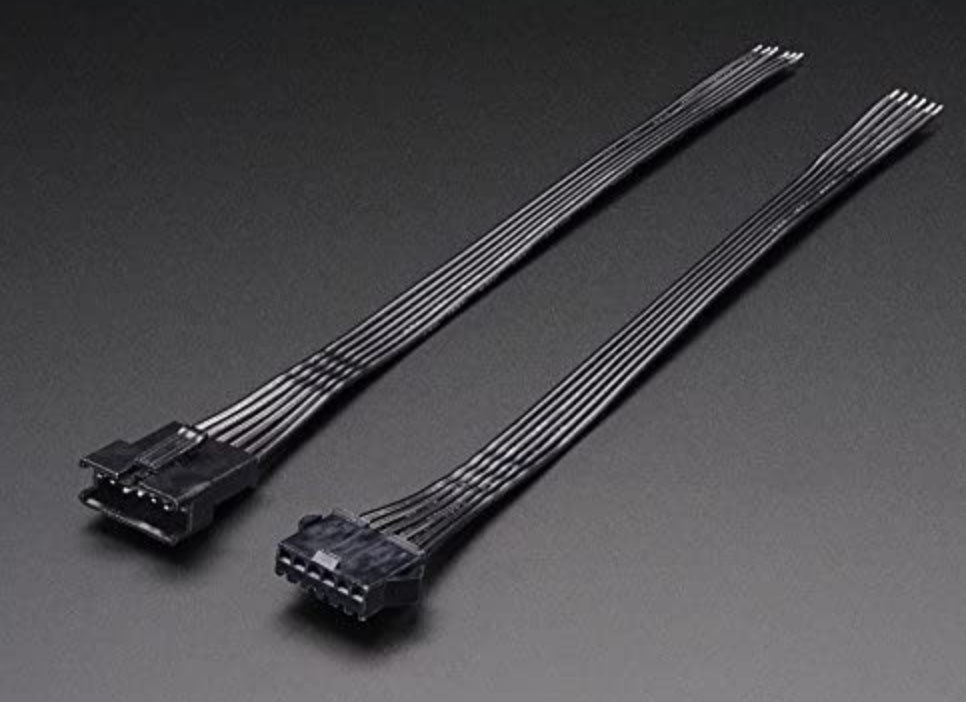
Another question as some of you posted questions about connectors / extension cables: As we didn't see extension cables released, even after the new mindstorm set arrived, I don't think Lego will release something like that in the near future. Another idea I had was to cut the cables of the motors in the middle and attach some small connectors (male + female). Normally you can just leave these connected to stay with the default length. But you could use self made extensions using flat ribbon cables and these connectors types instead of the ones Lego uses. Does anyone know good and small 6 pin connectors? JST-SM connectors can be crimped for both, male and female and have some protecting plastic around the pins, so they won't break too easy. And they are cheap and easy to handle. But not sure how durable they are.
-
Wow, thanks. So this is an artificial limitation on the software side. Maybe it's really a problem if you would set the 2 internal motors and two L-Motors to 100% with a lot friction. If the voltage gets too low, the hub might crash and restart. Would be interesting if this limitation also exists for other software solutions like node-poweredup or pybricks. I guess most likely not. Cause if it would be something in the firmware of the hub, the remote would also not be allowed to control it. It's more likely to be a limitation inside the Powered Up app...
-
Oh, I just realized that Tcm0 is the short version of technicmaster0. :) I watched a lot of your videos as starting point for Powered UP. Thanks a lot for all these videos. And yes, would be awesome if you can test if the technic motors are working for you too at the move hub (but maybe only with the remote).
-
In this video the technic and spike prime motors are used on the move hub. So what exactly is "not working" at the moment? Can't they be used in the app, just with the remote? Or can't the servo/tacho feature not be used, but simple speed control is possible?
-
As a big fan of @Mr Hobbles node-poweredup, I started to mix it with other useful nodejs / Javascript libraries lately. Really love the possibilities this opens up. I thought I try to share some of my tests and start with using the browser gamepad API in combination with node-poweredup. Most of the stuff can already be done with Powered UP app + Powered UP remote or with BrickController2. But it gives you the best of both worlds: - You're free to code your own sequences that can be started with the gamepad buttons. - You can use analog sticks for fine-grained control. I already tested this with some Robots based on the Lego Boost Hub and 2 additional motors, and the mix of good manual controls in combination with automated movement sequences is a lot of fun. There's a first version of the sample project available here: https://github.com/Thyraz/PoweredUpGamepad I haven't added a readme, but installation should be quite easy if you're familiar with node-poweredup. (Otherwise look at the node-poweredup repository for necessary installations step on Windows/Linux. OS X should be fine out of the box.) - Install node.js - Download the content of the repository to a local folder - Run npm install in the directory to install the dependencies - Run npm start in the directory to start the software A node.js express server will be started that loads node-poweredup and it will automatically start chrome and connect to this node.js server. The browser frontend will ask to connect a gamepad and send gamepad events like pressed buttons or positions of the axes to the node.js backend. There's an example program.js in the package that initializes the Powered UP hub and uses the gamepad events to control it. Feel free to ask questions if you're interested to use it. This might help me to write a proper Readme on Github. ;)
-
Ok, since the video is quite recent, this probably means that the Boost Hub can still only control the Train, Weedo 2.0 and Boost (medium) motors. For all other Powered UP motors it needs the City Hub or the Control+ (= Technic) Hub. Too bad, since it looks like it has been quite some time like that now. So, most likely there's not much hope... Does anyone know the reason? Is there a hardware incompatibility?
-
In a lot old threads I've seen comments, that the L and XL motors would not be fully compatible with the Boost Hub in the Powered App. But that this might change with future updates. Can anyone tell me if they don't work at all or what the problems are? Or if it's maybe already fixed with the current app version? Currently I only have a Boost Hub and would like to get an additional motor with more power and the possibility for absolute positioning (servo/tacho mode). But I'm not sure if I would have to buy a new hub as well to use it... Thank you for any hints, Tobias