


Detroit-Funk
-
Posts
43 -
Joined
-
Last visited
About Detroit-Funk

-
since imitation is the sincerest form of flattery, i'd love to copy your controller contraption that you use to make both engines go simultaneously. does this list look accurate? it's hard to tell and i don't have much knowledge with Technic pieces but i did my best:
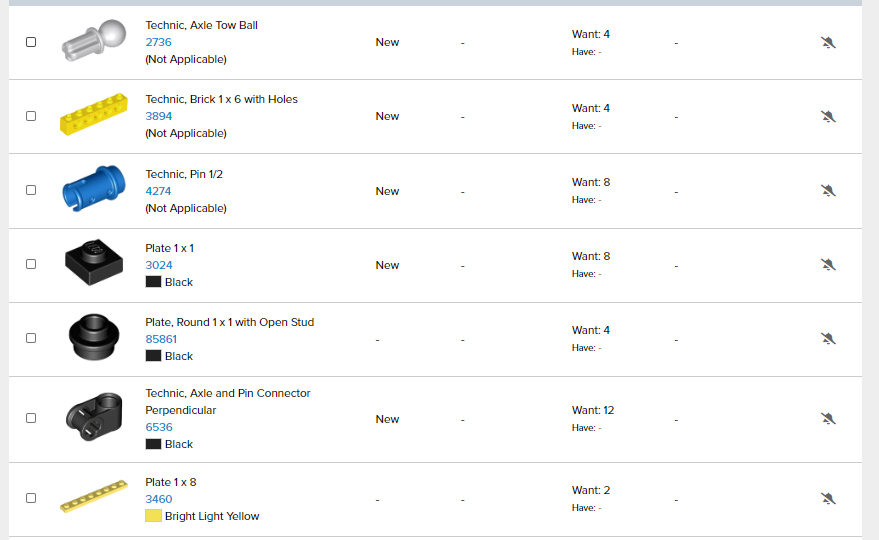
-
so maybe smartphone for 60198 & Crocodile and a physical handheld with your technic contraption on the HE i think so too. i think it needs the two motors.
-
-
i was leaning that way, but hitting two buttons at the same time for little hands might be troublesome. so i was just considering all options.
-
i see. so both motors in one engine, but using only one IR receiver so it should control both concurrently, correct? And your second point about one motor, would that be enough to power this train? from what i hear it is rather heavy once combined.
-
so can all of the wiring be contained in each engine segment? so basically what you have above x2 (with only one engine getting the polarity switch i assume)? why do i see folks running wires down all of the cars to the other engine? is it so they talk to each other? or is it for lights or some other purpose, maybe using a single battery box? i'm trying to reduce wiring and keep things simple.
-
not sure. @ps1flyer mentioned he did this utilizing PF. But i'm not sure if "reversing" the motor in the train requires any further modifications. i assume that means the motor uses the front bogeys in one train and the back in the other. don't know if that causes any issues with traction or not. or if any other considerations are necessary. And yes @Lok24's modified controller looks like a great setup. i may have to bricklink some parts, haha.
-
i greatly appreciate it. it's awesome that the coding ability exists. i'm just thinking of little 6 year old hands and having apps open and controllers going seems daunting knowing i will most likely have 2-3 other trains going simultaneously. at some point we will want to get good at the code program. would you agree that if I go PowerUp that running one on channel A and one on Channel B in opposite direction would be the best way? just get good at hitting the acceleration button at the same time? :) or others have mentioned running the train motor in the front of one engine and motor in the back of the second engine so they both stay on channel A? I suppose last resort to keep things easy would go Power Functions with like 8 extension wires for the polarity. that could be a quick way to get us going as well.
-
@Gimmick thanks for the continued reply's. Although I don't mind toying with the LEGO APP in the future, i'm just looking for the simplest route to get two trains running together. And to not over complicate things as I will have a six year old wanting to drive it as well. :)
-
think we need to add two more scenarios if i followed what @ps1flyer and @mr hobbles stated above 1. Plug both motors into the same port on both hubs (port A or B). This way the respective buttons on the remote (left or right) control both motors at the same time. But because one locomotive is turned around, the motors will run in opposite directions. So you need to put the motor at the other side of the locomotive and turn it around, and make the required modification to the underside. 2. Plug both motors into different ports. This way you can run one in front and one in reverse. But you need to press both buttons on the remote at the same time as covered in page 1 of this topic.
-
got it. that's where the little contraption came into play to ensure you nail both speeds at the same time. @ps1flyer do you recall any modifications you had to make? I believe the train engines are the same and the battery boxes are the same dimensions, so my scenario should be the same as yours even using PoweredUp.
-
even for PoweredUp? there isn't anything crazy about it knowing what is forward/reverse right since it's bluetooth? just making sure its wired opposite from the other engine? so you're saying use one motor on the front bogey in one engine and one motor on the back bogey in the other? that might be the easiest way. so then why go through all the trouble with the app?
-
am i crazy to think the exact same thing wouldn't work for two PoweredUp hubs/motors? just place one "backwards" if you will in the opposite engine?
-
ah i see. you have to have the app on in the background to run the program. copy that. i always wondered why folks didn't do it that way while running PF. do you have any issues with the engine placement?
-
haha, good deal. thank you both! question, i still have the 60198 cargo train running around and will probably add more. should i use the controller for the Horizon and the app for the Cargo train to make things easier on us? or buy another controller maybe? my partner in crime is a 6 year old and trying to keep things uncomplicated for both of us.