


vermontcathy
-
Posts
46 -
Joined
-
Last visited
Content Type
Profiles
Forums
Gallery
Everything posted by vermontcathy
-

Stud.io Noob Questions
vermontcathy replied to BrickMonkeyMOCs's topic in Digital LEGO: Tools, Techniques, and Projects
From my above post... It's a bummer someone charged money for a model, and didn't have PDF steps, or at least a file broken into steps. -
LEGO Collectable Minifigures Series 20. Rumors and discussion
vermontcathy replied to Robert8's topic in Special LEGO Themes
Edit: No selling -
LEGO Collectable Minifigures Series 20. Rumors and discussion
vermontcathy replied to Robert8's topic in Special LEGO Themes
You guys had me very nervous that the distribution in my case was off - but luckily the sealed border between Canada and VT kept your grubby incorrect-distribution boxes north of the border. :) Mine was just right. I was very nervous when one of you got zero space fans because that's what I wanted the most. -
LEGO Collectable Minifigures Series 20. Rumors and discussion
vermontcathy replied to Robert8's topic in Special LEGO Themes
Or in the US, there a post at https://forum.brickset.com/ from Minifigures Plus. -
LEGO Collectable Minifigures Series 20. Rumors and discussion
vermontcathy replied to Robert8's topic in Special LEGO Themes
I, too, would go feel bags in the past. This time, since I want 7 or 8 of them, and possible 2 of certain ones, I'm buying a box and will sell the ones I don't want. And I'll probably post on discussion boards (where allowed), selling at barely above my cost + actual shipping, to help out others who are in the same situation, not able to go out to stores. I hear lots of chatter about the power ranger and the viking, and I don't particularly want those, so PM in about a month if you're interested (I'm in the US). :) -
Joanne Fabrics and Michael's. Although, when I went to Michael's 2 days ago, they weren't set out yet, but they were willing to get what I wanted from the back. Both websites showed them in stock.
-
LEGO Collectable Minifigures Series 20. Rumors and discussion
vermontcathy replied to Robert8's topic in Special LEGO Themes
I'm excited about the snorkeler with the little turtle, but I wish they'd make a snorkeler without a helmet. Snorkelers don't wear helmets, and most scuba divers don't, either. -
Maybe making the bracelet as narrow as possible, it could loop around the stem of a wine glass, to identify whose glass is whose. :)
-
That would be amazing! Something not huge (so, fitting into the Creator 3-in-1 theme, not Expert), but big enough to have a decent number of bricks for 2 other models. I am sure it would be very popular.
-
Surprisingly, they were downloaded a decent amount. I say surprising, because I use it for the online 3D steps. But when it's someone else's model, and they may remove it at any time, I guess downloading the Studio file is safest. As an example, this silly little tiger, posted for just over a year, has been downloaded 117 times. This elephant, up for less than a year, 126 times. The hexadecimal thing is cute, kind of a secret code, but that's the problem - it's secret. If I want people to know that it's an alt of a certain set, how do I tell them which set? I've got one that hasn't been flagged (yet) that doesn't have the set number in the name/title but does have it in the description. But I want it in the name, for sorting purposes. I've got one model re-submitted with the set number listed as 1.1.0.0.1. We'll see if that gets flagged or accepted.
-
Ha. Yeah, that'll work for THAT set... But seriously, I'm not even sure it's the set number that causes the flag because I have other models with set numbers that didn't get flagged. At this point, I was about to say that I think all models are being flagged for some reason (a bug, a mistake). But I uploaded a "model" of a single brick, no set names, numbers, Lego lines, etc. and just now I see it was not flagged: https://www.bricklink.com/v3/studio/design.page?idModel=126070 And although earlier today, it seemed like all recent uploads were set as Display Only (flagged), some recent ones now allow you to download the Studio file. Maybe the rule (among others) is that you can't have a set number in the name, and the bots just haven't yet got to my unflagged models? I'll try uploading the tree flower again with no set number and see what happens. But I refuse to remove the set number from the names - that's how I sort my models so I can find a what I'm looking for.
-
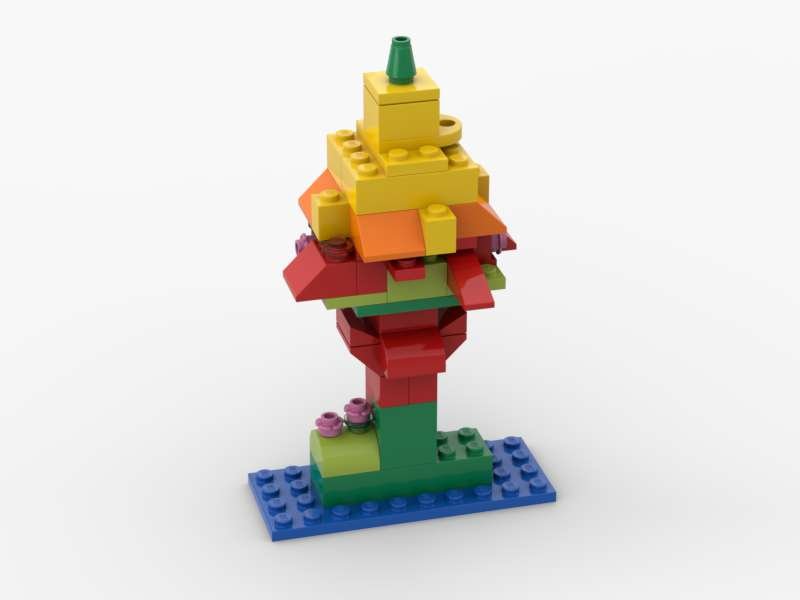
OK, I have no F'ING clue how to post a build that isn't flagged for IP. I thought I had it figured out. I was wrong. I posted a build yesterday, title is 11001 Flower Tree, description is "just a silly little alt build from set 11001." Flagged. I thought the set number was ok since ALL my models' titles include the set number, and some of them haven't been flagged. I just... whatever. I give up trying to figure it out. People can still see the online steps, and that's the only reason I use Bricklink's Studio Gallery.
-
Well, Lego Group seems to think that "classic" and "castle" are their own IP.... Brickowl is fine for ordering pieces, but it's not a place to post and share MOCs, and online 3D steps for those MOCs
-
I post on Rebrickable, but Bricklink (via Studio upload) is the only place I know of to post 3D rotatable steps. I can upload a PDF of steps to Rebrickable, but I like also providing the 3D online steps (and I like using them for building, as well). So in my Rebrickable MOCs' descriptions, I include a link to the online steps. Luckily, even if a set is "flagged", those online steps are still available, so it's not as big a deal to me as if they disallowed the online steps.
-
But we're not "selling" a set - we're just posting models. Are you saying if someone makes an alt build of a City set and has the word "City" in the title or description, or the set number, it'll be flagged? See my previous post. Most of my models are alt builds and have the original set number in the title, and I usually say in the description "alt build of ...". And even if that's what's causing the flagging, it still doesn't make sense. This one is an alt build of Classic set 11001, it has 11001 in the title, and description is "Two little creatures from the Classic set 11001 Bricks and Ideas" and was flagged. This set is also an alt build of 11001, has 11001 in the title, and description says, "This guy is an alt build for the little classic set 11001" and was NOT flagged. Oh.... so the first one had the NAME of the set. So it seems like I can have the set number but not the set name in the title and description? Hmm... it also seems like I can't have "Classic" in the description. This one has the title "10704 Purple Car" and description "An alt build for Classic set 10704". So, no set name, just "Classic" which I guess is prohibited. <facepalm> If I didn't have so many models to compare and contrast (and models that clearly have no IP such as a model of Yoda), I never would have figured this out. So, in summary: set number is OK set name is not OK Lego line such as "Classic" is not allowed - including possibly also castle, city, friends, ideas, elves, creator, etc. Looks like you can't use any of (possibly among others) the Friends' names? I have one that got flagged and I don't have the set name or the line (Friends) but I called it "Emma's not-heart-box" Did they flag every model that has the word classic, city, friends, elves, castle, dots, creator, dots, etc.? OK here's one that doesn't fit the rules as I thought I had figured them out. I have the original set number, but I don't have the set name... oh wait. The original set name was Trevi Fountain. My set is named Trevi Castle. How can Lego claim IP on "Trevi" when it's the name of an actual place? Oh wait.... it isn't "Trevi" that caused the flagging, but maybe "Castle"? Can we really not use "Castle" in any model name or description? Maybe it's OK if I spell if "Kastle"... :( This is stupid.
-
A majority of my models have been flagged as infringing on Ineffectual Property (meaning people can't download the Studio file), but it makes no sense at all. Such as this castle, made from a Creator set, or this little ship, an alt build of a Creator space shuttle, or these two little creatures made from a Classic set. It almost seems like their bots are just randomly flagging models - I can't make head or tails of why these were tagged but others of mine weren't. Someone suggested maybe they were flagged because of the set numbers in the titles, but almost all my models are alt builds and I begin the titles with the original set name, yet some were flagged and some weren't. Since even when flagged, people can view the online steps, I'm not too concerned, but I'm baffled. I've noticed that if I make any change to the model submission (title or description text, etc.) then I can "resubmit" it, and it says "pending review". We'll see if they become unflagged.
-
Lego Licensed Parts available from Bricks & Pieces
vermontcathy replied to LegoPercyJ's topic in LEGO Licensed
I think that's from the new Safari jeep set, 60267: https://www.lego.com/en-us/product/safari-off-roader-60267 -
Stud.io Noob Questions
vermontcathy replied to BrickMonkeyMOCs's topic in Digital LEGO: Tools, Techniques, and Projects
Someday maybe I'll make a video. Feel free to PM me. Instructions for Instructions in Studio: A. Check off "step view" above the parts list (the Step List) on the right. This will hide all pieces in steps below the currently-selected step. B. Separate your model piece list into steps: Click the "+" in the bottom right to add a step (a new, empty "step 2" - make sure it added the new empty step as Step 2, and not at the very bottom of your steps (once you have lots of steps). If it inserted it elsewhere, move it so that it's Step 2. Select several pieces in your model that are accessible (not buried). Drag them into the empty Step 2. Click on a piece in Step 1. All pieces in later steps (all pieces already separated into steps) will disappear. Repeat steps B1-B3 until all the pieces in your model are separated into steps. Basically you're deconstructing your model, backwards (the first pieces you remove/move into a step will be the last step). If you made any submodels, select them from the drop down above the parts list (drop down will say "Main Model" at first) and repeat the process to separate the pieces into steps, if necessary (if it's a submodel with only a few pieces, it may not be necessary). Choose "main model" from the drop down to return to the main model. C. Click "Instruction" icon. Click "Page Design". D. See what you've been given, and tweak as necessary - shrinking the parts list when it's too big and covers the model; moving, resizing, or rotating the model. To resize or rotate the model, click on the model but not a specific piece - if you click a specific piece, on the right there will be a blue button that says "Activate buffer exchange" and you don't want that. You want the button that says "change step view". Click that, then you can rotate and resize. E. If you discover a problem with your steps, click exit and fix. It will remember the work you've done on the instructions up to that point. (assuming you've been saving) F. Export the instructions to PDF. "2x" will give the same size page (last I tried it) but the images will be more detailed - sharper when you zoom in. If you're not actually printing the instructions on paper, paper size doesn't matter. If you are printing to paper, when you open the PDF in Acrobat, you can tell it to shrink pages to fit the paper size you've selected, so it's never been an issue for me. -
Lego Licensed Parts available from Bricks & Pieces
vermontcathy replied to LegoPercyJ's topic in LEGO Licensed
Just FYI, the way I get part numbers is I go to brickset.com, put in the set number (or search on the set name), click on "parts" and the numbers are there. -
Seeking Build Instructions maker for hire
vermontcathy replied to dzbin's topic in General LEGO Discussion
No worries - we've gotten in touch. -
Seeking Build Instructions maker for hire
vermontcathy replied to dzbin's topic in General LEGO Discussion
Nice instructions (and nice alt model - too bad I don't like squid, or I'd buy that set, to do that alt). You've tweaked the auto-generated instructions quite a bit to make it look extra pro - nice. I've added some arrows with notes to some of my instructions, and on some I've put a photo (or rendering of the model) at the beginning; I should probably do that for all of them. I doubt this is your first set of steps made in Studio - although you've only got that one listed on Rebrickable. And you're right - it can be a total headache. But you (and I) have now learned the headachy issues and can avoid them, and do things quicker, now that we've got experience. That's why I was saying it's up to the OP - if they're going to use the skills again, dive in and learn it, because the 2nd, 3rd, 4th time you make instructions, it'll go easier and easier. If you won't make more, and/or don't have the time or patience to learn it, hire someone. One last thing - Perfection is the enemy of the good. The last 10% of awesomeness in your instructions probably took 90% of your time. If someone can be satisfied with "fully functional and gets the job done" vs. your totally beautiful instructions, it can be done a lot faster. I probably spent less than 45 minutes tweaking the semi-auto-generated Studio instructions for this alt. (I say semi-auto-generated instructions because you have to separate the pieces into steps first, which is time-consuming). -
Seeking Build Instructions maker for hire
vermontcathy replied to dzbin's topic in General LEGO Discussion
You first have to make "steps" in Studio - "add step", select some pieces, and drag into that step. Then set it to hide pieces that are in later steps than the one you're in (so you don't see the pieces you've already added to a step). You're basically deconstructing your model a handful of pieces at a time. It's a bit tedious. And you have to make some sub-models sometimes (not always). Once your whole model is separated into steps, then it can auto-generate instructions. Then you tweak the instructions - rotating the model so you can see all new pieces, and sometimes resizing the box showing the new pieces, and/or resizing the model. Then save as PDF. I'd say, if you're going to use the learned skills again - making more models - then it's totally worth it to learn it yourself. If you don't think you'll ever make another model with instructions, then it would probably be more efficient to pay someone. A grand or two?? Good lord, I'd do it for a Bookstore ($179 + tax). It's fun. Instructions that I put some effort into tweaking (as opposed to the medieval keep instructions where the first few steps look like crap): https://bricksafe.com/files/CathyVT/60226/runabout-pair/60226runabout-truck.pdf -
Seeking Build Instructions maker for hire
vermontcathy replied to dzbin's topic in General LEGO Discussion
I would do it for not that much money; I enjoy it. PM me. I use Stud.io and have done a 1300+ piece model with steps. https://rebrickable.com/users/CathyVT/mocs/ Actually, I see I need to tweak some of the first few steps in the PDF for the biggest model, https://rebrickable.com/mocs/MOC-25711/CathyVT/10193-medieval-house-with-keep (instructions at https://bricksafe.com/files/CathyVT/10193/house-with-keep/10193medievalhouse.pdf). I mostly work off the rotatable online steps at bricklink: https://www.bricklink.com/v3/studio/design.page?idModel=90453 (then click on "Building Steps"). I can provide both the online steps and the PDF. Stud.io makes it fairly easy, once you learn the software - separate pieces into steps, have it auto generate instructions, and typically I just have to tweak by rotating some instruction steps so you can see all the pieces that were added per step, and resizing the box showing the new pieces, and/or resizing the model. But I totally get it if you don't want to invest the time to learn it - I've certainly had frustrations along the way while learning. -
[MOCs] Creator 31066 Space Shuttle: Additional models
vermontcathy replied to Legostein's topic in Special LEGO Themes
These are all very cool! I'd love if people could share LXF or Studio files of these models, but I realize not everyone enjoys building their model a 2nd time on the computer... -
I love the Creator 3 in 1 sets. I don't tend to just leave a set together forever - I like taking them apart, rebuilding, and I love alt builds (both the ones from Lego, and ones available at rebrickable.com or on YouTube). I sometimes make my own alt builds as well. My favorite creator sets are: 31079: Sunshine Surfer Van - the number of alt builds available for this is unreal 31063: Beachside Vacation, 31035: Beach Hut, and 7346: Seaside House (yeah, there's a theme here) 31051: Lighthouse Point (my favorite) 31025: Mountain Hut 31048: Lakeside Lodge - last year when I wasn't impressed with the Christmas Winter Village set, I made this set into a winter scene: