jemunoz0
-
Posts
9 -
Joined
-
Last visited
About jemunoz0

-
Thanks. I've changed the description.
-
A free model based on Lego Mindstorms #51515 (Robot Inventor) and on the MOC EV3 Chebyshev’s plantigrade machine by Artem 16 Free instructions at rebrickable.com
-
Easy to build insect that walks until it encounters an obstacle. At that point it walks backwards, turns around and keeps walking. As can be seen in the video, the way it moves forward and backward is quite curious. The mechanism of the legs is based on the MOC by Isowaga Free instructions and IO file at Rebrickable
-
Easy to build two wheeled vehicle based on 51515. It can be build using only the parts included in 51515 I lowered the center of gravity everything possible to prevent rollovers but still, to making sudden movements can hit the ground with the front or rear. To avoid this, I have put some small projections that avoid this problem Free instructions at rebrickable. https://rebrickable.com/mocs/MOC-71646/jemunoz0/two-wheeled-vehicle-51515-c-model/#details
-
[MOC] Robot Inventor Walker
jemunoz0 replied to jemunoz0's topic in LEGO Technic, Mindstorms, Model Team and Scale Modeling
Thank you! It's an interesting idea. Combined with the distance sensor it could be a great improvement for this MOC. -
[MOC] Robot Inventor Walker
jemunoz0 replied to jemunoz0's topic in LEGO Technic, Mindstorms, Model Team and Scale Modeling
I have embed the youtube video and another picture Thank you!!! -
A modification of "Strandbeest based Walking Frame" designed by JKBrickworks, and Lego robot inventor (51515) This walker allows to adapt a cell phone to its upper part in order to record the video of what would be seen from the walker itself in motion. It is operated remotely using two sliders. This video shows parts recorded with the cell phone mounted on the walker itself and parts in slow motion, so you can see the movement details I hope you like it. Free instructions at Rebrickable.com Pictures at Bricksafe
-
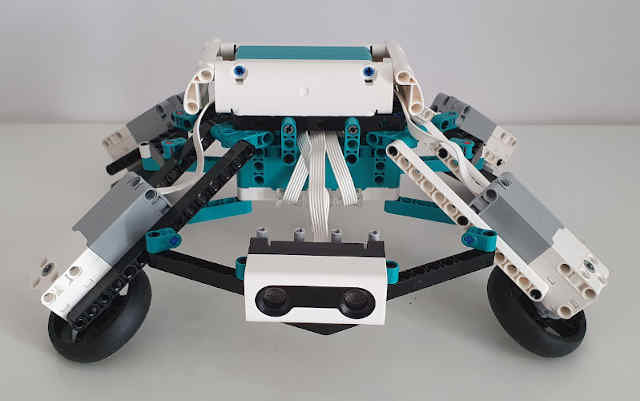
It moves front/back and left/right, and turns on four wheels, but it cann't go 45º The instructions contains the program to control the robot using sliders, and there is a video than includes a second program using the joystick for steering If you buid it, you can probe all kind of different movements Also, you can include a sensor to detect obstacles and create automatic movements
-
Tilt-wheeled vehicle. A free alternate model of the Lego Technic #51515. You can build it using only the pieces of the 51515 Robot inventor You can find the instructions at Rebrickable.com https://rebrickable.com/mocs/MOC-72116/jemunoz0/tilt-wheeled-vehicle-51515-c-model/#details