
GianCann
-
Posts
187 -
Joined
-
Last visited
Content Type
Profiles
Forums
Gallery
Everything posted by GianCann
-
Exploring the LEGO App APK file, i've found several firmware file:
-
Ok, thank you!
-
There is a strange thing .... Under the battery pack there is a soft button (reset?) which can only be pressed by removing the battery pack ...
-
Control+ internals. The processor is an 80Mhz (instead 48Mhz of the PU Hub) and the motors driver is a LB1836 There is a n.4 chip signed ad H25 02 27 x842 (each for single output port) but i don't sure what features they implement. (maybe they are dropdown linear regulator?) Macros:
-
There is a new bright light orange leave?
-
The steps to change the name of the hub (saved in flash memory) from the App https://itlug.org/forum/topic/7615-lego-poweredup-aka-power-functions-20/page/3/?tab=comments#comment-75176 P.S. Sorry for the external link, but i don't have the possibility to upload picture here (Max total size 0.01MB for upload)
-
Another interesting thing about "distance sensor": Back of the sensor (break-out): • Can be detached from the front of the sensor by removing two screws • Provides access to an 8-pin female header that allows direct and easy access to the LPF2 system for adding third-party sensors and boards
-
There is a way to increase number of decice connected via Bluetooth? Nooble library seems to work o up to 5 device.
-
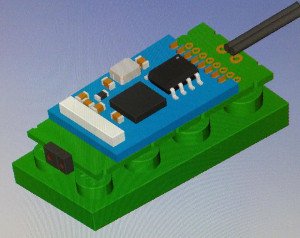
I am working, together with other AFOL, to develop various sensors (magnetic, proximity, laser) that enter the dimensions of a 2x4 brick and are powered to 9v. The sensors implement MQTT communication via WiFi. The Raspberry Pi 3B + system, with Node-Red and Mosquitto, functions as a message center and control logic between sensors and motors. This is the proxymity sensor based on Broacom ADPS9960 colors & proximity sensor. The ESP8266 chip act as WiFi client connected to an MQTT broker (running on Raspeberry) and send MQTT messages when the sensor is activated.
-
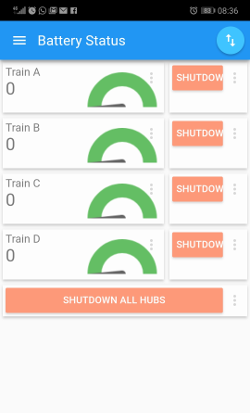
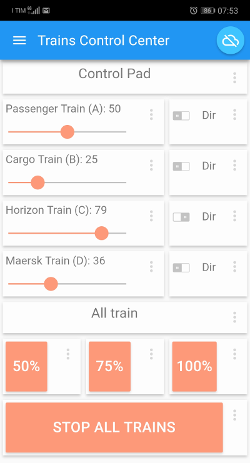
Thank you to the library written by @Mr Hobbles, i made a 'control train system' based on Raspberry 3B+ / MQTT / Node-Red. With this system it's possibile to control 4 trains at same time directly from smartphone phone with a free MQTT App Client. Raspberry act as Access Point for the smartphone device, and a bluetooth gateway for PoweredUp HUB. This is a first pieces of my 'ItLUG - Train System', a system to automate trains layout in a LEGO City Diorama with a complex logic. In each train there is a WiFi based sensor (realized with a ESP8266 03 chip) that track train position long the circuit. The Node-Red logic flow, interact with other device like railroad switch and level crossing barrier (also controlled by an ESP8266 device). I hope to make the Raspbian distro 'out of the box' available in a few days. This is the image of Node-Red Workflow (drive link to image, because it's to large to upload on Eurobricks Forum) These are the screenshots from Smartphone 'App' (it's based on IOT MQTT Panel App), one for control and one for battery status monitor
-
Yes, sorry for mistake.
-
Hi to all, I tried to use the library Node-PoweredUp (https://github.com/nathankellenicki/node-poweredup) I have one Smart Hub and one train motor from LEGO City Train. I haved user Raspberry 3 B+ with last Raspbian version. After installed Noble Library (https://github.com/noble/noble), and Node-Poweredup, i have activate the BT and execute the example to start/stop motor for 2 second with this command: node lego.js The Led on Smart Hub becomes fixed, but the motor (connected to port A) don't start. The console report: noble warning: unknown peripheral 90842b00420c noble warning: unknown peripheral 90842b00420c noble: unknown peripheral null connected! noble: unknown peripheral null connected! noble: unknown peripheral null connected! What am I doing wrong?