andyfarang
-
Posts
6 -
Joined
-
Last visited
About andyfarang

Recent Profile Visitors
430 profile views

-
Guys, you are awesome. Every single post was very helpful! I went through this thread and I think now I finally get it. Well, I didn't try anything. I just read a lot of informations at webpages posted here. Downloaded a lot of programs and tried to make it work without NXT (I don't have any at my home). But even in the worst case, if nothing gonna work (based on my experiences, that nothing works for the first time and you have invest a lot of time) I have enough info and knowledge to write about this topic at least 100 pages + add a lot of different scripts and different methods and screenshots. NXT looks really interesting, I regret I don't have enough time to play with it. THANK YOU GUYS!
-
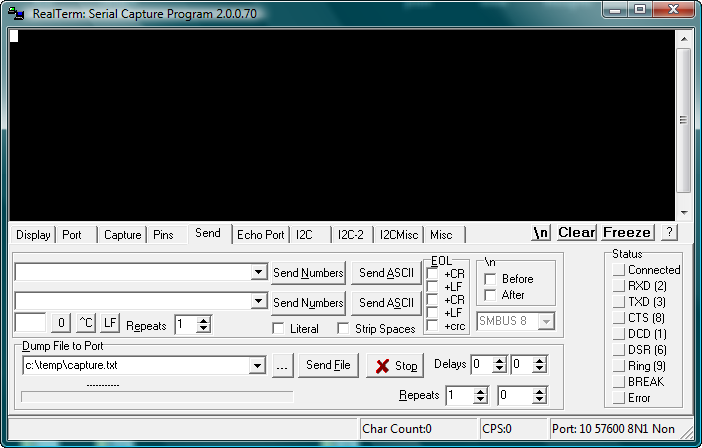
Finally I have more specific task. And both of you were right. Structure: Notebook (master) ==>> NXT (slave) - At first I have to use style like Gekke Ted suggested. I have to use this bits commands. Use them to read one of the sensors. - Second task is to use more advanced tool. I'll go for Robotc like a lot of you suggested. Again use it to read sensor. So far so good. Now I finally know what I want to do. RealTerm: I don't really need any script for NXT, if I'm using RealTerm? I only establish connection and send commands through RealTerm? Do I have to put NXT to some mode to communicating with him through RealTerm? RobotC: Kieran confused me with Robotc. If I get it right, at first I have to create first script with Robotc and upload it to NXT (it will be working in the slave mode). How? Through USB? And do I need to somehow initialize that script? After I need script for Master (notebook). What program should I use for this? Would it be possible to do it like command line? I don't really need automatic script. I would be happy with some command line and sending commands to NXT. Like "#check if communication is established, #hello i'm master, #send me data from sensor at port1, #close connection". I didn't have time to read new posts and go through all posted links. I'll go for it after i get home. Maybe some my answers are already answered. Sorry for that. Guys, thank you very much. You're really helping me a lot. All of you. Thank you.
-
hrontos: Yes, it's school project. It's totally unrelated to what I study. I just got this task. Without any introduction, without any specification, we never talked about Lego, we never saw Lego.....I just got this task. And because I'm studying university, I really don't have time for this. It really sucks. Tomorrow I'll go ask for more specific informations. Last time he just ignored me and told me just one extra sentence to this task. So I'll insist on more specific informations. Thank you so far. Tomorrow I'll know more. Hopefully.
-
Thank you Carsten Svendsen and kieran for your replies. My main goal is find out, how bluetooth protocol works. That at the beginning Master send "hello" Slave respond with "i'm ready" Master send "send me data from sensor 3" and Slave sends it. I have to describe how this protocol works. So the first step is find out, what is that protocol. Is that "0x00 0x3B 0x08" or is that "cCmdMessageWriteToBluetooth()"? Second option seems to me too "high programing", that I'm not working with that protocol but with some libraries. After that I have to use appropriate SW and program some basic script, that would demonstrate this communication. And yes, I would like to notebook be master and NXC would be slave, that would be responding to commands. I can see, that you're really trying to help me and I appreciate it very much. I'm sorry I can't describe my problem any better, because I'm really confused, helpless and starting to be really desperate. Because with every manual and every result in google and every your respond I'm getting another and another different program and method. I've found Realterm. I thought, that if I put here some commands like "0x00 0x3B 0x08", NXC make some noise. If I put here another code, NXC would read it's inputs and sends it back. Without uploading any program to NXC or at my notebook. It's not really how it works?
-
Thank you for your reply DLuders. But as you can see now, there are two different language methods. You sent link to official lego.com page. I've downloaded that manual, and there examples such as: PLAYTONE Byte 0: 0x00 or 0x80 Byte 1: 0x03 Byte 2........ And you also send link to Sariel's article, and he uses: cCmdMessageRead(valueReceived, 1, 1); nxtDisplayCenteredTextLine(0, "BAT: L%3.1f / R%3.1f", nImmediateBatteryLevel / (float) 1000, valueReceived[0] / (float) 10); wait1Msec(50); Now I'm confused, who is really using communication protocol. I need really it's decoded form. Plus what program should I use? I'm sorry I have so many questions. But after I find out what program should I use and what programming language and some manual, I think I'll be able to solve it on my own. But I really need that first kick. Thank you.
-
Hello, I have NXT brick. I have to decode communication protocol of bluetooth --->>> Make connection between notebook and NXT. Send commands and make NXT to react (make sound etc.), request data from sensors and receive them on notebook. Problem is that I found a lot of programs to make this connection. Realterm, BricxCC...... etc. And I found a different commands and programming methods - something looks like "0x02 0x16" or "120 136" or "something that looks like C++". And now I'm really confused. I don't know what program to choose and what language represent decoded communication protocol. Can you help me please? I need some appropriate program, I need use some language that would show how protocol works and maybe some manual. I will appreciate any help. Thank you, Andy